Вовед
This manual provides detailed instructions for the setup, operation, and maintenance of your Weofly Nova Active Noise Cancelling Headphones. Please read this manual thoroughly before using the product to ensure optimal performance and longevity.
Што има во кутијата
Upon unboxing your Weofly Nova headphones, please verify that all the following components are included:
- Weofly Nova Over-Ear Headphones
- Кабел за полнење USB-A до USB-C
- 3.5mm AUX Cable (USB-C to 3.5mm TRS)
- Упатство за употреба

Image: The Weofly Nova Active Noise Cancelling Headphones in Sliver, showcasing нивниот дизајн.
Производот завршиview
The Weofly Nova headphones are designed for comfort and high-quality audio, featuring Active Noise Cancellation and Bluetooth 5.4 connectivity.

Image: A woman wearing the Weofly Nova headphones, illustrating their lightweight and stylish design. The headphones weigh only 130g.

Image: Two pairs of Weofly Nova headphones, one in brown and one in white, highlighting their distinct aesthetic and color options.
Клучни карактеристики:
- Активно поништување на шум (ANC): Advanced technology to reduce ambient noise.
- Bluetooth V5.4: For faster and more stable wireless connections.
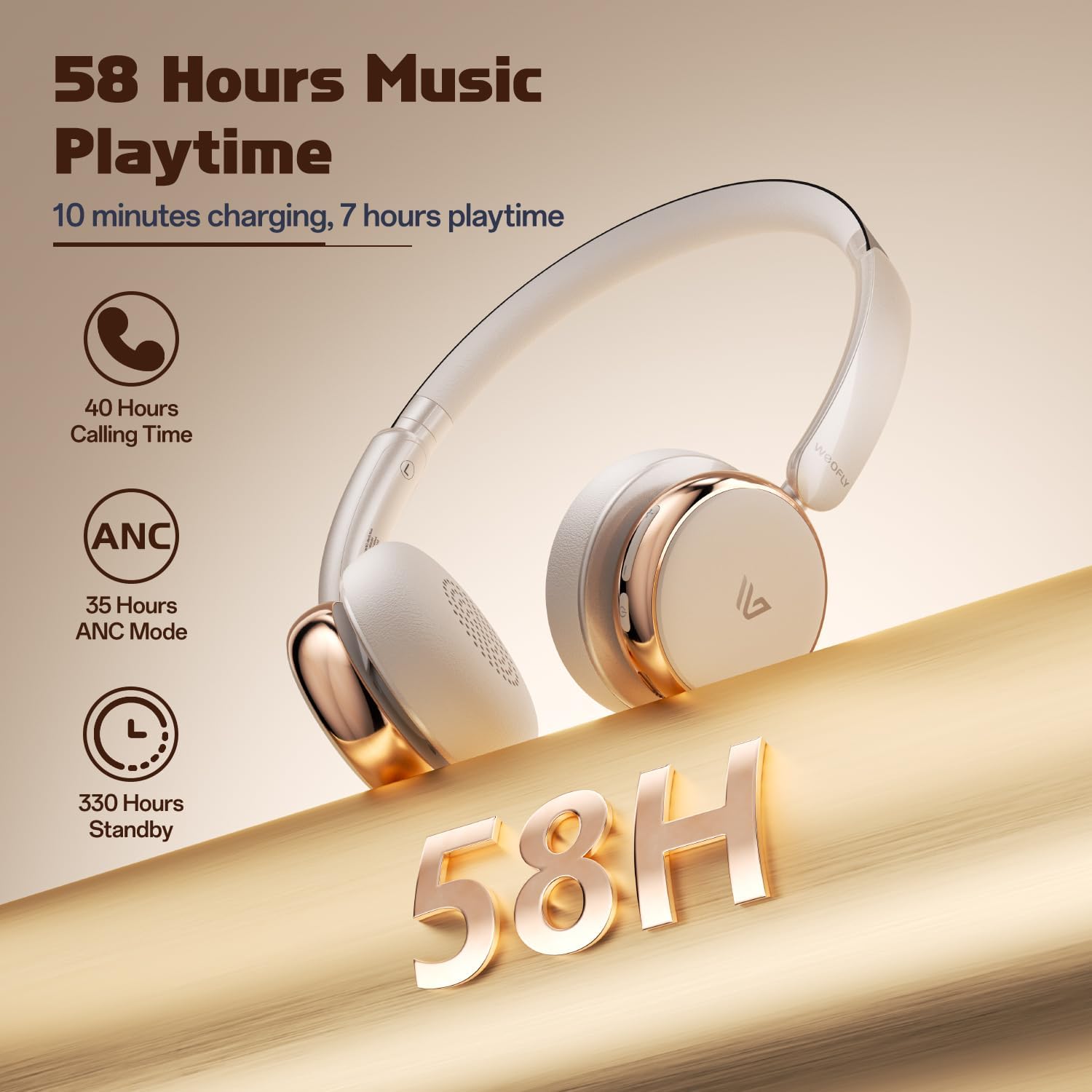
- Долг век на батеријата: До 58 часа време за репродукција на музика со едно полнење.
- Удобен дизајн: Ultra-soft memory protein earcups and adjustable headband.
- Звук со висока верност: 40mm dynamic drivers for clear audio with rich bass.
- Поврзување со повеќе уреди: Connect to two smart devices simultaneously.
Видео: Оверview of the Weofly Nova Active Noise Cancelling Headphones, demonstrating their features and design.
Инструкции за поставување
1. Полнење на слушалките
Before first use, fully charge your Weofly Nova headphones. A full charge takes approximately 2 hours.
- Connect the USB-C end of the charging cable to the headphone's charging port.
- Поврзете го USB-A крајот со компатибилен USB адаптер за напојување (не е вклучен) или USB порт на компјутер.
- Индикаторското светло ќе го покаже статусот на полнење и ќе се исклучи или ќе ја промени бојата кога ќе се наполни целосно.

Image: The Weofly Nova headphones being charged via a USB-C cable, illustrating the fast charging capability.
2. Вклучување/исклучување
- За вклучување: Притиснете и задржете го копчето за вклучување додека индикаторската ламбичка не трепка.
- За исклучување: Притиснете и задржете го копчето за вклучување додека индикаторската ламба не се изгасне.
3. Bluetooth спарување
The headphones support quick pairing. The first time you power them on, they will automatically enter pairing mode.
- Проверете дали слушалките се исклучени.
- Press and hold the Power button for approximately 5 seconds until the indicator light flashes blue and red alternately, indicating pairing mode.
- На вашиот уред (паметен телефон, таблет, лаптоп), овозможете Bluetooth и пребарајте достапни уреди.
- Select "Weofly Nova" from the list of devices.
- Откако ќе се поврзе, индикаторското светло ќе свети постојано сино или бавно ќе трепка сино.
The headphones can connect to two devices simultaneously. To connect a second device, repeat the pairing process. The headphones will automatically switch between devices for calls or media playback.

Image: An illustration showing the Weofly Nova headphones connecting to a laptop and a smartphone via advanced Bluetooth 5.4, highlighting faster transmission and stable connection.
Упатства за работа
1. Активно поништување на бучава (ANC)
The Weofly Nova headphones feature Active Noise Cancellation to minimize ambient sounds.
- To Activate/Deactivate ANC: Press the dedicated ANC button on the earcup. An audible prompt will confirm the status.

Image: A woman wearing Weofly Nova headphones while focused on her laptop, demonstrating the effectiveness of ANC in reducing distractions.
2. Репродукција на музика
Контролирајте ја вашата музика директно од слушалките:
- Пушти/Пауза: Притиснете го копчето за повеќе функции еднаш.
- Следна песна: Притиснете и задржете го копчето за зголемување на јачината на звукот.
- Претходна песна: Притиснете и задржете го копчето за намалување на јачината на звукот.
- Јачина на звук нагоре: Кратко притиснете го копчето за зголемување на јачината на звукот.
- Намалување на јачината на звукот: Кратко притиснете го копчето за намалување на јачината на звукот.
3. Управување со повици
Manage phone calls with ease:
- Одговори/заврши повик: Притиснете го копчето за повеќе функции еднаш.
- Одбијте го повикот: Притиснете и задржете го копчето за повеќе функции 2 секунди.
- Повторно бирајте последен број: Двапати притиснете го копчето за повеќе функции.
4. Гласовен асистент
Activate your device's voice assistant:
- Активирајте го гласовниот асистент: Трипати притиснете го копчето за повеќе функции.

Image: A multi-panel image illustrating the comfort of the headphones during travel, and the functionality of voice assistance and built-in microphone for hands-free calls.
5. Режим на игра
For reduced latency during gaming, activate Game Mode:
- Активирање/деактивирање на режимот на игра: Press and hold the Multi-function button for 2 seconds (while not on a call or playing music).
6. Жична врска
Use the provided 3.5mm AUX cable for a wired connection:
- Connect the USB-C end of the AUX cable to the headphone's USB-C port.
- Connect the 3.5mm end to your audio source's headphone jack.
- Слушалките автоматски ќе се префрлат во жичен режим.
Одржување
To ensure the longevity and optimal performance of your Weofly Nova headphones, follow these maintenance guidelines:
- Чистење: Користете мека, сува крпа за чистење на слушалките. Не користете абразивни средства за чистење или растворувачи.
- Складирање: Слушалките чувајте ги на ладно и суво место, подалеку од директна сончева светлина и екстремни температури.
- Избегнувајте влага: Не ги изложувајте слушалките на вода или прекумерна влага.
- Ракувајте со внимание: Избегнувајте испуштање или изложување на слушалките на силни удари.
Решавање проблеми
If you encounter issues with your Weofly Nova headphones, refer to the following common solutions:
| Проблем | Решение |
|---|---|
| Слушалките не се вклучуваат | Ensure the headphones are fully charged. Connect to a power source and allow to charge for at least 30 minutes before attempting to power on again. |
| Не може да се спари со уредот | Проверете дали слушалките се во режим на спарување (трепка сино/црвено). Исклучете го и вклучете го Bluetooth на вашиот уред. Доближете ги слушалките до уредот. Избришете ги претходните Bluetooth врски на вашиот уред. |
| Нема звук или низок волумен | Check headphone and device volume levels. Ensure headphones are properly connected via Bluetooth or AUX cable. Test with a different audio source. |
| ANC не работи ефикасно | Ensure ANC is activated. Adjust headphone fit to ensure a good seal around your ears. ANC is most effective against low-frequency, constant noise. |
| Наизменична врска | Ensure no obstacles are between the headphones and your device. Move away from other wireless devices that may cause interference. Ensure headphones are fully charged. |
Спецификации
Technical details for the Weofly Nova Active Noise Cancelling Headphones:
- Име на модел: Нова
- Технологија за поврзување: Безжичен (Bluetooth)
- Технологија на безжична комуникација: Bluetooth 5.4
- Тип на драјвер за аудио: Динамички драјвер од 40 мм
- Контрола на бучава: Активно поништување на шум
- Траење на батеријата: Up to 58 hours (music playtime), 40 hours (talk time), 35 hours (ANC mode)
- Време на полнење: Приближно 2 часа
- Капацитет на батеријата: 500 mAh
- Тежина на ставката: 0.26 килограми (9.1 унци)
- Поставување на увото: Над уво
- Компатибилни уреди: Мобилни телефони, таблети, лаптопи, паметни звучници
Слика: Детална view of the Weofly Nova earcup, emphasizing the 40mm dynamic driver responsible for high-fidelity sound quality.

Image: The Weofly Nova headphones prominently displaying '58H', signifying their extended battery life of 58 hours for music playback.
Гаранција и поддршка
Weofly products come with a standard manufacturer's warranty. For specific warranty details, please refer to the warranty card included in your product packaging or visit the official Weofly website. For technical support, troubleshooting assistance, or any inquiries regarding your Weofly Nova headphones, please contact Weofly customer service through the contact information provided on our webстраницата или во документацијата за вашиот производ.


