Вовед
The 1Mii SafeFly Pro is a versatile Bluetooth 5.3 audio adapter designed to transmit and receive audio wirelessly. It features an OLED screen for clear status display and supports advanced audio codecs for high-quality sound. This device allows you to connect your wireless headphones to non-Bluetooth audio sources or stream audio from your Bluetooth-enabled devices to wired audio systems.
Што има во кутијата

This image displays all items included in the 1Mii SafeFly Pro package. You will find the SafeFly Pro Bluetooth Audio Adapter, a USB-C Charging Cable, a 3.5mm Female to Female Audio Adapter, and a Keychain.
- SafeFly Pro Bluetooth аудио адаптер
- USB-C кабел за полнење
- 3.5mm женски-женски аудио адаптер
- Приврзок за клучеви
- Упатство за употреба (овој документ)
Производот завршиview

Оваа слика дава детален view of the 1Mii SafeFly Pro, highlighting its key components. These include the flexible audio cable with a 3.5mm audio connection, an audio plug protector, the OLED display screen, the 'M' key, the 'OK' key, the TX/RX sliding switch, a one-click reset button, and the USB-C charging port.
Компоненти и функции:
- Аудио поврзување од 3.5 мм: Се поврзува со аудио извор (TX режим) или аудио приемник (RX режим).
- Audio Plug Protector: Protects the 3.5mm audio plug when not in use.
- OLED екран: Shows battery level, volume, paired device names, and active audio codecs.
- 'M' Key: In pairing mode, press once to select the connected device. In TX mode, press twice to switch the Bluetooth decoding format.
- 'OK' Key: Power ON/OFF (long press for 1 second). Long press for 2 seconds to enter pairing mode. Also functions as Play/Pause.
- Лизгачки прекинувач TX/RX: Selects Transmitter (TX) or Receiver (RX) mode.
- Копче за ресетирање: Долго притиснете 3 секунди за да го ресетирате уредот.
- Приклучок за полнење USB-C: За полнење на внатрешната батерија.
Поставување
1. Полнење на уредот
Before first use, fully charge the SafeFly Pro using the provided USB-C charging cable. Connect the cable to the USB-C port on the device and a standard USB power adapter (not included). The OLED screen will indicate charging status.
2. Вклучување/исклучување
- За вклучување: Long press the 'OK' button for 1 second.
- За исклучување: Long press the 'OK' button for 1 second.
3. Избор на режим на работа (TX/RX)
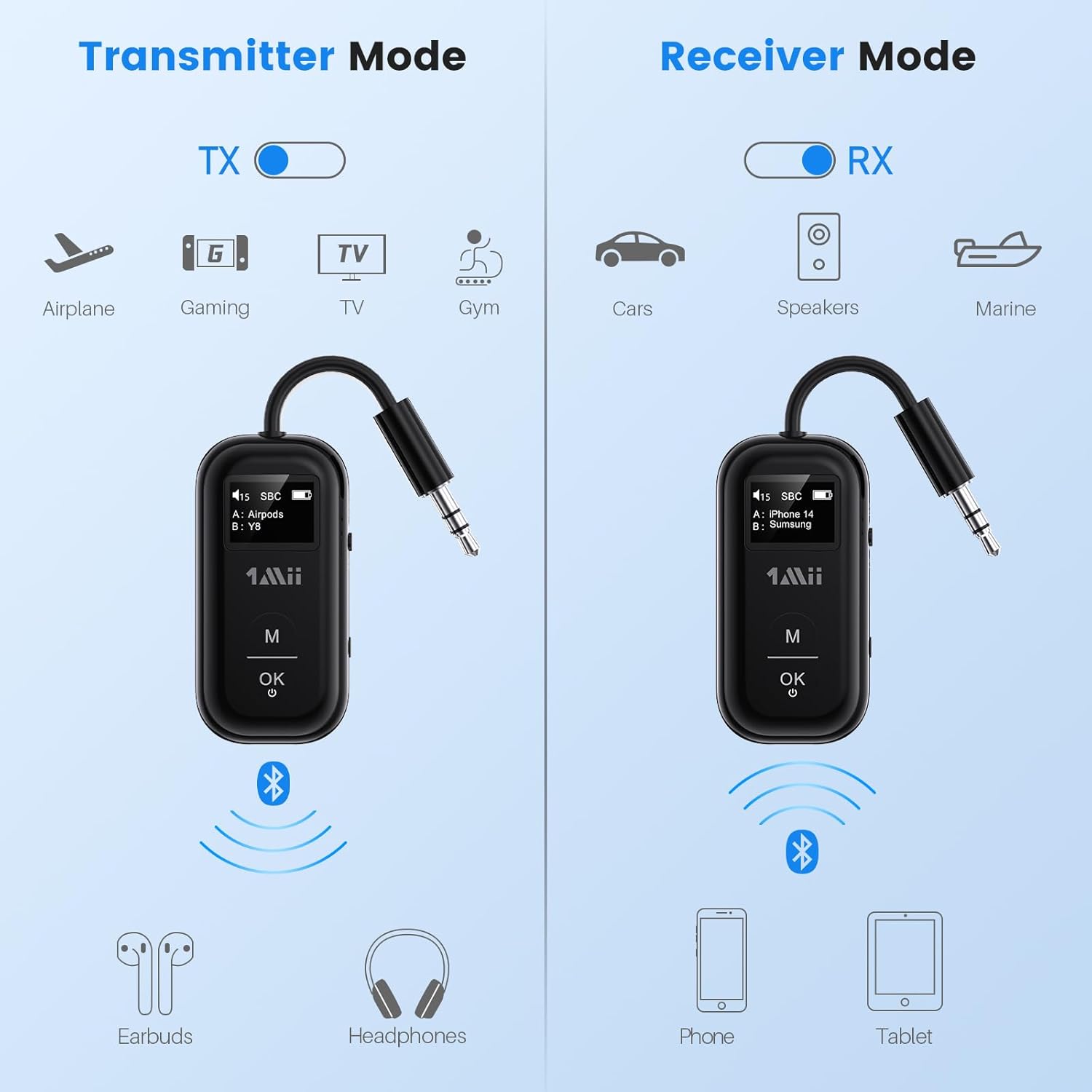
This image illustrates the two operating modes: Transmitter (TX) and Receiver (RX). TX mode is used for devices like airplanes, gaming consoles, TVs, and gym equipment to transmit audio to earbuds or headphones. RX mode is used for cars, speakers, and marine systems to receive audio from phones or tablets.
Use the TX/RX sliding switch on the side of the device to select the desired mode:
- Режим на TX (предавател): For sending audio from non-Bluetooth devices (e.g., airplane entertainment, TV, gym equipment) to Bluetooth headphones or speakers.
- Режим на RX (приемник): For receiving audio from Bluetooth-enabled devices (e.g., smartphones, tablets) to wired audio systems (e.g., car stereo, home speakers).
4. Pairing in TX Mode (Connecting to Headphones)

- Set the SafeFly Pro to TX mode using the sliding switch.
- Plug the 3.5mm audio connection into your audio source (e.g., airplane entertainment system, TV headphone jack). If needed, use the dual-prong airplane adapter.
- Long press the 'OK' button on the SafeFly Pro for 2 seconds to enter pairing mode. The screen will display "Searching".
- Put your Bluetooth headphones or speakers into pairing mode. Refer to your headphone's manual for specific instructions.
- SafeFly Pro автоматски ќе пребарува и ќе се поврзува со блиските Bluetooth уреди. Откако ќе се поврзе, името на уредот ќе се појави на OLED екранот.
- To connect a second pair of headphones: After the first device is connected, long press the 'OK' button again for 2 seconds to enter pairing mode for the second device. Put the second pair of headphones into pairing mode. Both devices will then be connected simultaneously.

This image shows the 1Mii SafeFly Pro connected to an airplane's in-flight entertainment system, enabling wireless audio streaming to a user's Bluetooth headphones.
5. Pairing in RX Mode (Connecting to Smartphones/Tablets)
- Set the SafeFly Pro to RX mode using the sliding switch.
- Plug the 3.5mm audio connection into your wired audio system's AUX input (e.g., car stereo, home speaker).
- Long press the 'OK' button on the SafeFly Pro for 2 seconds to enter pairing mode. The screen will display "Searching".
- On your smartphone or tablet, go to Bluetooth settings and select "1Mii SafeFly Pro" from the list of available devices to connect.
- Откако ќе се поврзете, името на уредот ќе се појави на OLED екранот.
- To connect a second smartphone/tablet: After the first device is connected, long press the 'OK' button again for 2 seconds to enter pairing mode for the second device. Connect the second smartphone/tablet via its Bluetooth settings.

This image shows the 1Mii SafeFly Pro in RX mode, connected to a car's audio system, receiving audio wirelessly from a smartphone.
Упатства за работа
OLED екран

Оваа слика овозможува крупен план view of the OLED screen, indicating the power status, audio format (e.g., SBC), volume level, battery level, and the names of the two currently paired devices (A and B).
OLED екранот обезбедува информации во реално време:
- Ниво на батерија: Го означува преостанатото полнење на батеријата.
- Ниво на гласност: Displays the current audio output volume.
- Спарен уред: Shows the name(s) of the connected Bluetooth headphones or smartphones.
- Аудио кодек: Displays the active audio codec (e.g., aptX LL, aptX HD, aptX Adaptive, aptX, AAC, SBC).
Функции на копчињата
- Копче „ОК“: Short press to Play/Pause audio.
- Копче „М“: In TX mode, press twice to cycle through available audio codecs (aptX LL, aptX HD, aptX Adaptive, AAC, SBC) if supported by your connected headphones.
Одржување
За да обезбедите долготрајност и оптимални перформанси на вашиот 1Mii SafeFly Pro, следете ги овие упатства за одржување:
- Чистење: Избришете го уредот со мека, сува крпа. Не користете течни средства за чистење или абразивни материјали.
- Складирање: Чувајте го уредот на ладно и суво место, подалеку од директна сончева светлина и екстремни температури.
- Нега на батеријата: Avoid fully discharging the battery frequently. Charge the device regularly, even if not in use, to maintain battery health.
- Ракување: Ракувајте со уредот внимателно. Избегнувајте да го испуштате или да го изложувате на силни удари.
Решавање проблеми
If you encounter issues with your SafeFly Pro, try the following steps:
- Уредот не се вклучува: Уверете се дека уредот е целосно наполнет. Поврзете го со извор на енергија користејќи го USB-C кабелот.
- Не може да се спари:
- Проверете дали SafeFly Pro е во правилниот режим на снимање или преснимување.
- Make sure both the SafeFly Pro and your target Bluetooth device are in pairing mode.
- Приближете ги уредите еден до друг.
- Исклучете ги и вклучете ги двата уреди, а потоа обидете се повторно да ги спарите.
- Нема аудио/Лош квалитет на аудио:
- Check that the 3.5mm audio cable is securely connected to both the SafeFly Pro and the audio source/receiver.
- Ensure the volume on both the SafeFly Pro and the connected device is turned up.
- Verify that the correct audio codec is selected (in TX mode, press 'M' twice to cycle).
- Test with a different audio cable or source/receiver if possible.
- Device Frozen/Unresponsive: Long press the Reset Button (small hole on the side) for 3 seconds using a thin object (e.g., paperclip) to restart the device.
Спецификации
| Димензии на производот | 2.24 x 1.18 x 0.51 инчи |
| Тежина на ставката | 0.64 унци |
| Број на модел на ставка | SafeFly Pro |
| Батерии | 1 литиум полимерна батерија (вклучена) |
| Технологија за поврзување | AUX, Bluetooth 5.3 |
| Извор на енергија | Напојува со батерија |
| Материјал | Акрилонитрил бутадиен стирен (ABS) |
| Посебни карактеристики | AptX LL/HD/Adaptive, Bluetooth Transmitter & Receiver, Built-in Battery, Connect 2 Devices, with Screen |
Информации за безбедност
Ве молиме прочитајте ги и следете ги овие безбедносни упатства за да спречите оштетување на уредот или телесна повреда:
- Avoid exposure to extreme temperatures (hot or cold).
- Handle the battery with care. Do not puncture, disassemble, or expose to fire.
- Бидете свесни за потенцијалните пречки со други безжични уреди.
- Чувајте го уредот подалеку од вода и други течности.
- Не обидувајте се сами да го поправите или модифицирате уредот. Контактирајте ја службата за корисничка поддршка за помош.
Гаранција и поддршка
1Mii products are designed for reliability and performance. For warranty information, technical support, or customer service inquiries, please refer to the official 1Mii website or contact their customer support team directly. Keep your purchase receipt as proof of purchase for warranty claims.


