1. Вовед
This manual provides essential instructions for the setup, operation, and maintenance of your TMY Projector. Please read this manual thoroughly before using the product to ensure proper functionality and to maximize your viewискуство. Чувајте го ова упатство за идна референца.
2. Производот завршиview
2.1 Содржина на пакетот
Проверете дали сите артикли се присутни во пакувањето:
- TMY Projector Unit
- Далечински управувач
- HDMI кабел
- Кабел за напојување
- Гарантна картичка
2.2 Клучни карактеристики
- Netflix Officially Licensed: Access streaming services directly without external devices.
- Резолуција од 1080P: Обезбедува јасни и детални слики.
- Electric Focus & Auto Keystone: Automatic image adjustment for optimal clarity and shape.
- Поставка што може да се ротира 270°: Flexible projection angles, including ceiling projection.
- Upgraded WiFi 6 Connectivity: Ensures stable and fast wireless streaming.
- Dual-Mode Bluetooth 5.2: Connects to external speakers or functions as a standalone Bluetooth speaker.
- Повеќе опции за поврзување: HDMI, USB, Phone/PC mirroring.
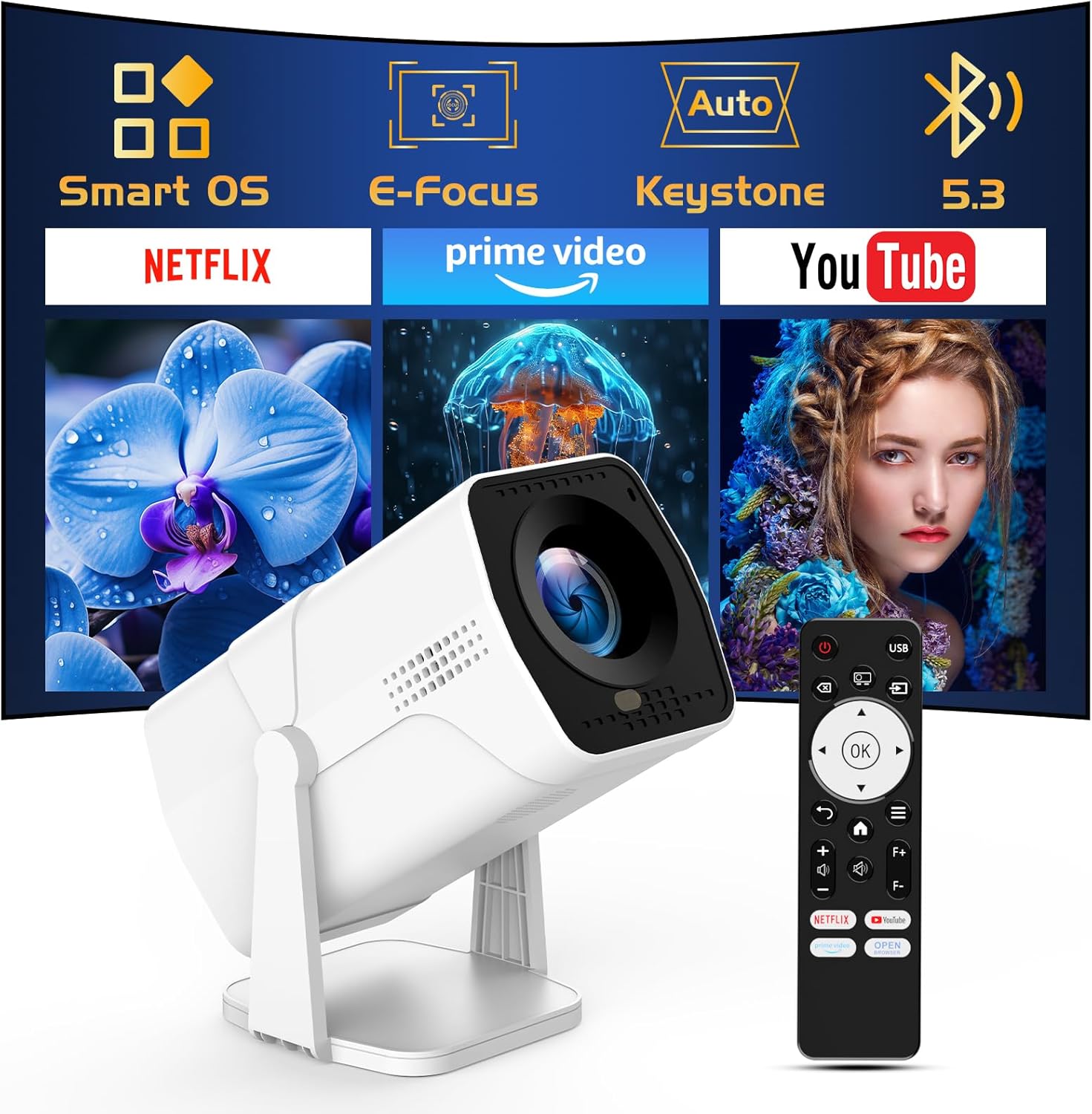
Image: The TMY Projector unit, its remote control, and a projected screen displaying logos for Smart OS, E-Focus, Auto Keystone, Bluetooth 5.3, Netflix, Prime Video, and YouTube.
3. Поставување
3.1 Поставување
Position the projector on a stable, flat surface. The 270° rotatable stand allows for versatile placement, including projecting onto walls or ceilings. Ensure adequate ventilation around the projector.

Image: A TMY Projector positioned on a bedside table, projecting an image onto the ceiling, demonstrating its 270° rotatable stand for multi-angle viewинг.
3.2 Поврзување за напојување
- Поврзете го кабелот за напојување со влезот за напојување на проекторот.
- Вклучете го другиот крај од кабелот за напојување во стандарден електричен штекер.
3.3 Првично вклучување и прилагодување на фокусот
- Притиснете го копчето за вклучување на проекторот или далечинскиот управувач за да го вклучите уредот.
- Карактеристики на проекторот Електричен фокус и Авто клучен камен correction. The image will automatically adjust for clarity and a rectangular shape within approximately 2 seconds.
- If further adjustment is needed, use the remote control to fine-tune the focus.

Image: A TMY Projector projecting a vibrant image onto a screen, with an overlay illustrating the 'FOCUS' function and icons for Auto Keystone and 50%-100% Zoom.
3.4 Мрежна конекција (WiFi)
The projector supports WiFi 6 for a fast and stable internet connection.
- Navigate to the 'Settings' menu using the remote control.
- Select 'Network' or 'WiFi Settings'.
- Choose your desired WiFi network from the list and enter the password.
- Потврдете ја врската.

Image: A TMY Projector wirelessly connected to a tablet, smartphone, and laptop, illustrating its WiFi 6 connectivity for faster streaming with no lagging.
3.5 Bluetooth конекција
The projector features Dual-Mode Bluetooth 5.2 for audio connectivity.
- Projector Mode (Output): To connect to external Bluetooth speakers or soundbars: Navigate to 'Bluetooth Settings', enable Bluetooth, and pair with your audio device.
- Speaker Mode (Input): To use the projector's built-in speakers as a standalone Bluetooth speaker: Select 'Speaker Mode' in the Bluetooth settings. Your phone or other device can then connect to the projector to play audio.

Image: A TMY Projector illustrating its two-way Bluetooth 5.2 functionality, showing connections to a soundbar (Projector Mode) and a smartphone (Speaker Mode).
4. Операција
4.1 Navigating the Smart OS
The projector runs on a smart TV operating system. Use the provided remote control to navigate menus, select applications, and control playback.

Image: The TMY Projector unit with a projected screen showing a grid of built-in smart OS applications, including Netflix, YouTube, Prime Video, TikTok, and others.
4.2 Accessing Built-in Apps
The projector comes with pre-installed and officially licensed applications such as Netflix, Prime Video, and YouTube. Access these directly from the home screen or through the 'App Store' for additional content.

Image: A TMY Projector projecting a screen filled with content from officially licensed apps like Netflix, Prime Video, and YouTube, with the remote control in the foreground.
4.3 Поврзување на надворешни уреди
The projector offers multiple ports for connecting external devices:
- HDMI: Connect TV sticks, TV boxes, PCs/Laptops, or gaming consoles (e.g., PS).
- USB: Играјте медиуми files directly from USB drives or connect other USB accessories.
- Phone/PC Mirroring: Wirelessly mirror content from your smartphone or PC (refer to the on-screen instructions for specific mirroring protocols).
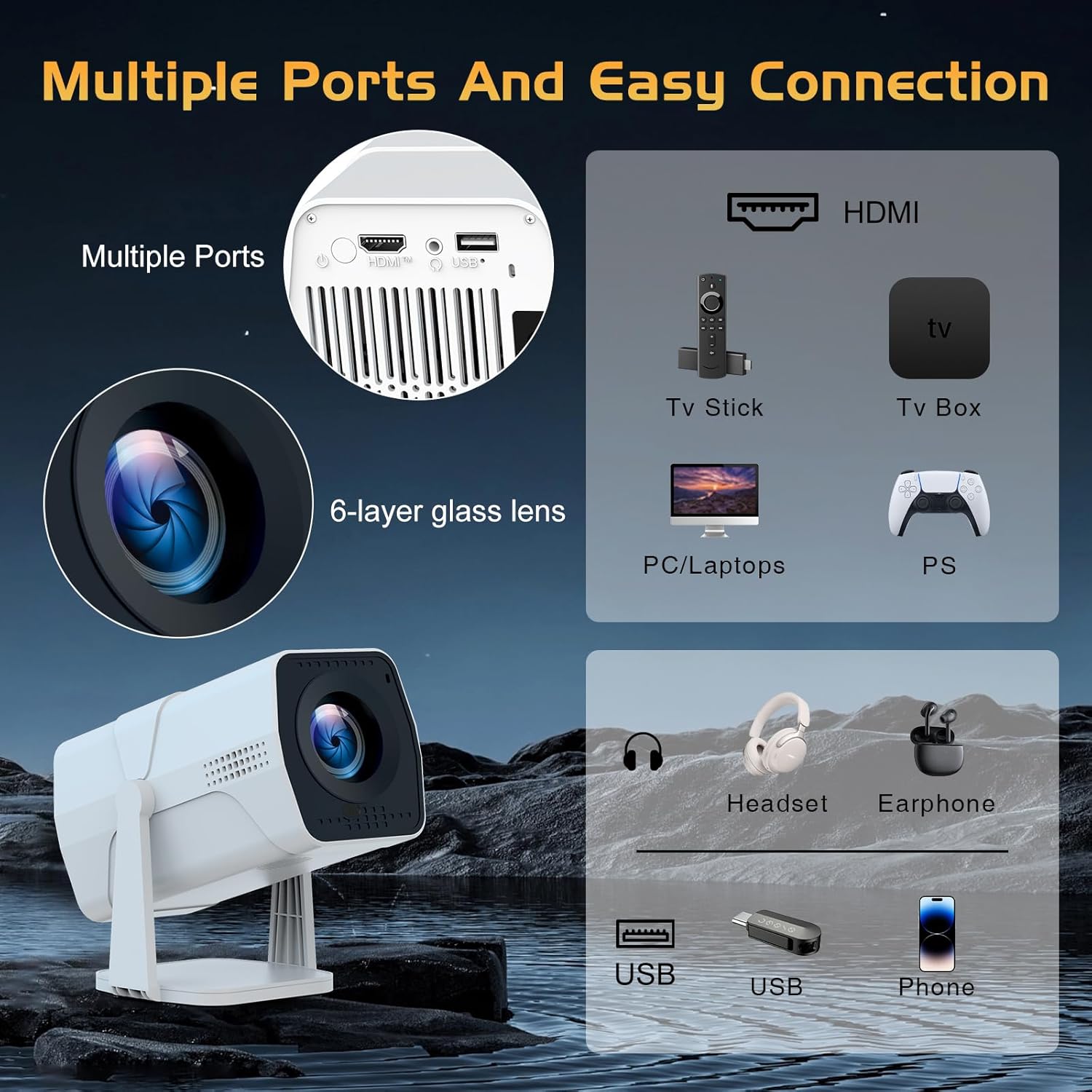
Image: A detailed diagram showing the multiple ports on the TMY Projector (HDMI, USB) and various connection possibilities, including TV sticks, PCs, gaming consoles, headsets, and phones.
4.4 Screen Zoom Function
The projector includes a 50%-100% zoom function, allowing you to adjust the screen size without moving the projector. This feature can be accessed via the remote control or settings menu.
5. Одржување
To ensure the longevity and optimal performance of your TMY Projector, follow these maintenance guidelines:
- Чистење на објективот: Користете мека крпа без влакненца, специјално дизајнирана за оптички леќи. Избегнувајте абразивни материјали или груби хемикалии.
- Чистење на надворешноста: Избришете ја надворешноста на проекторот со мека, сува крпа. Не користете течни средства за чистење директно на уредот.
- Вентилација: Погрижете се отворите за вентилација да не се блокирани за да се спречи прегревање.
- Складирање: When not in use for extended periods, store the projector in a cool, dry place, away from direct sunlight and dust.
6 Смена на проблеми
If you encounter issues with your TMY Projector, refer to the following common problems and solutions:
- Без моќност:
- Осигурајте се дека кабелот за напојување е безбедно поврзан и со проекторот и со функционален електричен штекер.
- Проверете дали штекерот е функционален.
- Нема слика / Заматена слика:
- Verify the projector is powered on and the lens cap is removed.
- Allow the automatic focus and keystone correction to complete. If still blurry, manually adjust focus using the remote.
- Ensure the projection surface is suitable and the projector is within the recommended distance.
- If using an external source (HDMI), ensure the correct input source is selected.
- Нема звук:
- Check the volume level on the projector and any connected external audio devices.
- Доколку користите Bluetooth звучници, проверете дали се правилно спарени и поврзани.
- If using internal speakers, ensure external Bluetooth output is not selected.
- Далечинскиот управувач не реагира:
- Осигурајте се дека батериите се правилно вметнати и дека не се испразнети.
- Насочете го далечинскиот управувач директно кон IR приемникот на проекторот.
- Проблеми со WiFi конекцијата:
- Ensure your WiFi network is active and within range.
- Проверете ја лозинката за WiFi двапати.
- Рестартирајте го проекторот и вашиот WiFi рутер.
- If the connection times out, try moving the projector closer to the router or reducing interference.
7. Спецификации
| Карактеристика | Спецификација |
|---|---|
| Бренд | TMY |
| Модел | B0DRFF5KMF |
| Тежина на ставката | 2.79 фунти |
| Димензии на производот | 5.35 x 4.84 x 7.09 инчи |
| Боја | Бело |
| Посебни карактеристики | Speakers, Electric Focus, Auto Keystone, 270° Rotatable Stand |
| Технологија за поврзување | HDMI, USB, WiFi 6, Bluetooth 5.2 |
| Резолуција на екранот | 1920 x 1080 (1080P Full HD) |
| Препорачана употреба | Затворен |

Image: A visual comparison showing the TMY Projector's 1080P Full HD image quality, emphasizing that it is recommended for use in dark environments for optimal viewing, contrasted with daytime or light-on conditions.
8. Гаранција и поддршка
TMY is committed to providing excellent customer service and product support.
- Гаранција: Овој производ доаѓа со гаранција од 3 години.
- Политика за враќање: Enjoy a 30-day return period.
- Техничка поддршка: Lifetime after-sale service and technical support are available.
- Време на одговор: Expect a quick reply within 24 hours for support inquiries.
За дополнителна помош, посетете ја официјалната страница TMY Store on Amazon or contact customer support through the provided channels in your warranty card.


