1. Вовед
The ORICO MiniMate Thunderbolt 4 External SSD is designed to provide high-speed storage expansion for your Mac Mini M4. Featuring a Thunderbolt 4/3 interface and an Intel JHL7440 chipset, it offers data transfer speeds up to 3100MB/s. This device is specifically engineered to complement the Mac Mini M4's dimensions and aesthetics, providing a seamless integration for your desktop setup. It is compatible only with Thunderbolt interfaces.
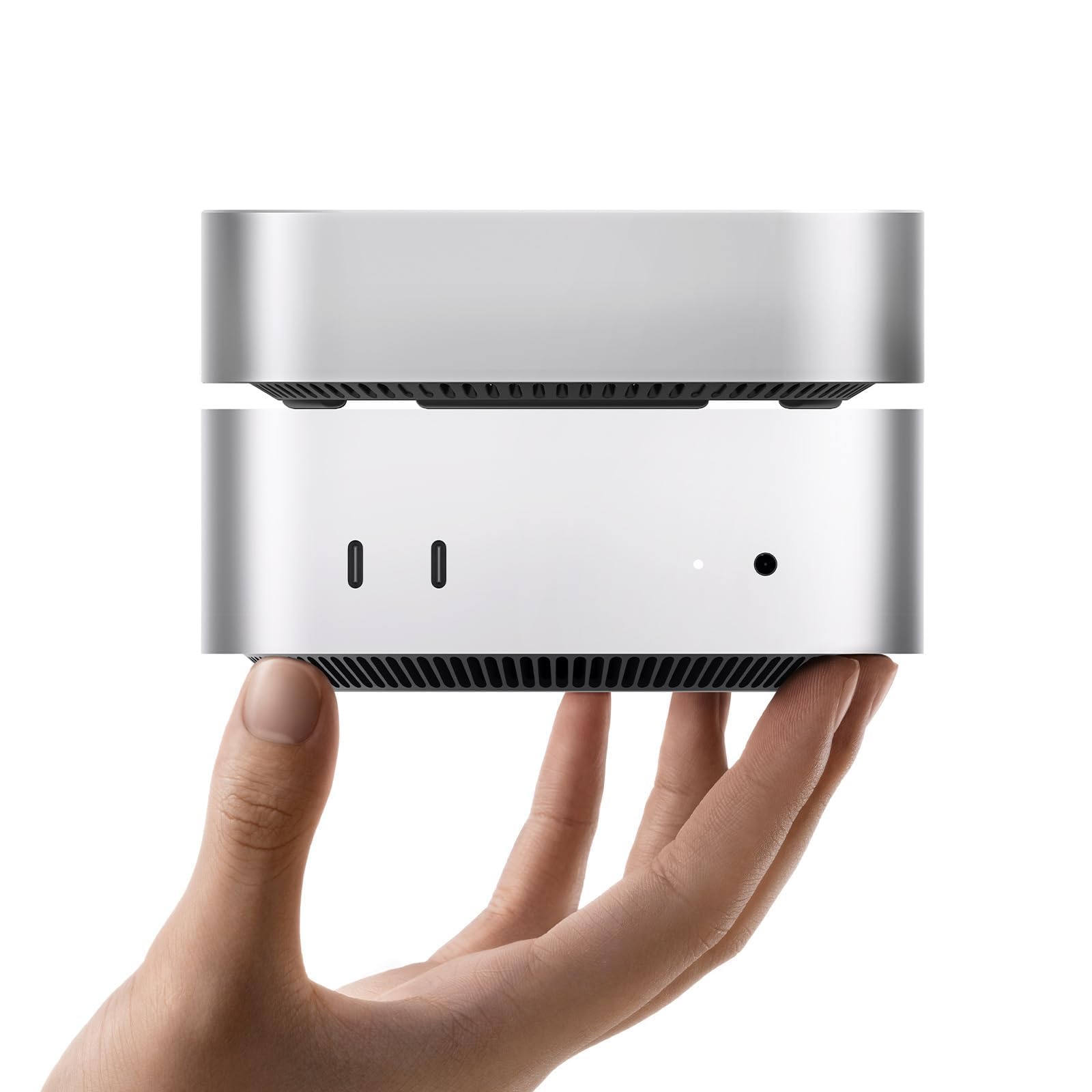
Image: The ORICO MiniMate Thunderbolt 4 External SSD, a compact device designed for storage expansion.
2. Што има во кутијата
Ве молиме проверете дали сите артикли се присутни во пакетот:
- ORICO MiniMate External SSD
- Упатство за употреба
- 40Gbps USB-C to USB-C Cable

Image: Contents of the ORICO MiniMate package, including the SSD unit, user manual, and USB-C to USB-C cable.
3. Упатства за поставување
Follow these steps to set up your ORICO MiniMate External SSD:
- Positioning the MiniMate: Place the ORICO MiniMate directly beneath your Mac Mini M4. The MiniMate is designed to match the dimensions of the Mac Mini M4 for a stable and integrated setup.
- Поврзување на кабелот: Use the provided 40Gbps USB-C to USB-C cable. Connect one end to the Thunderbolt port on the ORICO MiniMate and the other end to a Thunderbolt 3 or Thunderbolt 4 port on your Mac Mini M4. Ensure a secure connection.
- Вклучување: Ensure your Mac Mini M4 is powered on. The ORICO MiniMate does not require a separate power adapter as it draws power directly from the Thunderbolt connection.
- Системско препознавање: Your Mac Mini M4 should automatically detect the ORICO MiniMate. A new drive icon may appear on your desktop or in Finder under "Locations".
- Првично форматирање (доколку е потребно): For first-time use or if you wish to change the file system, you may need to format the SSD.
- Отвори Услужна алатка за диск on your macOS device (Applications > Utilities > Disk Utility).
- Select the ORICO MiniMate drive from the sidebar.
- Кликнете Избриши.
- Choose a format (e.g., APFS for macOS, ExFAT for cross-platform compatibility) and a scheme (e.g., GUID Partition Map).
- Кликнете Избриши повторно да се потврди. Warning: This will delete all data on the drive.

Image: The ORICO MiniMate positioned beneath a Mac Mini M4, illustrating the integrated setup.
Видео: Оверview of the ORICO MiniMate, demonstrating its physical integration with the Mac Mini M4 and highlighting its features. This video shows the connection process and general use.
4. Операција
The ORICO MiniMate provides fast and reliable external storage for various applications.
4.1. Пренос на податоци
Leverage the Thunderbolt 4/3 interface for high-speed data transfers. With speeds up to 3100MB/s, large files, such as 4K videos, high-resolution images, and extensive project files, can be moved quickly and efficiently between your Mac Mini M4 and the MiniMate.

Image: A graphic illustrating the data transfer speeds of Thunderbolt (40Gbps) compared to various USB-C standards, emphasizing the high performance of the ORICO MiniMate.
4.2. Проширување на складиштето
The MiniMate serves as a direct storage expansion for your Mac Mini M4. You can store documents, videos, photos, and other materials on the MiniMate, freeing up internal storage on your Mac Mini for applications and system files. This setup is ideal for managing growing data needs without impacting your primary system performance.

Image: A visual representation of the ORICO MiniMate as a storage expansion companion, showing various data types like videos, information, and databases being stored.
4.3. Сценарија на употреба
- Креативни работни процеси: Ideal for video editing, graphic design, and music production, where large project files and media libraries benefit from fast external storage.
- Развој на софтвер: Store development environments, large code repositories, and virtual machines for quick access and improved workflow efficiency.
- Играње: Install large game titles on the external SSD to reduce load times and expand your game library without consuming internal drive space.
- General Data Storage: Use it for backups, archiving important documents, or simply extending your available storage for everyday files.

Image: Depicts the ORICO MiniMate being used in various scenarios such as creative work (video editing), coding, and gaming, highlighting its versatility.
5. Одржување
Proper maintenance ensures the longevity and optimal performance of your ORICO MiniMate:
- Чистење: Користете мека, сува крпа за чистење на надворешноста на уредот. Избегнувајте течни средства за чистење или абразивни материјали.
- Еколошки услови: Operate the MiniMate within typical room temperatures. Avoid extreme heat, cold, or high humidity.
- Безбедно исклучување: Always eject the drive from your operating system before physically disconnecting the cable to prevent data corruption.
- Ажурирања на фирмверот: Периодично проверувајте го официјалниот претставник на ORICO website for any available firmware updates for your device to ensure optimal performance and compatibility.
6 Смена на проблеми
If you encounter issues with your ORICO MiniMate, refer to the following common problems and solutions:
- Уредот не е препознаен:
- Ensure the USB-C to USB-C cable is securely connected to both the MiniMate and a Thunderbolt 3/4 port on your Mac Mini M4.
- Verify that your Mac Mini M4 is powered on.
- Restart your Mac Mini M4.
- Confirm that the port on your Mac Mini M4 is a Thunderbolt interface. The MiniMate is не е компатибилен with non-Thunderbolt USB-C ports.
- Check Disk Utility to see if the drive is detected but unformatted.
- Бавни брзини на пренос на податоци:
- Ensure you are using the provided 40Gbps USB-C to USB-C cable.
- Confirm that the MiniMate is connected to a Thunderbolt 3 or Thunderbolt 4 port on your Mac Mini M4. Using a standard USB-C port will result in lower speeds.
- Close any background applications that might be heavily utilizing system resources or other storage devices.
- Невообичаен шум:
- The MiniMate features an upgraded silent fan designed to keep noise below 40dB during normal operation. If you experience excessive or unusual noise, ensure the device is placed on a flat, stable surface and that the fan vents are not obstructed.

Слика: Детална view of the Intel JHL7440 Chipset, which ensures stable and high-speed data transfer and compatibility with Thunderbolt 4/3 ports.
7. Спецификации
| Карактеристика | Детал |
|---|---|
| Бренд | ОРИКО |
| Број на модел | M4T4-512GB |
| Тип на хард диск | Солидна состојба на диск (SSD) |
| Дигитален капацитет за складирање | 512 GB |
| Интерфејс на тврдиот диск | Гром |
| Технологија за поврзување | USB (Thunderbolt 3/4 compatible) |
| Брзина на пренос на податоци | До 3100 MB/s |
| Чипсет | Интел JHL7440 |
| Компатибилност | Mac Mini M4 (Thunderbolt 3/4 interfaces only) |
| Специјална карактеристика | Backward Compatible (with Thunderbolt 3) |
| Тежина на ставката | 3.17 унци |
| Димензии на пакетот | 5.91 x 4.25 x 0.98 инчи |
8. Гаранција и поддршка
ORICO products come with a standard manufacturer's warranty. For specific warranty details, duration, and terms, please refer to the warranty card included in your product packaging or visit the official ORICO webсајт.
If you require technical assistance, troubleshooting beyond this manual, or have questions regarding your product, please contact ORICO customer support through their official webстраницата или информациите за контакт наведени во документацијата за вашиот производ.
Официјален претставник на ORICO Webсајт: www.oricotech.com


