1. Вовед
This manual provides essential information for setting up, operating, and maintaining your JVC LT-55NQ7165C AI Vision Series QLED Google TV. Please read it thoroughly before use to ensure proper functionality and safety.

The JVC LT-55NQ7165C is a 55-inch 4K Ultra HD QLED Google TV, featuring a 60Hz refresh rate, AI Vision technology, and integrated smart functionalities. It offers a vibrant display with HDR and HLG support, powerful 60 Watts Dolby Atmos sound, and extensive connectivity options.
Во текот наview of JVC AI Vision Series QLED Android TV features.
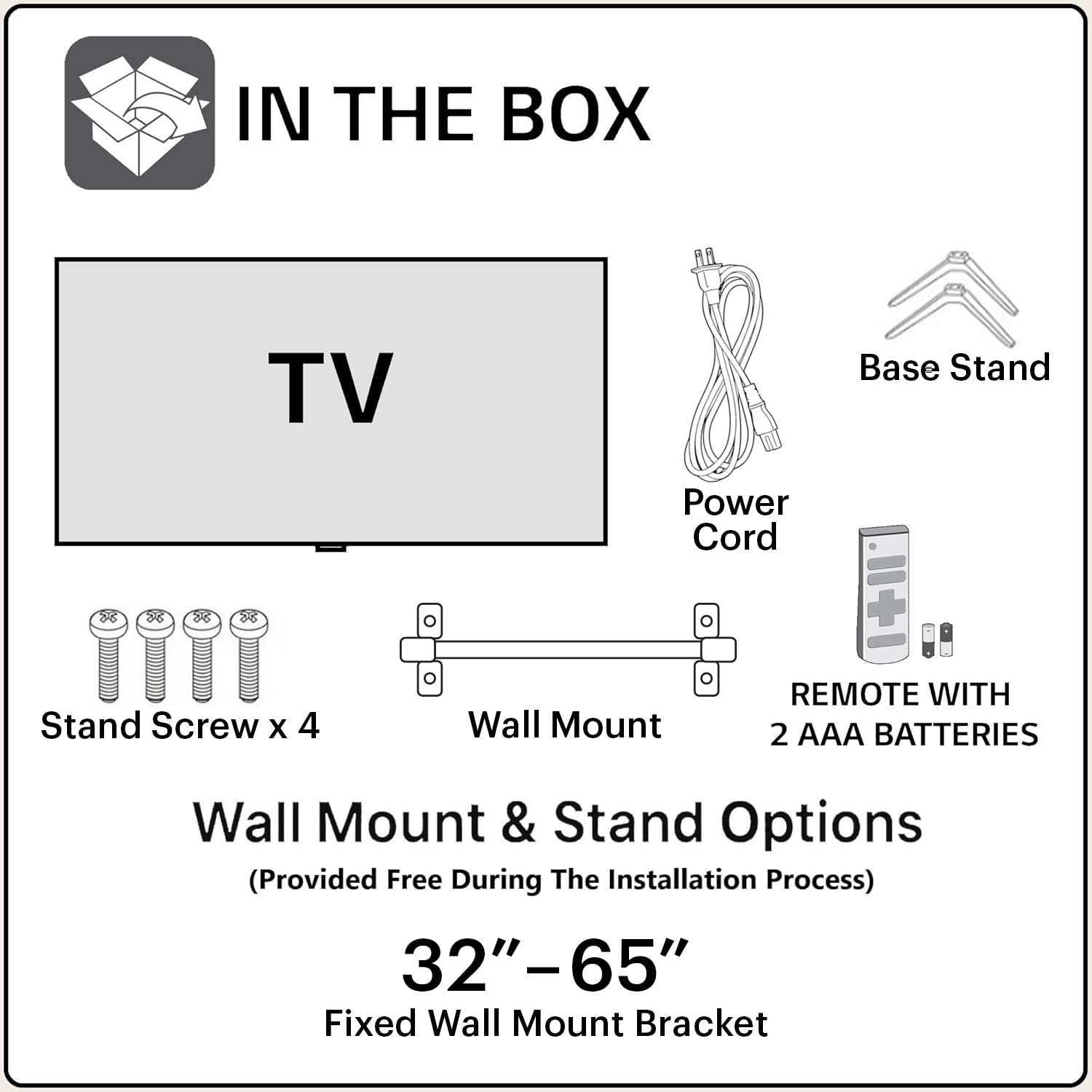
2. Што има во кутијата
По отворањето на пакувањето, проверете дали се вклучени сите следни компоненти:
- 1N JVC LT-55NQ7165C LED TV
- 1N Remote Control (with 2 AAA batteries included)
- 1N Wall Mount Bracket
- 1N Table Top Stand (Base Stand)
- 4x завртки за држење
- 1N Power Cord
- Упатство за употреба (овој документ)
3. Поставување и инсталација
Your JVC TV offers both table-top and wall-mount installation options. Ensure the TV is placed on a stable surface or securely mounted to a wall.
3.1. Table-Top Installation
- Внимателно поставете го екранот на телевизорот со свртен надолу на мека, чиста површина за да спречите гребнатини.
- Attach the two base stands to the bottom of the TV using the provided screws. Ensure they are firmly secured.
- Place the TV on a flat, stable surface, ensuring adequate ventilation around the unit.
3.2. Инсталација на ѕид
For wall-mount installation, it is recommended to seek professional assistance. The provided wall mount bracket is suitable for this model.
- Identify a suitable wall location, ensuring it can support the weight of the TV.
- Follow the instructions provided with the wall mount bracket to securely attach it to the wall.
- Carefully attach the TV to the wall mount bracket. Ensure all connections are secure before releasing телевизорот.
Внимание: Improper wall mounting can result in serious injury or damage to your TV. Always follow safety guidelines.
3.3. Првично вклучување
- Поврзете го кабелот за напојување со телевизорот, а потоа со штекер.
- Insert the included AAA batteries into the remote control.
- Притиснете го копчето за вклучување на далечинскиот управувач или на телевизорот за да го вклучите.
- Следете ги упатствата на екранот за почетно поставување, вклучувајќи го изборот на јазик, мрежната врска и најавувањето на сметката на Google.
4. Поврзување
The JVC LT-55NQ7165C offers a variety of ports for connecting external devices and network access.

- HDMI порти (3): Connect gaming consoles, set-top boxes, Blu-ray players, and other HDMI-enabled devices. Supports ALLM (Auto Low Latency Mode) and eARC (Enhanced Audio Return Channel).
- USB порти (2): Поврзете тврди дискови, USB флеш драјвови и други USB уреди за репродукција на медиуми.
- Двоен опсег Wi-Fi: Connect to your home network wirelessly (2.4GHz / 5GHz).
- Етернет (LAN) порт: За жична интернет конекција.
- Bluetooth 5.0: Connect wireless headphones, speakers, or other Bluetooth accessories.
- Оптички аудио излез: Connect to external sound systems or soundbars for high-quality audio.

5. Ракување со вашиот телевизор
5.1. Далечински управувач
The included remote control allows you to navigate the TV's features. It includes dedicated buttons for popular streaming services and Google Assistant voice control.

- Копче за вклучување: Го вклучува или исклучува телевизорот.
- Копче за Google Assistant: Активира гласовни команди.
- Плочка за навигација: За навигација низ менито.
- Јачина на звук нагоре/намалување: Ја прилагодува јачината на звукот.
- Канал нагоре/надолу: Менува ТВ канали.
- Копчиња за Netflix, Prime Video, YouTube: Директен пристап до овие апликации за стриминг.
5.2. Функции на Google TV
Your JVC TV runs on the Google TV operating system, providing access to a vast library of content and smart features.
- Пристап до апликацијата: Download and install over 10,000 apps and games from the Google Play Store, including Netflix, Prime Video, YouTube, Zee5, Disney+ Hotstar, SonyLIV, MX Player, JioCinema, Apple TV, and Voot.
- Google Assistant: Use voice commands to search for content, control smart home devices, get answers, and more. Press the Google Assistant button on your remote and speak into the microphone.
- Screen Mirroring (Chromecast built-in): Cast content from your compatible smartphone, tablet, or computer directly to your TV screen.
- Персонализирани препораки: Google TV learns your preferences and suggests content tailored to you.


5.3. Карактеристики на екранот
Experience stunning visuals with the TV's advanced display technologies.
- 4K Ultra HD резолуција: Enjoy incredibly sharp and detailed images with 3840 x 2160 pixels.
- QLED технологија: Quantum Dot LED display delivers vibrant colors and improved brightness.
- HDR (High Dynamic Range) & HLG: Provides enhanced contrast, brightness, and a wider color gamut for a more lifelike picture.
- AI Vision Series: AI-powered processing optimizes picture quality for various content types.
- 1.1 Billion Colours: Experience a rich and extensive color palette.
- Стапка на освежување 60Hz: Smooth motion for most content.


5.4. Аудио карактеристики
Immerse yourself in rich and clear audio with the TV's integrated sound system.
- Излезна моќност од 60 вати: Powerful audio delivery for an engaging listening experience.
- Dolby Digital Plus & Dolby Atmos: Обезбедува импресивен, повеќедимензионален звук што се движи околу вас.
- DTS-TruSurround: Enhances surround sound effects for a cinematic audio experience.

5.5. Играње
The TV is designed to enhance your gaming experience with features like ALLM (Auto Low Latency Mode) and a responsive display.

6 Смена на проблеми
Погледнете го овој дел за вообичаени проблеми и нивни решенија.
6.1. Нема моќ
- Проверете дали кабелот за напојување е безбедно поврзан и со телевизорот и со функционален штекер.
- Проверете дали штекерот работи со вклучување на друг уред.
- Проверете дали батериите на далечинскиот управувач се правилно вметнати и не се испразнети.
6.2. Нема слика / Лош квалитет на сликата
- Проверете ги сите кабли (HDMI, антена итн.) за да се осигурате дека се безбедни.
- Изберете го точниот влезен извор користејќи го далечинскиот управувач.
- Прилагодете ги поставките за слика (осветленост, контраст, боја) во менито на телевизорот.
- Ако користите надворешен уред, проверете ги неговите излезни поставки.
6.3. Нема звук / Лош квалитет на звук
- Осигурајте се дека јачината на звукот не е пригушена или поставена премногу ниско.
- Проверете ги поврзувањата на аудио каблите со надворешните звучни системи.
- Прилагодете ги поставките за аудио во менито на телевизорот.
- Доколку користите надворешни звучници, проверете дали се вклучени и дека работат правилно.
6.4. Проблеми со мрежната конекција
- Проверете дали вашиот Wi-Fi рутер е вклучен и работи.
- Рестартирајте го вашиот рутер и модем.
- Одете во мрежните поставки на телевизорот и обидете се повторно да се поврзете на вашата Wi-Fi мрежа.
- Ако користите жична врска, проверете дали етернет кабелот е безбедно поврзан.
7. Спецификации
| Карактеристика | Детал |
|---|---|
| Име на моделот | LT-55NQ7165C |
| Големина на екранот | 55 инчи (140 см) |
| Технологија на прикажување | QLED, IPS Display |
| Резолуција | 4K Ultra HD (3840 x 2160) |
| Стапка на освежување | 60 Hz |
| Посебни карактеристики | Dolby Digital Plus, HDR, DTS-TruSurround, Google Assistant, Dolby Atmos, AI Vision Series |
| Оперативен систем | Google TV |
| RAM меморија | 2 GB |
| Складирање (ROM) | 16 GB |
| Аудио излез | 60 вати |
| Поврзување | Dual Band Wi-Fi, 3 HDMI, 2 USB, Bluetooth 5.0, Optical, Ethernet |
| Димензии на производот (ДxШxВ) | 124 x 12 x 71 cm |
| Тежина на ставката | 10.4 кг |
| Извор на енергија | AC |
| Viewинголен агол | 178 степени |
| Сооднос на контраст на слика | 4000:1 |

8. Гаранција и поддршка
Your JVC LT-55NQ7165C TV comes with a standard manufacturer's warranty.
- Гаранција на производот: 1 година од датумот на купување.
- Remote Accessories Warranty: 6 месеци од датумот на купување.
To avail warranty services, please retain your purchase invoice. The user manual can also be accessed from the brand's website under the product details section.
Исклучоци од гаранција: The warranty does not cover light bleeding and dot issues (Mura issues) occurring on a certain Grey scale, as per the Mura Inspection standard, this is considered acceptable. As per ND (Neutral Density) Filter 2% guideline, this is not considered a panel defect.
For further assistance or technical support, please refer to the contact information provided on the official JVC webстраницата или вашата документација за купување.