1. Вовед
This manual provides detailed instructions for setting up, operating, and maintaining your BenQ EW2790U 27-inch 4K monitor. Please read this manual thoroughly before using the monitor to ensure proper functionality and to prevent damage.
2. Информации за безбедност
Секогаш следете ги овие основни безбедносни мерки за да го намалите ризикот од пожар, електричен удар и повреда:
- Не го изложувајте мониторот на дожд или влага.
- Не го отворајте мониторот casing; обратете се за сервисирање кај квалификуван персонал.
- Обезбедете соодветна вентилација околу мониторот.
- Use only the power cord and adapter provided by BenQ.
- Исклучете го мониторот од струја за време на грмотевици или кога не се користи подолг период.
3. Содржина на пакетот
Проверете дали сите артикли се присутни во вашиот пакет:
- BenQ EW2790U 27-inch 4K Monitor
- Кабел за напојување
- HDMI кабел
- USB-C кабел
- Водич за брз почеток
- Гарантна картичка
4. Поставување
4.1 Склопување на штандот
- Поставете го мониторот со лицето надолу на мека, чиста површина за да спречите гребнатини.
- Прикачете ја основата на држачот на вратот на држачот и прицврстете ја со приложениот шраф.
- Align the stand assembly with the mounting slot on the back of the monitor and push until it clicks into place.

Figure 4.1: Assembled BenQ EW2790U monitor.
4.2 Кабли за поврзување
Поврзете ги потребните кабли со мониторот и компјутерот:
- Моќност: Поврзете го кабелот за напојување со приклучокот за напојување на мониторот, а потоа со штекер.
- Видео:
- HDMI: Connect an HDMI cable from your computer's HDMI output to one of the monitor's HDMI ports (HDMI 1, 2, or 3).
- USB-C: Connect a USB-C cable from your computer's USB-C port to the monitor's USB-C (65W) port for video, data, and power delivery.
- USB низводно: Connect USB-A devices to the USB-A 3.2 downstream ports on the monitor.
- Аудио: Доколку сакате, поврзете ги слушалките во приклучокот за слушалки.

Слика 4.2: Заден дел view of BenQ EW2790U showing connectivity ports.

Слика 4.3: Детално view of BenQ EW2790U input/output ports.
4.3 Adjusting Ergonomics
The EW2790U monitor offers various adjustments for comfortable viewИНГ:
- Прилагодување на висината: Подигнете го или спуштете го мониторот на вашето претпочитано ниво на очите.
- Навалување: Прилагодете го вертикалниот агол на екранот.
- Завртување: Ротирајте го екранот хоризонтално.
- Стожер: Ротирајте го екранот за 90 степени за портретен режим.

Figure 4.4: BenQ EW2790U monitor pivot adjustment.
5. Ракување со мониторот
5.1 Вклучување/исклучување
Press the Power key located on the bottom right of the monitor to turn it on or off.

Figure 5.1: Monitor controls: Scenario hotkey, 5-way controller, and Power key.
5.2 Мени за приказ на екран (OSD).
Use the 5-way controller on the bottom bezel to navigate the OSD menu and adjust settings such as brightness, contrast, color mode, and input source.
5.3 Scenario Hotkey
The Scenario hotkey allows quick access to custom or preset optimal monitor settings for various uses like work, studying, gaming, or watching movies.
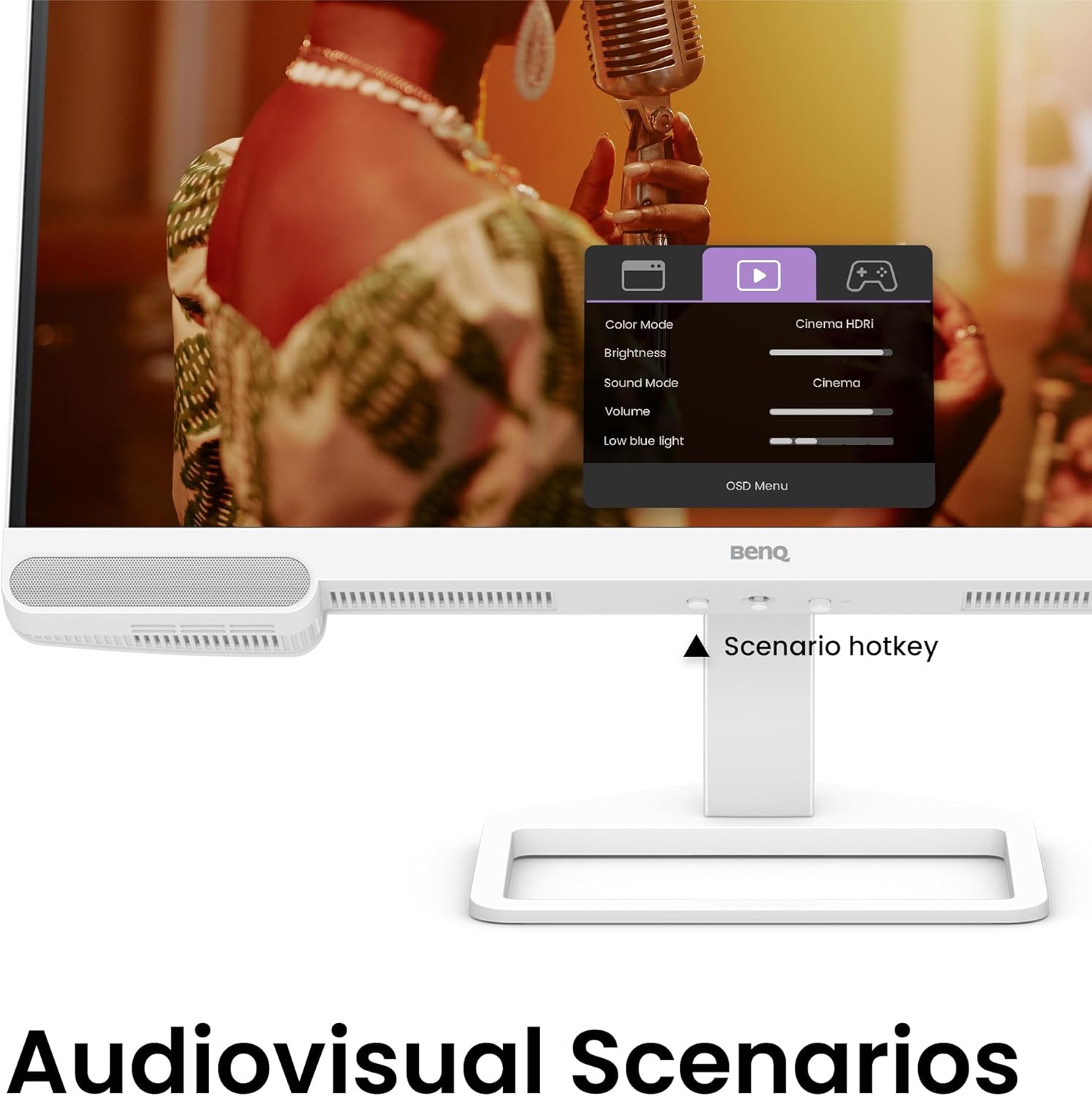
Figure 5.2: OSD menu accessed via Scenario hotkey.
5.4 AI Contrast Technology
The exclusive AI Contrast technology intelligently adjusts the contrast based on the displayed content, optimizing image quality without affecting other areas of the screen.

Figure 5.3: Demonstration of AI Contrast technology.
5.5 Вградени звучници
The monitor includes a pair of 5W built-in speakers for audio output. Adjust the volume through the OSD menu or your connected device.

Figure 5.4: BenQ EW2790U built-in 5W speakers.
6. Одржување
6.1 Чистење на мониторот
- Секогаш исклучувајте го мониторот пред чистење.
- Лесно користете мека крпа без влакненца dampизмиено со вода или со благ, неабразивен чистач.
- Не прскајте средство за чистење директно на екранот.
- Избегнувајте употреба на алкохол, амонијак или абразивни средства за чистење, бидејќи тие можат да го оштетат екранот илиasing.
6.2 Складирање
Store the monitor in a cool, dry place away from direct sunlight and extreme temperatures. If storing for an extended period, consider using the original packaging for protection.
7 Смена на проблеми
| Проблем | Можна причина | Решение |
|---|---|---|
| Нема слика на екранот | Кабелот за напојување е исклучен; Видео кабелот е исклучен; Избран е неправилен влезен извор. | Ensure power and video cables are securely connected. Press the Scenario hotkey to select the correct input source. |
| Сликата е заматена или искривена | Неточна резолуција; Лабав видео кабел. | Set the display resolution to 3840x2160. Check video cable connections. |
| Нема звук од звучници | Јачината на звукот е прениска; исклучена; Избран е неправилен аудио излез на компјутерот. | Adjust volume via OSD menu or computer settings. Ensure monitor is selected as audio output device. |
| AI Contrast not working as expected | Feature disabled; Specific content not optimized. | Check OSD settings to ensure AI Contrast is enabled. Performance may vary with different content. |
8. Спецификации
| Карактеристика | Детал |
|---|---|
| Големина на екранот | 27 инчи |
| Резолуција | 3840x2160 (4K UHD) |
| Сооднос на аспект | 16:9 |
| Покриеност на бојата | 95% P3 |
| AI Contrast Technology | Да |
| Вградени звучници | 2 x 5 W |
| Поврзување | 1x USB Type-C (65W), 3x HDMI (2.0), USB-C 3.2 downstream, USB-A 3.2 downstream, Headphone Jack |
| Ергономски дизајн | Прилагодување на висина, навалување, вртење, вртење |
| Тежина на ставката | 21.4 фунти |
| Димензии на производот (ДxШxВ) | 17 x 8 x 21 инчи |
9. Гаранција и поддршка
Your BenQ EW2790U monitor is covered by a manufacturer's warranty. Please refer to the warranty card included in your package for specific terms and conditions. For technical support, product registration, or service inquiries, please visit the official BenQ webсајт или контактирајте со нивниот оддел за услуги на клиентите.
Official BenQ Webсајт: www.benq.com