1. Вовед
This manual provides detailed instructions for the setup, operation, maintenance, and troubleshooting of your Transformers TF-Crystal 85 Keys Mechanical Keyboard. Please read this manual thoroughly before using the product to ensure proper functionality and longevity.
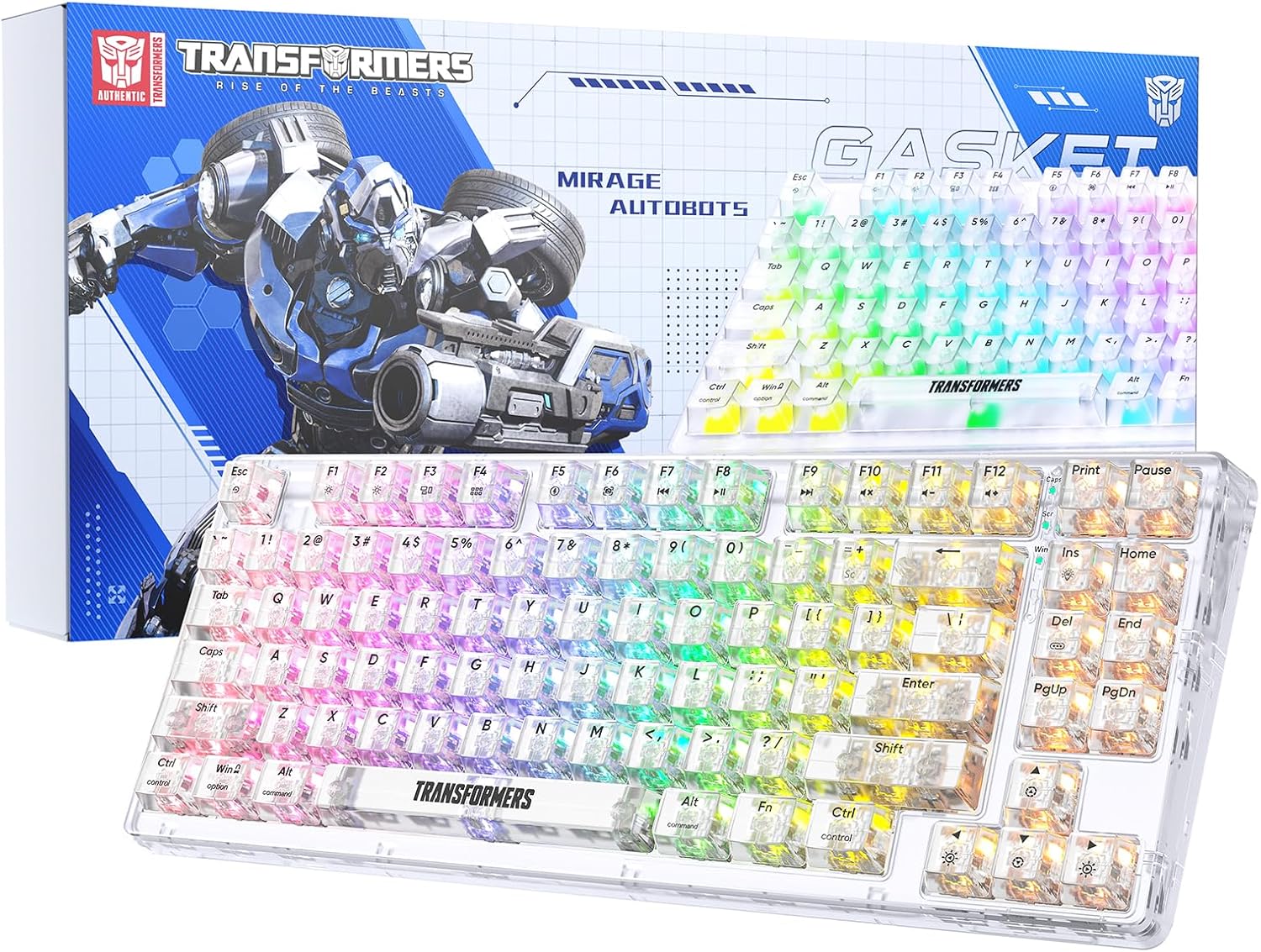
Image 1.1: Transformers TF-Crystal 85 Keys Mechanical Keyboard with its packaging, showcasing the transparent design and RGB lighting.
2. Производот завршиview
2.1 Клучни карактеристики
- Распоред со 85 копчиња: Compact 75% design retaining essential functions, arrow, and navigation keys.
- Три-режимска поврзаност: Поддржува Bluetooth 5.0, безжично поврзување од 2.4 GHz и USB-C жично поврзување.
- ПХБ што може да се замени со топла замена: Compatible with most 3-pin and 5-pin mechanical switches, allowing for easy customization and replacement.
- Linear Switches: Pre-lubricated switches with a 50 million keystroke lifespan for durability and smooth operation.
- Структура на дихтунг: Incorporates high-quality gasket materials and a silicone pad to absorb vibrations and reduce typing noise.
- Прилагодливо RGB позадинско осветлување: Features 20 built-in backlight modes, 16.8 million color options, and dynamic music rhythm effects.
- Programmable Driver: Enables macro customization, key function remapping, and advanced lighting control.
- Долг век на батеријата: Equipped with a 4000mAh battery, providing up to 240 hours of continuous use in 2.4GHz mode without backlighting.
- Широка компатибилност: Supports Mac, Windows, iOS, Android, PC, Laptop, Smartphone, Tablet, Switch, Xbox, and PlayStation.
- Транспарентен дизајн: Features transparent keycaps and base for enhanced aesthetic appeal.
3. Поставување
3.1 Полнење на тастатурата
Before initial use, fully charge the keyboard. Connect the provided USB-C cable to the keyboard's USB-C port and the other end to a powered USB port (e.g., computer, wall adapter). The charging indicator will show the charging status.
3.2 Connecting via 2.4GHz Wireless Mode
- Locate the 2.4GHz USB receiver, typically stored in a compartment on the keyboard.
- Приклучете го USB-приемникот во достапна USB порта на вашиот компјутер.
- Toggle the mode switch on the keyboard to the 2.4G позиција.
- The keyboard will automatically connect to your device.
3.3 Connecting via Bluetooth 5.0 Mode
- Toggle the mode switch on the keyboard to the BT позиција.
- Притиснете и задржете fn+1 (или fn+2, fn+3) 3-5 секунди додека индикаторската ламбичка не трепка брзо, означувајќи го режимот на спарување.
- На вашиот уред (компјутер, таблет, паметен телефон), овозможете Bluetooth и пребарувајте нови уреди.
- Select "TF-Crystal 85" from the list of available devices to pair.
- Once paired, the indicator light will stop flashing and remain solid. You can pair up to three Bluetooth devices using fn+1, fn+2, и fn+3.
3.4 Connecting via USB-C Wired Mode
- Поврзете го испорачаниот USB-C кабел со USB-C портата на тастатурата.
- Поврзете го другиот крај од USB-C кабелот со слободен USB порт на вашиот компјутер.
- The keyboard will automatically switch to wired mode and function without battery power.

Image 3.1: Diagram illustrating the three connection modes: Bluetooth 5.0, 2.4GHz wireless, and USB-C wired, compatible with various devices.
4. Упатства за работа
4.1 Префрлување помеѓу режими
Use the physical switch located on the keyboard to select between BT (Bluetooth), 2.4G (2.4GHz wireless), and USB-C (wired) modes.
4.2 RGB контрола на позадинско осветлување
The keyboard features customizable RGB backlighting. Use the following key combinations to adjust:
- Fn + Ins: Cycle through 20 different backlight effects.
- Fn + Del: Switch backlight colors within certain modes.
- Fn + ↑ / ↓: Прилагодете ја осветленоста на задното осветлување (5 нивоа).
- Fn + ← / →: Adjust backlight effect speed (5 levels).
- Fn + Esc (hold for 3s): Reset backlight settings to default.

Image 4.1: Visual guide for controlling RGB backlight effects, brightness, and speed using Fn key combinations.
4.3 Programmable Driver Usage
The keyboard includes a programmable driver for advanced customization. This driver allows you to:
- Уредување на макро: Record and edit complex key sequences.
- Клучна редефинирање: Customize the function of individual keys.
- RGB Effect Customization: Fine-tune lighting modes, colors, and speeds, including music rhythm lighting effects.
Refer to the software's dedicated user interface for detailed instructions on using these features.

Image 4.2: Screenshot of the programmable driver interface, showing options for macro editing, RGB effects, and key redefinition.
4.4 Прекинувачи за топла замена
The TF-Crystal 85 keyboard features a hot-swappable PCB, allowing you to change mechanical switches without soldering. This supports most 3-pin and 5-pin mechanical switches.
- Исклучете ја тастатурата или исклучете ја од уредот.
- Користете го испорачаниот извлекувач на капачето за тастатура за внимателно да го отстраните посакуваното капаче за тастатура.
- Use the provided switch puller to gently grip the switch from its top and bottom clips, then pull it straight up to remove it.
- Порамнете ги пиновите на новиот прекинувач со дупките на печатената плочка. Уверете се дека пиновите се прави.
- Нежно притиснете го новиот прекинувач на своето место додека не кликне безбедно. Не го форсирајте.
- Заменете го капачето на копчето.

Image 4.3: Illustration of the hot-swappable feature, showing how to remove and insert 3-pin/5-pin switches and the linear switch specifications.
5. Одржување
5.1 Чистење на тастатурата
- Исклучете ја тастатурата од сите извори на енергија пред чистење.
- Користете мека крпа без влакненца малку гampизмијте со вода или благ раствор за чистење за да ги избришете капачињата на копчињата и куќиштето.
- За прашина и остатоци помеѓу копчињата, користете компримиран воздух или мала четка.
- Avoid using harsh chemicals or abrasive materials that could damage the keyboard's surface.
5.2 Грижа за батерии
- Избегнувајте често целосно празнење на батеријата.
- Чувајте ја тастатурата на ладно и суво место кога не ја користите подолг период.
- Доколку тастатурата нема да се користи подолго време, наполнете ја до околу 50% пред складирање.
6 Смена на проблеми
| Проблем | Можна причина | Решение |
|---|---|---|
| Тастатурата не реагира во безжичен режим. | Low battery, incorrect mode selected, receiver not connected, Bluetooth not paired. | Charge the keyboard. Ensure the mode switch is set correctly (2.4G or BT). Re-insert the 2.4G receiver. Re-pair Bluetooth. |
| Клучевите не се регистрираат или се пишуваат двојно. | Faulty switch, debris under keycap, software issue. | Clean under the keycap. Try hot-swapping the switch with a known working one. Restart your computer. |
| RGB backlight not working or incorrect. | Backlight turned off, incorrect settings, software conflict. | Прилагодете ја осветленоста користејќи Fn + ↑. Cycle modes with Fn + Ins. Reset backlight with Fn + Esc (hold 3s). Check programmable driver settings. |
| Тастатурата не се полни. | Faulty USB-C cable, power source issue, keyboard port damage. | Try a different USB-C cable. Use a different USB port or power adapter. Ensure the cable is fully inserted. |
7. Спецификации
| Карактеристика | Детал |
|---|---|
| Број на модел | TF-Crystal 85 |
| Распоред на копчињата | 85 Keys (75% Compact) |
| Поврзување | Bluetooth 5.0, безжичен 2.4GHz, USB-C кабел |
| Тип на прекинувач | Pre-lubricated Linear Mechanical Switches |
| Животен век на прекинувачот | 50 милиони удари на тастатурата |
| Топло-заменливо | Yes (3-pin/5-pin compatible) |
| Задно осветлување | RGB (20 modes, 16.8 million colors) |
| Капацитет на батеријата | 4000 mAh |
| Battery Life (2.4G, no light) | До 240 часа |
| Battery Life (Backlit ON) | Приближно 22 часа |
| Димензии (Д x Ш x В) | 34.7 cm x 14 cm x 4.5 cm |
| Компатибилност | Mac, Windows, iOS, Android, PC, Laptop, Smartphone, Tablet, Switch, Xbox, PlayStation |

Image 7.1: Visual representation of the keyboard's battery life: 240 hours with backlight off, 22 hours with backlight on, powered by a 4000mAh battery.
8. Гаранција и поддршка
Transformers is committed to providing exceptional customer service. If you encounter any problems with your TF-Crystal 85 Keys Mechanical Keyboard, our after-sales support team is available to assist you. This includes technical support, exchanges, or installation guidance.
Please contact our customer service for assistance. We guarantee a hassle-free service experience.


