1. Вовед
This manual provides detailed instructions for the setup, operation, maintenance, and troubleshooting of your Keychron Q6 HE QMK Wireless Custom Mechanical Keyboard. Please read this guide thoroughly to ensure optimal performance and longevity of your device.
The Keychron Q6 HE is a full-size layout wireless QMK custom keyboard featuring Hall Effect Gateron 2.0 magnetic switches, offering advanced customization and a premium typing experience.
2. Содржина на пакетот
Проверете дали сите артикли се присутни во вашиот пакет:
- Keychron Q6 HE Keyboard
- Keyboard PCB
- Случај
- Алуминиумска плоча
- Keycaps (Mac & Windows compatible)
- Кабел USB-C на USB-C
- USB-A до USB-C адаптер
- Прекинувач извлекувач
- Привлечник за клучеви
- Упатство за употреба

Image: Keychron Q6 HE keyboard with included accessories, showcasing the full package contents.
3. Поставување
3.1 Почетна врска
The Keychron Q6 HE supports three connection modes: 2.4 GHz Wireless, Bluetooth 5.1, and Wired (USB-C).
3.1.1 iredична врска
- Поврзете го испорачаниот USB-C кабел со USB-C портата на тастатурата.
- Поврзете го другиот крај од кабелот со USB-портата на вашиот компјутер.
- Ensure the mode switch on the back of the keyboard is set to 'Cable' mode.
- Тастатурата ќе биде автоматски препознаена од вашиот оперативен систем.
3.1.2 Безжична конекција од 2.4 GHz
- Locate the 2.4 GHz receiver (dongle) included with your keyboard.
- Plug the 2.4 GHz receiver into an available USB port on your computer.
- Set the mode switch on the back of the keyboard to '2.4G' mode.
- The keyboard should automatically connect to the receiver. If not, press and hold the 'Fn' + '4' keys for 4 seconds to initiate pairing.
3.1.3 Bluetooth конекција
- Set the mode switch on the back of the keyboard to 'Bluetooth' mode.
- To enter pairing mode, press and hold 'Fn' + '1' (for device 1), 'Fn' + '2' (for device 2), or 'Fn' + '3' (for device 3) for 4 seconds until the indicator light flashes rapidly.
- On your computer, smartphone, or tablet, enable Bluetooth and search for 'Keychron Q6 HE'.
- Изберете ја тастатурата за спарување. Индикаторското светло ќе престане да трепка откако ќе се поврзе.
- You can switch between paired Bluetooth devices by pressing 'Fn' + '1', 'Fn' + '2', or 'Fn' + '3' briefly.
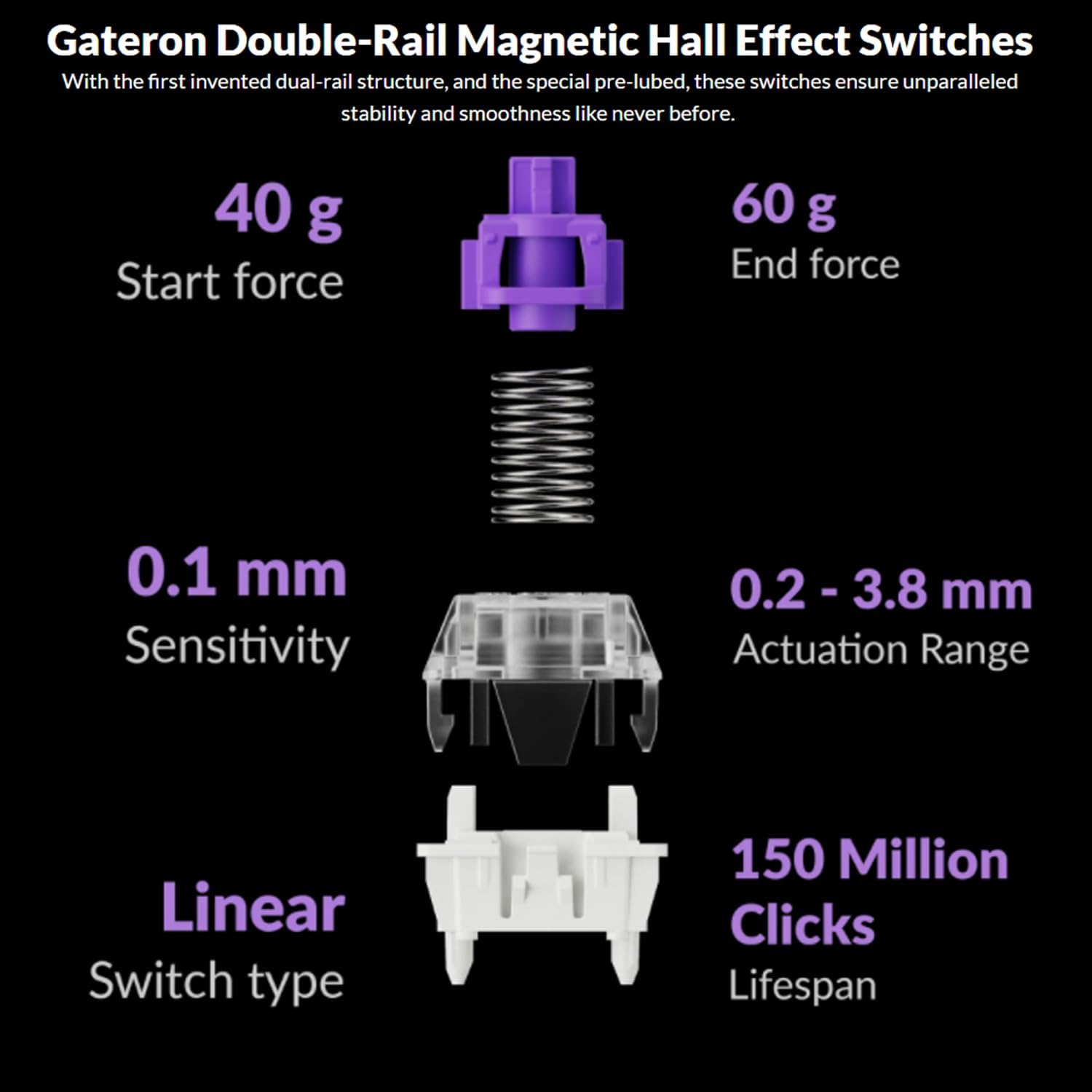
Image: The Keychron Q6 HE keyboard connected to a computer and a tablet, demonstrating its multi-device connectivity.
3.2 Прекинувач на оперативен систем
The keyboard has a switch to toggle between Mac and Windows layouts. Ensure this switch, located on the back of the keyboard, is set to your current operating system for correct key mapping.
3.3 Полнење на батеријата
The keyboard is equipped with a 4000 mAh Lithium Ion battery. Connect the USB-C cable to the keyboard and a power source (computer USB port or USB wall adapter) to charge. The charging indicator light will show the charging status.
4. Упатства за работа
4.1 Основни функции на копчињата
The Q6 HE features a standard 100% layout. All keys function as labeled. Use the 'Fn' key in combination with other keys for secondary functions (e.g., media controls, backlight adjustments).
4.2 Програмабилно копче
The rotary knob on the top right of the keyboard is programmable. By default, it controls volume (rotate) and media play/pause (press). Its functions can be customized using the Keychron Launcher web апликација.
4.3 Gateron Magnetic Hall Effect Switches
The Q6 HE utilizes Gateron Double-Rail Magnetic Hall Effect Switches, which allow for dynamic customization of key behavior.

Image: Diagram illustrating the adjustable actuation points of the magnetic switches, ranging from 0.5mm to 3.5mm.
4.3.1 Adjustable Actuation Points
The actuation point (the distance a key needs to travel to register a press) can be adjusted from 0.1 mm to 3.8 mm using the Keychron Launcher web app. This allows for personalized typing and gaming sensitivity.
4.3.2 Брзо активирање
Rapid Trigger functionality allows a key to reactivate instantly upon reset, without needing to return to its original position. This feature is highly beneficial for competitive gaming and can be configured via the Keychron Launcher.

Image: Detailed breakdown of Gateron Double-Rail Magnetic Hall Effect Switches, showing components and specifications like start force, end force, sensitivity, actuation range, switch type, and lifespan.
4.4 RGB позадинско осветлување
The keyboard features south-facing RGB LED lights. You can cycle through various lighting effects and adjust brightness using 'Fn' key combinations or through the Keychron Launcher web апликација.
4.5 Keychron Launcher Web Апликација
The Keychron Launcher is a web-based application for advanced customization. It allows you to:
- Ремапирајте ги копчињата
- Adjust actuation points for magnetic switches
- Create personalized macro commands
- Set shortcuts and key combinations
- Customize RGB lighting effects

Слика: Слика од екранот на Keychron Launcher web app interface, showing options for key remapping, actuation point adjustment, and macro creation.
5. Одржување
5.1 Чистење на тастатурата
За чистење на тастатурата:
- Исклучете ја тастатурата од сите извори на енергија и уреди.
- Користете мека крпа без влакненца малку гampизмијте со вода или благ раствор за чистење за да ги избришете капачињата на копчињата и куќиштето.
- За подлабоко чистење, користете го испорачаниот извлекувач на капачињата за да ги отстраните капачињата и исчистете ја подлогата со компримиран воздух или мала четка.
- Избегнувајте прскање течности директно врз тастатурата.
5.2 Прекинувачи што може да се заменат со топла струја
The Q6 HE features hot-swappable magnetic switches, allowing you to replace individual switches without soldering.

Слика: Крупен план view of the Keychron Q6 HE keyboard with several keycaps and switches removed, highlighting the hot-swappable magnetic switch design.
5.2.1 Замена на прекинувачи
- Use the switch puller to carefully remove the desired switch. Grip the switch firmly and pull straight up.
- Порамнете ги игличките на новиот прекинувач со дупките на печатената плочка.
- Gently press the new switch into place until it clicks. Ensure it is seated correctly and not bent.
5.3 Грижа за батерии
За да го продолжите животниот век на батеријата:
- Избегнувајте често целосно празнење на батеријата.
- Чувајте ја тастатурата на ладно и суво место кога не ја користите подолг период.
- Не ја изложувајте тастатурата на екстремни температури.
6 Смена на проблеми
6.1 Тастатурата не реагира
- Wичен режим: Проверете дали USB-C кабелот е безбедно поврзан и со тастатурата и со компјутерот. Обидете се со друг USB порт или кабел.
- Режим на 2.4 GHz: Verify the 2.4 GHz receiver is plugged in and the keyboard is set to '2.4G' mode. Re-pair by holding 'Fn' + '4' for 4 seconds.
- Режим на Bluetooth: Check if Bluetooth is enabled on your device and the keyboard is paired. Re-pair if necessary by holding 'Fn' + '1/2/3' for 4 seconds.
- Батерија: Ensure the keyboard battery is charged. Connect it to a power source.
6.2 Keys Not Registering or Double Typing
- Точка на активирање: Adjust the actuation point for the affected keys using the Keychron Launcher. A higher actuation point (e.g., 2.0mm or 3.0mm) can help prevent accidental presses or double typing.
- Проблем со прекинувачот: If a specific key consistently malfunctions, the magnetic switch might be faulty. Consider replacing the hot-swappable switch.
- Фирмвер: Ensure your keyboard firmware is up to date via the Keychron Launcher.
6.3 Проблеми со RGB позадинското осветлување
- Осветленост: Adjust backlight brightness using 'Fn' key combinations.
- Ефекти: Cycle through different RGB effects using 'Fn' key combinations.
- Софтвер: Use the Keychron Launcher to customize and troubleshoot RGB settings.
7. Спецификации
| Број на модел | Q6H-P1 |
| Бренд | Keychron |
| Технологија за поврзување | 2.4 GHz безжична, Bluetooth 5.1, USB-C кабелска |
| Опис на тастатурата | Full-size, Ergonomic |
| Посебни карактеристики | Hall Effect Magnetic Switches, Programmable Knob, Large Battery Capacity, Hot-Swappable |
| Компатибилни уреди | PC, Mac, Smartphone, Tablet, Gaming Console |
| Позадинско осветлување на тастатурата | RGB (насочен кон југ) |
| Материјал | 6063 Aluminum (Case) |
| Батерија | Литиум-јонска батерија од 4000 mAh (вклучена) |
| Тежина на ставката | 6.49 фунти (приближно 2.94 кг) |
| Димензии на пакетот | 19 x 8.5 x 3 инчи |

Image: An exploded diagram showing the internal layers and components of the Keychron Q6 HE keyboard, including keycaps, knob, magnetic switches, top case, sound absorbing foam, gaskets, plate, PCB, latex bottom pad, bottom case PET film, bottom case acoustic foam, battery, and silicone gaskets.
8. Информации за гаранцијата
Keychron products typically come with a limited manufacturer's warranty. For specific warranty terms, conditions, and duration, please refer to the official Keychron webлокација или гарантната картичка вклучена со вашиот производ. Зачувајте го доказот за купување за гаранциски барања.
9. Поддршка
For further assistance, technical support, or to download the latest firmware and software, please visit the official Keychron webсајт:
You can also visit the Keychron store on Amazon for product information and customer service:


