1. Вовед
This manual provides detailed instructions for the SOLAKAKA SM805 Lightweight Wireless Gaming Mouse. Please read this manual thoroughly before using the product to ensure proper operation and to maximize your gaming and work experience.

Слика 1: Предна страна view of the SOLAKAKA SM805 mouse, showcasing its ergonomic shape and the included 2.4GHz USB receiver.
2. Производот завршиview и Карактеристики
The SOLAKAKA SM805 is a versatile gaming mouse designed for performance and comfort. Key features include:
- Три-режимска поврзаност: Supports 2.4GHz wireless, Bluetooth 5.0, and Type-C wired connections.
- Високопрецизен сензор: Equipped with the PAW3311 sensor, offering adjustable DPI from 100 to 24000.
- Лесен дизајн: Weighs approximately 66g (without cable) for reduced wrist burden.
- Ергономски зафат: Contoured shape designed for comfortable right-hand use.
- Програмабилни копчиња: Features 6 customizable buttons for personalized functions and macros.
- Долг век на батеријата: Integrated 800mAh high-capacity rechargeable battery with intelligent sleep design.
- Висока анкета: Up to 1000Hz polling rate for responsive tracking.

Слика 2: Надview of the SOLAKAKA SM805 mouse's main features, including its connectivity options, sensor capabilities, button count, weight, polling rate, and battery capacity.
3. Содржина на пакетот
Ве молиме проверете го пакувањето за следните ставки:
- SOLAKAKA SM805 Wireless Gaming Mouse
- USB приемник од 2.4 GHz
- Кабел за полнење Type-C
- Упатство за употреба
- AAA Battery (pre-installed or included separately)
4. Поставување
4.1 Полнење на глувчето
Before first use, it is recommended to fully charge the mouse. Connect the Type-C charging cable to the mouse's front port and the other end to a USB power source (e.g., computer USB port, USB wall adapter). The mouse can be used while charging.
4.2 Поврзување на глувчето
The SM805 mouse offers three connection modes:

Figure 3: Image illustrating the three connectivity modes (Bluetooth, 2.4GHz wireless, and Type-C wired) of the SM805 mouse, along with its 800mAh rechargeable battery.
Безжичен режим од 2.4 GHz:
- Пронајдете го USB приемникот од 2.4 GHz, кој обично се чува во преграда на долната страна од глувчето.
- Приклучете го USB-приемникот во достапна USB порта на вашиот компјутер.
- On the underside of the mouse, slide the mode switch to the '2.4G' position. The mouse should connect automatically.
Bluetooth 5.0 режим:
- On the underside of the mouse, slide the mode switch to the 'BT' position.
- На вашиот компјутер или уред, овозможете Bluetooth и пребарајте нови уреди.
- Select 'SOLAKAKA SM805' from the list of available devices to pair.
Type-C Wired Mode:
- Connect the Type-C charging cable to the mouse and the other end to your computer's USB port.
- Глувчето автоматски ќе се префрли во жичен режим и ќе почне да се полни.
5. Упатства за работа
5.1 Прилагодување на DPI
The SM805 mouse features a dedicated DPI button, typically located behind the scroll wheel, allowing you to cycle through preset DPI levels (800-1200-1600-3200-12000-22000). The DPI indicator light will change to reflect the current setting. Fine-tuning of DPI (100-24000 DPI) is available via the software.
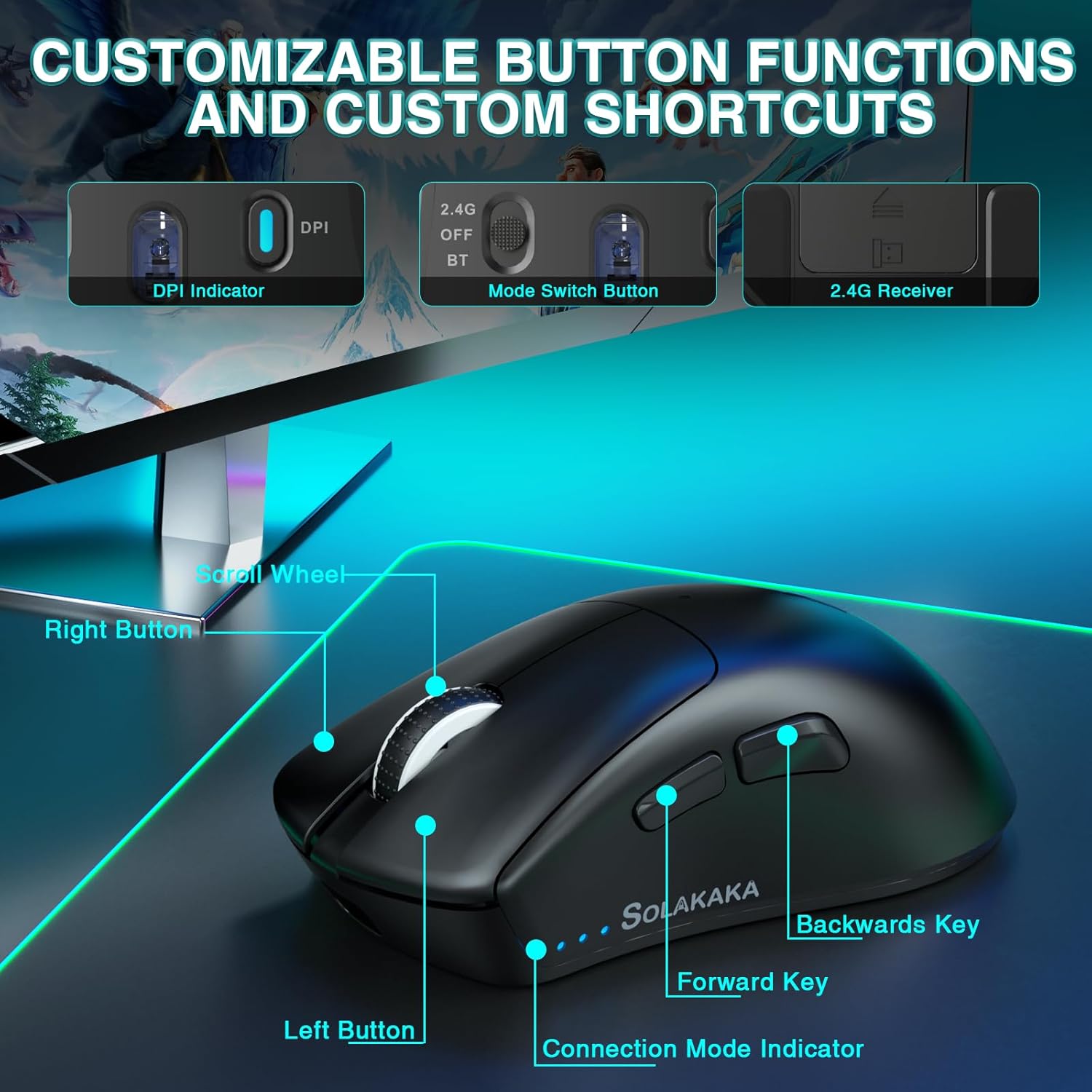
Figure 4: A detailed diagram pointing out the various buttons and indicators on the SM805 mouse, including the DPI indicator, mode switch, scroll wheel, and side buttons.
5.2 Програмабилни копчиња
The mouse includes 6 programmable buttons: Left Click, Right Click, Middle Click (Scroll Wheel), Forward Key, Backward Key, and DPI Switch. These buttons can be customized using the SOLAKAKA software.
5.3 Intelligent Power Saving
To conserve battery life, the SM805 mouse is equipped with an intelligent sleep design. If the mouse is inactive for a certain period, it will automatically enter hibernation mode. To wake it up, simply click any button.
6. Customization (Software)
For advanced customization, download the official SOLAKAKA software (compatible with Windows). The software allows you to:
- Program all 6 buttons with various functions, multimedia keys, or fire keys.
- Create and assign macro files for complex command sequences.
- Adjust DPI settings in increments of 100, up to 24000 DPI.
- Set the polling rate (report rate) from 125Hz to 1000Hz.
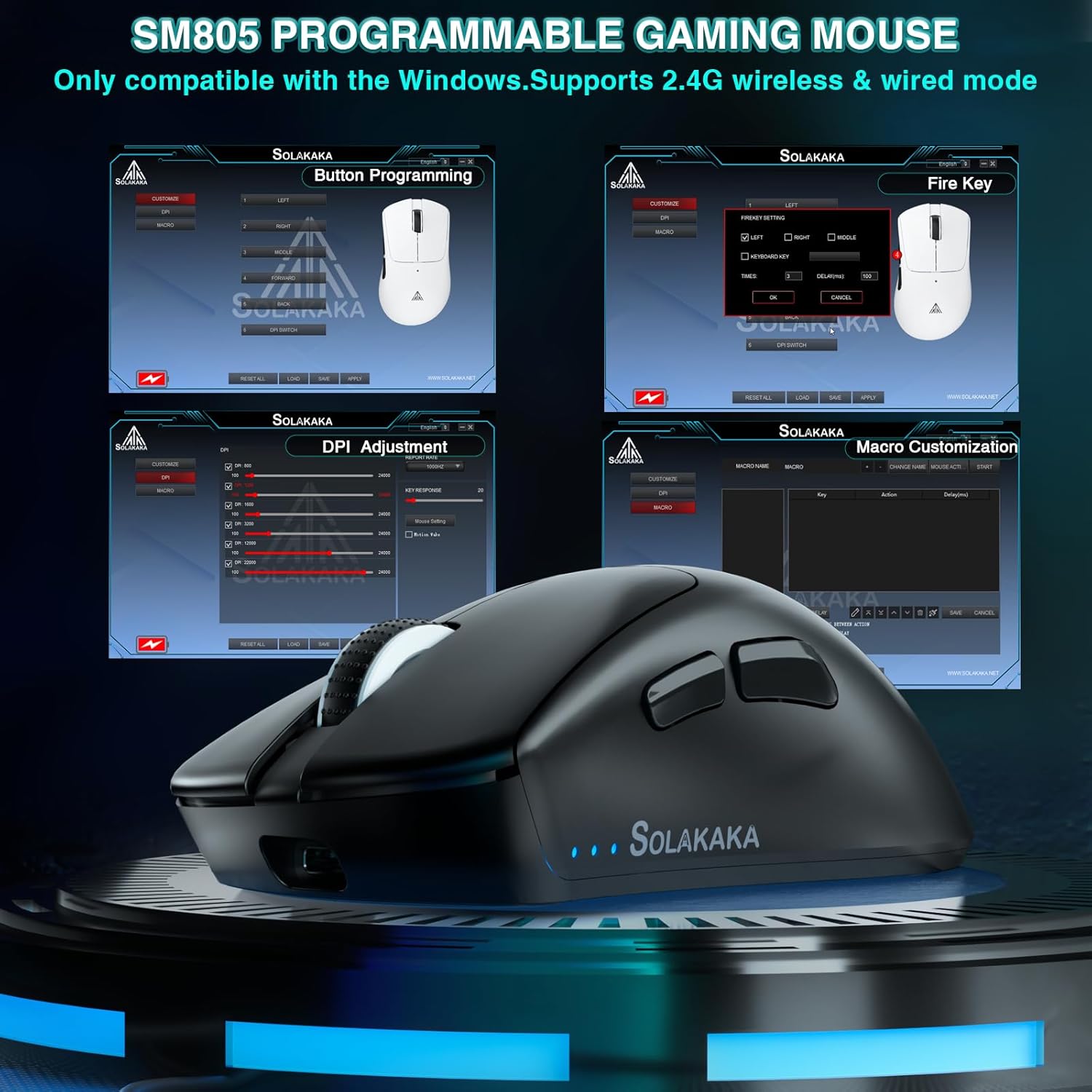
Figure 5: A visual representation of the SM805 mouse's software interface, demonstrating its capabilities for button programming, DPI settings, and macro creation.
Видео 1: Ова видео дава визуелен прегледview of the SOLAKAKA SM805 Lightweight Wireless Gaming Mouse, demonstrating its design, tri-mode connectivity, adjustable DPI settings, and customizable features through its software. It shows the mouse in use and highlights its ergonomic shape and lightweight construction.
7. Одржување
- Чистење: Користете мека, сува крпа за чистење на глувчето. Избегнувајте употреба на груби хемикалии или абразивни материјали.
- Складирање: Чувајте го глувчето на ладно и суво место, подалеку од директна сончева светлина и екстремни температури.
- Нега на батеријата: For optimal battery longevity, avoid fully discharging the battery frequently. Charge the mouse when the battery indicator is low.
8 Смена на проблеми
8.1 Проблеми со поврзувањето
- No connection in 2.4GHz mode: Ensure the USB receiver is securely plugged in and the mouse switch is set to '2.4G'. Try a different USB port.
- Неуспешно спарување со Bluetooth: Ensure Bluetooth is enabled on your device and the mouse switch is set to 'BT'. Remove previous pairings and try pairing again.
- Повремена врска: Ensure the mouse is within range of the receiver/device. Avoid sources of strong electromagnetic interference.
8.2 Глувчето не реагира
- Check the battery level. If low, connect the charging cable.
- If in intelligent sleep mode, click any button to wake the mouse.
- Обидете се да го рестартирате компјутерот.
9. Спецификации
| Карактеристика | Детал |
|---|---|
| Модел | SM805 |
| Технологија за поврзување | 2.4GHz Wireless, Bluetooth 5.0, Type-C Wired |
| Технологија за откривање на движење | Оптички (PAW3311 сензор) |
| Опсег на DPI | 100-24000 DPI (Adjustable via software) |
| Стапка на анкети | До 1000 Hz |
| Копчиња | 6 Програмабилни копчиња |
| Капацитет на батеријата | 800 mAh |
| Тежина на ставката | 5.6 ounces (approx. 66g without cable) |
| Специјална карактеристика | Soundless (referring to silent click switches, if installed) |
| Производител | СОЛАКАКА |
10. Гаранција и поддршка
For warranty information and technical support, please refer to the documentation included with your product or visit the official SOLAKAKA brand store. You can find more information at the SOLAKAKA Store on Amazon.


