Вовед
Thank you for choosing the SOAR NBA Wireless Mouse and Mouse Pad. This product combines reliable wireless technology with ergonomic design and your favorite NBA team's spirit, providing a comfortable and efficient experience for work or leisure. This manual provides essential information for setting up, operating, maintaining, and troubleshooting your new device.

Image: The SOAR NBA Wireless Mouse and Mouse Pad featuring the Philadelphia 76ers logo and colors, shown together on a white background.
Содржина на пакетот
Ве молиме проверете дали сите артикли се присутни во вашиот пакет:
- 1 x SOAR Wireless Mouse
- 1 x SOAR Mouse Pad with Wrist Rest
- 1 x USB Wireless Receiver (stored inside the mouse battery compartment)
- Note: 1 AA battery required for the mouse (not included).

Image: The SOAR NBA Wireless Mouse and Mouse Pad displayed in its clear retail packaging, showing both components.
Поставување
-
Инсталирајте ја батеријата: Locate the battery compartment on the underside of the wireless mouse. Slide open the cover. Insert one AA battery (not included) ensuring correct polarity (+/-). Close the battery compartment cover.
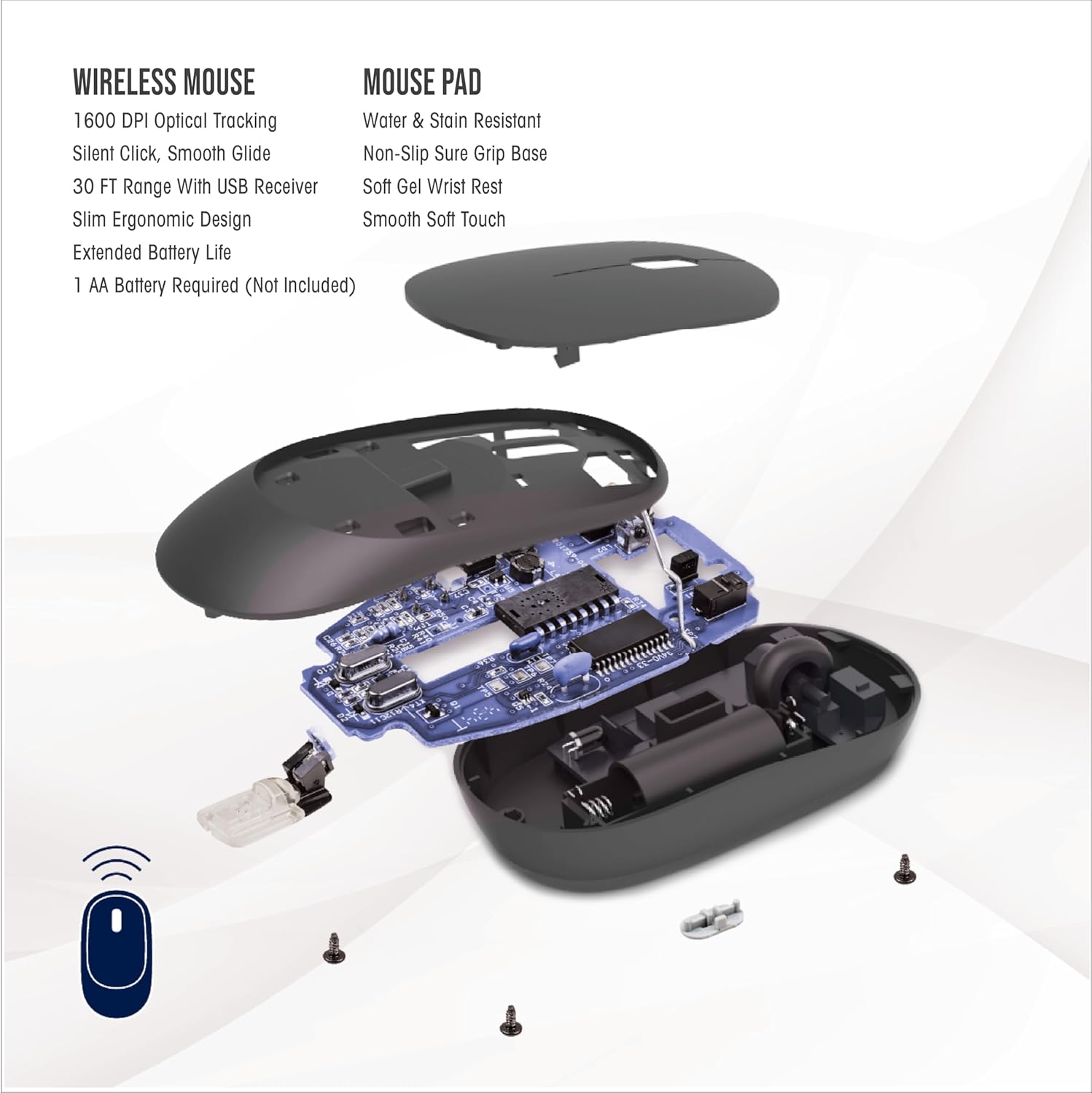
Image: An exploded diagram of the wireless mouse, illustrating the internal components, including the battery slot and the location of the USB receiver.
- Преземи USB приемник: The small USB wireless receiver is typically stored inside the mouse's battery compartment for safe keeping during transit. Gently remove it.
- Поврзете го приемникот: Plug the USB wireless receiver into an available USB-A port on your computer (desktop, laptop, etc.). Your computer should automatically detect and install the necessary drivers. No special software installation is required.
-
Position Mouse Pad: Place the mouse pad on a flat, stable surface. The anti-slip base will help keep it firmly in place during use. Position the wrist rest to comfortably support your wrist.

Image: A hand positioned on the wireless mouse, with the wrist comfortably supported by the mouse pad's gel wrist rest, illustrating optimal wrist alignment.
Упатства за работа
Wireless Mouse Functionality:
- Основна навигација: The mouse features standard left-click and right-click buttons for primary and secondary functions.
- Тркало за лизгање: Користете го тркалото за вертикално скролување низ документите и web pages. Pressing down on the scroll wheel can activate an auto-scroll function in some applications.
- Прилагодување на DPI: The "DPI" button, located near the scroll wheel, allows you to cycle through three different sensitivity settings (low, medium, high). This adjusts the cursor speed to suit your preference and task.
- Тивок клик: The mouse is designed with silent click technology, reducing noise during use.
- Безжичен опсег: The mouse operates using advanced 2.4GHz technology, providing a stable and reliable connection within a 30-foot range from the USB receiver.
Mouse Pad Benefits:
- Ергономска поддршка: The soft gel wrist rest provides ergonomic support, helping to reduce wrist fatigue and discomfort during extended use.
- Стабилна површина: The anti-slip base ensures the mouse pad remains securely in place on your desk, providing a consistent and smooth gliding surface for the mouse.

Image: A user's hands operating the wireless mouse and mouse pad alongside a laptop, demonstrating a typical desk setup.
Одржување
- Замена на батерија: When the mouse performance degrades or stops responding, it is likely time to replace the AA battery. Follow the steps in the "Setup" section to open the battery compartment and insert a new AA battery.
- Чистење на глувчето: Use a soft, dry cloth to wipe the exterior of the mouse. For stubborn dirt, a slightly damp Може да се користи крпа, но осигурајте се дека влагата не влегува во уредот. Избегнувајте груби хемикалии или абразивни средства за чистење.
- Чистење на подлогата за глувче: The mouse pad is water and stain resistant. For minor spills, wipe immediately with a damp cloth. For general cleaning, a mild soap solution and a soft cloth can be used. Allow the mouse pad to air dry completely before reuse.
Решавање проблеми
-
Глувчето не реагира:
- Проверете дали AA батеријата е правилно инсталирана и има доволно полнење. Заменете ја доколку е потребно.
- Verify the USB wireless receiver is securely plugged into a working USB port on your computer. Try a different USB port.
- Move the mouse closer to the USB receiver to rule out range issues or interference.
- Рестартирајте го компјутерот.
-
Повремена врска или застој:
- Ensure there are no large metallic objects or other wireless devices (like Wi-Fi routers, cordless phones) directly between the mouse and the receiver that could cause interference.
- The effective range is 30 feet; operating beyond this distance may cause connection issues.
-
Cursor Movement is Erratic or Too Slow/Fast:
- Press the "DPI" button on the mouse to cycle through the sensitivity settings.
- Уверете се дека оптичкиот сензор на дното на глувчето е чист и без остатоци.
- Ensure the mouse pad surface is clean and free from obstructions.
-
USB Receiver Hard to Remove:
- Grip the receiver firmly and pull straight out. Avoid twisting or bending.
Спецификации
| Карактеристика | Детал |
|---|---|
| Име на моделот | Безжичен глушец и подлога за глушец |
| Број на дел | NBA-MMP-PHI |
| Бренд | ИСТОЈ |
| Боја | Team Color (Philadelphia 76ers) |
| Материјал | Neoprene (Mouse Pad) |
| Поврзување | 2.4 GHz безжичен (USB приемник) |
| Опсег | До 30 стапки |
| Карактеристики на глувчето | 1600 DPI Optical Tracking, Silent Click, Smooth Glide, Ergonomic Design |
| Карактеристики на подлогата за глувчето | Water & Stain Resistant, Non-Slip Sure Grip Base, Soft Gel Wrist Rest, Smooth Soft Touch |
| Извор на енергија | 1 x AA батерија (не е вклучена) |
| Димензии на пакетот со ставки | 11.69 x 8.98 x 3.5 инчи |
| Тежина на пакетот | 0.2 килограми |
| Производител | Prime Brands Group Inc. |
| UPC | 192129180531 |
Гаранција и поддршка
This SOAR product comes with a 1 години Ограничена гаранција from the date of purchase. This warranty covers defects in materials and workmanship under normal use. It does not cover damage caused by accident, misuse, abuse, neglect, improper installation, or unauthorized repair.
For warranty claims or technical support, please contact the manufacturer, Prime Brands Group Inc., through their official support channels. Please retain your proof of purchase for warranty validation.


