1. Вовед
Ви благодарам за купувањетоasing the DANFI AUDIO DF TE-2017 Vinyl Record Player. This manual provides essential information for the safe and correct operation of your new record player. Please read it thoroughly before use and retain it for future reference.
2. Содржина на пакетот
- DANFI AUDIO DF TE-2017 Vinyl Record Player
- Адаптер за 45 вртежи во минута
- Power Cord & Adapter (100-240V~)
- Игла за замена
- Turntable Slipmat
- Упатство за употреба (овој документ)
3. Производот завршиview
The DANFI AUDIO DF TE-2017 is a versatile 3-speed belt-drive turntable with built-in speakers, Bluetooth wireless playback, USB/SD recording, AUX input, and RCA output. It features a clear dust cover and a digital display for easy operation.

Слика 1: Предна и Задна страна View of the TE-2017 Record Player with Labeled Components. This image displays the turntable platter, spindle, 45 RPM adapter, tone arm lift lever, speed selection switch, auto stop on/off switch, tone arm lock, stylus, speakers, AUX input, Mode/TF/USB controls, LED display, RCA audio out, and power port.
4. Поставување
- Отпакување: Внимателно извадете го грамофонот и сите додатоци од пакувањето. Зачувајте го пакувањето за иден транспорт или складирање.
- Инсталација на капак за прашина: Slide the clear plastic dust cover into the brackets located at the rear of the turntable. Ensure it is securely seated.
- Поврзување за напојување: Connect the power adapter to the DC 5V/1A port on the rear of the record player and plug it into a wall outlet.
- Поставување: Поставете го грамофонот на стабилна, рамна површина подалеку од директна сончева светлина, извори на топлина и прекумерна прашина или вибрации.
- Заштита на пенкалото: Remove the stylus protective cap before playing a record.
5. Упатства за работа
5.1 Свирење винил плочи
- Вклучување: Turn the ON/OFF/VOLUME knob clockwise to power on the unit and adjust the volume.
- Изберете режим: Set the PH/BT/AUX/USB switch to 'PH' (Phono) mode.
- Запис за место: Place a vinyl record on the turntable platter. If playing a 7-inch single, use the included 45 RPM adapter.
- Изберете брзина: Adjust the 3-speed selection switch (33, 45, 78 RPM) to match the record's speed.
- Auto-Stop (Optional): If desired, set the Auto Stop ON/OFF switch to 'ON'. The turntable will stop spinning automatically when the record finishes.
- Позиција на тонот на раката: Gently lift the tone arm using the lift lever. Move the tone arm over the desired track of the record.
- Долна рака за тонус: Slowly lower the tone arm onto the record using the lift lever. The music will begin to play.
- Прилагоди го тонот: Use the PITCH control knob to fine-tune the playback speed if necessary.
- Крај на репродукцијата: At the end of the record, lift the tone arm, return it to its rest, and lower the lift lever. Turn the ON/OFF/VOLUME knob counter-clockwise to power off.
Video 1: Demonstration of Vinyl Playback Mode on an LP&No.1 Turntable with Built-in Speakers. This video illustrates how to place a record, position the tone arm, and initiate playback, highlighting the smooth operation of the turntable.
5.2 Bluetooth Wireless Playback
- Вклучување: Turn the ON/OFF/VOLUME knob clockwise to power on the unit.
- Изберете режим: Set the PH/BT/AUX/USB switch to 'BT' (Bluetooth) mode. The digital display will show 'BT' and the indicator light will blink blue, indicating pairing mode.
- Спари уред: On your smartphone, tablet, or other Bluetooth-enabled device, search for 'Turntable' in the Bluetooth settings and select it to pair. Once connected, the indicator light will stop blinking and remain solid blue.
- Пушти музика: Start playing music on your paired device. The audio will stream through the record player's built-in speakers.
- Прилагодете ја јачината на звукот: Control the volume using the ON/OFF/VOLUME knob on the record player or your paired device.
Видео 2: Надview of Record Player with Speakers, demonstrating Bluetooth connectivity. This video shows how to switch to Bluetooth mode, pair a mobile device, and stream audio wirelessly to the turntable's speakers.
5.3 USB/SD Recording and Playback
- Insert USB/SD: Insert a USB flash drive or SD card into the corresponding port on the front panel.
- Изберете режим: Set the PH/BT/AUX/USB switch to 'USB' mode. The digital display will show 'USB'.
- Репродукција: The unit will automatically detect and play audio files from the USB/SD device. Use the control buttons (Previous Song, Pause & Play, Next Song) to navigate tracks.
- Recording Vinyl to USB/SD:
- Start playing a vinyl record as described in section 5.1.
- Press the 'REC' button (if available, typically near the USB/SD slot) to begin recording. The indicator light may change to confirm recording is active.
- Press 'REC' again to stop recording. The recorded audio will be saved as an MP3 file on the USB/SD device.
- Use the 'SPLIT' button (if available) to create separate tracks during recording.
Video 3: USB Playback & Vinyl to MP3 Recording demonstration. This video shows how to insert a USB drive, initiate recording from vinyl, and manage recorded files, highlighting the digital conversion feature.
5.4 Влез AUX
- Вклучување: Turn the ON/OFF/VOLUME knob clockwise to power on the unit.
- Изберете режим: Set the PH/BT/AUX/USB switch to 'AUX' mode.
- Поврзете го уредот: Connect an external audio device (e.g., MP3 player, CD player) to the AUX IN port on the rear of the record player using a 3.5mm audio cable (not included).
- Пушти аудио: Пуштете аудио од вашиот надворешен уред. Звукот ќе се емитува преку звучниците на грамофонот.
- Прилагодете ја јачината на звукот: Control the volume using the ON/OFF/VOLUME knob on the record player or the external device.
5.5 RCA излез
- Connect External Speakers: Connect external powered speakers or an amplifier to the RCA OUT ports (red for right, white for left) on the rear of the record player using an RCA cable (not included).
- Пушти аудио: Play a vinyl record or stream via Bluetooth/AUX. The audio will be routed through the connected external audio system.
- Прилагодете ја јачината на звукот: Control the volume primarily through your external audio system. The record player's volume knob may still affect the output level.
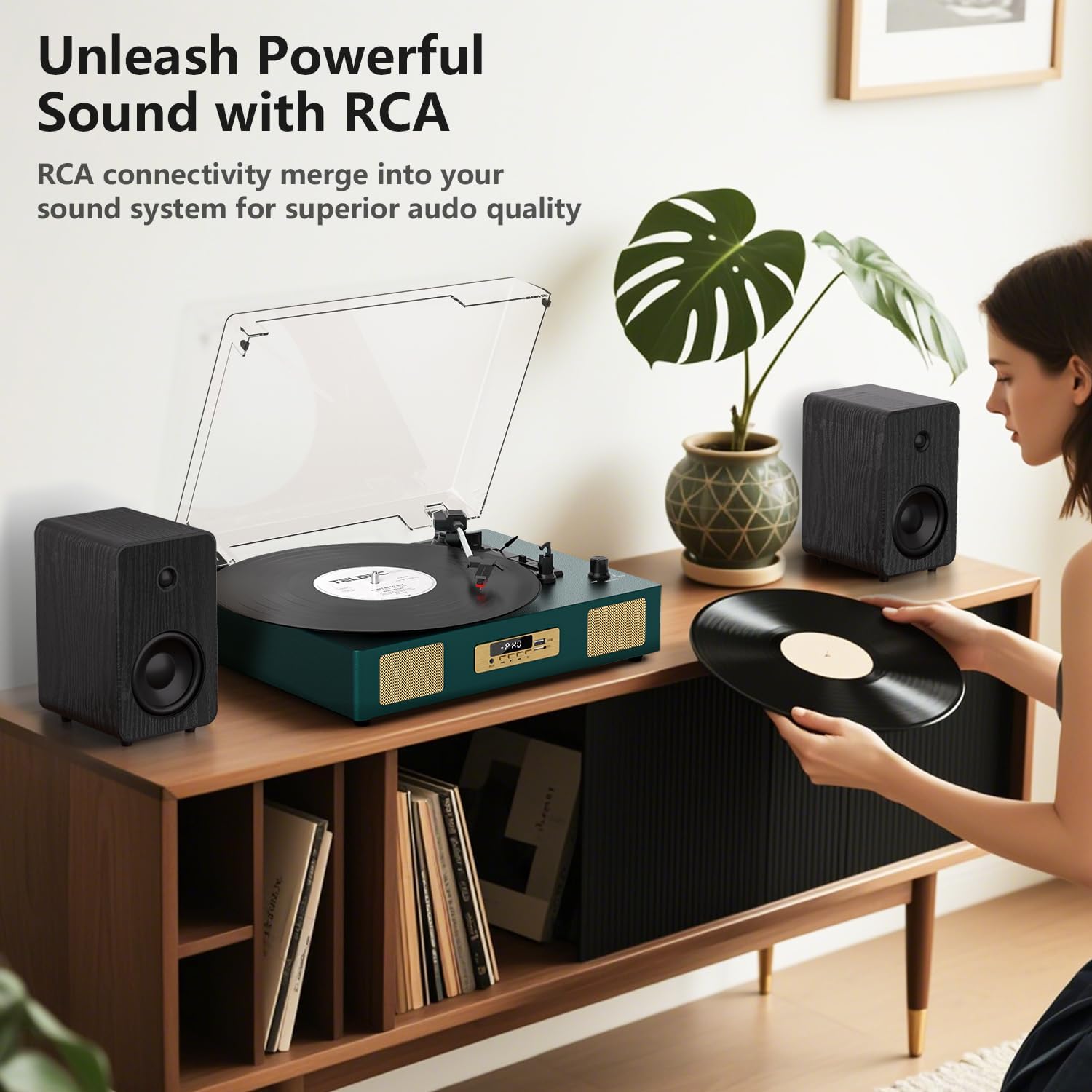
Слика 2: Заден дел view of the TE-2017 Record Player, illustrating the RCA output ports connected to external speakers for enhanced audio quality.
5.6 Приклучок за слушалки
For private listening, plug 3.5mm headphones into the headphone jack located on the front panel. The built-in speakers will be muted automatically.
6. Одржување
- Чистење на пенкалото: Use a soft brush (not included) to gently clean the stylus from back to front. Do not use excessive force.
- Чистење на грамофонот: Избришете го уредот со мека, сува крпа. Не користете абразивни средства за чистење или растворувачи.
- Покривка за прашина: Држете го капакот за прашина затворен кога не го користите за да го заштитите грамофонот од прашина и остатоци.
- Грижа за картоните: Handle records by their edges. Store them vertically in their sleeves to prevent warping and dust accumulation.
7 Смена на проблеми
| Проблем | Можна причина | Решение |
|---|---|---|
| Нема моќ | Адаптерот за напојување не е поврзан или штекерот е неисправен. | Проверете дали адаптерот за напојување е безбедно поврзан и дали штекерот е функционален. |
| Нема звук од звучници | Јачината на звукот е прениска; избран е неправилен режим; поврзани се слушалки. | Increase volume; select correct mode (PH, BT, AUX, USB); disconnect headphones. |
| Плочата не се врти | Power off; belt dislodged; auto-stop engaged prematurely. | Ensure power is on; check belt (refer to maintenance); try disabling auto-stop. |
| Прескокнување или искривен звук | Dirty or damaged record; dirty or worn stylus; turntable not level. | Clean record; clean or replace stylus; ensure turntable is on a level surface. |
| Bluetooth не се спарува | Incorrect mode; device too far; device already paired. | Ensure 'BT' mode is selected; move device closer; unpair from other devices. |
8. Спецификации
- Бренд: DANFI AUDIO DF
- Модел: TE-2017
- Брзини на грамофон: 33 1/3, 45, 78 вртежи во минута
- Тип на диск: Погон на ременот
- Поврзување: Bluetooth Receiver, USB, SD Card, AUX Input, RCA Output
- Посебни карактеристики: Digital Recorder, WAV Converter, Digital Display, Pitch Control, Auto-Stop
- Извор на енергија: Електричен кабел (DC 5V/1A)
- Signal-to-noise ratio (dB): 78 dB
- Димензии на производот: 35.56 x 27.94 x 12.45 cm (14 x 11 x 4.9 инчи)
- Тежина: 3.07 кг (6.77 фунти)
9. Гаранција и поддршка
For warranty information or technical support, please refer to the contact details provided with your purchase or visit the official DANFI AUDIO DF webстраница. Зачувајте го доказот за купување за какви било гаранциски побарувања.


