Вовед
The STRONG Leap-UNA TV Streaming Stick is a compact and powerful device designed to transform your television into a smart TV, providing instant access to a vast array of streaming content. Powered by Android TV 11, it offers seamless 2K resolution streaming with Wi-Fi 5 connectivity. This manual provides detailed instructions for setting up, operating, and maintaining your Leap-UNA streaming stick to ensure an optimal entertainment experience.
Информации за безбедност
- Прочитајте ги сите упатства пред да го користите уредот.
- Не го изложувајте уредот на дожд, влага или екстремни температури.
- Обезбедете соодветна вентилација околу уредот за да спречите прегревање.
- Користете го само адаптерот за напојување испорачан со уредот.
- Не обидувајте се сами да го расклопите или поправите уредот. За сите сервиси обратете се на квалификуван персонал.
- Чувајте го уредот подалеку од директна сончева светлина и извори на топлина.
Содржина на пакетот
Проверете дали сите предмети се присутни и во добра состојба:
- STRONG Leap-UNA 2K Android TV Streaming Stick
- Далечински управувач
- Power Adapter (or USB cable for power)
- HDMI Extender (if included)
- Упатство за употреба (овој документ)
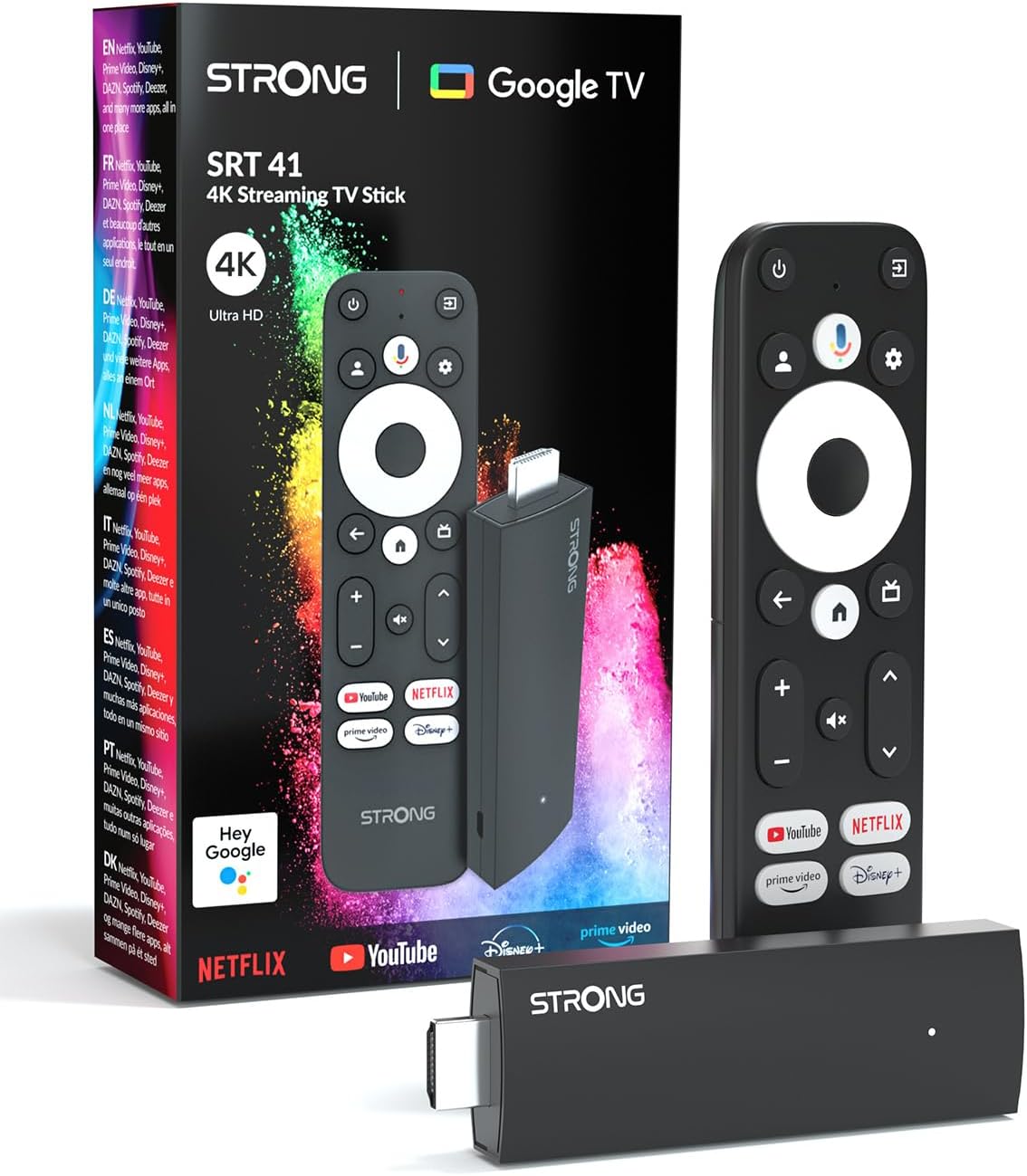
Image: The STRONG Leap-UNA streaming stick, its remote control, and the product packaging. This shows the main components included in the box.
Производот завршиview
The Leap-UNA stick is designed for ease of use and portability. It connects directly to your TV's HDMI port.
Компоненти на уредот:
- Streaming Stick: Compact device with an HDMI connector for TV and a Micro USB port for power.
- Далечински управувач: Features dedicated buttons for power, navigation, volume, Google Assistant, and quick access to popular streaming services like Netflix and YouTube.

Image: A close-up of the STRONG Leap-UNA streaming stick, highlighting its compact design and connectivity options including HDMI and Micro USB ports.
Поставување
Follow these steps to set up your STRONG Leap-UNA streaming stick:
- Поврзете се со телевизор: Plug the STRONG Leap-UNA streaming stick directly into an available HDMI port on your television. If space is limited, use an HDMI extender (if provided).
- Вклучување: Connect the power adapter to the Micro USB port on the streaming stick and then plug the adapter into a power outlet. The device will power on automatically.
- Изберете HDMI влез: Use your TV's remote control to select the correct HDMI input source to which the Leap-UNA stick is connected.
- Спарете далечински управувач: Follow the on-screen instructions to pair your remote control. This usually involves pressing and holding specific buttons on the remote close to the stick.
- Поврзете се на Wi-Fi: On the screen, select your Wi-Fi network from the list and enter the password. Ensure you have a stable internet connection for optimal streaming.
- Поставување сметка на Google: Sign in with your Google account. This is necessary to access the Google Play Store, Google Assistant, and other Google services. If you don't have one, you can create one.
- Инсталирајте апликации: After initial setup, you can download and install your favorite streaming applications like Netflix, Amazon Prime Video, YouTube, and Disney+ from the Google Play Store.

Image: Visual representation of the simple setup process: 1. Connect the stick to your TV. 2. Connect to your internet box (Wi-Fi). 3. Start streaming your content.
Упатства за работа
Користење на далечинскиот управувач:
The included remote control allows you to navigate the Android TV interface and control your streaming experience.
- Плочка за навигација: Use the circular pad to move through menus and select items.
- Копче за назад: Се враќа на претходниот екран.
- Копче за почеток: Се враќа на почетниот екран на Android TV.
- Копче за Google Assistant: Press to activate voice commands.
- Копчиња за јачина на звук: Прилагодете ја јачината на телевизорот.
- Наменски копчиња за апликации: Quickly launch Netflix, YouTube, Prime Video, and Disney+ (if available).

Image: The remote control for the STRONG Leap-UNA, highlighting its dedicated app buttons and the wide range of applications available through Google Play.
Гласовна контрола со Google Assistant:
The integrated Google Assistant allows you to control your device and search for content using your voice. Press the Google Assistant button on your remote and speak your command. Exampтие вклучуваат:
- „Отворено Netflix“
- „Најди акциони филмови“
- "Пушти [Наслов на филм]"
- "Какво е времето?"

Image: The STRONG Leap-UNA remote control positioned in front of a TV screen, illustrating the use of Google Assistant for voice commands, such as "Avvia Netflix" (Start Netflix).
Вграден Chromecast:
With Chromecast built-in, you can cast content directly from your smartphone, tablet, or computer to your TV. Simply open a compatible app on your mobile device and tap the Cast icon ▶ to send the content to your TV.

Image: A TV screen displaying content being cast via Google Cast, with a smartphone in the foreground demonstrating the casting functionality.
Одржување
To ensure the longevity and optimal performance of your STRONG Leap-UNA streaming stick, follow these maintenance guidelines:
- Чистење: Користете мека, сува крпа за чистење на уредот. Не користете течни средства за чистење или аеросоли.
- Вентилација: Ensure the device is placed in a well-ventilated area and that its vents are not blocked.
- Ажурирања на софтверот: The device may receive automatic software updates. Ensure it is connected to the internet to receive these updates, which improve performance and add new features.
- Складирање: Кога не го користите уредот подолг период, чувајте го на ладно и суво место.
Решавање проблеми
If you encounter issues with your STRONG Leap-UNA streaming stick, refer to the following common problems and solutions:
| Проблем | Можна причина | Решение |
|---|---|---|
| Нема струја/Уредот не се вклучува | Power cable not connected properly; Faulty power adapter; Power outlet issue. | Check all power connections. Try a different power outlet. Ensure the power adapter is working. |
| Нема слика на телевизорот | Incorrect HDMI input selected; Loose HDMI connection; TV compatibility issue. | Ensure your TV is on the correct HDMI input. Reconnect the HDMI cable. Try a different HDMI port on your TV. |
| Далечинскиот управувач не реагира | Batteries are low or dead; Remote not paired; Obstruction between remote and stick. | Replace batteries. Re-pair the remote control (refer to Setup section). Ensure no obstructions. |
| Баферирање или лош квалитет на стриминг | Weak Wi-Fi signal; Internet speed issues; Network congestion. | Move the stick closer to your Wi-Fi router. Restart your router. Check your internet speed. Reduce other network activity. |
| Апликациите паѓаат или замрзнуваат | App error; Insufficient memory; Software glitch. | Restart the app. Clear the app's cache (Settings > Apps > [App Name] > Clear cache). Restart the streaming stick. |
Спецификации
| Карактеристика | Детал |
|---|---|
| Бренд | Силен |
| Име на моделот | Leap-UNA |
| Оперативен систем | Андроид ТВ 11 |
| Резолуција | 2K |
| Технологија за поврзување | Bluetooth, HDMI, IR, Wi-Fi (Wi-Fi 5) |
| Поддржани интернет услуги | Netflix, Amazon Prime Video, Disney+, YouTube |
| Големина на RAM меморија | 1 GB |
| Димензии | 9L x 3W x 1.5H сантиметри |
| Компатибилни уреди | TV, smartphone, tablet, personal computer, laptop |
| Боја | Црното |
Гаранција и поддршка
STRONG products are designed for reliability and performance. For warranty information and technical support, please refer to the warranty card included with your product or visit the official STRONG website. You can also contact customer support through the details provided on the packaging or website for assistance with any issues not covered in this manual.
За најнови информации и поддршка, посетете ја страницата: www.strong.tv


