Вовед
This manual provides comprehensive instructions for the setup, operation, maintenance, and troubleshooting of your COLMI C8 MAX Smartwatch. Please read this manual carefully before using the device to ensure proper functionality and longevity.

Слика 1: The COLMI C8 MAX Smartwatch in gold with a beige strap, displaying the main watch face with fitness data and time.
1. Поставување
1.1 Распакување и компоненти
По отварањето на пакувањето, проверете дали се присутни сите компоненти:
- COLMI C8 MAX Smartwatch
- Replacement Strap (if included in your package)
- Кабел за полнење
- Упатство за употреба (овој документ)
1.2 Полнење на уредот
Пред првата употреба, целосно наполнете го вашиот паметен часовник. Поврзете го магнетниот кабел за полнење со точките за полнење на задната страна од часовникот и вклучете го USB крајот во стандарден USB адаптер за напојување (не е вклучен).
- Време на полнење: приближно 2 часа за целосно полнење.
- Battery capacity: 250 mAh Lithium Polymer.
1.3 Вклучување/исклучување
- За вклучување: Press and hold the side button until the COLMI logo appears.
- За исклучување: From the watch face, swipe down to access quick settings, or navigate to 'Settings' > 'System' > 'Power Off'. Confirm your selection.
1.4 Инсталација и спарување на апликацијата
To unlock the full features of your COLMI C8 MAX Smartwatch, you need to install the companion application on your smartphone or tablet. The watch is compatible with both Android and iOS operating systems.
- Scan the QR code provided in the quick start guide or search for the official COLMI app in your device's app store (Google Play Store for Android, Apple App Store for iOS).
- Преземете ја и инсталирајте ја апликацијата.
- Отворете ја апликацијата и следете ги упатствата на екранот за да креирате сметка или да се најавите.
- Овозможете Bluetooth на вашиот паметен телефон/таблет.
- Во апликацијата, одете до делот за спарување на уреди и изберете „Додај уред“ или слично.
- The app will search for available devices. Select "COLMI C8 MAX" from the list.
- Confirm the pairing request on both your smartphone and the smartwatch. The watch utilizes Bluetooth 5.3 for stable connectivity.
2. Ракување со паметниот часовник
2.1 Приказ и навигација
The COLMI C8 MAX features a 1.93-inch IPS touchscreen with a resolution of 240 x 288 pixels, offering clear visuals and responsive touch control.
- Повлечете нагоре: Пристап до известувања.
- Повлечете надолу: Access quick settings (brightness, battery, DND, etc.).
- Повлечете лево/десно: Navigate through widgets and main functions (activity, heart rate, weather, etc.).
- Допрете: Изберете ставка или отворете апликација.
- Притиснете го страничното копче: Вратете се на екранот на часовникот или отворете го менито на апликацијата.
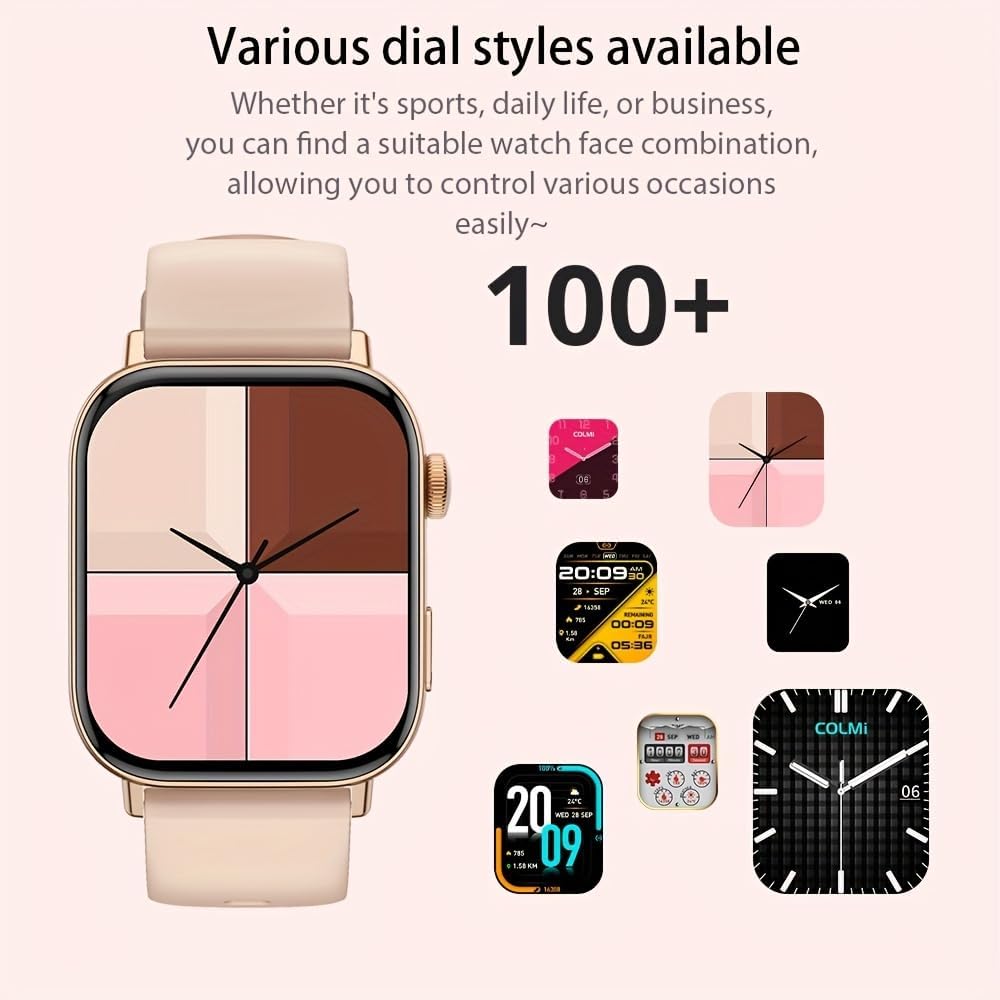
Слика 2: Шоуто на паметниот часовникasing a selection of its over 100 available dial styles, allowing for personalization.
2.2 Core Features and Functions
The COLMI C8 MAX is equipped with a wide range of features to support your daily activities and health monitoring.
- Следење на фитнес: Monitor steps, distance, calories burned, and active minutes. Includes a pedometer, heart rate monitor, and multi-sport modes (over 100 sports modes available, including walking, running, cycling, football, basketball, table tennis, badminton, mountaineering, rope jumping).

Слика 3: The smartwatch highlighting its extensive range of over 100 sports tracking modes, suitable for various physical activities.
- Следење на сонот: Ги следи моделите на спиење и квалитетот.
- Комуникација:
- Безжично повикување: Make and receive calls directly from your wrist. Access recent calls, dial pad, and contacts.
- Известувања за пораки: Receive alerts for SMS, WhatsApp, emails, and other social media applications (Facebook, Snapchat, Twitter, Telegram, Instagram, LinkedIn).

Слика 4: The smartwatch demonstrating its wireless calling feature, showing an incoming call notification on the display.

Слика 5: The watch's ability to synchronize information and notifications from a connected smartphone, including messages from WhatsApp and other platforms.
- Гласовен асистент со вештачка интелигенција: Use voice commands to interact with your watch for tasks like making calls, checking weather, or playing music.

Слика 6: Illustration of the intelligent voice assistant function, showing examples of voice commands and responses on the watch screen.
- Други карактеристики: Calendar, alarm clock, countdown timer, remote camera control, sedentary reminder, menstruation management.
3. Одржување
3.1 Водоотпорност (IP68)
The COLMI C8 MAX Smartwatch has an IP68 water resistance rating, meaning it is protected against dust ingress and can withstand immersion in water up to 1.5 meters for 30 minutes. It is suitable for daily use, hand washing, and light rain. However, it is not recommended for hot showers, saunas, or diving, as steam and hot water can compromise the seals.
3.2 Чистење на вашиот паметен часовник
За да го одржите изгледот и функционалноста на вашиот уред:
- Избришете го екранот и куќиштето со мека крпа што не остава влакненца.
- За тврдокорна нечистотија, малку дampИзмијте ја крпата со вода. Избегнувајте употреба на груби хемикалии или абразивни материјали.
- Редовно чистете ги контактите за полнење за да обезбедите ефикасно полнење.
- If the strap gets dirty, clean it according to its material type (e.g., silicone straps can be washed with mild soap and water).
3.3 Оптимизација на животниот век на батеријата
The smartwatch offers a battery life of 5-10 days depending on usage, with an average life of 240 hours. To maximize battery life:
- Намалете ја осветленоста на екранот.
- Оневозможете ги непотребните известувања.
- Limit continuous heart rate monitoring if not required.
- Исклучете го „Секогаш вклучен екран“ ако е достапно.
4 Смена на проблеми
If you encounter issues with your COLMI C8 MAX Smartwatch, refer to the following common problems and solutions:
| Проблем | Можно решение |
|---|---|
| Часовникот не се вклучува. | Проверете дали часовникот е целосно наполнет. Поврзете го со полначот најмалку 30 минути. |
| Не може да се спари со паметен телефон. |
|
| Известувањата не се примаат. |
|
| Неточни податоци за фитнес. |
|
| Екранот не реагира. | Restart the watch by pressing and holding the side button until it reboots. |
4.1 Фабричко ресетирање
If problems persist, you may need to perform a factory reset. This will erase all data on the watch and restore it to its original settings. Navigate to 'Settings' > 'System' > 'Reset' or 'Factory Reset' on your smartwatch and confirm.
5. Спецификации
| Карактеристика | Детал |
|---|---|
| Име на моделот | C8 Max |
| Бренд | КОЛМИ |
| Приказ | 1.93-inch IPS Touchscreen, 240 x 288 pixels |
| Капацитет на батеријата | Литиум полимер од 250 mAh |
| Траење на батеријата | 5-10 days (typical usage), 240 hours average life |
| Отпорност на вода | IP68 |
| Меморија | 128 MB меморија, 640 KB RAM меморија |
| Поврзување | Bluetooth 5.3 |
| Компатибилност | Android & iOS Smartphones/Tablets |
| Димензии | 10 x 9 x 6.5 cm |
| Тежина | 200 гр |
| Вклучени компоненти | Smartwatch, User Manual |
6. Гаранција и поддршка
The COLMI C8 MAX Smartwatch comes with a manufacturer's warranty. Please refer to the warranty card included in your product packaging for specific terms and conditions, including warranty duration and coverage details.
For technical support, product inquiries, or warranty claims, please contact COLMI customer service through their official website or the contact information provided in your product documentation. Ensure you have your product model number (C8 Max) and purchase details ready when contacting support.