1. Вовед
This user manual provides essential information for the safe and efficient operation of your iFFALCON 65U85 4K Mini LED Google TV. Please read this manual thoroughly before using the product and retain it for future reference.
2. Информации за безбедност
Секогаш следете ги основните безбедносни мерки на претпазливост при користење на овој телевизор за да го намалите ризикот од пожар, електричен удар и повреди.
- Не го изложувајте телевизорот на дожд или влага.
- Не го отворајте телевизорот casing; препуштете го целото сервисирање на квалификуван персонал.
- Ensure proper ventilation and do not block ventilation openings.
- Користете само кабел за напојување и додатоци наведени од производителот.
- Држете го телевизорот подалеку од извори на топлина и директна сончева светлина.
3. Содржина на пакетот
Проверете дали сите артикли се присутни во пакувањето:
- iFFALCON 65U85 4K Mini LED Google TV
- Далечински управувач
- Кабел за напојување
- Упатство за употреба (овој документ)
- Гарантна картичка
- Wall Bracket (if included)
4. Поставување
4.1 Отпакување и поставување
Carefully remove the TV from its packaging. Place the TV on a stable, flat surface or mount it on a wall using a VESA-compatible bracket. Ensure adequate space around the TV for ventilation.
4.2 Поврзување на напојување и уреди
- Поврзете го кабелот за напојување со телевизорот, а потоа со штекер.
- Connect external devices (e.g., gaming consoles, Blu-ray players) to the HDMI 2.1 ports.
- For internet access, connect an Ethernet cable to the LAN port or prepare for Wi-Fi setup.
4.3 Initial Setup and Remote Pairing
Upon first power-on, the TV will guide you through the initial setup process. This includes language selection, network connection, and Google account login.
To pair the Bluetooth remote control:
- Насочете го далечинскиот управувач кон ТВ.
- Притиснете и задржете го Поставки копчето и Дома копчето истовремено 4 секунди.
- The TV will display a pairing confirmation message once successful.
4.4 мрежно поврзување
Connect your TV to the internet via Wi-Fi or Ethernet to access Google TV features and streaming services.
- Wi-Fi: Select your network from the list and enter the password.
- Етернет: Поврзете етернет кабел од вашиот рутер во LAN-портата на телевизорот.
5. Ракување со вашиот телевизор
5.1 Интерфејс на Google TV
Your iFFALCON 65U85 features Google TV, providing a personalized experience with access to a vast library of content and apps.

5.2 Гласовна контрола со Google Assistant
Use the built-in Google Assistant for hands-free control. Press the Google Assistant button on your remote and speak your commands.
- Пребарај за филмови и емисии.
- Контролирајте ги паметните домашни уреди.
- Добијте одговори на прашања.

5.3 Casting Content (AirPlay2 & Chromecast)
Easily share content from your smartphone or tablet to the TV screen.
- AirPlay2: For Apple devices, use AirPlay2 to stream videos, photos, and music.
- Chromecast: For Android devices and Chrome browser, use Chromecast built-in to cast content.

6. Клучни карактеристики
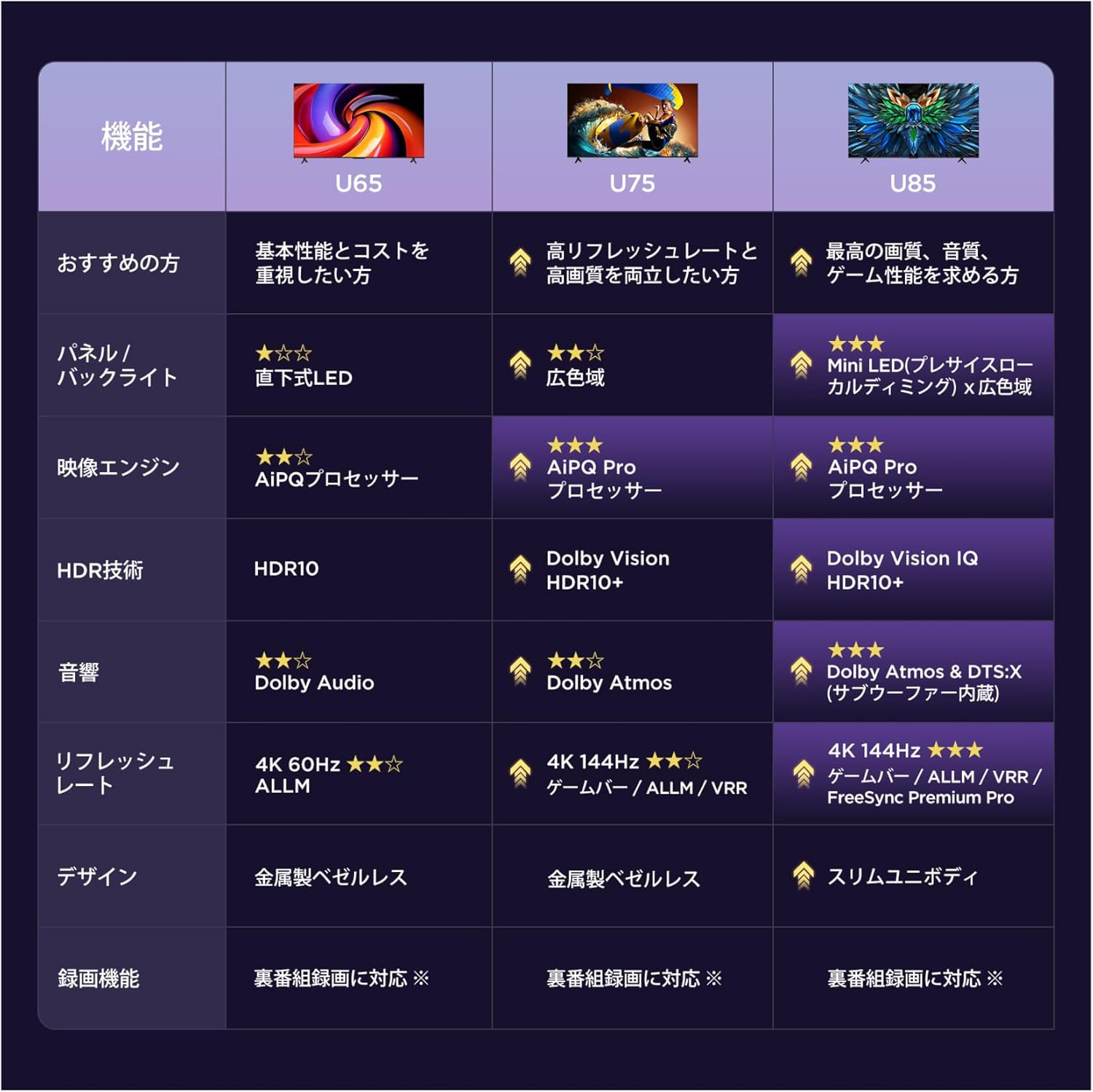
6.1 Display Technology: Mini LED & 4K HDR
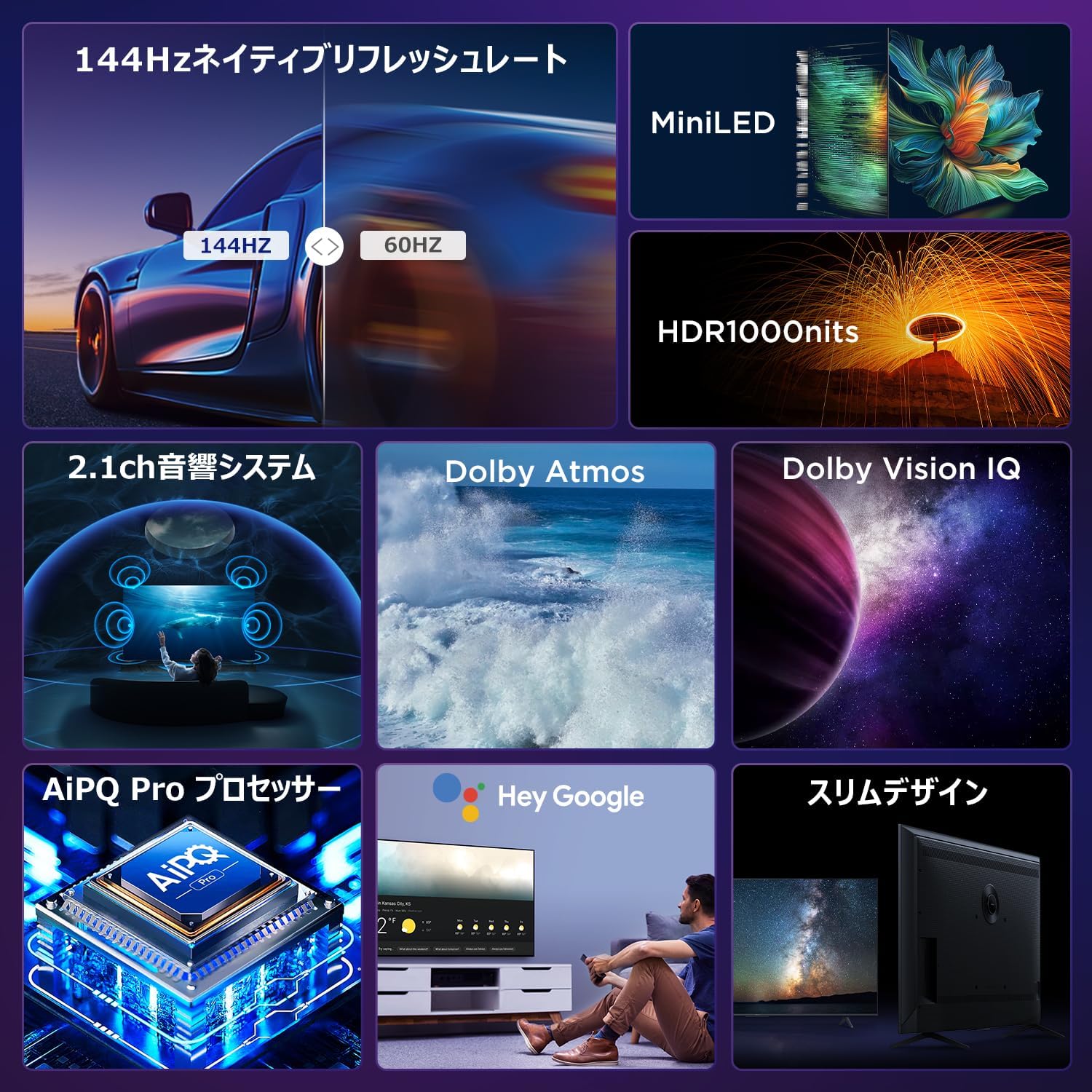
Experience stunning visuals with Mini LED backlight technology, delivering 1000 nits peak brightness and enhanced contrast. Combined with 4K resolution, Dolby Vision IQ, and HDR10+, you get precise brightness, vibrant colors, and deep blacks.


6.2 Immersive Audio: Dolby Atmos & DTS Virtual:X
Enjoy a captivating audio experience with Dolby Atmos and DTS Virtual:X, delivering multi-dimensional sound that fills your room. The 2.1ch speaker system provides powerful bass and clear audio.


6.3 Gaming Features: 144Hz VRR & Game Master
Designed for gamers, the 65U85 offers a native 144Hz refresh rate, Variable Refresh Rate (VRR), Auto Low Latency Mode (ALLM), and FreeSync Premium Pro for smooth, tear-free gameplay.


6.4 AiPQ Pro Processor
The AiPQ Pro processor intelligently optimizes color, contrast, and motion for every scene, delivering a visually stunning and immersive viewискуство.

6.5 Slim Metal Bezel-less Design
The TV features a sleek, metal bezel-less design that blends seamlessly into any living space, offering a premium aesthetic.

7. Спецификации
| Карактеристика | Опис |
|---|---|
| Големина на екранот | 65 инчи |
| Тип на дисплеј | VA Panel, Mini LED |
| Резолуција | 4K (3840 x 2160) |
| Стапка на освежување | 144 Hz (матична) |
| Поддршка за HDR | Dolby Vision IQ, HDR10+ |
| Аудио | 2.1ch Speaker System, Dolby Atmos, DTS Virtual:X |
| Платформа за паметна телевизија | Google TV |
| Гласовен асистент | Google Assistant |
| Поврзување | 3x HDMI 2.1, 2x USB, Wi-Fi, Bluetooth |
| Димензии (Ш x Д x В) | 144.8 x 32.4 x 89.5 см (со држач) |
| Тежина | 19 кг |
| Компатибилност со VESA | Да |

8 Смена на проблеми
Доколку наидете на проблеми со вашиот телевизор, погледнете ги следниве вообичаени решенија:
- Без моќност: Проверете дали кабелот за напојување е безбедно поврзан и дали штекерот е функционален.
- Нема слика/звук: Check all cable connections (HDMI, audio). Verify the correct input source is selected.
- Далечинскиот управувач не работи: Replace batteries. Re-pair the remote control as described in Section 4.3.
- Нема интернет конекција: Проверете го вашиот рутер и модем. Повторно поврзете се на Wi-Fi мрежата или проверете дали етернет кабелот е правилно поврзан.
- Проблеми со квалитетот на сликата: Adjust picture settings (brightness, contrast, color). Ensure content source is high quality.
За постојани проблеми, контактирајте ја корисничката поддршка.
9. Одржување
Proper maintenance ensures the longevity of your iFFALCON TV:
- Чистење на екранот: Gently wipe the screen with a soft, dry, lint-free cloth. Do not use harsh chemicals or abrasive cleaners.
- Чистење на Casing: Користете мека, гamp cloth to wipe the TV casing.
- Вентилација: Држете ги отворите за вентилација чисти од прашина и пречки.
- Исклучено: Исклучете го телевизорот од штекерот за време на грмотевици или кога е оставен без надзор подолг период.
10. Гаранција и поддршка
Your iFFALCON 65U85 TV comes with a manufacturer's warranty. Please refer to the included warranty card for details on coverage, terms, and conditions.
For technical support, service inquiries, or further assistance, please visit the official iFFALCON website or contact their customer service hotline. Contact information can be found on the warranty card or the official product page.
11. Видеа за производи
11.1 Mini LED Quantum Dot 144Hz 65-inch TV
This video showcases the Mini LED and Quantum Dot display technology of the 65-inch iFFALCON TV, highlighting its 144Hz refresh rate for smooth visuals.


