1. Вовед
This manual provides essential information for the safe and efficient operation of your Ulefone Armor X31 rugged smartphone. Please read this manual thoroughly before using your device to ensure proper functionality and to understand its features.
The Ulefone Armor X31 is designed for durability and performance, featuring a robust build, advanced camera system, and long-lasting battery life, suitable for various environments.
2. Што има во кутијата
Проверете дали сите артикли се присутни во пакувањето на вашиот производ:
- Ulefone Armor X31 Smartphone
- Полнач за наизменична струја (100~240V)
- Кабел за податоци од тип C до тип C (100 см)
- Заштитник за екран (претходно нанесен или посебен)
- Исфрлач на фиока за SIM
- Ланјард
- Упатство за употреба (овој документ)
3. Уредот завршиview
Familiarize yourself with the physical components of your Ulefone Armor X31.

Слика: Напред и назад view of the Ulefone Armor X31 rugged smartphone, showcasinнеговиот робустен дизајн и модул на камерата.
3.1 Физички компоненти
- Предна страна: 6.56-inch HD+ display with Corning Gorilla Glass, 16MP front camera, earpiece, sensors.
- Заден дел: 48MP main camera, 20MP night vision camera, 2MP macro camera, LED flash, fingerprint sensor, Ulefone branding.
- Страни: Power button, volume up/down buttons, custom key, SIM/microSD card slot, USB Type-C port, 3.5mm audio jack.
4. Почетно поставување
4.1 Инсталирање на SIM картички и MicroSD картичка
- Пронајдете го држачот за SIM-картичка на страната од уредот.
- Вметнете ја алатката за исфрлање на фиоката на SIM-картичката во малата дупка до фиоката и цврсто притиснете додека фиоката не испадне.
- Place your Nano-SIM cards (up to two) and/or a microSD card (for storage expansion up to 2TB) into the designated slots on the tray. Ensure the gold contacts face downwards.
- Внимателно вратете го држачот во телефонот додека не кликне на своето место.
4.2 Вклучување/исклучување
- За вклучување: Притиснете и држете го копчето за вклучување додека не се појави логото на Ulefone.
- За исклучување: Притиснете го и задржете го копчето за вклучување додека не се појави менито со опции за вклучување, а потоа изберете „Исклучи“.
- За рестартирање: Притиснете го и задржете го копчето за вклучување додека не се појави менито со опции за вклучување, а потоа изберете „Рестарт“.
4.3 Почетна конфигурација
Upon first power-on, follow the on-screen prompts to complete the initial setup, which includes selecting your language, connecting to Wi-Fi, setting up your Google account, and configuring security features.
5. Ракување со вашиот уред
5.1 Основни функции на телефонот
- Остварување повици: Отворете ја апликацијата Телефон, внесете го бројот и допрете ја иконата за повик.
- Испраќање пораки: Отворете ја апликацијата Пораки, допрете „Започни разговор“, внесете го примачот и пораката, а потоа испратете.
- Интернет конекција: Поврзете се на Wi-Fi преку Поставки > Мрежа и интернет > Wi-Fi или овозможете мобилни податоци преку Поставки > Мрежа и интернет > Мобилна мрежа.
5.2 Перформанси и складирање

Image: Diagram illustrating the MediaTek Helio G91 processor, highlighting its 8-core CPU and 2.0GHz clock speed.
The Armor X31 is powered by a MediaTek Helio G91 8-core processor, ensuring smooth performance for daily tasks and applications. It features 6GB of physical RAM, expandable with up to 6GB of virtual RAM, totaling 12GB. Internal storage is 128GB, with support for up to 2TB via a microSD card.

Image: Graphic detailing the 12GB RAM (6GB physical + 6GB virtual) and 128GB ROM, with 2TB expansion capability.
5.3 Функции на камерата

Image: Visual representation of the Ulefone Armor X31's camera setup, including the 48MP main, 20MP night vision, 2MP macro, and 16MP front cameras, with exampфотографиите.
- Главна камера: The 48MP main camera captures high-resolution photos. Open the Camera app and select 'Photo' mode.
- Ноќна камера за гледање: The 20MP night vision camera allows for clear imaging in low-light or complete darkness. Select 'Night Vision' mode in the Camera app.
- Макро камера: Use the 2MP macro camera for detailed close-up shots.
- Предна камера: The 16MP front camera is for selfies and video calls. Switch to the front camera in the Camera app.
- Подводен режим: This mode allows you to take photos and videos while submerged. Activate it from the camera settings or quick toggles. Ensure all ports are securely sealed before submerging the device.
5.4 Карактеристики на екранот

Image: Graphic highlighting the 6.56-inch display with 720x1612 resolution, 90Hz refresh rate, 800 nits brightness, and Corning Gorilla Glass protection.
The 6.56-inch HD+ display offers a 720 x 1612 resolution and a 90Hz refresh rate for smooth visuals. With 800 nits brightness, it provides good visibility outdoors. The screen is protected by Corning Gorilla Glass for enhanced durability.
5.5 Управување со батерии

Image: Illustration of the 6050mAh battery and its estimated usage times for standby, talk, music, and video playback.
The device is equipped with a 6050mAh battery, providing extended usage times. It supports 18W fast charging. The reverse charging feature allows you to use your phone as a power bank to charge other compatible devices via a USB-C to USB-C cable (sold separately).
5.6 Робусни карактеристики
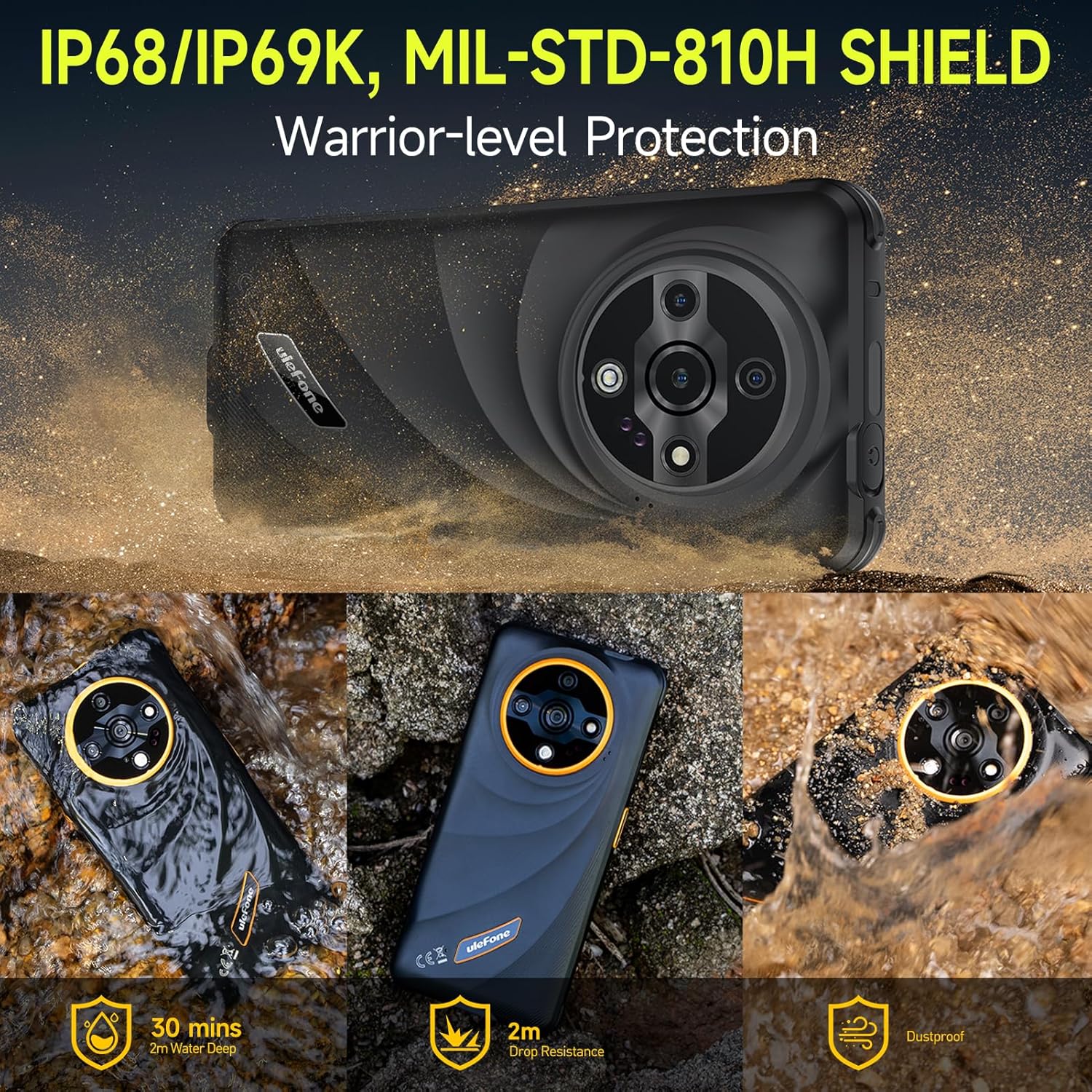
Image: Depiction of the Ulefone Armor X31's IP68/IP69K and MIL-STD-810H ratings, showing its resistance to water, drops, and dust in various scenarios.
The Armor X31 is IP68/IP69K certified and meets MIL-STD-810H standards, making it highly resistant to water, dust, and drops. It can withstand submersion in up to 2 meters of water for 30 minutes and drops from up to 2 meters.
5.7 Дополнителни карактеристики
- 120 Lumen Flashlight: An independent, high-brightness flashlight is integrated for illumination in dark environments.
- Google Lens Support: Utilize Google Lens through the camera for instant translations, object identification, and image searches.
- Поддршка за Widevine L1: Enables streaming of high-definition content from platforms like Netflix and Disney+.
- IR Blaster: Use your phone as a universal remote control for compatible home appliances.
- Отклучување со отпечаток од прст и отклучување со лице: Secure your device with biometric authentication.
- NFC: Supports contactless payments and data transfer.
- FM радио без слушалки: Listen to FM radio without needing to connect headphones as an antenna.
- Приспособен клуч: A programmable button for quick access to frequently used apps or functions.
- Кутија со алатки за надворешна употреба: A suite of utility apps designed for outdoor activities.
- 3-Card Slot: Accommodates two SIM cards and one microSD card simultaneously.
- GPS + GLONASS + Beidou + Galileo: Multiple navigation systems for accurate positioning.
- Режим на ракавици: Ја подобрува чувствителноста на екранот на допир за работа додека носите ракавици.

Image: Graphic showing Widevine L1 support, enabling HD streaming on platforms like Netflix and Disney+.
6. Одржување
6.1 Чистење на вашиот уред
To clean your Armor X31, use a soft, lint-free cloth. For stubborn dirt or grime, especially after exposure to mud or saltwater, rinse the device under fresh water and ensure all ports are closed. Allow the device to air dry completely before charging or opening any ports.
6.2 Грижа за батерии
- Избегнувајте изложување на уредот на екстремни температури (под 0°C или над 45°C) бидејќи тоа може да ги намали перформансите на батеријата.
- Use only the original charger and cable provided with your device to prevent damage and ensure optimal charging.
- Do not attempt to replace the battery yourself, as it is an integrated component and requires professional service.
6.3 Општа нега
Despite its rugged design, avoid unnecessary drops or impacts. Ensure all port covers are securely closed when the device is exposed to water or dust.
7 Смена на проблеми
This section addresses common issues you might encounter with your Ulefone Armor X31.
| Прашање | Можно решение |
|---|---|
| Уредот не се вклучува | Проверете дали батеријата е наполнета. Поврзете го полначот и почекајте неколку минути пред повторно да се обидете да го вклучите. Доколку не реагира, извршете принудно рестартирање со држење на копчето за вклучување 10-15 секунди. |
| Лош мрежен сигнал | Check if your SIM card is properly inserted. Move to an area with better network coverage. Restart the device. Verify mobile data settings in 'Settings > Network & internet > Mobile network'. |
| Апликациите паѓаат или замрзнуваат | Close and reopen the app. Clear the app's cache and data via 'Settings > Apps > [App Name] > Storage & cache'. Ensure the app is updated to the latest version. Restart the phone. |
| Екранот на допир не реагира | Restart the device. Ensure the screen is clean and dry. If using a screen protector, ensure it is properly applied and not interfering with touch sensitivity. |
| Уредот не се полни | Check the charging cable and adapter for damage. Ensure the USB-C port is clean and free of debris. Try a different power outlet. Use the original charger and cable. |
If you encounter issues not listed here or if solutions do not resolve the problem, please contact Ulefone customer support.
8. Спецификации
| Карактеристика | Детал |
|---|---|
| Име на моделот | Улефон Армор X31 |
| Оперативен систем | Андроид 14 |
| Процесор | MediaTek Helio G91, 8-core, 2.0 GHz |
| RAM меморија | 12 GB (6 GB физичка + 6 GB виртуелна) |
| Внатрешно складирање | 128 GB |
| Складирање што може да се прошири | До 2 TB преку microSD картичка |
| Приказ | 6.56 inches HD+ (720 x 1612), 90 Hz Refresh Rate, 800 nits Max Brightness, Corning Gorilla Glass |
| Задни камери | 48MP Main Camera, 20MP Night Vision Camera, 2MP Macro Camera |
| Предна камера | 16 MP |
| Капацитет на батеријата | 6050 mAh |
| Полнење | Брзо полнење од 18W, обратно полнење |
| Трајност | IP68/IP69K Waterproof & Dustproof, MIL-STD-810H Shockproof |
| Поврзување | Dual 4G, Wi-Fi, Bluetooth 5.2, NFC, GPS (GPS+GLONASS+Beidou+Galileo), USB Type-C, 3.5mm Audio Jack |
| Посебни карактеристики | 120 Lumen Flashlight, IR Blaster, Fingerprint Unlock, Face Unlock, Custom Key, Outdoor Toolbox, Widevine L1, Headset-Free FM Radio, Gloves Mode |
| Димензии | 6.84 x 3.23 x 0.54 инчи (173.78 x 82 x 13.65 мм) |
| Тежина | 10.6 унци (301 грама) |
9. Гаранција и поддршка
9.1 Гаранција на производителот
The Ulefone Armor X31 comes with a 12-month manufacturer warranty service in the US. This warranty covers defects in materials and workmanship under normal use. It does not cover damage caused by misuse, accidents, unauthorized repairs, or normal wear and tear.
9.2 Поддршка за корисници
For technical assistance, warranty claims, or any questions regarding your Ulefone Armor X31, please contact Ulefone customer support. Refer to the contact information provided in your product packaging or visit the official Ulefone webстраница за детали за поддршка.


