1. Поставување
1.1 Распакување и содржина на пакувањето
Carefully unpack your Keychron K8 HE keyboard. Ensure all components are present:
- 1x Fully Assembled Keyboard (K8 HE)
- 1x Кабел од тип А до тип Ц
- 1x ресивер од тип А 2.4 GHz
- 1x продолжен адаптер за ресивер
- 1x тастатура и извлекувач на прекинувач
- 1x шрафцигер
- 1x хексадецимален клуч
- Дополнителни копчиња (за прилагодување на распоредот за Mac/Windows)

Image: The Keychron K8 HE Special Edition package contents, showing the keyboard, USB cable, 2.4GHz receiver, extension adapter, keycap and switch puller, screwdriver, and hex key.
1.2 Почетна врска
The K8 HE supports three connection modes: 2.4 GHz wireless, Bluetooth 5.1, and USB-C wired. Select your preferred mode using the switch located on the side of the keyboard.
- 2.4 GHz безжична врска: Plug the included 2.4GHz receiver into your computer's USB-A port. Switch the keyboard to 2.4G mode. The keyboard should connect automatically.
- Bluetooth: Switch the keyboard to Bluetooth mode. On your device, search for Bluetooth devices and select 'Keychron K8 HE'. Follow any on-screen pairing instructions. The keyboard can pair with up to three devices.
- USB-C кабел: Connect the keyboard to your computer using the provided USB-C cable. The keyboard will operate in wired mode and charge simultaneously.

Image: A close-up of the Keychron K8 HE keyboard's side, highlighting the switches for 2.4 GHz, Bluetooth, and wired USB-C connectivity, along with the USB-C port.
1.3 Системска компатибилност
The Keychron K8 HE keyboard is compatible with Mac, Windows, and Linux operating systems. Use the dedicated switch on the keyboard to select the appropriate operating system layout for optimal functionality.
Видео: Оверview of the Keychron K8 HE Wireless Hot Swappable Hall Effect Keyboard, demonstrating its features including online key remapping, adjustable actuation points, multi-system compatibility, triple mode connectivity, magnetic switches, and per-key RGB lighting.
2. Упатства за работа
2.1 Режими на поврзување
The K8 HE offers versatile connectivity options:
- 2.4 GHz безжична врска: Provides an ultra-fast 1000 Hz polling rate for responsive, lag-free performance, ideal for gaming.
- Bluetooth 5.1: Allows connection to up to three devices simultaneously, suitable for multi-device workflows.
- USB-C кабел: Offers a stable connection and charges the keyboard's internal battery.
2.2 Key Customization with Keychron Launcher
Customize your keyboard's functions using the web-based Keychron Launcher application. This tool allows you to remap keys, create macros, adjust actuation points, and enable advanced features without requiring software downloads.
- Пристап: Отворете го вашиот web прелистувач и одете до Keychron Launcher webсајт.
- Карактеристики: Adjust actuation distance, configure rapid trigger, set dynamic keystrokes, and manage RGB lighting effects.

Слика: Слика од екранот на Keychron Launcher web application, demonstrating its interface for customizing keymaps, macros, and other keyboard settings online.
2.3 Rapid Trigger Functionality
The K8 HE features Rapid Trigger, which allows keys to activate and reset based on real-time travel distance rather than fixed points. This enables faster, more precise keystrokes, particularly beneficial for competitive gaming.

Image: A diagram illustrating the difference between magnetic switches with rapid trigger (activating and resetting based on travel distance) and traditional mechanical switches (activating and resetting at fixed points).
2.4 Прилагодлива точка на активирање
Customize the actuation point for each key from 0.2 mm to 3.8 mm with 0.1 mm sensitivity. This allows you to fine-tune key responsiveness to your preference, reducing misfires and optimizing your typing or gaming style.
2.5 Dynamic Keystrokes (DKS)
Dynamic Keystrokes allow you to assign up to four different actions to a single key based on the press depth. For example, a light press could trigger one action, while a deeper press triggers another. This feature enhances efficiency and control, especially in games requiring layered inputs.
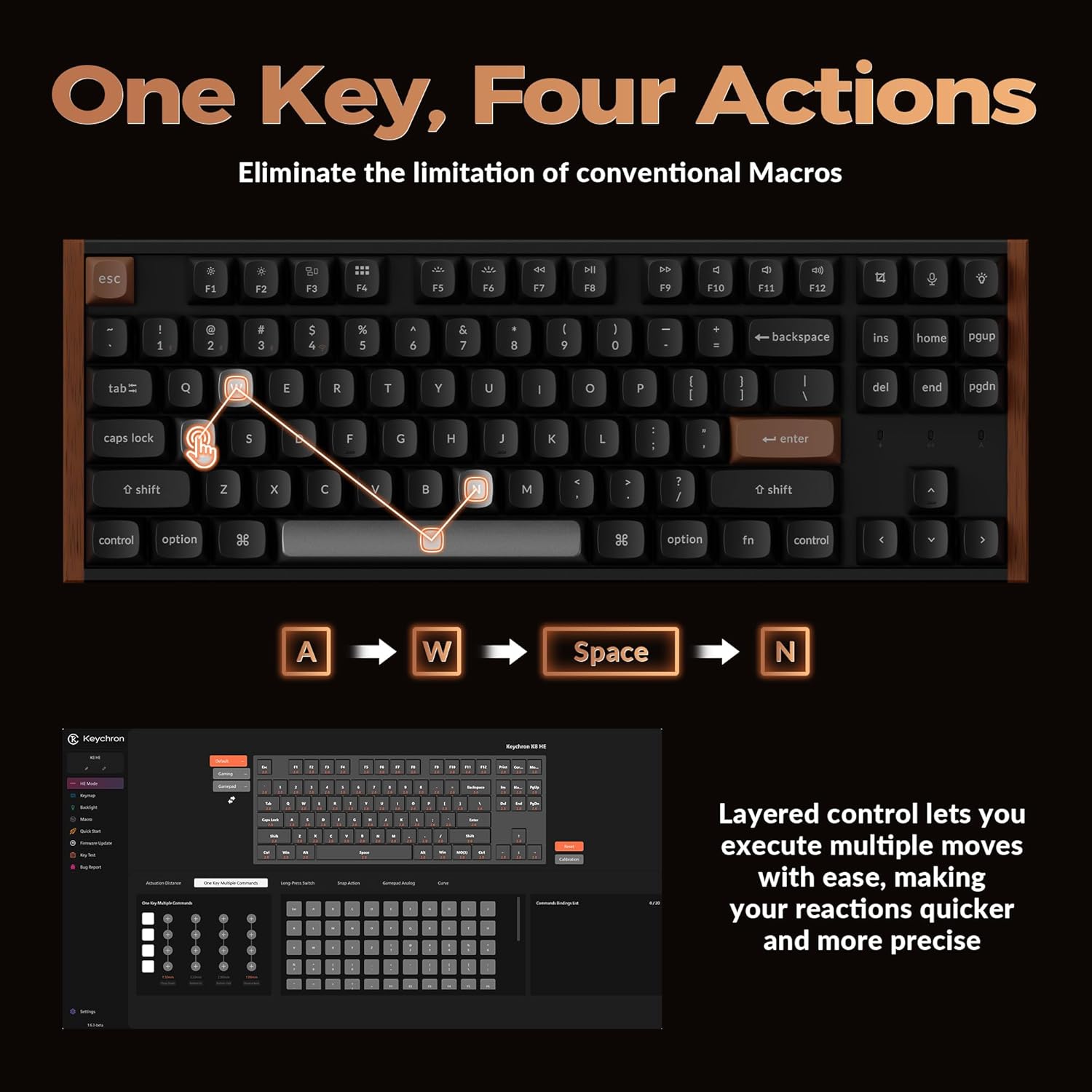
Image: A visual representation of Dynamic Keystrokes (DKS), demonstrating how a single key can execute up to four different actions depending on the depth of the keypress, with an example of 'A', 'W', 'Space', and 'N' actions.
2.6 Snap Action
Snap Action, combined with Last Key Priority (LKP), prioritizes deeper keypresses when multiple keys are pressed. This feature contributes to smoother and more precise directional changes, particularly useful in fast-paced gaming scenarios.
2.7 RGB осветлување
The K8 HE features per-key RGB backlighting. Customize lighting effects, colors, and brightness through the Keychron Launcher software to match your setup or mood.

Image: The Keychron K8 HE keyboard illuminated with colorful RGB backlighting, showcasing the customizable lighting options.
3. Одржување
3.1 Чистење на тастатурата
За да ги одржите оптималните перформанси и изглед, редовно чистете ја тастатурата:
- Користете мека крпа без влакненца малку гampened with water or a mild cleaning solution to wipe down keycaps and the frame.
- За прашина и остатоци помеѓу копчињата, користете компримиран воздух.
- Избегнувајте груби хемикалии или абразивни материјали.
3.2 Прекинувачи и копчиња што може да се заменуваат со топла замена
The K8 HE features hot-swappable Hall Effect switches, allowing you to easily replace them without soldering. Keycaps can also be removed for cleaning or customization.
- Отстранување на копчињата: Use the included keycap puller to gently lift keycaps straight up.
- Отстранување на прекинувачи: Use the included switch puller to carefully grip and pull the switch out.
- Installing Switches/Keycaps: Align the new switch/keycap with the socket and press down gently until it clicks into place. Ensure pins are not bent when installing switches.

Image: A close-up of the Keychron K8 HE keyboard with several keycaps and Hall Effect switches removed, illustrating the hot-swappable design for easy customization and maintenance.
4 Смена на проблеми
4.1 Проблеми со поврзувањето
- 2.4 GHz / Bluetooth Not Connecting: Ensure the keyboard is in the correct mode (2.4G or BT). For Bluetooth, check if the keyboard is in pairing mode and visible on your device. Try re-pairing. For 2.4G, ensure the receiver is securely plugged in.
- Наизменична врска: Move the keyboard closer to the receiver/device. Avoid sources of interference (e.g., other wireless devices, large metal objects). Ensure the keyboard battery is sufficiently charged.
- Жичната врска не работи: Try a different USB-C cable or USB port on your computer. Ensure the keyboard is switched to wired mode.
4.2 Keychron Launcher Not Recognizing Keyboard
- Ensure the keyboard is connected via USB-C cable to your computer.
- Потврдете ја вашата web browser is compatible (e.g., Chrome).
- Check for any necessary drivers or permissions for your operating system (especially Linux users may need specific udev rules).
4.3 Keys Not Responding or Double-Typing
- Check if the switch is properly seated. Remove the keycap and switch, then reinsert.
- If using wireless modes, ensure the battery is charged.
- Reset the keyboard to factory settings (refer to Keychron's official support for specific instructions).
5. Спецификации
| Карактеристика | Спецификација |
|---|---|
| Модел | К8 ТОЈ |
| Распоред | TKL (Tenkeyless), 87 Keys |
| Поврзување | 2.4 GHz безжична, Bluetooth 5.1, USB-C кабелска |
| Прекинувачи | Hall Effect Magnetic Switches, Hot-Swappable |
| Точка на активирање | Adjustable from 0.2 mm to 3.8 mm (0.1 mm sensitivity) |
| Стапка на анкети | 1000 Hz (2.4G & Wired Modes) |
| Задно осветлување | RGB |
| Материјал за клуч | PBT Двоен истрел |
| Материјал за рамка | Aluminum, Wood Sidings |
| Тип на батерија | Литиум полимер (вклучен) |
| Тежина на ставката | 3.91 фунти |
| Димензии на пакетот | 15.79 x 7.95 x 2.87 инчи |
| Компатибилен ОС | Мек, Виндоус, Линукс |
5.1 Димензии
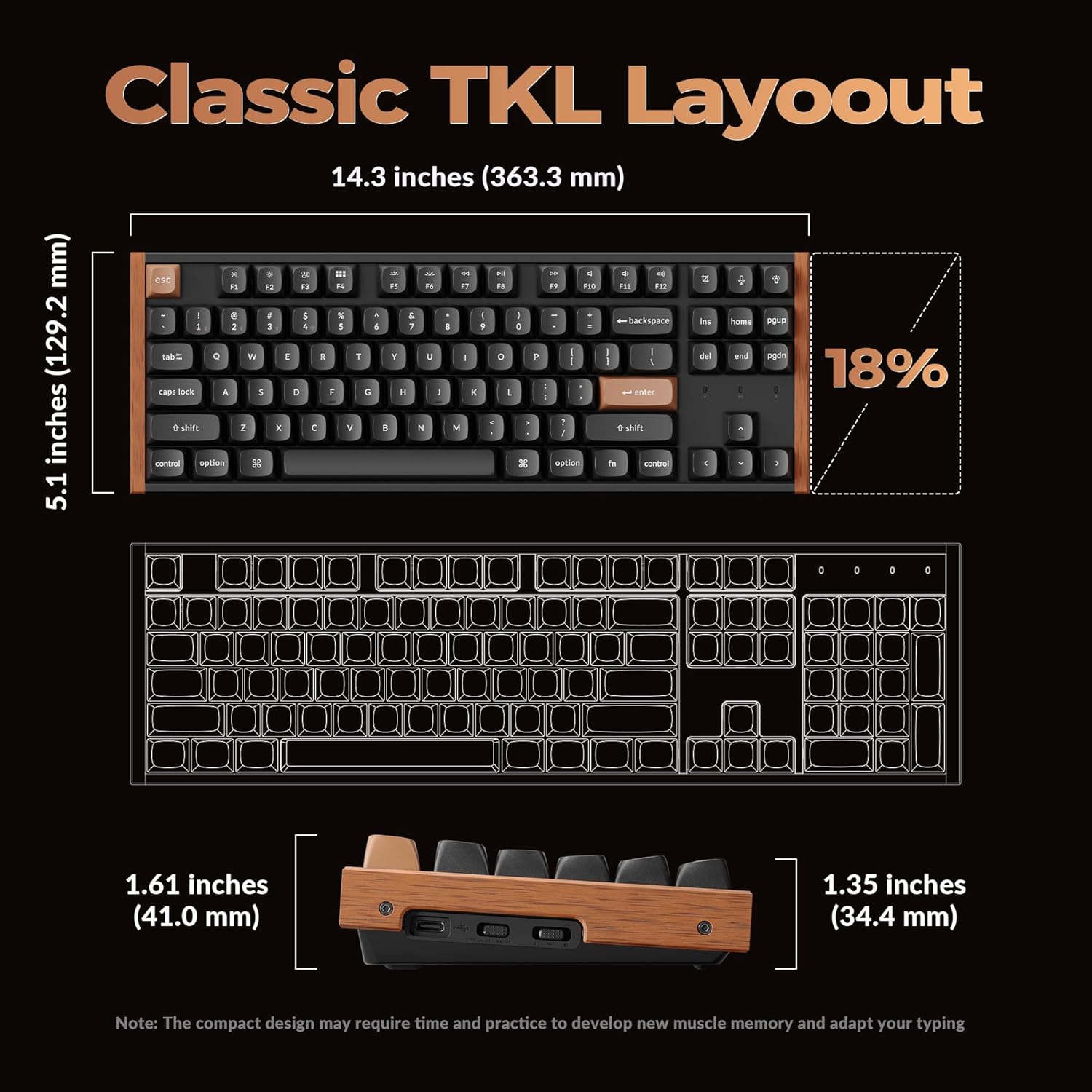
Image: A diagram detailing the dimensions of the Keychron K8 HE TKL keyboard, including its length (14.3 inches / 363.3 mm), width (5.1 inches / 129.2 mm), and height (1.61 inches / 41.0 mm at the front, 1.35 inches / 34.4 mm at the back).
6. Гаранција и поддршка
6.1 Гаранција за производот
Производите на Keychron обично доаѓаат со ограничена гаранција што ги покрива производствените дефекти. Ве молиме погледнете ја официјалната Keychron. webстраницата или вашата документација за купување за специфични гарантни услови што важат за вашиот регион.
6.2 Поддршка за корисници
За техничка помош, решавање проблеми надвор од ова упатство или барања за гаранција, ве молиме контактирајте ја корисничката поддршка на Keychron преку нивната официјална website. Have your product model and purchase information ready when contacting support.


