1. Вовед
This manual provides comprehensive instructions for the installation, operation, maintenance, and troubleshooting of your NIVIAN Professional WiFi SuperHD Surveillance Camera Kit. This system is designed to provide reliable and efficient security monitoring for your home or business.
Please read this manual carefully before using the product to ensure proper setup and optimal performance. Keep this manual for future reference.
2. Производот завршиview
The NIVIAN CCTV Kit is a professional 2K SuperHD WiFi surveillance system featuring 6 IP cameras and a 10-channel Network Video Recorder (NVR) with a pre-installed 1TB hard drive. Key features include:
- 2K SuperHD Image Resolution: Обезбедува јасна и детална видео-фудбаtage (3MP).
- Откривање на луѓе со вештачка интелигенција: Intelligent motion detection to reduce false alarms.
- Двонасочно аудио: Вграден микрофон и звучник за комуникација во реално време.
- Двојно ноќно гледање: Infrared mode for discreet monitoring and white LED mode for full-color night vision activated by motion.
- WiFi-6 Long Range Connectivity: Stable wireless connection up to 250 meters with repeater function.
- IP66 Weatherproof Cameras: Издржлив метал casing suitable for outdoor use.
- Професионално снимање: Continuous or event-based recording to the included 1TB hard drive.
- HDMI излез: Connect to a monitor or TV for live viewинг.
- Апликација EseeCloud: Remote access and control from mobile devices.
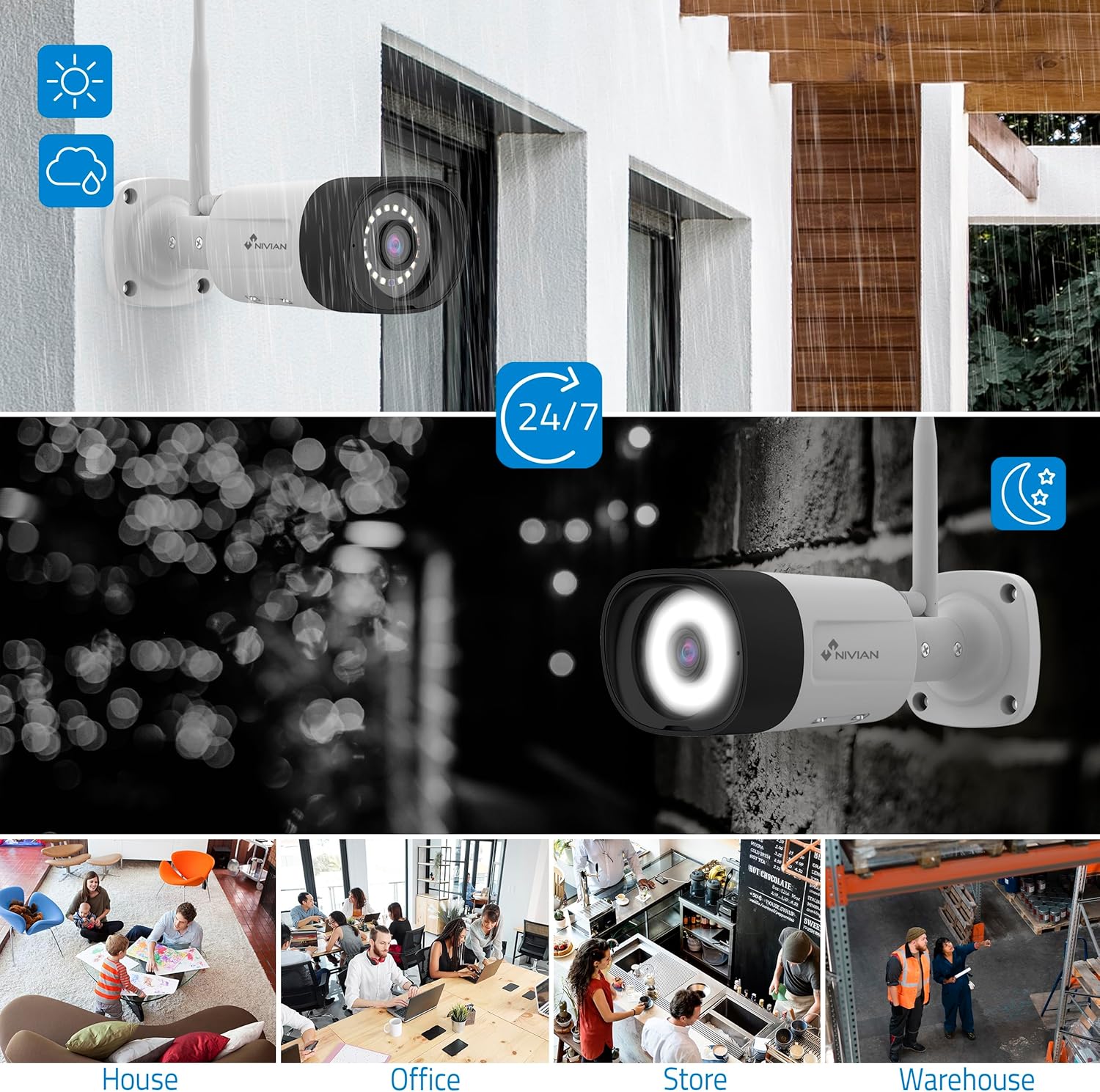
Image: NIVIAN CCTV Camera with day and night vision capabilities, showing weatherproof design and application in various environments like house, office, store, and warehouse.

Image: Comparison of 1080p Full HD video quality versus 2K Super HD video quality, demonstrating enhanced detail with 2K resolution.
3. Содржина на пакетот
Проверете дали сите артикли се присутни во вашиот пакет:
- 1x 10-Channel NVR (Network Video Recorder) with 1TB Hard Drive
- 6x NIVIAN 2K SuperHD WiFi IP Cameras
- Адаптери за напојување за NVR и камери
- USB глушец
- Етернет кабел
- Монтирачки завртки и приклучоци
- Водич за брз почеток (погледнете го ова упатство за детални упатства)
4. Поставување
4.1. Инсталација на NVR
- Поврзете го NVR:
- Поврзете го NVR-от со штекер користејќи го испорачаниот адаптер за напојување.
- Connect the NVR to a monitor or TV via the HDMI port for local viewинг.
- Connect the USB mouse to the NVR's USB port.
- For internet access, connect the NVR to your router using the Ethernet cable.
- Вклучување: Turn on the NVR. Follow the on-screen prompts for initial setup, including language selection and network configuration.
4.2. Инсталација на фотоапаратот
- Локација за монтирање: Изберете соодветни локации за вашите камери, осигурувајќи се дека имаат чисто поле на гледање. view and are within range of the NVR's WiFi signal. The IP66 rating allows for outdoor installation.
- Напојување на камерите: Поврзете ја секоја камера во штекер користејќи го нејзиниот наменски адаптер за напојување.
- Спарување (автоматско): The cameras are pre-paired with the NVR. Once powered on, they should automatically connect to the NVR's WiFi network. You will see the camera feeds appear on the connected monitor.
- Signal Repetition Function: If a camera is too far from the NVR, you can use another camera as a repeater to extend the WiFi range up to 250m. Refer to the NVR's on-screen menu for configuring this feature.

Image: Diagram illustrating various connection options for the NIVIAN CCTV system, including direct WiFi-6 connection to NVR, HDMI output to a monitor, and NVR connection to a router via LAN for remote access via Eseecloud app. Also shows signal repetition function.
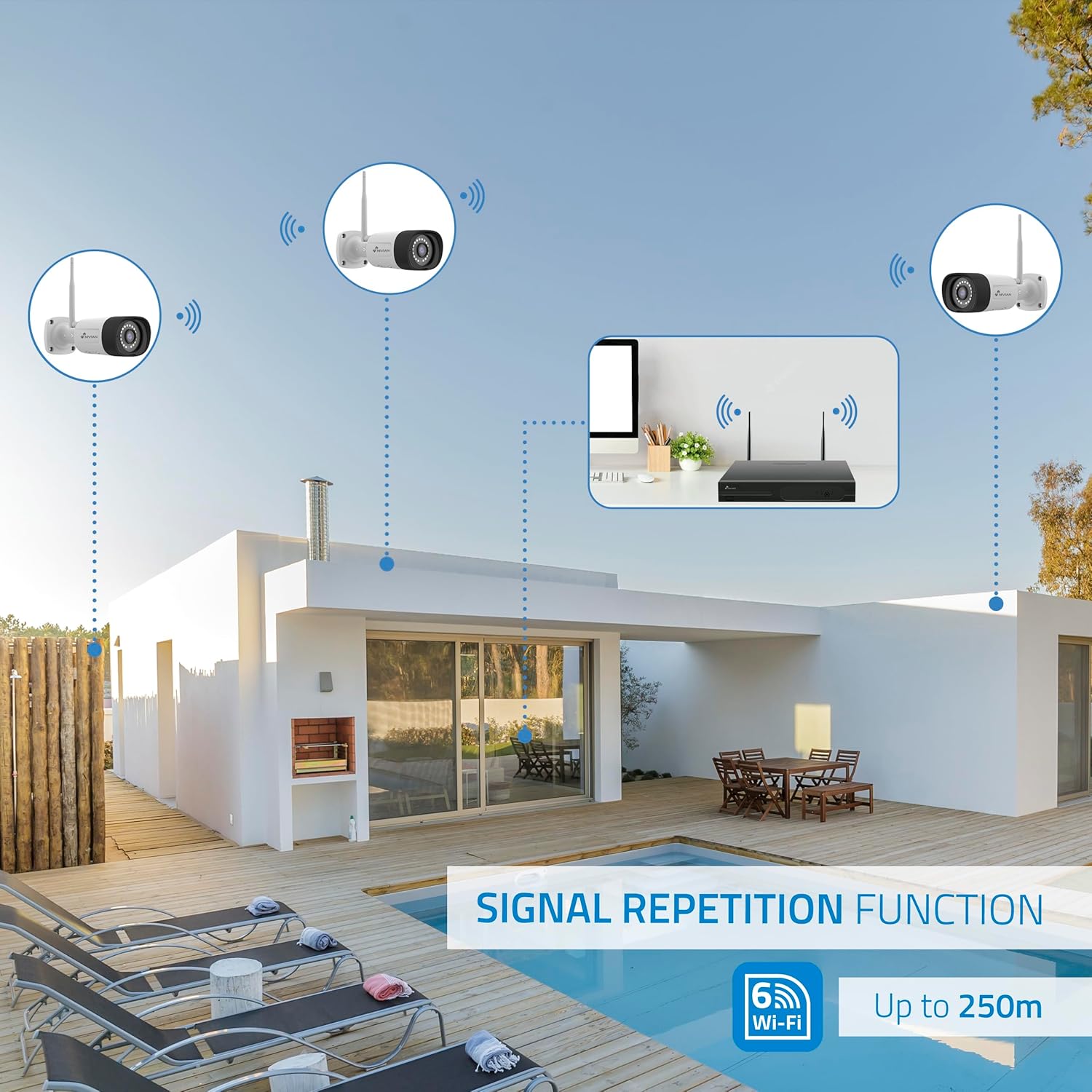
Image: Diagram showing the signal repetition function of the NIVIAN WiFi CCTV system, where cameras can extend the WiFi range up to 250 meters from the NVR.
4.3. EseeCloud App Setup
- Преземи апликација: Download the "EseeCloud" app from your mobile device's app store (available for iOS, Android).
- Регистрирајте сметка: Отворете ја апликацијата и регистрирајте нова сметка или најавете се ако веќе имате.
- Додај уред: Follow the in-app instructions to add your NVR system. This typically involves scanning a QR code displayed on the NVR's monitor or entering the device ID manually.
- Далечински ViewИНГ: Откако ќе се додаде, можете view live feeds, access recordings, and configure settings remotely.

Image: Smartphone screen displaying the EseeCloud app interface for managing the security system, showing live camera feeds and control options, with NIVIAN cameras and a laptop in the background.
5. Упатства за работа
5.1. Во живо View
Access live camera feeds through the NVR connected to a monitor or via the EseeCloud mobile app. The NVR interface allows you to switch between single-camera view и мрежа со повеќе камери view.
5.2. Снимање
- Континуирано снимање: The system is configured for continuous recording by default to the 1TB hard drive.
- Снимање на откривање на движење: Configure cameras to record only when motion is detected. This can be scheduled via the NVR settings or EseeCloud app.
- H.265+ Codec: The system uses H.265+ video compression to optimize storage space while maintaining video quality.
5.3. Репродукција
Пристап до снимената хранаtage through the NVR's playback menu or the EseeCloud app. You can search recordings by date, time, and event type (e.g., motion detection).
5.4. Детекција на луѓе со вештачка интелигенција
The cameras feature advanced AI human detection to differentiate human movement from other objects, significantly reducing false alarms. When human motion is detected, the system can trigger recordings, send notifications, and activate the white LED night vision for color footage.

Image: NIVIAN camera detecting a person at night, with the white LED light activated for color night vision, and a mobile notification indicating motion detection.
5.5. Двонасочно аудио
Use the EseeCloud app to utilize the two-way audio feature. This allows you to listen to audio from the camera's location and speak through the camera's built-in speaker.
5.6. Режими на ноќно гледање
- Infrared (IR) Mode: Provides black and white video in low-light conditions for discreet surveillance.
- White LED Mode: When motion is detected in low light, the camera's white LEDs activate, providing full-color video and acting as a deterrent.
6. Одржување
- Чистење на камерата: Редовно чистете ги леќите на фотоапаратот со мека, дamp крпа за да се обезбеди јасен квалитет на сликата. Не користете груби хемикалии.
- Ажурирања на фирмверот: Check for firmware updates for the NVR and cameras through the EseeCloud app or NVR settings. Keep your system updated for optimal performance and security.
- Управување со хард диск: The 1TB hard drive will automatically overwrite the oldest recordings when full. If you need to preserve specific footage, back it up to an external device.
- Проверка на напојувањето: Ensure all power adapters are securely connected and free from damage.
7 Смена на проблеми
7.1. No Camera Feed
- Проверете ја моќноста: Ensure the camera is powered on and its adapter is working.
- WiFi сигнал: Verify the camera is within the NVR's WiFi range. Use the signal repetition function if necessary.
- Повторно спарување на камерата: If issues persist, try re-pairing the camera with the NVR through the NVR's menu.
7.2. Лош квалитет на сликата
- Чиста леќа: Исчистете го објективот на камерата од нечистотија или дамки.
- Осветлување: Обезбедете соодветно осветлување за оптимален квалитет на сликата, особено ноќе.
- WiFi пречки: Reduce potential WiFi interference by moving the camera or NVR, or by using the signal repetition function.
7.3. Remote Access Issues (EseeCloud App)
- Интернет врска: Ensure both your NVR and mobile device have a stable internet connection.
- NVR Network Settings: Verify the NVR is correctly connected to your router and has internet access.
- Верзија на апликација: Ensure your EseeCloud app is updated to the latest version.
7.4. Hard Drive Full / Recording Issues
- Проверете го складирањето: Verify the hard drive status in the NVR settings.
- Распоред за снимање: Осигурајте се дека распоредите за снимање се правилно конфигурирани.
- Здравје на тврдиот диск: If issues persist, the hard drive may need to be checked or replaced.
8. Спецификации
| Бренд | НИВИЈАНСКИ |
| Број на модел | NV-KIT830W-8CAM |
| Димензии на производот (Д x Ш x В) | 23 x 12 x 8 cm; 6.2 килограми |
| Технологија за поврзување | Wireless (WiFi-6) |
| Резолуција за снимање видео | 2K (3MP) |
| Број на канали | 10 (NVR) |
| Број на камери | 6 |
| Капацитет на складирање | 1 TB Hard Drive (included) |
| Карактеристики на камерата | IP Cameras SuperHD with PTZ, Night Vision, AI Human Detection, Two-Way Audio |
| Стапка на слики | 15 fps, 24 fps, 30 fps |
| Компатибилни уреди | Television (via HDMI) |
| Тип на струја | Монтирање на ѕид |
| Земја на потекло | Кина |
9. Гаранција и поддршка
NIVIAN offers technical support to all customers. If you have any questions, suggestions, or encounter any issues with your WiFi surveillance camera kit, please do not hesitate to contact us.
You can reach us through Amazon messages or via any official NIVIAN brand channel. Please refer to your purchase documentation for specific warranty terms and contact details.


