1. Вовед
This manual provides detailed instructions for the JOMAA 20-Key Macro Programmable Numeric Gaming Keyboard. This device is designed to enhance your gaming and productivity experience with its customizable features and robust construction. Please read this manual thoroughly to ensure proper setup and operation.
Клучни карактеристики:
- Hot-Swappable Keys: Customize your typing feel by easily changing switches.
- Тело од алуминиумска легура: Обезбедува издржливост и врвна естетика.
- RGB осветлување: Features 12 distinct lighting modes for personalized ambiance.
- Интерфејс тип C: Ensures versatile and reliable connectivity.
- Detachable Cable Design: Enhances portability and simplifies storage.
- Макро програмирање: Supports macro definitions for 19 keys, optimizing workflow and gaming efficiency.
- Структура на дихтунг: Contributes to a responsive and comfortable typing experience.

Image 1.1: The JOMAA 20-Key Macro Programmable Numeric Gaming Keyboard, showcasing неговиот компактен дизајн и распоред на копчињата.
2. Поставување
Follow these steps to set up your JOMAA 20-Key Macro Programmable Numeric Gaming Keyboard:
- Отпакувај: Внимателно извадете ја тастатурата и USB-C кабелот од пакувањето.
- Поврзете го кабелот: Insert the USB-C end of the provided cable into the Type-C port on the keyboard.
- Поврзете се со компјутер: Plug the standard USB-A end of the cable into an available USB port on your computer (PC, Laptop, or Gaming Console).
- Системско препознавање: Your operating system (Windows XP/Vista/7/8/10, Mac) should automatically detect the device. No additional drivers are required for basic functionality.

Image 2.1: The detachable USB-C cable connecting the keyboard to a laptop, highlighting the keyline separation design for portability.
3. Ракување со тастатурата
The JOMAA 20-Key keyboard functions as a standard numeric keypad out of the box. It also features dedicated keys for mode switching and lighting control.
Префрлување режим:
- The keyboard supports switching between different operational modes, such as 'Game Mode' and 'Office Mode'.
- Locate the dedicated 'Mode Switching Key' (often marked with a gear or sun icon) on the keyboard.
- Press this key to cycle through available modes. Each mode may have different key assignments or lighting profiles.
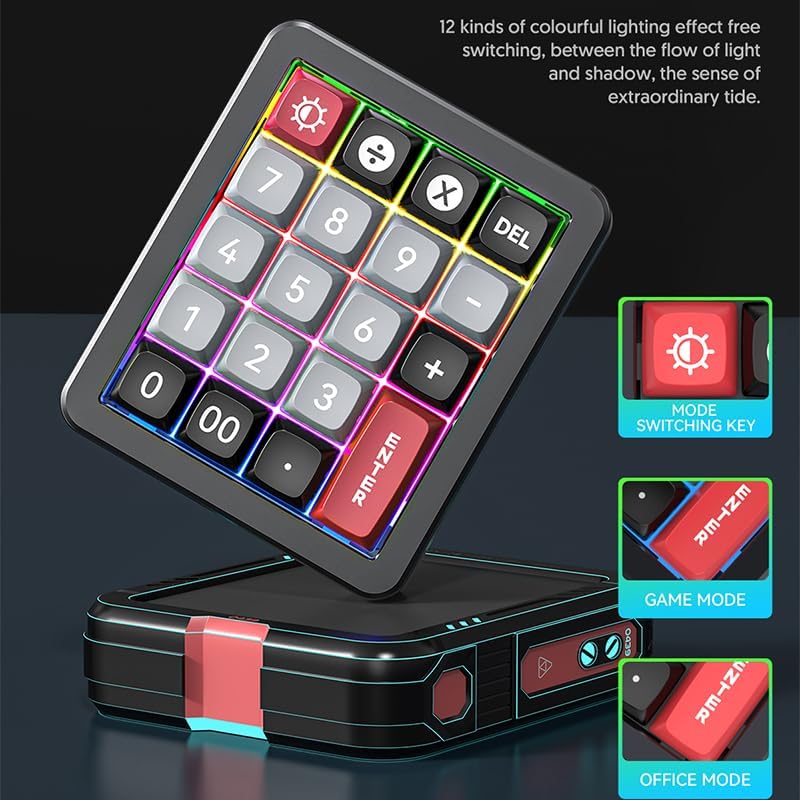
Image 3.1: Illustration of the mode switching key and visual indicators for Game Mode and Office Mode.
4. Макро програмирање
The JOMAA 20-Key keyboard allows for macro definition on 19 of its keys, significantly enhancing efficiency for complex tasks or gaming commands.
- Потребно за софтвер: To program macros, you must use the dedicated driver software. This software is compatible with Windows operating systems only.
- Преземање на софтвер: Погледнете го официјалниот претставник на производителот website for the latest driver software download.
- Програмски чекори:
- Install and launch the driver software on a Windows computer.
- Connect the keyboard to the Windows computer.
- Within the software interface, select the key you wish to program.
- Define your desired macro sequence or key remapping.
- Save the settings to the keyboard's onboard memory.
- Cross-System Use: Once programmed on a Windows system, the keyboard will retain its macro settings when connected to other compatible systems, including Mac.

Image 4.1: A visual representation of the macro programming software interface, showing options for key assignment.
5. RGB осветлување
The keyboard features dynamic RGB lighting with 12 distinct modes to personalize your setup.
- Циклусни режими: Use the dedicated lighting control key (often marked with a sun or lightbulb icon) to cycle through the 12 available lighting effects.
- Осветленост/брзина: Some lighting modes may allow for adjustment of brightness or animation speed through key combinations (refer to the software or quick guide for specific commands).
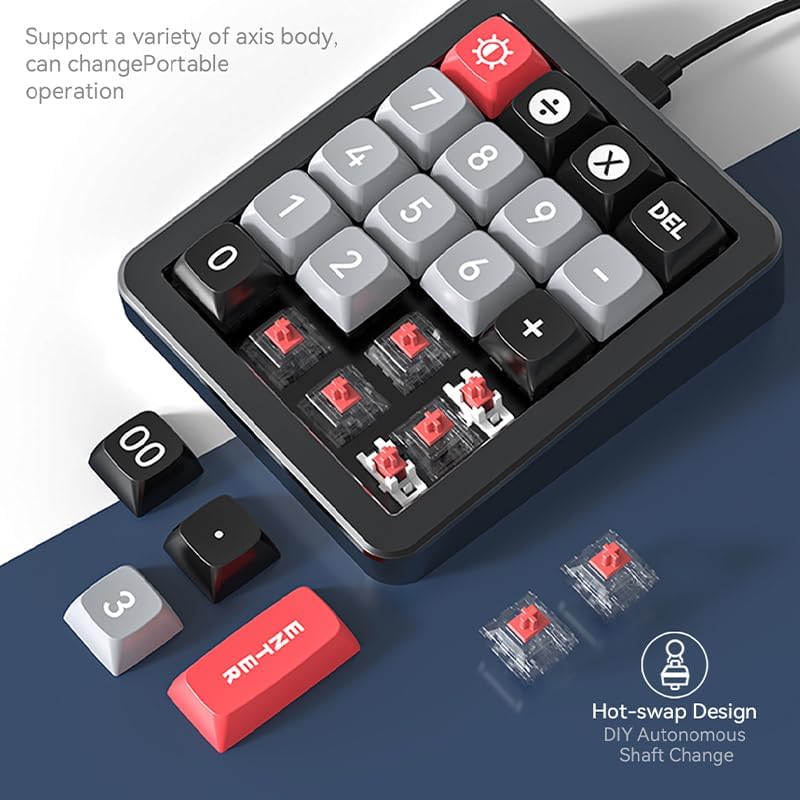
Image 5.1: The keyboard illuminated with various RGB lighting effects, demonstrating the 12 available modes.
6. Hot-Swappable Keys
The hot-swappable design allows you to easily change mechanical switches without soldering, offering a personalized typing experience.
- Отстранете го копчето: Use a keycap puller to gently remove the desired keycap.
- Отстранете го прекинувачот: Use a switch puller to carefully extract the mechanical switch from its socket.
- Вметни нов прекинувач: Align the pins of the new mechanical switch with the holes on the PCB. Gently press the switch into place until it clicks securely. Ensure pins are not bent.
- Заменете го капачето на клучот: Place the keycap onto the new switch.

Image 6.1: An illustration demonstrating the hot-swap design, showing how switches can be easily changed.
7. Gasket Structure
The keyboard incorporates a gasket structure, which provides a more flexible and cushioned typing feel compared to traditional mounting styles. This design helps to reduce typing noise and offers a more consistent keypress experience.

Image 7.1: A cross-section diagram detailing the components of the gasket structure, including wear-resistant keycaps, superstructure, red shaft, positioner plate, PCB board, and bottom cover.
8. Одржување
Правилното одржување обезбедува долготрајност и оптимални перформанси на вашата тастатура.
- Чистење: Use a soft, dry cloth to wipe the keyboard surface. For deeper cleaning, gently remove keycaps and use compressed air to clear dust and debris from between switches. Avoid using harsh chemicals or abrasive materials.
- Грижа за кабел: When detaching the USB-C cable, always pull from the connector head, not the cable itself, to prevent damage. Store the cable neatly to avoid kinks or bends.
- Складирање: Кога не ја користите подолг период, чувајте ја тастатурата на чиста, сува средина, подалеку од директна сончева светлина и екстремни температури.
9 Смена на проблеми
If you encounter issues with your JOMAA keyboard, refer to the following common solutions:
- Тастатурата не реагира:
- Проверете дали USB-C кабелот е безбедно поврзан и со тастатурата и со компјутерот.
- Обидете се да ја поврзете тастатурата со друг USB порт на вашиот компјутер.
- Тестирајте ја тастатурата на друг компјутер за да исклучите проблеми специфични за системот.
- Копчињата не функционираат правилно:
- If using hot-swappable switches, ensure the switches are fully seated and their pins are not bent.
- If macros are programmed, verify the settings in the driver software.
- Проблеми со RGB осветлување:
- Press the lighting control key to cycle through modes.
- Осигурајте се дека тастатурата добива доволно напојување од USB-портата.
- Macro Programming Software Issues:
- Ensure you are running the software on a Windows operating system.
- Download the latest version of the driver software from the official JOMAA webсајт.
10. Спецификации
| Карактеристика | Детал |
|---|---|
| Бренд | JOMAA |
| Модел | B0DZ24X11F |
| Клучеви | 20-Key Numeric Pad |
| Поврзување | USB-C (кабел што може да се одвои) |
| Материјал за тело | Алуминиумска легура |
| Тип на прекинувач | Hot-Swappable Mechanical |
| Осветлување | RGB (12 режими) |
| Поддршка за макро | 19 програмибилни клучеви |
| Системска компатибилност | Windows XP/Vista/7/8/10, Mac (Driver for Windows only) |
| Димензии на пакетот | 6.3 x 4.72 x 1.97 инчи |
| Тежина на ставката | 15.5 унци |
11. Гаранција и поддршка
JOMAA products are manufactured to high-quality standards. For warranty information, please refer to the documentation included with your purchase or visit the official JOMAA webсајт.
If you require further assistance or encounter issues not covered in this manual, please contact JOMAA customer support through their official webлокацијата или продавачот на мало каде што е купен производот.


