Вовед
Thank you for choosing the CHUWI Wireless Mouse S1. This 2.4GHz USB computer mouse is designed for comfort and efficiency, featuring a 1600 DPI optical sensor with 3-level adjustable DPI settings, long battery life, and broad compatibility with various devices. This manual provides essential information for setting up, operating, maintaining, and troubleshooting your new wireless mouse.
Содржина на пакетот
Ве молиме проверете дали сите артикли се присутни во вашиот пакет:
- CHUWI Wireless Mouse
- USB ресивер
- Корисничка документација
- 1 AA батерија (претходно инсталирана или вклучена одделно)
Водич за поставување
Follow these steps to set up your CHUWI Wireless Mouse S1:
- Лоцирајте го USB приемникот: Gently remove the bottom cover of the mouse by sliding it downward. The USB receiver and the battery compartment are located inside.
- Инсталирајте ја батеријата: Insert the provided AA battery into the battery compartment, ensuring correct polarity.
- Преземете го USB приемникот: Take out the small USB receiver from its storage slot.
- Поврзете се со вашиот уред: Вклучете го USB приемникот во слободен USB порт на вашиот компјутер, лаптоп или таблет.
- Затворете го капакот: Replace the bottom cover of the mouse.
- Вклучување: Slide the power switch at the bottom of the mouse to the "on" position. The mouse should now be ready for use.

Figure 1: Locating the USB receiver and installing the AA battery.
Упатства за работа
Поврзување на глувчето
The CHUWI Wireless Mouse S1 uses 2.4G wireless technology for a stable connection up to 33 feet (10 meters). Once the USB receiver is plugged into your device and the mouse is powered on, it will automatically establish a connection. No complex pairing is required.

Figure 2: Establishing a 2.4G wireless connection.
Прилагодување на DPI
The mouse features three adjustable DPI (Dots Per Inch) settings: 800, 1200, and 1600. To switch between DPI levels, simply press the DPI button located below the scroll wheel. Each press cycles through the available settings, allowing you to adjust cursor sensitivity for different tasks such as general browsing, office work, graphic design, or gaming.

Figure 3: Adjusting DPI settings with the dedicated button.
Копчиња за навигација
The mouse is equipped with convenient forward and back buttons on the side. These buttons allow for quick navigation through web pages, documents, and folders, enhancing your workflow efficiency.
Silent Click Feature
The CHUWI Wireless Mouse S1 is designed with silent click buttons, making it suitable for quiet environments such as libraries, offices, or late-night use. This feature minimizes click noise without compromising tactile feedback.

Figure 4: The silent click feature for quiet operation.
Ергономски дизајн
The mouse features an ergonomic design that conforms to the natural curve of your hand, providing a comfortable grip for extended use. Its compact and lightweight build, along with rubber-coated side grips, helps reduce hand fatigue. The design is ambidextrous, accommodating both left-handed and right-handed users.

Слика 5: Ергономски дизајн за удобна употреба.
Информации за батеријата
The CHUWI Wireless Mouse S1 is powered by a single AA battery, offering an approximate battery life of 12-15 months. The mouse is designed for convenience with no on/off switch; simply pick it up and start using it. This design eliminates the need for frequent charging, providing hassle-free use for mobile work and daily tasks.
Одржување
To ensure optimal performance and longevity of your CHUWI Wireless Mouse S1:
- Чистење: Користете мека, сува крпа за да ја избришете површината на глувчето. За тврдокорна нечистотија, малку дampИзмијте ја крпата со вода или благ раствор за чистење. Избегнувајте употреба на груби хемикалии или абразивни материјали.
- Одржување на сензорот: Periodically clean the optical sensor area at the bottom of the mouse with a cotton swab to prevent dust buildup, which can affect tracking performance.
- Складирање: When not in use for extended periods, consider removing the AA battery to prevent potential leakage. Store the USB receiver in its designated slot within the mouse to prevent loss.
- Заштита на животната средина: The mouse features a splash-proof and dust-proof design, contributing to its durability. However, avoid exposing it to excessive moisture or dust.
Решавање проблеми
If you encounter issues with your CHUWI Wireless Mouse S1, refer to the following common solutions:
- Глувчето не реагира:
- Проверете дали AA батеријата е правилно инсталирана и има доволно полнење. Заменете ја батеријата доколку е потребно.
- Проверете дали USB приемникот е безбедно приклучен во функционален USB порт на вашиот компјутер. Обидете се со друг USB порт.
- Make sure the mouse's power switch (if present, though this model is designed to be always on when battery is inserted) is in the 'on' position.
- Рестартирајте го компјутерот.
- Неправилно движење на курсорот:
- Clean the optical sensor at the bottom of the mouse.
- Уверете се дека го користите глувчето на соодветна површина. Високо рефлектирачки или транспарентни површини може да влијаат на следењето. Се препорачува подлога за глушец.
- Check for interference from other wireless devices. Move the mouse closer to the USB receiver.
- Проблеми со поврзувањето:
- If the connection is unstable, try plugging the USB receiver into a different USB port, preferably one closer to the mouse.
- Ensure there are no large metal objects between the mouse and the receiver that could block the signal.
- Копчињата не работат:
- Check if the mouse is properly connected and powered on.
- Тестирајте го глувчето на друг компјутер за да утврдите дали проблемот е во глувчето или во поставките на компјутерот.
Спецификации
Detailed specifications for the CHUWI Wireless Mouse S1:
| Димензии на производот | 3.89 x 2.36 x 0.04 инчи |
| Тежина на ставката | 1.76 унци |
| Број на модел на ставка | CHUWI Wireless Mouse S1 |
| Батерии | 1 AA батерија (вклучена) |
| Технологија за поврзување | 2.4G безжична (USB приемник) |
| Технологија за откривање на движење | Оптички |
| Поставки за ДПИ | 800, 1200, 1600 (Прилагодливо) |
| Копчиња | 4 (Left, Right, Scroll Wheel/Middle, DPI, Forward, Back) |
| Боја | Црното |
| Компатибилност | PC, Mac, Laptop, Windows Tablets (Universal USB interface) |
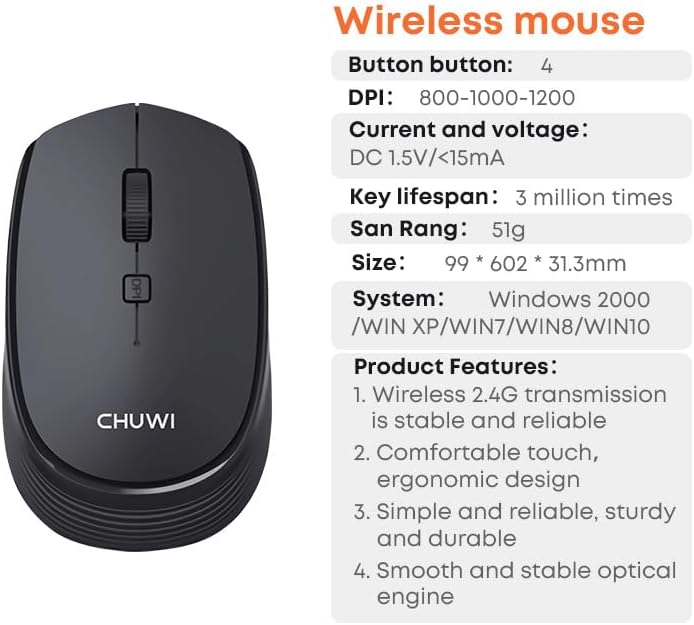
Figure 6: CHUWI Wireless Mouse S1 and its key specifications.
Гаранција и поддршка
CHUWI is committed to providing high-quality products and excellent customer service. While specific warranty details for this mouse are not provided, CHUWI generally offers professional support for its products.
- Професионална поддршка: CHUWI offers lifetime factory professional support.
- Поддршка преку Интернет: 24 hours of online support is available to assist with any issues or questions you may have.
За дополнителна помош, посетете ја официјалната страница на CHUWI webстраницата или директно контактирајте ја нивната служба за корисници.


