1. Вовед
Thank you for choosing the OREiN OL17006 Bathroom Exhaust Fan with Light. This product is designed to enhance air quality and illumination in your bathroom, laundry room, or similar indoor spaces. It features a humidity sensor, adjustable airflow (CFM), a multi-color temperature LED light, and a nightlight function. Please read this manual thoroughly before installation and operation to ensure safe and efficient use.
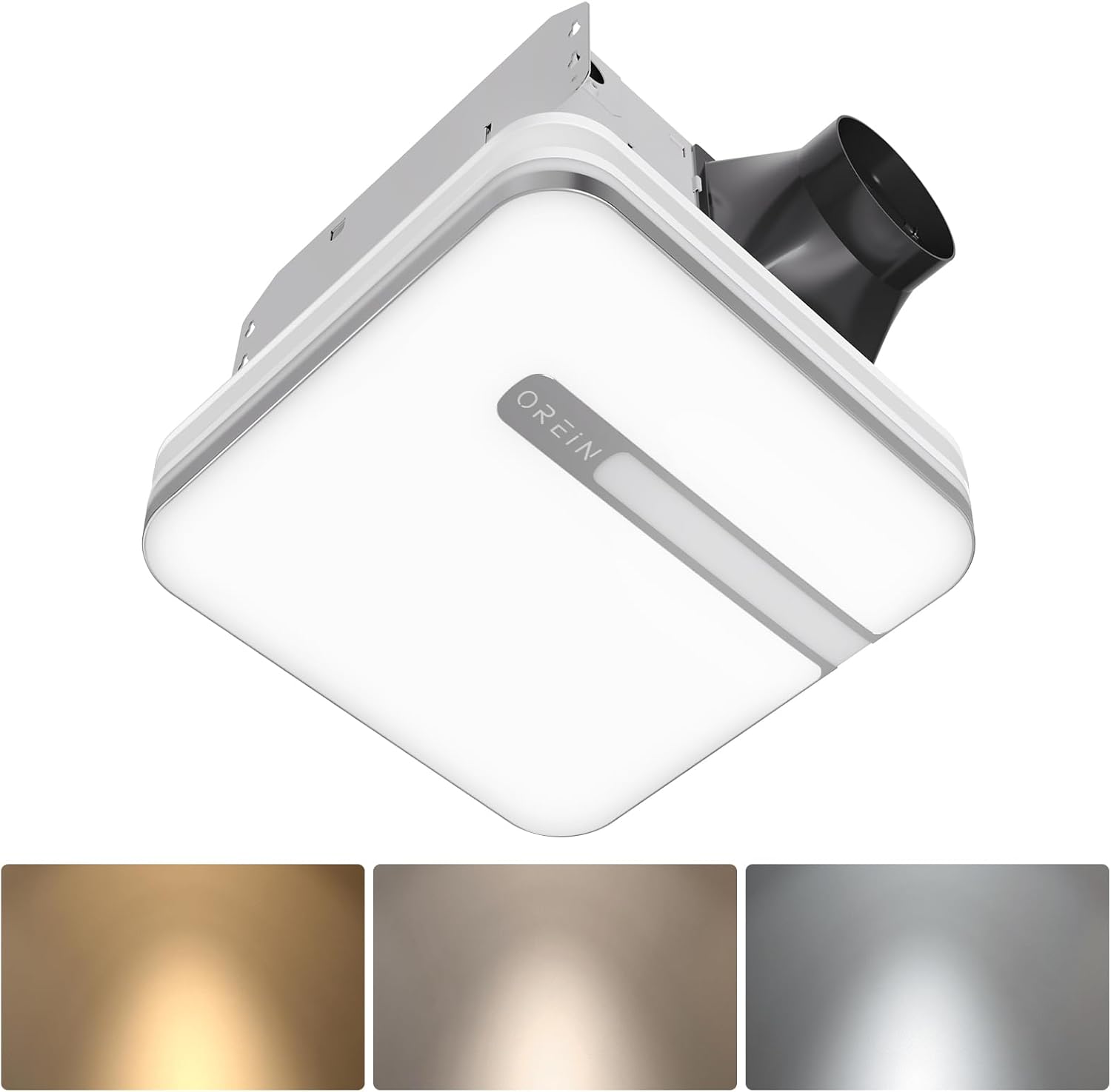
Image 1.1: The OREiN OL17006 Bathroom Exhaust Fan with Light, showcasinнеговиот елегантен дизајн и интегрирано осветлување.
2. Информации за безбедност
Секогаш следете ги основните безбедносни мерки на претпазливост при инсталирање, ракување и одржување на овој производ за да го намалите ризикот од пожар, електричен удар или повреда на лица.
- Прочитајте ги сите упатства: Familiarize yourself with the product and its functions before use.
- Електрична безбедност: Disconnect power at the service panel before wiring or servicing the unit. Ensure all wiring complies with local electrical codes and standards.
- Квалификуван персонал: Installation and wiring should be performed by a qualified electrician.
- Заземјување: Оваа единица мора да биде правилно заземјена.
- Вентилација: Do not use this fan in kitchens or areas where it may be exposed to grease.
- Расчистување: Одржувајте соодветно растојание од запаливи материјали.
- Оштетување: Do not operate any fan with a damaged cord or plug, or if the fan motor is dropped or damaged in any manner.
3. Содржина на пакетот
Проверете дали сите компоненти се присутни пред да започнете со инсталацијата:
- OREiN OL17006 издувен вентилатор за бања со светло
- Fast Bracket for Installation
- Упатство за употреба (Овој документ)
- Mounting Hardware (Screws, wire nuts, etc.)
4. Спецификации
| Карактеристика | Спецификација |
|---|---|
| Бренд | ОРЕиН |
| Име на моделот | OL17006 |
| Капацитет на проток на воздух | 80 / 110 Cubic Feet Per Minute (CFM) selectable |
| Ниво на бучава | 0.8 / 1.0 Sones |
| Ватtage | 30 вати (вентилатор) |
| Voltage | 120 волти |
| Излез на светлина | 1500 лумени |
| Температура на боја | 3000K (Soft White), 4000K (Bright White), 5000K (Daylight) selectable |
| Ноќна светлина | 2200 илјади |
| Посебни карактеристики | Humidity Sensor, Adjustable Color Temperature, LED Light |
| Дијаметар на канал | 4 инчи |
| Димензии на домување | 9.25" x 9.75" x 7.1" |
| Големина на инсталација | 10.24" x 9.37" (260 x 238 мм) |
| Light Cover Size | 13" x 13" |
| Тип на соба | Бања, Перална |
5. Поставување и инсталација
The OREiN OL17006 fan is designed for easy installation in new construction or retrofit applications. It fits 10.24" x 9.37" ceiling constructions with a 4-inch duct.
5.1 Чекори пред инсталација
- Исклучување на струја: Ensure power is turned OFF at the circuit breaker before starting any installation work.
- Избор на локација: Choose a suitable location in the ceiling, ensuring adequate space for the fan housing and ductwork.
- Канал: Plan for a 4-inch duct connection to the exterior.
5.2 Постапка за инсталација
The fan comes with a fast bracket for secure and easy installation. You can mount the exhaust fan between ceiling joists using the fast bracket, or nail/screw it directly to a joist.
- Монтирање на куќиштето: Secure the fan housing to the ceiling joists using the provided fast bracket or by nailing/screwing directly. Ensure the housing is level and firmly attached.
- Поврзување на канал: Connect the 4-inch ductwork to the fan's exhaust port. Seal all duct connections with appropriate tape or sealant to prevent air leakage.
- Електрични жици: Connect the electrical wiring according to the wiring diagram provided with the unit and local electrical codes. Ensure proper grounding.
- Light Cover Installation: Откако ќе завршите со поврзувањето и ќе го тестирате ожичувањето, прикачете го капакот на светлото на куќиштето на вентилаторот.

Image 5.1: Diagram illustrating the product dimensions, installation size (10.24" x 9.37"), and the fast bracket for mounting.
6. Упатства за работа
The OREiN OL17006 fan offers versatile operation modes and lighting options.
6.1 CFM Selection (Airflow Speed)
You can select between 80 CFM and 110 CFM airflow speeds to suit your ventilation needs. This is done by sliding a toggle switch located on the fan housing before final installation of the light cover.
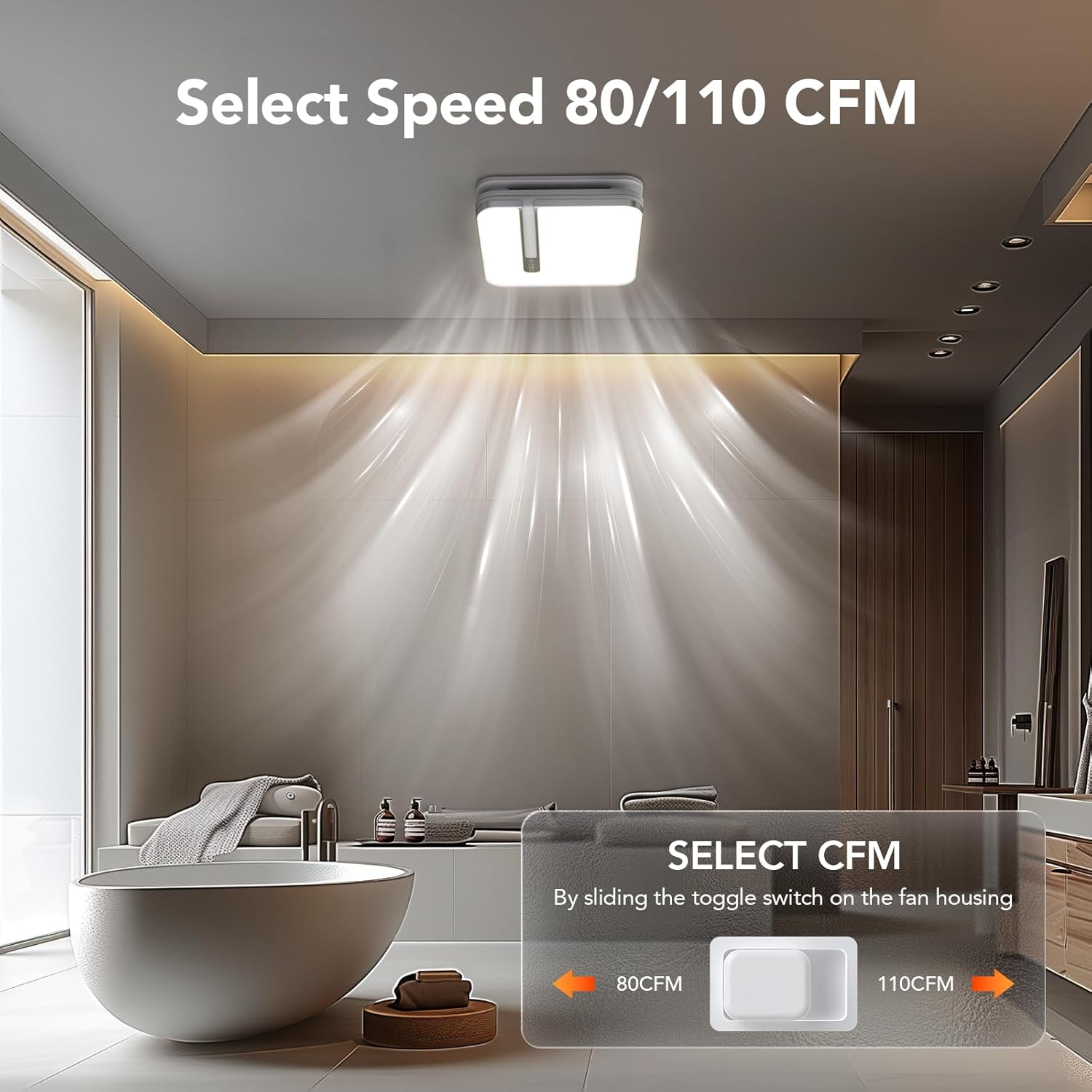
Image 6.1: Illustration of the toggle switch on the fan housing used to select between 80 CFM and 110 CFM airflow settings.
6.2 Light Color Temperature (CCT) Selection
The integrated LED light offers three color temperature options: 3000K (Soft White), 4000K (Bright White), and 5000K (Daylight). To select your desired CCT, slide the toggle switch located on the back of the bath fan shade before installing it.

Image 6.2: Visual guide for selecting the LED light's color temperature (3000K, 4000K, 5000K) using the switch on the lampсенка.
6.3 Функција за ноќно светло
The fan includes a 2200K nightlight. To activate the nightlight mode, cycle the wall switch of the light from OFF to ON-OFF-ON within 2 seconds. This quick sequence will switch the light to nightlight mode.

Слика 6.3: Поранешенample of the 2200K nightlight providing subtle illumination in a bathroom setting.
6.4 Humidity Sensing Mode
The built-in humidity sensor automatically turns the fan on when the humidity level in the room exceeds 60%. The LED indicator light on the back of the fan will be green when in humidity sensing mode.
To switch between Manual Mode (fan runs continuously) and Humidity Sensing Mode, cycle the wall switch of the fan to the "OFF" position and then back to the "ON" position. The fan will indicate the current mode by the color of its indicator light.
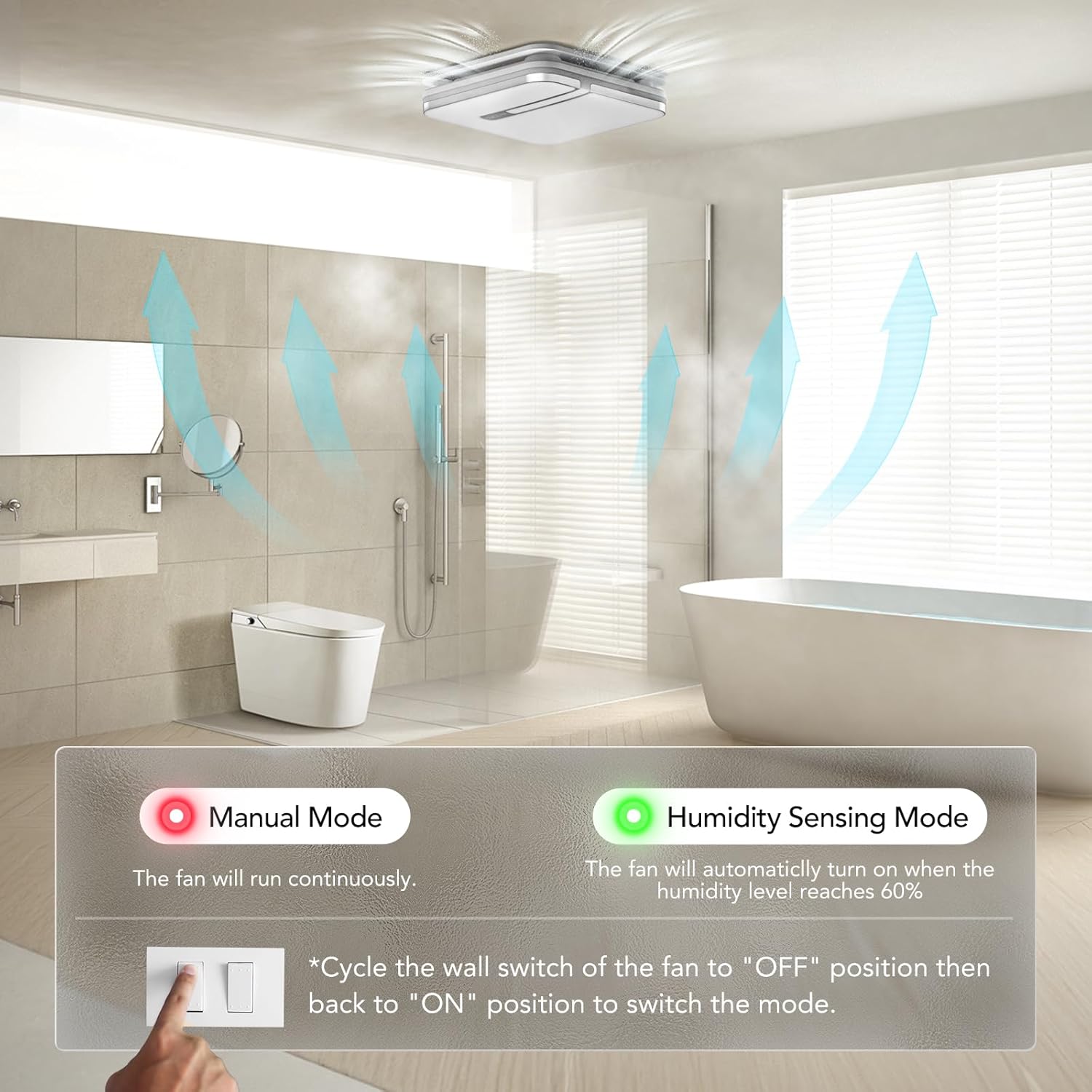
Image 6.4: Explanation of Manual Mode (red indicator, continuous operation) and Humidity Sensing Mode (green indicator, automatic activation at 60% humidity).
7. Одржување
Редовното одржување обезбедува оптимални перформанси и долготрајност на вашиот вентилатор за издувни гасови.
- Исклучување на струја: Секогаш исклучувајте го напојувањето на прекинувачот пред да вршите какво било одржување.
- Cleaning the Grille/Light Cover: Remove the light cover and wash it with mild soap and water. Rinse thoroughly and dry completely before reattaching.
- Чистење на лопатките на вентилаторот: Gently wipe the fan blades with a damp cloth to remove dust and debris. Do not bend the blades.
- Одржување на моторот: Моторот е трајно подмачкан и не бара дополнително подмачкување.
- Инспекција на канали: Periodically check ductwork for obstructions or damage.
8 Смена на проблеми
If you encounter issues with your OREiN OL17006 fan, refer to the following common problems and solutions:
| Проблем | Можна причина | Решение |
|---|---|---|
| Вентилаторот не работи | Нема напојување Лабава жици Неисправност на моторот | Проверете го прекинувачот и ѕидниот прекинувач Verify all wire connections are secure (ensure power is off) Контактирајте ја поддршката за корисници |
| Светлото не се вклучува | Нема напојување Лабава жици Неуспех на ЛЕР | Проверете го прекинувачот и ѕидниот прекинувач Verify all wire connections are secure (ensure power is off) Контактирајте ја поддршката за корисници |
| Вентилаторот е бучен | Лабава монтажа Duct obstruction Валкани сечила на вентилаторот Проблем со моторот | Ensure fan housing is securely mounted Check ductwork for debris Clean fan blades (ensure power is off) Контактирајте ја поддршката за корисници |
| Humidity sensor not activating | Избран е погрешен режим Humidity level below 60% Неисправност на сензорот | Cycle wall switch to switch to Humidity Sensing Mode Ensure room humidity is above 60% Контактирајте ја поддршката за корисници |
| Nightlight not activating | Incorrect switch sequence | Ensure ON-OFF-ON sequence is performed within 2 seconds |
9. Гаранција и поддршка
OREiN products are manufactured with quality and reliability in mind. For specific warranty details, please refer to the warranty card included with your product or contact OREiN customer service directly.
9.1 Поддршка за корисници
For technical assistance, troubleshooting not covered in this manual, or warranty inquiries, please contact OREiN customer support:
- Телефон: 1 (844) 506-1530 (24-часовна услуга)
- Онлајн: Visit the OREiN store on Amazon or search for OREiN on the internet to find contact options.

Image 9.1: OREiN customer service contact details, including a 24-hour service phone number.


