1. Вовед
This user manual provides comprehensive instructions for the Jedel KL69 60% Mechanical Gaming Keyboard. It covers setup, operation, maintenance, troubleshooting, and detailed specifications to help you maximize your keyboard's performance and lifespan. The Jedel KL69 is a compact, wired mechanical keyboard featuring a 61-key layout, rainbow LED backlighting, and durable blue mechanical switches, designed for an optimal gaming and typing experience.

Figure 1: Jedel KL69 60% Mechanical Gaming Keyboard. This image displays the compact keyboard with its vibrant rainbow LED backlighting and black/red keycap design.
2. Поставување
The Jedel KL69 keyboard is designed for simple plug-and-play setup. Follow these steps to connect your keyboard:
- Unpack the keyboard and its USB cable from the packaging.
- Locate an available USB Type-A port on your computer (desktop or laptop).
- Insert the USB connector of the keyboard cable firmly into the USB port on your computer.
- Your operating system (Windows, Android, Linux, etc.) will automatically detect and install the necessary drivers. This process may take a few moments.
- Once the drivers are installed, the keyboard's LED backlight will illuminate, indicating it is ready for use.

Figure 2: Connecting the Jedel KL69 Keyboard. This image shows the keyboard with its attached USB cable, ready for connection to a computer.
3. Упатства за работа
3.1 Клучни карактеристики
- 60% компактен дизајн: The KL69 features a space-saving 61-key layout, ideal for gaming setups and smaller desks.
- Arabic/English Layout: Keycaps are designed with both Arabic and English characters for versatile use.
- Сини механички прекинувачи: Provides tactile feedback and an audible click, preferred by many for typing and gaming precision.
- Виножито LED позадинско осветлување: Offers vibrant, customizable lighting effects to enhance your experience.
- Двоен удар на копчиња: Ensures legends never fade, providing long-lasting durability.
- Целосно анти-духовски третман: All 61 keys support N-key rollover, ensuring every keystroke is registered accurately, even during intense gaming sessions.
- Wired USB Connectivity: Provides a stable and reliable connection with minimal latency.

Слика 3: Готовоview of the 60% Mechanical Gaming Keyboard. This image emphasizes the compact size and key features like RGB backlight, ABS double injection keycaps, 50 million switch lifespan, and ergonomic design.
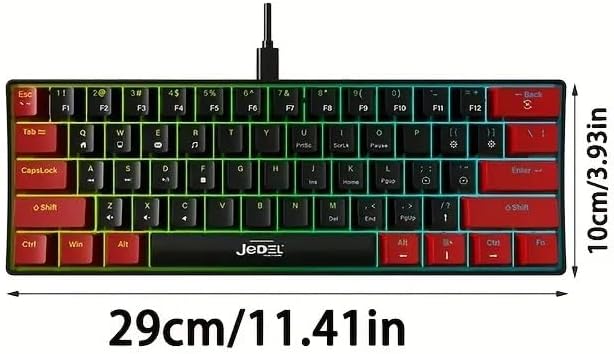
Figure 4: Blue Switches and Double-Shot Keycaps. This close-up view shows the transparent housing of the blue mechanical switches and the durable double-shot keycaps, designed for fast response and longevity.
3.2 Lighting Adjustment Function
The Jedel KL69 keyboard offers 10 distinct rainbow LED lighting modes. Use the following key combinations to adjust the lighting effects:
- Fn + \: Switch between 19 stunning LED lighting effects. (Note: The product description states 10 modes, while the image indicates 19. Please refer to the image for the most accurate number of effects.)
- Fn + [: Намалете ја осветленоста на позадинското осветлување.
- Fn + ]: Зголемете ја осветленоста на позадинското осветлување.
- Fn + ": Slow down the lighting effect speed.
- Fn + .: Speed up the lighting effect speed.

Figure 5: Introduction to Light Adjustment Functions. This diagram illustrates the Fn key combinations for controlling LED lighting effects, brightness, and speed.
3.3 Специјални функции на копчињата
The 60% layout utilizes the Function (Fn) key to access secondary functions of certain keys. Refer to the keycap legends for specific Fn combinations. For example, multimedia controls or F-keys (F1-F12) are typically accessed by holding down the Fn key and pressing the corresponding key.
4. Одржување
Proper maintenance will ensure the longevity and optimal performance of your Jedel KL69 keyboard. Follow these guidelines for cleaning and care:
- Редовно чистење: Користете мека четка или компримиран воздух за да отстраните прашина и остатоци од меѓу копчињата на копчињата.
- Чистење на капачето на тастатурата: For deeper cleaning, you can carefully remove keycaps using a keycap puller (if included or purchased separately). Clean the keycaps with a damp cloth and mild soap, then ensure they are completely dry before reattaching.
- Површинско чистење: Избришете ја површината на тастатурата со мека, малку влажна крпа.amp крпа. Избегнувајте употреба на груби хемикалии или абразивни материјали.
- Истурени течности: In case of a liquid spill, immediately unplug the keyboard from your computer. Invert the keyboard to drain as much liquid as possible. Allow it to air dry completely for at least 24-48 hours before plugging it back in. Do not use a hairdryer as excessive heat can damage components.
- Складирање: Кога не ја користите подолг период, чувајте ја тастатурата на суво место без прашина.
5 Смена на проблеми
If you encounter issues with your Jedel KL69 keyboard, refer to the following common problems and solutions:
| Проблем | Можна причина | Решение |
|---|---|---|
| Тастатурата не реагира. | Лабава USB конекција, неисправен USB порт, проблем со драјверот. |
|
| LED backlight is not working or is dim. | Lighting mode off, brightness set too low, software conflict. |
|
| Одредени клучеви не работат. | Dust/debris under keycap, switch malfunction, software issue. |
|
6. Спецификации
Below are the detailed technical specifications for the Jedel KL69 Mechanical Gaming Keyboard:
| Карактеристика | Детал |
|---|---|
| Број на модел | KL69 |
| Име на брендот | Jedel |
| Опис на тастатурата | Механички |
| Број на клучеви | 61 |
| Технологија за поврзување | USB (жичен) |
| Посебни карактеристики | Задно осветлување (виножито LED) |
| Боја | Црно / Црвено |
| Компатибилни уреди | Desktop, Laptop (Windows, Android, etc.) |
| Препорачана употреба | Играње |
| Материјал | Акрилонитрил бутадиен стирен (ABS) |
| Вклучени компоненти | USB кабел |
| Животен век на клучот | 50 милиони преси |
| Димензии на тастатурата (Д x Ш x В) | 290 x 101 x 38 mm (11.41 x 3.93 x 1.49 инчи) |
| Тежина | Approx. 404 ±5 grams |
| Анти-Ghosting | Целосно превртување на клучот N |

Figure 6: Keyboard Dimensions. This image provides a visual representation of the keyboard's length (29 cm / 11.41 in) and width (10 cm / 3.93 in).
7. Гаранција и поддршка
For warranty information and technical support, please refer to the documentation provided with your purchase or visit the official Jedel webстраница. Зачувајте го доказот за купување за какви било гаранциски побарувања.