1. Вовед
Thank you for choosing the AURIOL Color Display Weather Station. This device provides comprehensive weather information, including indoor and outdoor temperature and humidity, animated weather forecasts, moon phase, and a clock with alarm functions. Please read this manual carefully before use to ensure proper operation and to maximize the lifespan of your product.
2. Информации за безбедност
- Keep the device away from extreme temperatures, direct sunlight, strong vibrations, and impacts.
- The main unit is designed for indoor use only. The outdoor sensor is splash-proof (IPX4) but should not be submerged in water.
- Не обидувајте се сами да го отворите или поправите уредот. За сите сервиси обратете се на квалификуван персонал.
- Чувајте ги батериите подалеку од дофат на деца. Отстранете ги искористените батерии според локалните прописи.
- Use only the provided power adapter for the main unit.
3. Содржина на пакетот
Ве молиме проверете го пакувањето за следните ставки:
- AURIOL Color Display Weather Station (Main Unit)
- Wireless Outdoor Sensor (IPX4 splash-proof)
- Адаптер за напојување за главната единица
- 4 x Alkaline Batteries (2 x 1.5 V AA for sensor, 2 x 1.5 V AAA for main unit backup)
- Упатство за употреба (овој документ)
4. Производот завршиview
Familiarize yourself with the main components of your weather station.

Слика 4.1: Main unit (right) displaying time, date, indoor/outdoor temperature, humidity, and weather forecast. Wireless outdoor sensor (left) showing its own temperature and humidity.

Слика 4.2: Close-up of the main unit's color display, highlighting the animated weather forecast symbols, moon phase indicator, and alarm icons (AL1, AL2).
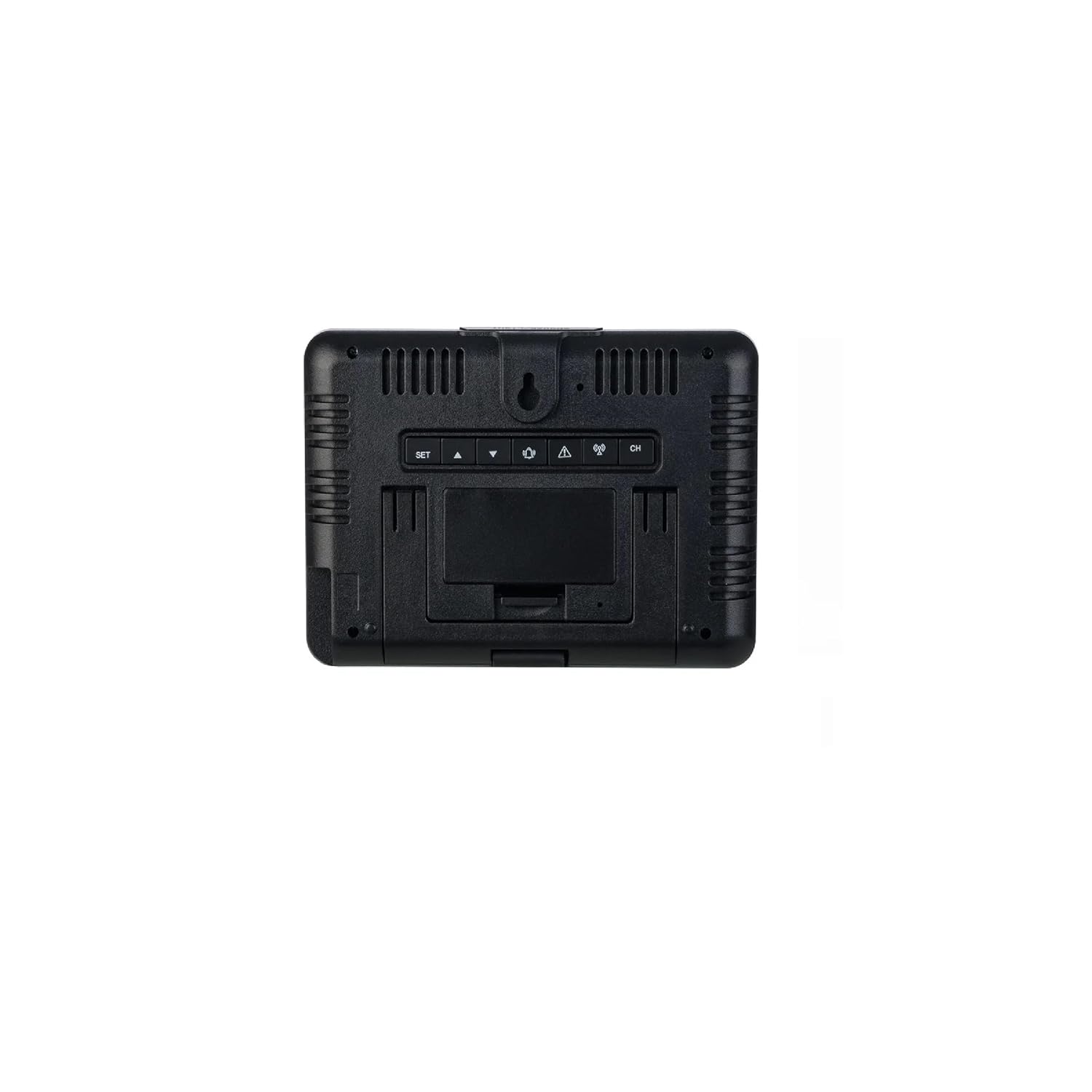
Слика 4.3: Заден дел view of the main unit. Visible are the control buttons (SET, UP, DOWN, ALARM, CH) and the battery compartment cover. The unit can be placed on a flat surface or wall-mounted.
5. Поставување
5.1. Инсталација на батерија
- Надворешен сензор: Open the battery compartment on the back of the wireless outdoor sensor. Insert 2 x 1.5 V AA alkaline batteries, observing the correct polarity (+/-). Close the compartment securely.
- Main Unit (Backup): Open the battery compartment on the back of the main unit (refer to Figure 4.3). Insert 2 x 1.5 V AAA alkaline batteries, observing the correct polarity (+/-). These batteries serve as a backup in case of power outage. Close the compartment.
5.2. Вклучување на главниот уред
Connect the provided power adapter to the DC input port on the back of the main unit and then plug it into a wall outlet. The display will light up permanently. The backup batteries will ensure settings are retained if the power adapter is disconnected.
5.3. Синхронизација на сензори
Once both the sensor and main unit are powered, the main unit will automatically attempt to connect with the outdoor sensor. This process may take a few minutes. The outdoor temperature and humidity readings will appear on the main unit's display once connected. If synchronization fails, press and hold the "CH" button on the main unit to initiate a manual search for the sensor.
5.4. Поставување на сензорот
Place the outdoor sensor in a shaded, dry location, protected from direct sunlight and rain, but within the 100m wireless range of the main unit. Avoid placing it near large metal objects or electrical appliances that could interfere with the signal. The sensor can be placed on a flat surface or mounted to a wall using the integrated hanging hole.
6. Упатства за работа
6.1. Прикажи надview
Приказот во боја е поделен на неколку делови:
- Горно лево: Animated Weather Forecast symbols.
- Горе десно: Надворешна температура и влажност.
- Средна лева страна: Фаза на Месечината.
- Средна десна страна: Внатрешна температура и влажност.
- Долу: Time, Date, Day of the Week, Alarm Indicators (AL1, AL2).
6.2. Setting Time, Date, and Day of the Week
- Press and hold the "SET" button (refer to Figure 4.3) for 3 seconds to enter time setting mode. The hour digit will flash.
- Use the "UP" or "DOWN" buttons to adjust the value.
- Press "SET" again to confirm and move to the next setting (minutes, 12/24-hour format, year, month, day, day of week language).
- Repeat steps 2 and 3 until all settings are configured. Press "SET" one last time to exit.
6.3. Поставки за аларм
The weather station features two separate alarms (AL1, AL2).
- Press the "ALARM" button repeatedly to cycle through AL1, AL2, and alarm off.
- To set an alarm, press and hold the "ALARM" button for 3 seconds when the desired alarm (AL1 or AL2) is displayed. The hour digit will flash.
- Use "UP" or "DOWN" to adjust the hour, then press "ALARM" to confirm and move to minutes.
- Adjust minutes with "UP" or "DOWN", then press "ALARM" to confirm and exit.
- When an alarm sounds, press any button (except "SNOOZE") to stop it. Press "SNOOZE" for a temporary pause.
6.4. Приказ на температура и влажност
- The main unit displays both indoor and outdoor temperature and humidity.
- Press the "UP" button to switch between Celsius (°C) and Fahrenheit (°F) temperature units.
- The display also shows minimum and maximum recorded temperatures and humidity for both indoor and outdoor. These values reset automatically every 24 hours or can be manually reset by pressing and holding the "DOWN" button.
6.5. Временска прогноза
The weather station predicts weather conditions for the next 12-24 hours based on atmospheric pressure changes. The animated symbols (e.g., sunny, partly cloudy, cloudy, rainy, snowy) indicate the forecast. This is a prediction and may not always be 100% accurate.
6.6. Приказ на фазите на Месечината
The moon phase icon on the display changes to reflect the current lunar phase.
6.7. Temperature/Freeze Alarm
The device features a temperature alarm and a freeze alarm. When the outdoor temperature drops to a certain threshold (typically near freezing point), a special icon or sound may activate to warn of potential frost conditions. Refer to the specific settings menu (usually accessed via "SET" or "ALARM" button in conjunction with "UP"/"DOWN") to configure these thresholds.
6.8. Индикатор за статус на батеријата
Battery icons on the display will indicate the battery status for both the main unit (backup) and the outdoor sensor. Replace batteries promptly when the low battery indicator appears to ensure continuous operation.
7. Одржување
- Чистење: Избришете го уредот со мека, гamp крпа. Не користете абразивни средства за чистење или растворувачи.
- Замена на батерија: Replace batteries in both the main unit (backup) and the outdoor sensor when the low battery indicator appears. Ensure correct polarity.
- Складирање: Доколку го складирате уредот подолг временски период, извадете ги сите батерии за да спречите протекување.
8 Смена на проблеми
| Проблем | Можна причина | Решение |
|---|---|---|
| Нема дисплеј на главниот уред. | Power adapter not connected or faulty; backup batteries depleted or incorrectly inserted. | Ensure power adapter is securely connected. Check and replace backup batteries if necessary, verifying polarity. |
| Отчитувањата на отворено не се прикажуваат или се неточни. | Sensor out of range; sensor batteries depleted; interference; sensor not synchronized. | Move sensor closer to the main unit. Replace sensor batteries. Relocate sensor away from interference sources. Press and hold "CH" button on main unit to re-synchronize. |
| Временската прогноза се чини неточна. | Forecast is a prediction based on atmospheric pressure and may not always match actual conditions. | This is normal. The forecast is an estimation. Ensure the unit has been operating for at least 24 hours for initial pressure calibration. |
| Алармот не се огласува. | Алармот не е активиран или е неправилно поставен. | Verify that the alarm (AL1 or AL2) is enabled and the time is set correctly. |
9. Спецификации
- Модел: 456364
- Бренд: Auriol
- Технологија за поврзување: 433 MHz, 868 MHz (Wireless)
- Опсег на надворешни сензори: До 100 m (отворено поле)
- Извор на енергија (главна единица): Power Adapter (included), 2 x 1.5 V AAA Alkaline Batteries (backup, included)
- Извор на енергија (надворешен сензор): 2 x 1.5 V AA Alkaline Batteries (included)
- Специјална карактеристика: Color Display, Min/Max Temperature/Humidity, Animated Weather Forecast, Moon Phase, Dual Alarms, Temperature/Freeze Alarm
- Материјал: Пластика
- Боја: Црното
- Заштита на надворешниот сензор: IPX4 (отпорен на прскање)
- Препорачана употреба: Дома
- Специфична употреба: Следење на температурата
10. Гаранција и поддршка
This AURIOL product comes with a standard manufacturer's warranty. For detailed warranty terms and conditions, please refer to the warranty card included in your package or contact your retailer. For technical support, troubleshooting assistance, or to inquire about replacement parts, please contact AURIOL customer service through their official webстраницата или информациите за контакт дадени во вашата документација за купување.


