1. Вовед
Thank you for choosing the Ewent EW3295 Backlit Wireless Keyboard. This full-size keyboard offers versatile connectivity options, including Bluetooth 5.0 and 2.4GHz wireless, allowing you to connect up to three devices simultaneously. Its slim design, silent keys, and adjustable backlight provide a comfortable and efficient typing experience. This manual provides detailed instructions for setup, operation, and maintenance to ensure optimal performance of your keyboard.

Figure 1.1: Slim and sturdy design of the EW3295 keyboard.
2. Клучни карактеристики
- Wireless Multi-Device Connection: Connect up to 3 devices simultaneously via Bluetooth 5.0 (x2) or wireless 2.4 GHz. Easily switch between devices with just one button.
- Прилагодливо позадинско осветлување: The keyboard's backlight is dimmable and can be turned off completely, ideal for various lighting conditions.
- Flat & Quiet Design: Flat, silent keys ensure a comfortable and low-noise typing experience, suitable for quiet environments.
- 12 мултимедијални копчиња: Quick access to functions like volume control, email, and other operations.
- Долготрајна батерија на полнење: Equipped with a 300mAh lithium battery and intelligent energy-saving function for extended use.
- Широка компатибилност: Compatible with Windows (XP, 7, 8.1, 10, 11) and Android, suitable for PCs, laptops, and tablets.
- Цврст и издржлив дизајн: Made of high-density polycarbonate, lightweight yet durable, with a compact design.
- Italian Layout: Features an Italian QWERTY keyboard layout.
3. Содржина на пакетот
Ве молиме проверете ја содржината на пакувањето при отпакувањето:
- Ewent EW3295 Backlit Wireless Keyboard
- USB-A 2.4GHz Wireless Receiver
- Кабел за полнење USB-C до USB-A
- Упатство за употреба (овој документ)
4. Водич за поставување
4.1 Полнење на тастатурата
The EW3295 keyboard is equipped with a built-in rechargeable 300mAh lithium battery. Before first use, it is recommended to fully charge the keyboard.
- Locate the USB Type-C charging port on the rear panel of the keyboard.
- Connect one end of the provided USB-C charging cable to the keyboard's USB-C port.
- Connect the other end of the USB-A cable to a USB power source (e.g., computer USB port, USB wall adapter).
- The charging indicator light (if present) will illuminate during charging and turn off when fully charged. A full charge takes less than 1 hour and provides over 1 month of use.

Figure 4.1: Rear panel of the keyboard with charging port and receiver compartment.
4.2 Поврзување на тастатурата
The EW3295 keyboard supports three connection modes: 2.4GHz wireless and two Bluetooth 5.0 channels (BT1, BT2). You can connect up to three devices and switch between them.
4.2.1 Безжична конекција од 2.4 GHz
- Locate the USB-A wireless receiver, typically stored in a compartment on the rear panel of the keyboard.
- Plug the USB-A receiver into an available USB port on your computer or device.
- Притиснете го fn+1 keys on the keyboard to switch to 2.4GHz mode. The indicator light for channel 1 will illuminate.
- Тастатурата треба автоматски да се поврзе со вашиот уред.

Figure 4.2: Ewent EW3295 keyboard and its USB wireless receiver.
4.2.2 Bluetooth конекција (BT1 / BT2)
- Притиснете го fn+2 keys to select Bluetooth channel 1 (BT1) or fn+3 keys to select Bluetooth channel 2 (BT2). The corresponding indicator light will flash, indicating pairing mode.
- On your device (PC, laptop, tablet), enable Bluetooth and search for new devices.
- Select "EW3295" or a similar name from the list of available Bluetooth devices.
- Follow any on-screen prompts to complete the pairing process. Once connected, the indicator light will stop flashing and remain solid.
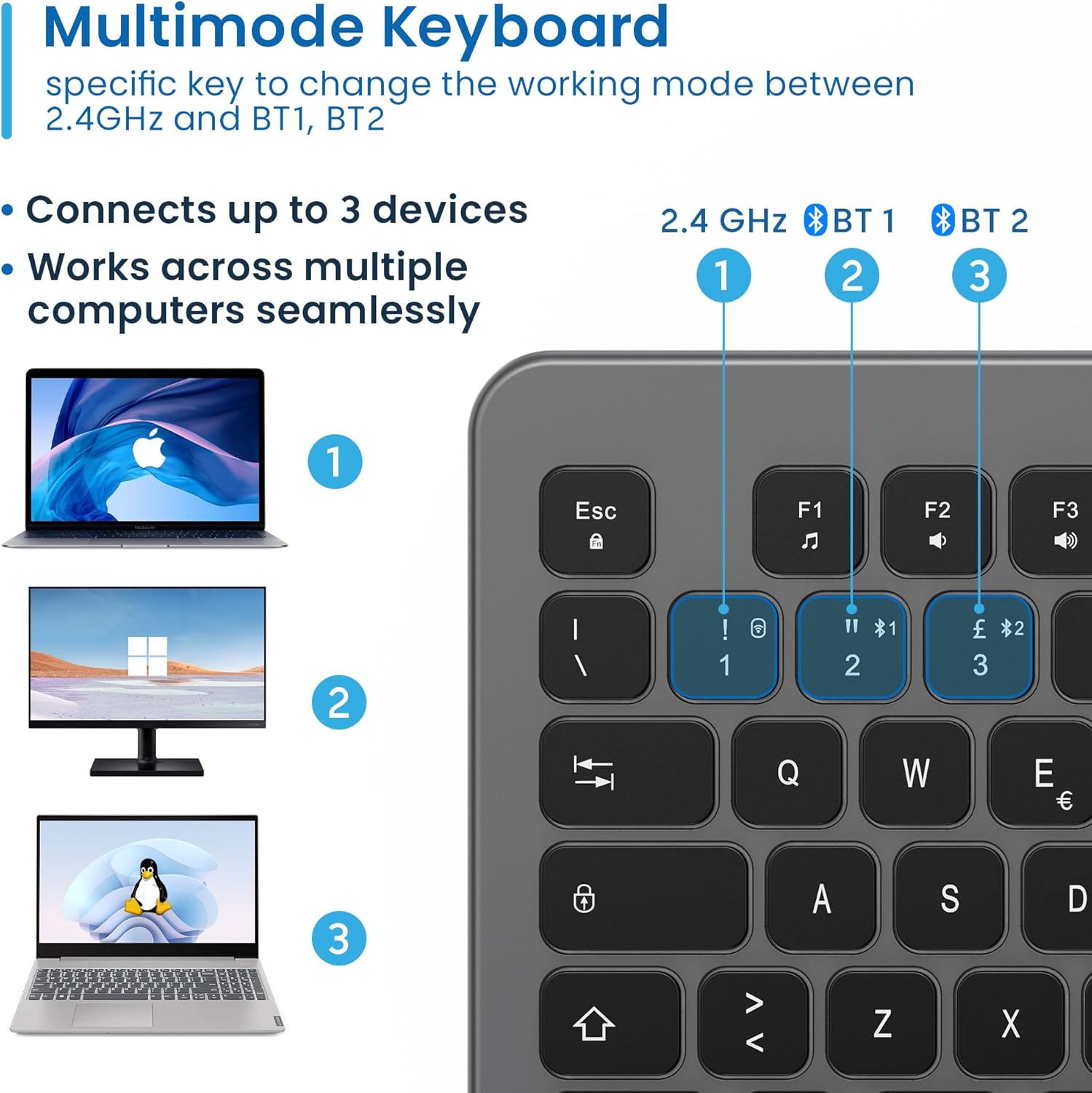
Figure 4.3: Multi-device connectivity options for the EW3295 keyboard.
4.2.3 Префрлување помеѓу поврзани уреди
Once multiple devices are paired, you can easily switch between them:
- Притиснете fn+1 to switch to the 2.4GHz connected device.
- Притиснете fn+2 to switch to the Bluetooth 1 connected device.
- Притиснете fn+3 to switch to the Bluetooth 2 connected device.
5. Упатства за работа
5.1 Основно пишување
The EW3295 features a full-size Italian QWERTY layout. Its flat and silent keys provide a comfortable and precise typing experience, reducing noise in quiet environments.

Figure 5.1: Illuminated Italian QWERTY Keyboard Layout.

Figure 5.2: Silent keys for reduced noise.
5.2 Контрола на позадинско осветлување
The keyboard features an adjustable backlight for improved visibility in low-light conditions.
- ВКЛУЧЕНО/ИСКЛУЧЕНО задно осветлување: Притиснете го Блок Скорр key (often labeled with a lightbulb icon) to toggle the backlight on or off.
- Backlight Brightness Up: Притиснете Fn + Pag ↑ за зголемување на осветленоста на задното осветлување.
- Backlight Brightness Down: Притиснете Fn + Pag ↓ за намалување на осветленоста на задното осветлување.
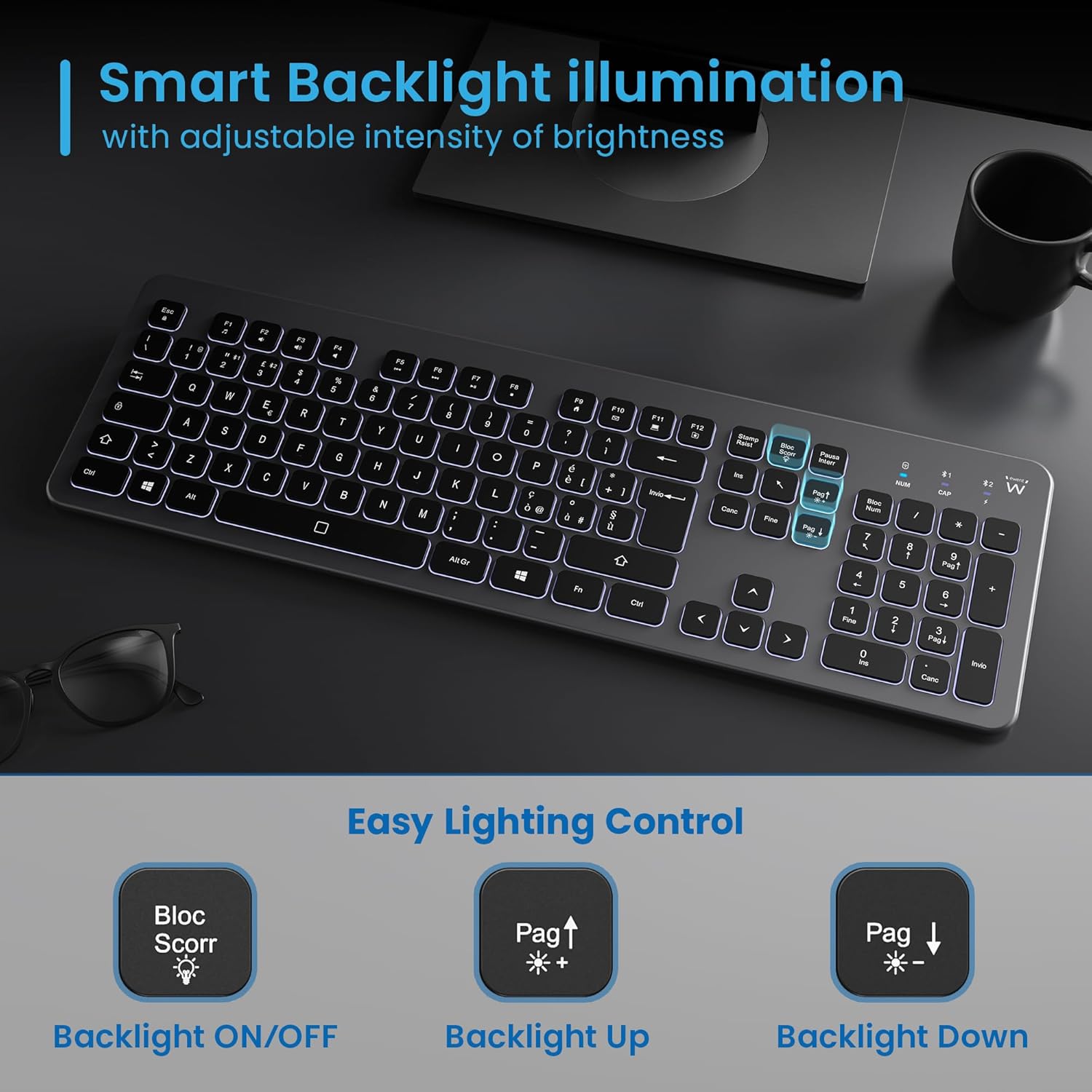
Figure 5.3: Backlight control keys.
5.3 Мултимедијални клучеви
The keyboard includes 12 dedicated multimedia keys (F1-F12) that provide quick access to various functions. To use these functions, press the Fn притиснете го копчето истовремено со саканото F-копче.
| Комбинација на клучеви | Функција |
|---|---|
| Fn + F1 | Медиа плеер |
| Fn + F2 | Намалување на јачината на звукот |
| Fn + F3 | Јачина на звук нагоре |
| Fn + F4 | Исклучи звук |
| Fn + F5 | Претходна песна |
| Fn + F6 | Следна песна |
| Fn + F7 | Пушти/Пауза |
| Fn + F8 | Стоп |
| Fn + F9 | Почетна страница |
| Fn + F10 | Е-пошта |
| Fn + F11 | Мојот компјутер |
| Fn + F12 | Калкулатор |
6. Одржување и грижа
Правилното одржување обезбедува долготрајност и оптимални перформанси на вашата тастатура.
- Чистење: Користете мека, сува крпа без влакненца за чистење на површината на тастатурата. За тврдокорна нечистотија, малкуampИзмијте ја крпата со вода или со благ, неабразивен чистач. Избегнувајте прекумерна влага.
- Избегнувајте течности: Do not spill liquids on the keyboard. In case of accidental spills, immediately disconnect the keyboard and allow it to dry completely before re-using.
- Складирање: Кога не ја користите подолго време, чувајте ја тастатурата на ладно и суво место, подалеку од директна сончева светлина и екстремни температури.
- Нега на батеријата: To prolong battery life, avoid fully discharging the battery frequently. Charge the keyboard when the low battery indicator appears.
- Складирање на приемникот: When transporting the keyboard, store the USB wireless receiver in its dedicated compartment on the rear panel to prevent loss.
7 Смена на проблеми
If you encounter issues with your EW3295 keyboard, please refer to the following common solutions:
| Проблем | Можна причина | Решение |
|---|---|---|
| Keyboard not responding (2.4GHz) | Low battery; Receiver not plugged in; Incorrect channel selected. | Charge the keyboard; Ensure USB receiver is securely plugged in; Press fn+1 to select 2.4GHz mode. |
| Тастатурата не реагира (Bluetooth) | Low battery; Bluetooth not enabled on device; Not paired; Incorrect channel selected. | Charge the keyboard; Enable Bluetooth on your device; Re-pair the keyboard (see Section 4.2.2); Press fn+2 or fn+3 to select the correct Bluetooth channel. |
| Позадинското осветлување не работи | Задното осветлување е исклучено; Батеријата е слаба. | Притиснете Блок Скорр to turn on/off; Increase brightness with Fn + Pag ↑; Charge the keyboard. |
| Копчињата се лепливи или не реагираат | Dirt or debris under keys; Physical damage. | Clean the keyboard (see Section 6); If physical damage, contact support. |
| Краток век на батеријата | Frequent backlight use; Battery degradation over time. | Reduce backlight brightness or turn it off when not needed; Ensure full charge cycles. |
8. Спецификации
| Карактеристика | Детал |
|---|---|
| Име на моделот | Tastiera Wireless Retroilluminata EW3295 |
| Број на модел на ставка | EW3295 |
| Бренд | Евент |
| Технологија за поврзување | Bluetooth 5.0 (x2), 2.4GHz Wireless |
| Опис на тастатурата | Multimedia, Full-size, Italian Layout |
| Компатибилни уреди | PC (Windows XP, 7, 8.1, 10, 11), Android |
| Тип на батерија | Литиумска батерија на полнење од 300mAh |
| Задно осветлување | Прилагодлив интензитет |
| Димензии (Д x Ш x В) | Прибл. 432 mm x 122 mm x 22 mm |
| Тежина | Прибл. 390 гр |
| Материјал | High-density Polycarbonate |

Figure 8.1: Keyboard dimensions and weight.
9. Информации за гаранцијата
Ewent products are designed and manufactured to the highest quality standards. This product is covered by a limited warranty from the date of purchase. Please refer to the warranty card included with your product or visit the official Ewent webстраница за детални услови за гаранција специфични за вашиот регион. Гаранцијата обично ги покрива дефектите во материјалите и изработката при нормална употреба.
10. Поддршка за корисници
For technical support, troubleshooting assistance, or any questions regarding your Ewent EW3295 keyboard, please contact Ewent customer support. You can typically find contact information (phone, email, support portal) on the official Ewent webлокацијата или во пакувањето на производот.
Please have your product model number (EW3295) and purchase details ready when contacting support.


