1. Вовед
Ви благодарам за купувањетоasing the iFFALCON 40S55T 40-inch Full HD Google TV. This manual provides essential information for the safe and efficient use of your television. Please read it thoroughly before operating the device and retain it for future reference.
The iFFALCON 40S55T is a tunerless smart TV designed for streaming content, offering a Full HD display, Google TV operating system, Chromecast built-in, and Dolby Audio for an immersive entertainment experience.
2. Информации за безбедност
Секогаш следете ги основните безбедносни мерки на претпазливост при користење на овој телевизор за да го намалите ризикот од пожар, електричен удар и повреди.
- Не го изложувајте телевизорот на дожд или влага.
- Не го отворајте телевизорот casing; препуштете го целото сервисирање на квалификуван персонал.
- Обезбедете соодветна вентилација околу телевизорот.
- Држете го телевизорот подалеку од директна сончева светлина, извори на топлина и силни магнетни полиња.
- Use only the power cord and accessories supplied by the manufacturer.
- Исклучете го телевизорот од струја за време на грмотевици или кога не се користи подолг период.
3. Содржина на пакетот
Проверете дали сите предмети се присутни во кутијата:
- iFFALCON 40S55T 40-inch Full HD Google TV
- Далечински управувач
- Поставка за телевизор (2 парчиња)
- Завртки за држач за телевизор
- Кабел за напојување
- Гарантна картичка
- Упатство за употреба (овој документ)
4. Поставување
4.1 Прикачување на држачот за телевизор
- Внимателно поставете го телевизорот со лицето надолу на мека, рамна површина за да спречите оштетување на екранот.
- Порамнете го секој држач со соодветните слотови на дното од телевизорот.
- Прицврстете ги држачите со приложените завртки. Уверете се дека се цврсто затегнати.
4.2 Поврзување напојување
Connect the power cable to the TV's power input and then plug it into a wall outlet. The TV will enter standby mode.
4.3 Initial Setup (Google TV & Network)
При првото вклучување, телевизорот ќе ве води низ почетниот процес на поставување на Google TV. Ова вклучува:
- Избор на јазик.
- Поврзување со Wi-Fi мрежа.
- Signing in with your Google account to access personalized content and apps.
- Прифаќање на условите и одредбите.
4.4 Поврзување
The iFFALCON 40S55T offers various connection options for external devices.

Слика: Надview of the TV's connectivity options, including HDMI, USB, Bluetooth, and Wi-Fi.
- HDMI порти: Connect external devices like gaming consoles, Blu-ray players, or set-top boxes.
- USB порта: За поврзување на USB уреди за складирање за репродукција на медиуми files.
- Wi-Fi: For wireless internet connection to access streaming services and online features.
- Bluetooth: For connecting wireless headphones, speakers, or other Bluetooth-enabled accessories.
4.5 Tunerless Operation
This TV is designed as a tunerless model, meaning it does not have a built-in tuner for terrestrial (over-the-air) broadcasts. To watch terrestrial, BS, or CS broadcasts, an external tuner is required and must be purchased separately.

Image: The iFFALCON 40S55T TV showcasing its smart features, highlighting its tunerless design and ability to enjoy internet video content without an antenna connection.
5. Ракување со телевизорот
5.1 Преку далечински управувачview
The remote control provides access to all TV functions, including power, volume, channel navigation, and smart TV features. It also supports voice search via 'Hey Google'.

Image: The TV remote control, featuring quick access buttons for popular streaming services and a dedicated microphone button for voice commands.
- Копче за вклучување: Го вклучува или исклучува телевизорот.
- Копчиња за навигација: Користете ја насочната тастатура и копчето OK за да се движите низ менијата.
- Копчиња за јачина на звук/канал: Adjust volume and change channels (if an external tuner is connected).
- Копчиња за кратенки на апликацијата: Direct access to popular streaming services like Netflix, YouTube, etc.
- Копче за микрофон: Press and hold to activate 'Hey Google' voice search.
5.2 Функции на Google TV
Your iFFALCON TV runs on Google TV, providing a personalized and integrated entertainment experience.
- Агрегација на содржини: Google TV organizes movies, shows, and live TV from all your apps and subscriptions into one place.
- Персонализирани препораки: Врз основа на вашиот viewing history and preferences, Google AI suggests content you might enjoy.
- Гласовно пребарување: Use the 'Hey Google' feature on your remote to quickly find content, get information, or control smart home devices.
- Вграден Chromecast: Easily cast content from your smartphone, tablet, or computer directly to your TV screen.

Image: A smartphone screen mirroring content to the iFFALCON TV, demonstrating the Chromecast built-in feature for enjoying mobile content on a larger display.
5.3 Поставки за слика
The TV incorporates advanced image processing technologies to deliver a superior viewискуство.
- AI PQ Processor: TCL's proprietary AiPQ Processor intelligently adjusts image quality at the pixel level, enhancing clarity, color, and contrast for a vivid and realistic picture.
- Full HD (FHD): Experience sharp and detailed images with Full High Definition resolution, offering 200% more detail than standard HD screens.

Image: A visual comparison illustrating the enhanced detail and clarity provided by Full HD resolution compared to standard HD.
- HDR10/HLG Support: Enjoy a wider range of colors and contrast with HDR10 and HLG compatibility, revealing stunning detail in both bright and dark scenes.

Слика: ТВ екранотasing the vibrant and detailed picture quality achieved with HDR10/HLG technology.
- Микро затемнување: This technology analyzes the image in hundreds of separate zones to adjust brightness and darkness independently, enhancing contrast and picture quality.

Image: A visual representation of Micro Dimming technology, illustrating how it enhances contrast and picture depth by adjusting brightness in specific areas of the screen.
5.4 Sound Settings (Dolby Audio)
The TV features Dolby Audio for clear, rich, and immersive sound.
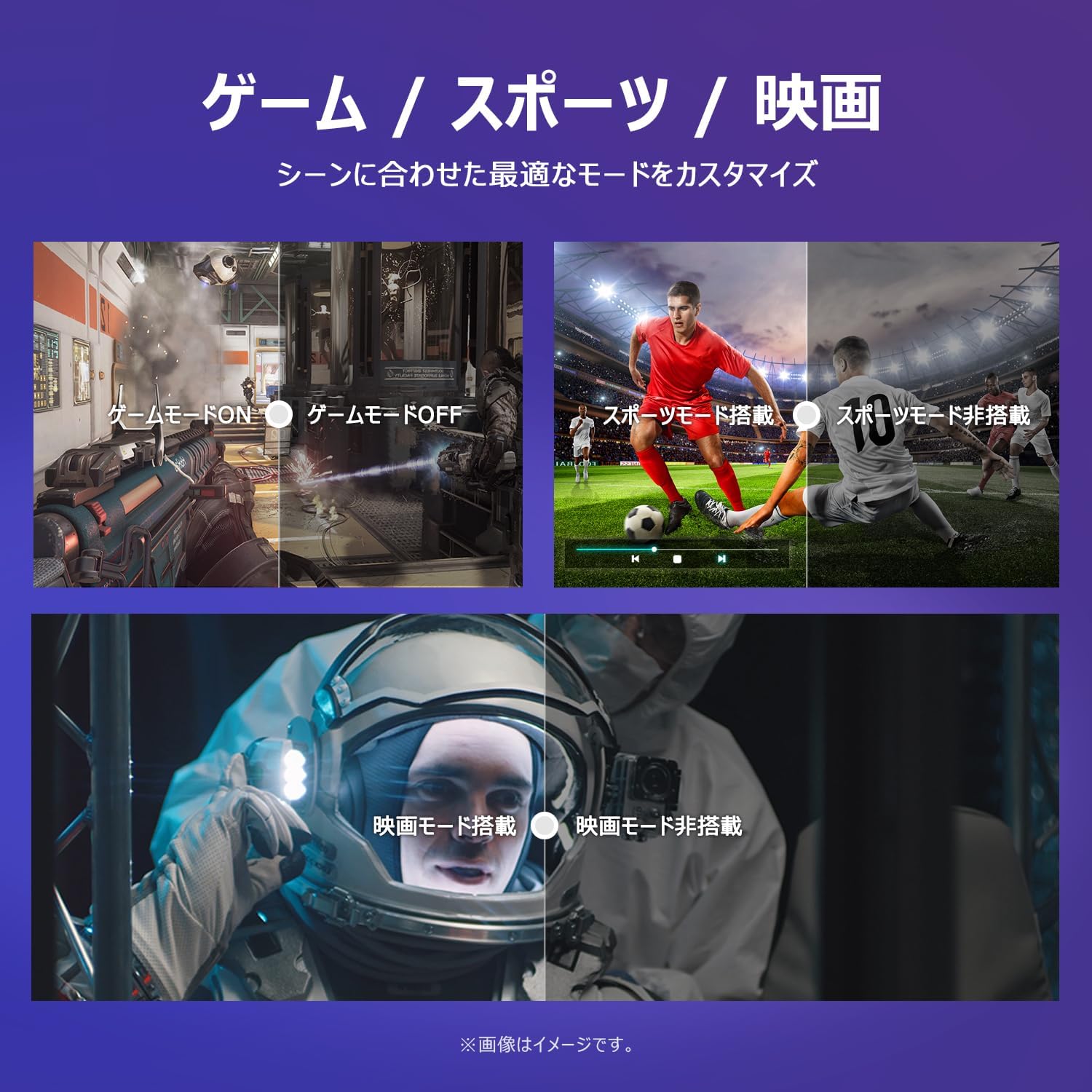
Image: The TV screen with a visual representation of sound, highlighting the immersive audio experience provided by Dolby Audio.
Access the sound settings menu to adjust modes like Standard, Music, Movie, or Custom to suit your preferences.
5.5 Режим на игра
Activate Game Mode for an optimized gaming experience with reduced input lag.
Image: Visual comparisons demonstrating the optimized settings for Game Mode, Sports Mode, and Movie Mode, adapting the TV's performance to different content types.
The TV also offers dedicated Sports Mode and Movie Mode to enhance viewing for specific content types.
5.6 Системски поставки
The quick settings menu allows you to customize frequently used system settings and rearrange their order for intuitive and convenient access.

Слика: А view of the TV's quick system settings interface, illustrating how users can easily access and customize various functions like brightness, picture mode, and network settings.
6. Одржување
Соодветната грижа и одржување ќе го продолжат животниот век на вашиот телевизор.
- Чистење на екранот: Нежно избришете го екранот со мека крпа што не остава влакненца. За тврдокорни дамки, користете средство за чистење екран специјално дизајнирано за телевизори, нанесено на крпата, а не директно на екранот.
- Чистење на Casing: Користете мека, сува крпа за да го избришете телевизоротasing. Не користете абразивни средства за чистење или растворувачи.
- Вентилација: Осигурајте се дека отворите за вентилација на задната страна од телевизорот не се блокирани за да спречите прегревање.
- Кабел за напојување: Редовно проверувајте го кабелот за напојување за евентуални оштетувања. Доколку е оштетен, контактирајте ја службата за корисничка поддршка за замена.
7 Смена на проблеми
Доколку наидете на проблеми со вашиот телевизор, погледнете ги следните вообичаени проблеми и решенија. Доколку проблемот продолжи, контактирајте ја службата за корисници.
| Проблем | Можна причина | Решение |
|---|---|---|
| Нема моќ | Кабелот за напојување не е поврзан; Приклучокот не работи | Ensure power cable is securely plugged in; Test outlet with another device |
| Нема слика, но звукот е присутен | Incorrect input source; External device issue | Press the 'Input' button on the remote to select the correct source; Check external device connections |
| Нема звук, но сликата е присутна | Јачината на звукот е пригушена или прениска; Проблем со надворешниот аудио систем | Unmute or increase volume; Check audio cable connections to external sound system |
| Далечинскиот управувач не работи | Батериите се испразнети; Пречка помеѓу далечинскиот управувач и телевизорот | Replace batteries; Remove any obstructions; Ensure remote is pointed at the TV's IR sensor |
| Не може да се поврзе на Wi-Fi | Неточна лозинка; Проблем со рутерот; телевизорот е премногу далеку од рутерот | Verify Wi-Fi password; Restart router; Move TV closer to router or use a Wi-Fi extender |
8. Спецификации
Detailed technical specifications for the iFFALCON 40S55T TV:

Image: Dimensional drawing of the iFFALCON 40S55T TV, indicating its physical measurements.
| Карактеристика | Спецификација |
|---|---|
| Големина на екранот | 40 инчи |
| Тип на дисплеј | VA Liquid Crystal |
| Резолуција | Full HD (1920 x 1080) |
| Стапка на освежување | 60 Hz |
| Сооднос на аспект | 16:9 |
| Сооднос на контраст | 1000:1 |
| Оперативен систем | Google TV |
| Аудио излез | 20 Watts (2.1 channels) |
| HDMI порти | 2 |
| USB порти | 1 |
| Безжично поврзување | Wi-Fi, Bluetooth |
| Димензии на производот (Ш x В x Д) | 89.2 x 55.8 x 18.4 см (со држач) |
| Тежина на производот | 4.63 кг |
| Компатибилен со ѕиден држач | Да |
| Вклучени додатоци | Stand, Remote Control, Warranty Card, Power Cable |
9. Гаранција и поддршка
Your iFFALCON 40S55T TV comes with a manufacturer's warranty. Please refer to the included warranty card for specific terms, conditions, and duration of coverage.
For technical support, troubleshooting assistance beyond this manual, or warranty claims, please contact iFFALCON customer service. Contact information can typically be found on the warranty card or the official iFFALCON webсајт.
Please have your model number (40S55T) and purchase date ready when contacting support.


