Вовед
Ви благодариме што го избравте Црнотоview W50PRO Smartwatch. This manual provides essential information for setting up, operating, and maintaining your device. Please read it carefully to ensure optimal performance and a safe user experience. Keep this manual for future reference.
Содржина на пакетот
Проверете дали сите артикли се присутни во вашиот пакет:
- Црнотоview W50PRO Smartwatch
- Силиконски ремен
- Replacement Nylon Braided Strap
- Кабел за магнетно полнење
- Упатство за употреба (овој документ)

Image: Package contents and product dimensions.
Производот завршиview
Црнотоview W50PRO Smartwatch features a 1.45-inch HD touchscreen display, function buttons, a powerful flashlight, and a comfortable silicone strap. Its robust design is suitable for various activities.

Image: Blackview W50PRO Smartwatch with its key features labeled.
Поставување
1. Полнење на уредот
Before first use, fully charge your smartwatch. Connect the magnetic charging cable to the charging points on the back of the watch and plug the USB end into a power adapter (not included) or a computer's USB port. The watch will display a charging indicator.
- Целосното полнење обично трае околу 3 часа.
- The 960mAh battery provides up to 30 days of typical use and 100 days of standby time.

Image: Battery capacity and charging information.
2. Инсталација на апликација
Преземете и инсталирајте го „Да Фит“ application on your smartphone. You can find it in the App Store (iOS) or Google Play Store (Android).
3. Device Pairing and Bluetooth Calls
To connect your smartwatch and enable Bluetooth calling:
- Download the Da Fit app from your phone's app store.
- Овозможете Bluetooth на вашиот паметен телефон.
- Open the Da Fit app and add your device.
- Confirm the pairing request on your phone and watch.
- Grant necessary notification permissions within the Da Fit app for calls and messages.
- Откако ќе се поврзете, можете да воспоставувате и примате повици директно од вашиот часовник.

Image: Connection and calling setup guide.
Упатства за работа
1. Основна навигација
- Екран на допир: Повлечете лево/десно, горе/долу за да се движите низ менијата и да пристапите до функциите. Допрете за да изберете.
- Функциски копчиња: Use the physical buttons on the side of the watch for quick access to specific functions or to return to the home screen.
2. Flashlight and Compass
The W50PRO includes a built-in flashlight and compass for outdoor activities.
- Фенерче: Activate the flashlight feature from the watch's menu. It offers fixed and intermittent modes for various situations.
- Компас: Access the compass feature from the watch's menu for accurate directional guidance.
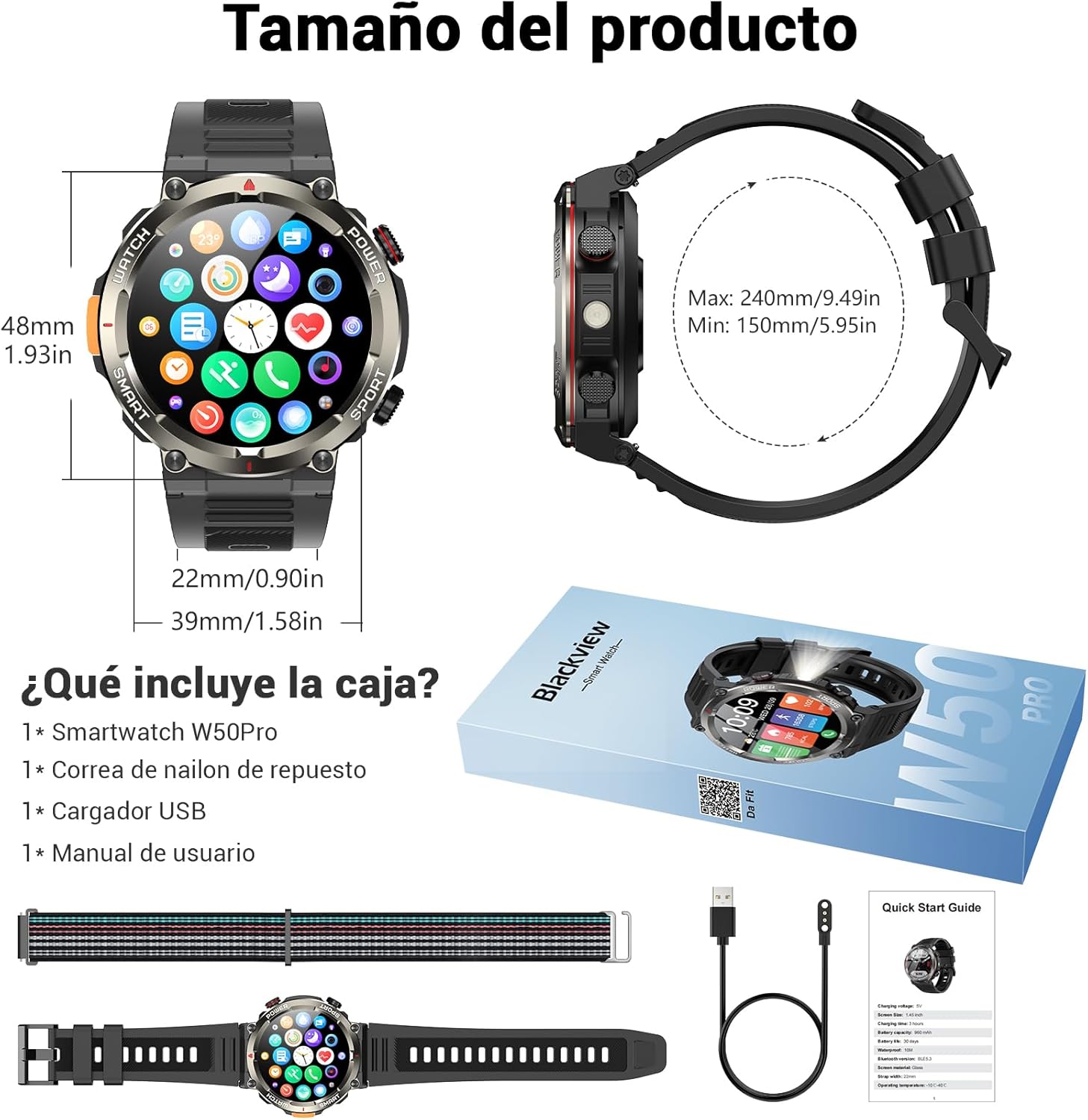
Image: Compass feature for outdoor navigation.

Image: Powerful LED flashlight in action.
3. Bluetooth повици и известувања
Once paired with your smartphone, the W50PRO allows you to manage calls and notifications directly from your wrist.
- Воспоставувајте/Примајте повици: Use the integrated speaker and microphone to make or answer calls.
- Известувања: Receive real-time alerts for text messages, emails, and social media apps.
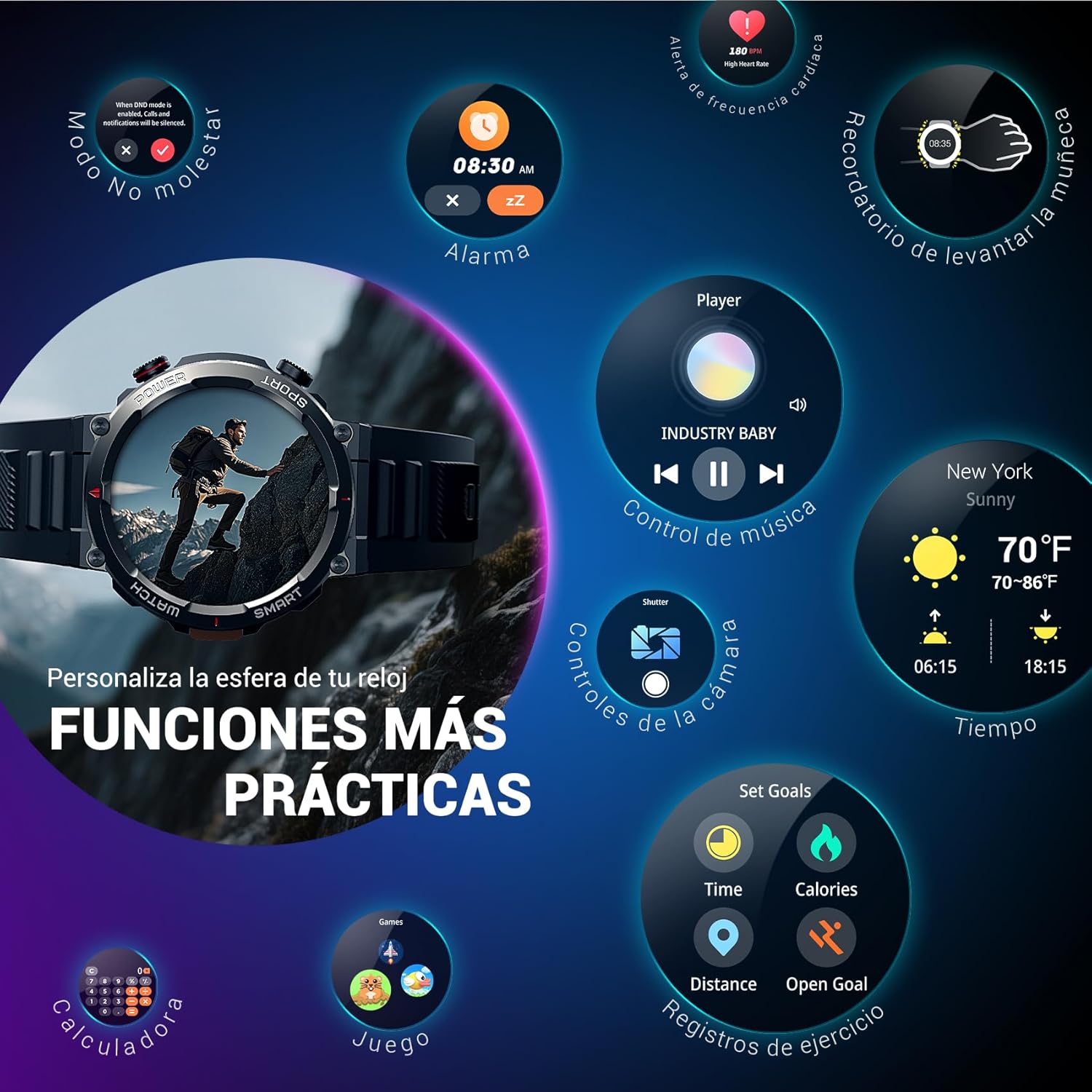
Image: Bluetooth calling and notification features.
4. Мониторинг на здравјето
The smartwatch is equipped with high-precision sensors to monitor various health indicators:
- Отчукувањата на срцето: Следење на срцевиот ритам во реално време.
- Кислород во крвта (SpO2): Следете ги нивоата на кислород во крвта.
- Монитор за спиење: Ги следи квалитетот и моделите на спиење.
- Нивоа на стрес: Дава информации за вашите нивоа на стрес.
All health data synchronizes with the Da Fit app for detailed analysis and trend tracking.

Image: Real-time health monitoring features.
5. Спортски режими
The W50PRO offers over 100 integrated sports modes, including running, cycling, climbing, rope skipping, football, and basketball. It accurately records exercise time, distance, steps, calorie consumption, and heart rate changes, providing clear and intuitive performance data. Detailed data can be viewед во апликацијата Da Fit.

Слика: Надview of 100+ sports modes.
6. Прилагодување на екраните на часовникот
The Da Fit app provides a wide selection of watch faces to suit various styles. You can also upload personal photos as wallpaper and adjust text color and widget layout to create a unique watch interface.

Image: Customizable watch faces.
7. Други практични функции
Црнотоview W50PRO includes additional features for daily convenience:
- Временска прогноза
- Контрола на музика
- Далечински управувач на камерата
- Аларми
- Седентарен потсетник
- Потсетник за вода за пиење
- Штоперица
- Тајмер за одбројување
- Пронајдете телефон
- Калкулатор
- Игри
- Прилагодување на осветленоста

Image: Multiple smart functions available on the smartwatch.
Одржување
1. Чистење
Regularly clean your smartwatch and strap to prevent skin irritation and maintain device functionality. Use a soft, damp крпа за бришење на екранот и вasing. For the strap, follow the manufacturer's cleaning recommendations based on the material (silicone or nylon).
2. Водоотпорност
Црнотоview W50PRO Smartwatch features an IP68 water resistance rating. This means it is protected against dust ingress and can withstand immersion in water up to 1.5 meters for up to 30 minutes. It is suitable for daily use, such as hand washing or light rain. Avoid using it in hot water, saunas, or during diving, as steam and high pressure can compromise the seals.

Image: Durability features including IP68 water resistance.
3. Нега на батерии
За да го продолжите животниот век на батеријата:
- Избегнувајте екстремни температури.
- Не дозволувајте батеријата често целосно да се празни.
- Charge the device using the provided magnetic charging cable.
Решавање проблеми
If you encounter issues with your Blackview W50PRO Smartwatch, try the following:
- Уредот не се вклучува: Проверете дали часовникот е целосно наполнет.
- Не може да се спари со телефон: Check if Bluetooth is enabled on both devices. Restart both the watch and phone. Ensure the Da Fit app has necessary permissions.
- Неточни здравствени податоци: Осигурајте се дека часовникот е цврсто носен на вашиот зглоб. Редовно чистете ги сензорите.
- Не се примени известувања: Verify that notification permissions are granted in the Da Fit app and your phone's settings. Ensure the app is running in the background.
- Кратко траење на батеријата: Reduce screen brightness, disable unnecessary features, and limit frequent heart rate monitoring.
For persistent issues, refer to the Da Fit app's help section or contact customer support.
Спецификации
| Карактеристика | Спецификација |
|---|---|
| Бренд | Црнотоview |
| Модел | W50PRO |
| Големина на приказ | 1.45 инчи |
| Тип на дисплеј | LCD екран |
| Резолуција | 360 x 360 пиксели |
| Капацитет на батеријата | 960 mAh |
| Типичен век на батеријата | До 30 дена |
| Време на мирување | До 100 дена |
| Време на полнење | Прибл. 3 часа |
| Поврзување | Bluetooth |
| Влез со човечки интерфејс | Buttons, Microphone |
| Отпорност на вода | IP68 |
| Компатибилни модели на телефони | iOS и Android |
| Димензии на производот | 8.8 x 2.2 x 18.1 cm |
| Тежина на производот | 136 гр |
Гаранција и поддршка
For warranty information and technical support, please refer to the documentation included with your purchase or visit the official Blackview webстраница. Зачувајте го доказот за купување за гаранциски побарувања.