Вовед
This manual provides comprehensive instructions for the OMAIC EN2Q36H replacement remote control, designed for Hisense Smart TVs. It covers essential information regarding setup, operation, and maintenance to ensure optimal performance and user experience. This remote offers a direct replacement solution without the need for complex programming.
Поставување
The OMAIC EN2Q36H remote control is designed for immediate use with compatible Hisense Smart TVs. No programming or pairing is required.
Инсталација на батерија
- Пронајдете ја преградата за батерии на задниот дел од далечинскиот управувач.
- Лизнете го капакот на батеријата надолу или во насоката означена со стрелката за да го отворите.
- Insert two AAA alkaline batteries (not included), ensuring the positive (+) and negative (-) terminals align correctly with the markings inside the compartment.
- Вратете го капакот на батеријата со лизгање назад на своето место додека не кликне безбедно.
Once batteries are installed, the remote is ready to operate your Hisense Smart TV.

Упатства за работа
This remote control utilizes infrared (IR) technology for communication with your Hisense Smart TV. Ensure a clear line of sight between the remote and the TV's IR receiver for optimal performance.
Клучни карактеристики
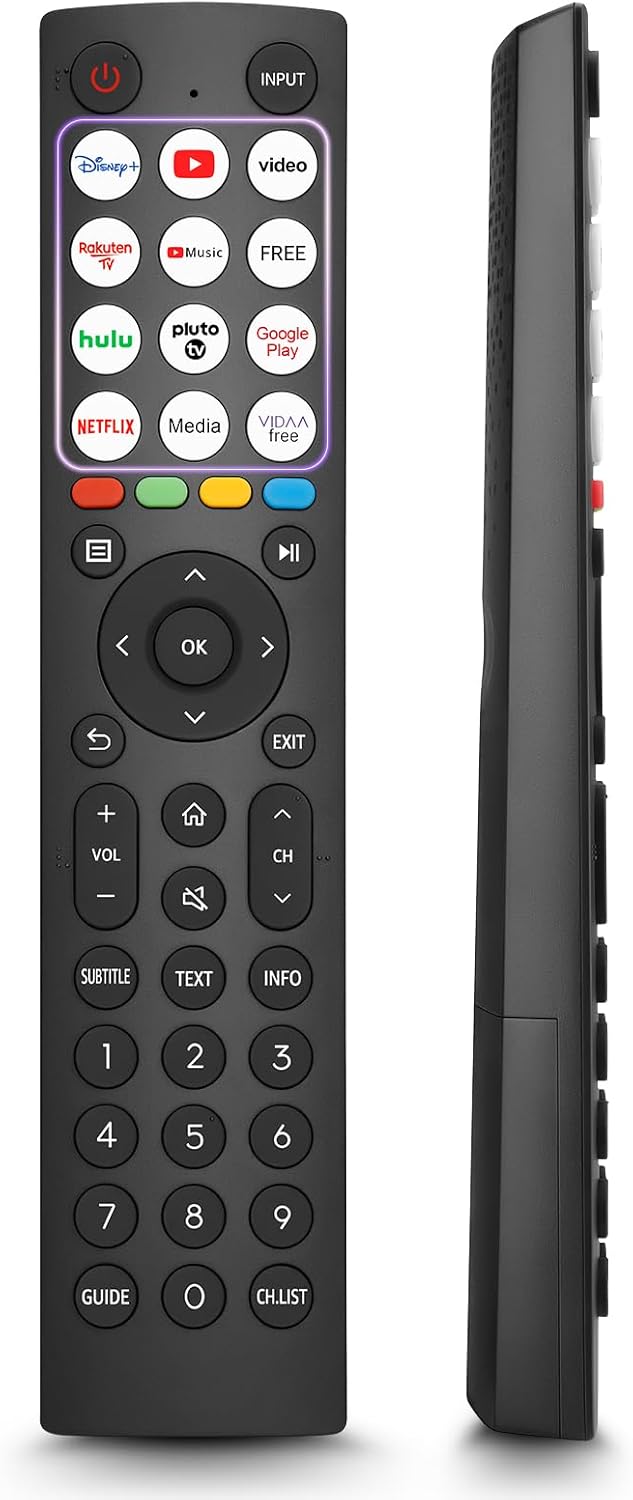
- 12 Shortcut Buttons: Quickly access popular streaming services and applications with dedicated buttons.
- Strong IR Signal: Provides a longer transmission distance and quick response without noticeable delay.
- Издржлива конструкција: Made from high-quality ABS and silicone materials for extended lifespan.

Функции на копчињата
Familiarize yourself with the functions of each button on your OMAIC EN2Q36H remote control:
| Копче | Функција |
|---|---|
| МОЌ | Switches the TV on or into standby mode. |
| ВЛЕЗ | Ги избира влезните извори (HDMI, AV, итн.). |
| APP Buttons | Quick access buttons for specific applications (e.g., Disney+, Netflix, YouTube). |
| МЕНИ | Displays the Quick Setup menu. |
| Контрола на МЕДИУМИ | Buttons for Play, Pause, Stop, Fast Forward, Rewind. |
| Navigation (Up/Down/Left/Right) | Navigates on-screen menus and adjusts system settings. |
| OK | Confirms selection in on-screen menus. |
| НАЗАД | Се враќа на претходното мени. |
| ИЗЛЕЗ | Излегува од тековното мени. |
| VOL +/- | Го прилагодува нивото на јачина на звук. |
| ДОМА | Enters the Home screen. |
| МУТИРА | Го исклучува или го враќа звукот на ТВ. |
| CH ^/v | Switches channels. |
| SUBTITLE | Activates or deactivates subtitle mode. |
| ТЕКСТ | Turns teletext function on and off. |
| ИНФОРМАЦИИ | Ги прикажува информациите за тековната програма. |
| NUMBER Buttons (0-9) | Direct channel selection or number input. |
| ВОДИЧ | Displays the Electronic Programme Guide (DTV input). |
| CH.LIST | Displays the Channel List on the screen. |

Compatible Hisense TV Models
The OMAIC EN2Q36H replacement remote control is compatible with the following Hisense VIDAA 4K HDTV Smart TV series:
- 32A4K, 40A4K, 43A4K
- 32A5KQ, 40A5KQ
- 43A6K, 50A6K, 55A6K, 58A6K, 65A6K, 70A6K, 75A6K, 85A6K
- 55U6KQ, 65U6KQ
- 43A7KQ, 50A7KQ, 55A7KQ, 65A7KQ, 75A7KQ
- 43E7KQ, 50E7KQ, 55E7KQ, 65E7KQ, 75E7KQ
Одржување
За да обезбедите долготрајност и правилно функционирање на вашиот далечински управувач, следете ги овие упатства за одржување:
- Чистење: Use a soft, dry cloth to clean the remote. Avoid using liquid cleaners or abrasive materials, as they may damage the surface or internal components.
- Замена на батерија: Replace batteries when the remote's response becomes sluggish or stops working. Always replace both batteries at the same time with new ones of the same type (AAA alkaline).
- Складирање: Чувајте го далечинскиот управувач на ладно и суво место, подалеку од директна сончева светлина, екстремни температури и висока влажност.
- Избегнувајте капки: Заштитете го далечинскиот управувач од физички удари, бидејќи капките можат да ги оштетат внатрешните кола.
Решавање проблеми
Доколку наидете на проблеми со далечинскиот управувач, погледнете ги следните чекори за решавање проблеми:
| Проблем | Можна причина | Решение |
|---|---|---|
| Далечинскиот управувач не реагира | Мртви или неправилно вметнати батерии. | Заменете ги батериите со нови алкални батерии AAA, внимавајќи на правилниот поларитет. |
| Далечинскиот управувач не реагира | Пречка помеѓу далечинскиот управувач и телевизорот. | Ensure a clear line of sight to the TV's IR receiver. Remove any objects blocking the path. |
| Далечинскиот управувач не реагира | Далечинскиот управувач е предалеку од телевизорот. | Move closer to the TV. The remote has an extended range, but extreme distances may affect performance. |
| Копчињата се лепливи или не реагираат | Нечистотија или остатоци под копчињата. | Gently clean around the buttons with a soft, dry cloth. Avoid liquids. |
| Специфични функции не работат | TV model incompatibility (rare). | Verify your Hisense TV model is listed in the 'Compatible Hisense TV Models' section. |
Спецификации
| Карактеристика | Детал |
|---|---|
| Име на моделот | EN2Q36H |
| Бренд | OMAIC |
| Компатибилни уреди | Hisense Smart TVs |
| Технологија за поврзување | Инфрацрвена (IR) |
| Број на копчиња | 48 |
| Тип на контрола | Контрола на копче |
| Посебни карактеристики | Universal, Comfortable |
| Боја | Црното |
| Опис на батеријата | AAA (Alkaline) |
| Supported Devices (Max) | 1 |
| Димензии на производот (приближно) | 34.7 x 24.7 x 2.2 cm |
| Тежина на производот (приближно) | 80 грама |

Гаранција и поддршка
OMAIC is committed to the quality and compatibility of its replacement remote controls. We provide professional after-sales support to ensure customer satisfaction.
If you have any questions or concerns regarding your OMAIC EN2Q36H remote control or your order, please contact us directly. Our support team aims to respond to inquiries within 12 working hours.