1. Вовед
The YUNZII QL75 is a retro-inspired mechanical keyboard designed for both style and functionality. It features tri-mode connectivity, hot-swappable switches, customizable RGB backlighting, and QMK/VIA programmability, making it suitable for various users and setups.

Figure 1: YUNZII QL75 Keyboard Overview
2. Што има во кутијата
- 1x YUNZII QL75 тастатура
- 1x USB кабел (тип-C)
- 1x Извлекувач на капачиња
- 1x Извлекувач на прекинувач
- 2x Дополнителни прекинувачи
- 1x 2.4G адаптер
- 1x Покривка за прашина
- 1x Function Card & User Manual
Слика 2: Содржина на пакетот
3. Производот завршиview
The YUNZII QL75 combines a vintage typewriter aesthetic with modern mechanical keyboard technology. Its 75% layout offers a compact design while retaining essential keys. The keyboard features a durable construction and thoughtful design elements for an enhanced user experience.

Figure 3: Internal Structure and Components
Клучни карактеристики:
- Три-режимска поврзаност: Seamlessly switch between Bluetooth 5.0, 2.4GHz wireless, and wired (Type-C) connections.
- Прекинувачи што може да се заменуваат со топла вода: Easily change 3-pin/5-pin mechanical switches without soldering.
- QMK/VIA Programmable: Full customization of key mappings, macros, and RGB lighting effects.
- RGB позадинско осветлување: Dynamic LED effects with various lighting styles and brightness levels.
- Вграден штанд: Integrated holder for tablets, phones, or pads.
- Multi-functional Knobs & Lever: Dedicated controls for volume, device switching, scrolling, and a programmable lever.
- Ретро дизајн: Typewriter-style aesthetic with punk round keycaps and an ergonomic stepped layout.
- Издржлива конструкција: UV-coated finish and sturdy materials for longevity.
4. Поставување и поврзување
4.1 Вклучување/исклучување
To power on the keyboard, ensure it has sufficient charge. The keyboard will automatically enter standby mode after a period of inactivity to conserve battery.
4.2 Трирежимска врска
The YUNZII QL75 supports three connection modes: Bluetooth, 2.4GHz wireless, and wired (Type-C).

Figure 4: Tri-Mode Connectivity
4.2.1 Bluetooth конекција
- Вклучете ја тастатурата.
- Rotate the right metal knob to the Bluetooth icon.
- Long press the right metal knob to enter pairing mode. The indicator lights (BT1/BT2/BT3) will blink.
- On your device (PC, laptop, smartphone, tablet), search for "YUNZII QL75" in Bluetooth settings and connect.
- The corresponding indicator light will become solid when connected.
4.2.2 Безжична конекција од 2.4 GHz
- Вклучете ја тастатурата.
- Insert the 2.4G USB dongle into your device's USB port.
- Rotate the right metal knob to the 2.4GHz icon.
- The keyboard will automatically connect. The indicator lights will blink slowly together during connection and become solid when connected.

Figure 5: 2.4GHz Wireless Dongle
4.2.3 Жична (тип-C) врска
- Connect the keyboard to your device using the provided Type-C USB cable.
- Rotate the right metal knob to the wired icon.
- The keyboard will be ready for use.
4.3 Прекинувач на режим на оперативен систем
Use the switch on the side of the keyboard to select between Windows and Mac modes for optimal compatibility.

Figure 6: Operating System Mode Switch
5. Key Functions and Controls
5.1 Multi-functional Knobs and Lever
- Лево копче: Controls volume. Short press to mute/unmute, rotate to adjust volume.
- Десно копче: Manages connectivity and scrolling. Short press to change connection channel, long press to change pairing mode, rotate for scroll function.
- Typewriter Lever: Functions as the Enter key by default. Fully programmable via QMK/VIA.
Figure 7: Typewriter Lever
Figure 8: Left Knob (Volume)
Figure 9: Right Knob (Connection/Scroll)
5.2 Комбинации на копчиња FN
The keyboard includes various FN key combinations for quick access to functions on both Windows and macOS.

Figure 10: FN Key Functions
6. Прилагодување
6.1 Прекинувачи што може да се заменат со топла струја
The YUNZII QL75 is a hot-swappable mechanical keyboard, allowing you to easily change switches without soldering. It is compatible with both 3-pin and 5-pin switches.
- Користете го испорачаниот извлекувач на прекинувач за внимателно да го отстраните постоечкиот прекинувач.
- Порамнете ги игличките на новиот прекинувач со дупките на печатената плочка.
- Gently press the new switch into place until it clicks.

Слика 11: Прекинувачи што може да се заменат со топла замена
6.2 RGB контрола на позадинско осветлување
Customize your typing experience with dynamic RGB backlighting. Use FN key combinations to adjust effects, colors, brightness, and blinking speed.
Figure 12: RGB Backlight Controls
6.3 Програмабилност на QMK/VIA
Unlock advanced customization with QMK/VIA support. This allows for full remapping of keys, creation of macros, and fine-tuning of RGB effects.
- Download the QMK/VIA software from the official YUNZII webсајт.
- Connect the keyboard in wired mode.
- Use the software interface to customize key assignments, create macros, and personalize lighting.

Слика 13: Софтверски интерфејс QMK/VIA
7. Батерија и полнење
The YUNZII QL75 is equipped with a 4000mAh rechargeable battery. To check the battery level in wireless mode, press FN + Backspace.

Слика 14: Информации за батеријата и полнењето
Connect the provided Type-C USB cable to the keyboard and a power source to charge. The keyboard supports auto-sleep and one-touch wake functions to extend battery life.
8. Built-in Stand
The keyboard features an integrated stand holder designed to securely hold your tablet, phone, or pad, helping to save desk space and maintain a cohesive aesthetic.
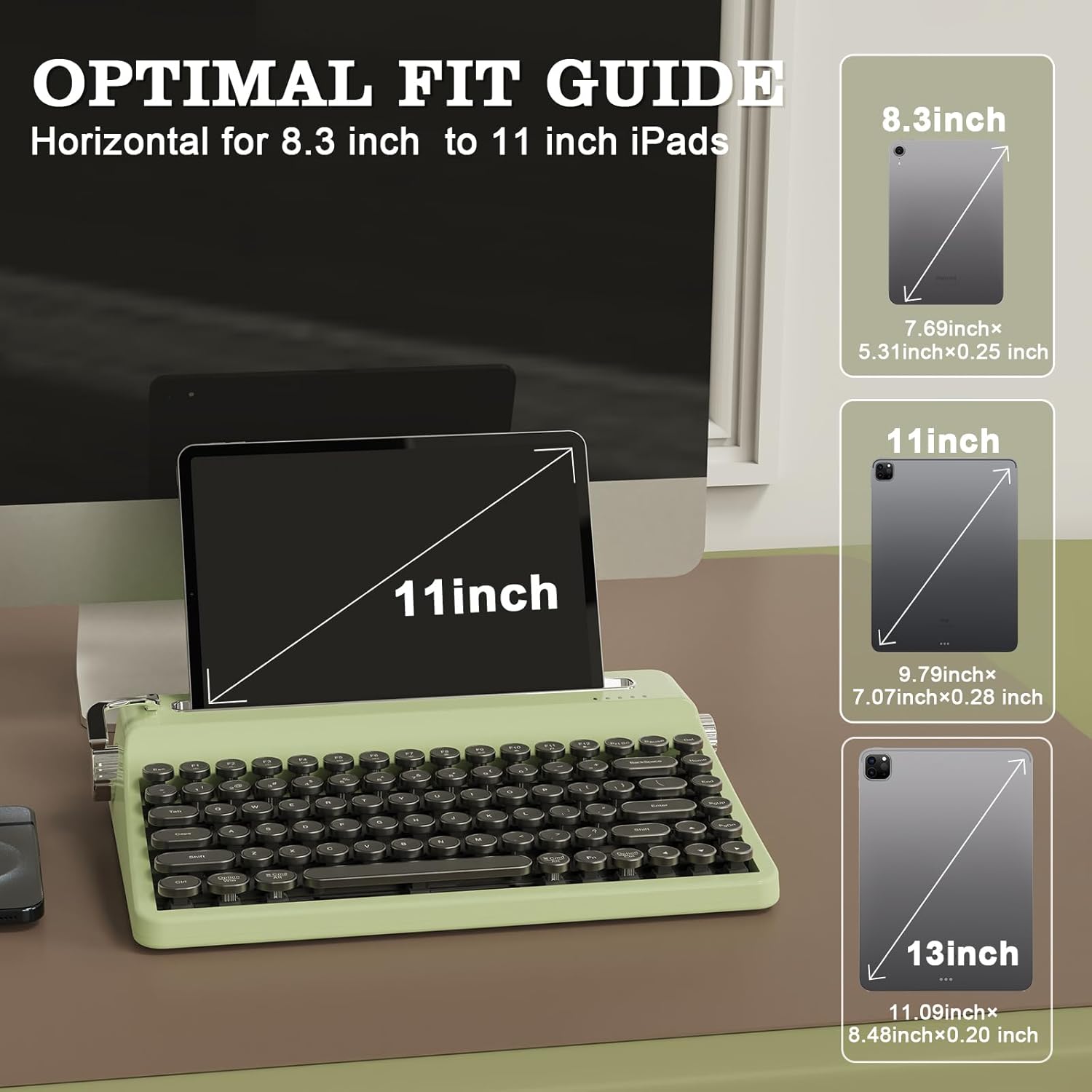
Figure 15: Built-in Stand with Tablet
The stand is optimized for horizontal placement of 8.3-inch to 11-inch iPads. Larger devices, such as 13-inch screens, can only be placed upright, not horizontally.
9. Removable Keycaps
The keyboard comes with removable typewriter-style round keycaps. These electroplated matte chrome keycaps are fade-proof and easy to clean, allowing for effortless maintenance and customization.

Figure 16: Removable Keycaps
Use the provided keycap puller to carefully remove keycaps for cleaning or replacement.
10. Спецификации
| Карактеристика | Детал |
|---|---|
| Димензии на производот | 12.6 x 8.27 x 2.52 инчи |
| Тежина на ставката | 3.3 фунти |
| Производител | ЈУНЗИИ |
| Технологија за поврзување | Bluetooth, 2.4 GHz, тип-C |
| Опис на тастатурата | Механички |
| Специјална карактеристика | Осветлување позади, Ергономски, 3 режими, прилагодливи копчиња на екранот, можност за топла замена |
| Позадинско осветлување на тастатурата | RGB |
| Материјал | Пластика |
| Капацитет на батеријата | 4000 mAh (вклучено) |
| Компатибилни уреди | Лаптоп, компјутер, паметен телефон |
11 Смена на проблеми
If you encounter any issues with your YUNZII QL75 keyboard, please refer to the following common troubleshooting steps:
- Проблеми со поврзувањето: Ensure the keyboard is in the correct mode (Bluetooth, 2.4GHz, or wired) for your device. Re-pair Bluetooth devices or re-insert the 2.4G dongle.
- Копчињата не реагираат: Check if the keyboard is powered on and connected. If using wireless modes, ensure the battery is charged. Try connecting via wired mode to rule out wireless issues.
- Проблеми со RGB осветлување: Verify that RGB is enabled (FN+F7). Adjust brightness and effects using the FN key combinations.
- QMK/VIA не работи: Ensure the keyboard is connected via Type-C USB and the correct software version is installed.
- Батеријата не се полни: Check the Type-C cable and power source. Ensure the cable is securely connected.
For further assistance, please contact YUNZII customer support.
12. Гаранција и поддршка
YUNZII products typically come with a manufacturer's warranty. Please refer to the warranty card included in your package or visit the official YUNZII webстраница за детални информации и услови за гаранцијата.
For technical support, product inquiries, or warranty claims, please contact YUNZII customer service through their official channels. Contact information can usually be found in the user manual or on the YUNZII webсајт.


