Вовед
This manual provides essential instructions for setting up, operating, and maintaining your SVITOO Kids Tablet 10 Inch. Designed for young users, this Android 15 tablet features parental controls, a durable shockproof case, and a vibrant 10-inch HD IPS display. Please read this guide thoroughly to ensure proper use and to maximize your tablet's functionality.
Што има во кутијата
- SVITOO Kids Tablet 10 Inch
- Protective Cover (Pre-installed)
- USB-C кабел за полнење
- Упатство за употреба
- Кутија за подароци
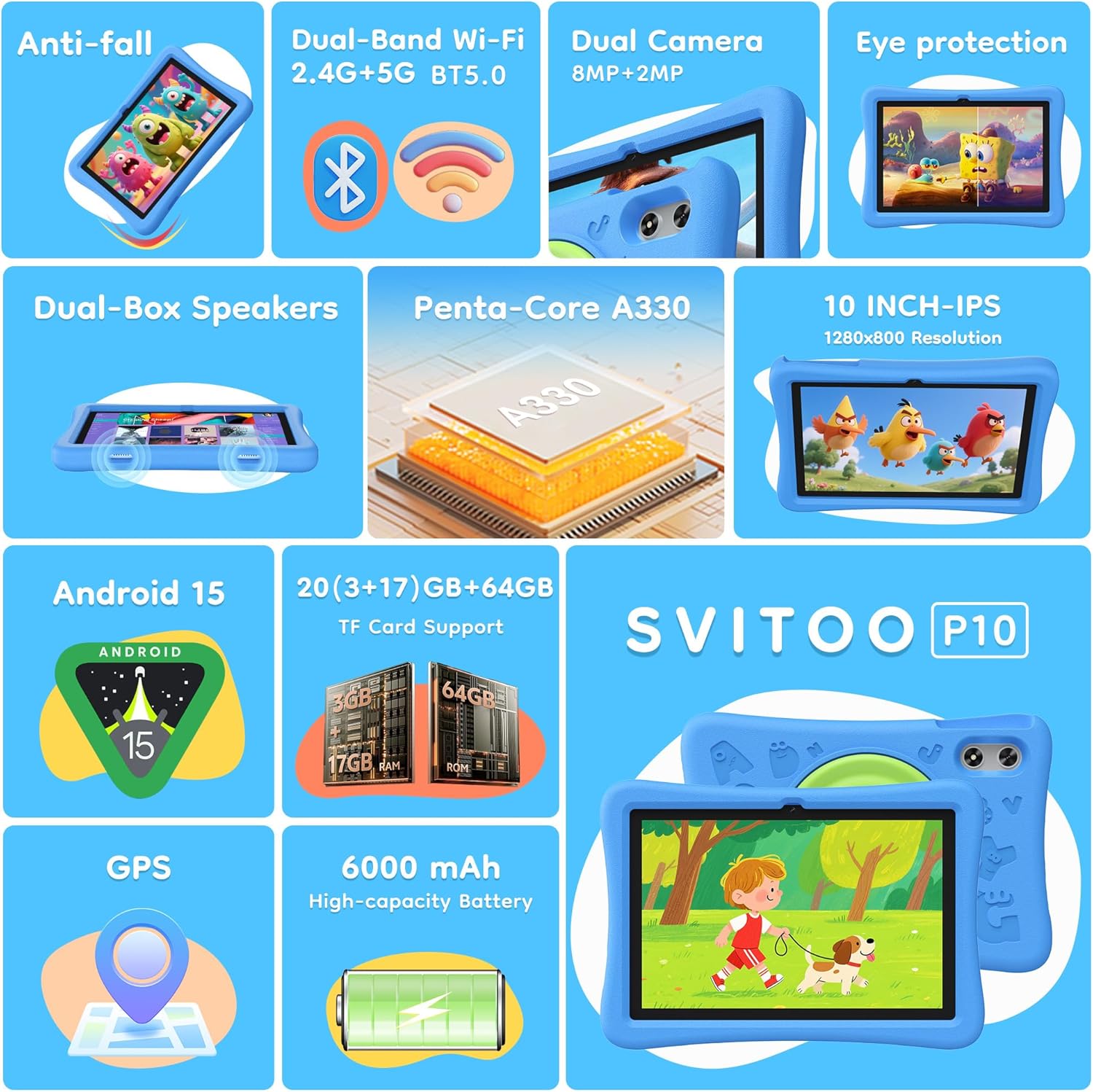
Image: The SVITOO Kids Tablet 10 Inch, shown in its blue protective case, highlighting its robust design suitable for children.
Производот завршиview
Клучни карактеристики
- Оперативен систем: Android 15 with GMS Certification for full Google Play access.
- Прикажи: 10-inch HD IPS (1280 x 800 pixels) touchscreen with eye protection mode.
- Процесор: Unisoc T7200 8-core CPU for smooth performance.
- Меморија и складирање: 20GB RAM (3GB physical + 17GB virtual) and 64GB internal storage, expandable up to 1TB via microSD card (sold separately).
- Камери: 8MP Rear Camera and 2MP Front Camera.
- Поврзување: Dual-Band Wi-Fi (2.4/5 GHz) and Bluetooth 5.0.
- Батерија: 6000mAh high-capacity battery for extended usage.
- Аудио: Dual-box speakers and a 3.5mm headphone jack.
- Трајност: Kid-friendly EVA shockproof case with a 360° rotating handle and 180° rotating stand.
- Родителска контрола: Advanced settings for screen time limits, content filtering, and app management.
Компоненти на таблетот
Запознајте се со физичките компоненти на вашиот таблет:

Слика: Детална view of the tablet's side and rear, indicating the USB Type-C port, headphone jack, power ON/OFF button, volume controls, speakers, rear camera, and front camera.
- Приклучок за USB Type-C: За полнење и пренос на податоци.
- Приклучок за слушалки (3.5 мм): За поврзување на жични слушалки.
- Копче за вклучување/исклучување: To turn the tablet on/off or put it to sleep.
- Копчиња за јачина на звук: За прилагодување на јачината на звукот.
- Говорници: Dual-box speakers for audio output.
- Предна камера: За видео повици и селфиња.
- Задна камера: За снимање фотографии и видеа.
- Слот за MicroSD картичка: Located under a protective flap, for storage expansion.

Image: The tablet's protective case featuring a versatile 360-degree rotating handle that also functions as a 180-degree rotating stand, allowing for various viewинг агли.
Водич за поставување
- Наполнете го таблетот: Before first use, fully charge the tablet using the provided USB-C cable and a compatible power adapter.
- Вклучување: Press and hold the Power ON/OFF button until the screen lights up.
- Почетно поставување: Следете ги упатствата на екранот за да го изберете вашиот јазик, да се поврзете на Wi-Fi мрежа и да ја поставите вашата сметка на Google.
- Google Kids Space / Parental Controls: During setup, you will have the option to configure Google Kids Space or other parental control settings. It is highly recommended to set these up immediately to ensure a safe environment for your child.
- Инсталирајте апликации: Once setup is complete, you can download age-appropriate apps and games from the Google Play Store.
Упатства за работа
Основна навигација
- Почетен екран: Повлечете налево или надесно за да пристапите до различни страници на апликацијата.
- Фиока за апликации: Повлечете нагоре од долниот дел на екранот кон view сите инсталирани апликации.
- Известувања и брзи поставки: Swipe down from the top of the screen to access notifications and quick settings like Wi-Fi, Bluetooth, and screen brightness.
- Назад, Почетна, Неодамнешни апликации: Use the navigation buttons at the bottom of the screen to go back, return to the home screen, or view неодамна отворени апликации.
Полнење на таблетот
Connect the USB-C charging cable to the tablet's USB-C port and the other end to a power adapter. The battery icon on the screen will indicate charging status. A full charge provides approximately 12 hours of mixed use.

Image: The tablet connected to a charger, displaying a battery icon with 99% charge, illustrating the charging process and battery life features like Night Mode and Energy Saving.
Режим за заштита на очите
To reduce eye strain, especially during prolonged use, activate the Eye Protection Mode (often called Night Mode or Reading Mode) from the quick settings panel or display settings. This mode adjusts screen colors to warmer tones.
Родителска контрола
The SVITOO Kids Tablet features robust parental controls to help manage your child's digital experience. These controls are integrated with Android 15 and Google Family Link.

Image: A family using the tablet, with an overlay showing various parental control options such as setting screen time limits, blocking harmful apps/websites, approving app downloads, and tracking child's location.
Конфигурирање на родителски контроли:
- Пристап до поставки: Одете на Поставки > Дигитална благосостојба и родителска контрола or search for "Family Link" in your app drawer.
- Set Screen Time Limits: Define daily limits for tablet usage to encourage balanced screen time.
- Филтрирање содржина: Блокирајте го пристапот до несоодветни webсајтови и апликации.
- App Approvals: Require parental approval for new app downloads or in-app purchases.
- Следење локација: Monitor your child's device location (if enabled and configured).
For detailed instructions on Google Family Link, please refer to Google's official support documentation.
Одржување
- Чистење: Користете мека крпа што не остава влакненца за чистење на екранот и телото на таблетот. Избегнувајте абразивни средства за чистење или растворувачи.
- Нега на батеријата: За да го продолжите траењето на батеријата, избегнувајте често целосно празнење на таблетот. Полнете го редовно и избегнувајте изложување на екстремни температури.
- Ажурирања на софтверот: Keep the tablet's operating system and apps updated to ensure optimal performance and security.
- Складирање: Store the tablet in a cool, dry place away from direct sunlight when not in use.
- Заштитно куќиште: The included EVA shockproof case provides protection against drops and bumps. Ensure it is properly fitted at all times.
Решавање проблеми
| Проблем | Решение |
|---|---|
| Таблетот не се вклучува. | Ensure the tablet is fully charged. Connect it to a charger for at least 30 minutes, then try powering it on again. |
| Екранот не реагира. | Perform a force restart by holding the Power ON/OFF button for 10-15 seconds. If the issue persists, contact support. |
| Проблеми со Wi-Fi конекција. | Check if other devices can connect to the Wi-Fi network. Restart your router and the tablet. Forget the network and reconnect. |
| Апликациите се уриваат или бавно работат. | Close background apps. Clear app cache (Settings > Apps > [App Name] > Storage > Clear Cache). Ensure sufficient storage space is available. Restart the tablet. |
| Батеријата брзо се троши. | Reduce screen brightness. Close unused apps. Disable Wi-Fi/Bluetooth when not in use. Check battery usage in settings to identify power-hungry apps. |
Спецификации
| Карактеристика | Детал |
|---|---|
| Име на моделот | SVITOO Tab 10 GMS Certified 1027C |
| Оперативен систем | Андроид 15 |
| Големина на екранот | 10 инчи |
| Резолуција на екранот | 1280 x 800 пиксели (HD IPS) |
| Процесор | 1.8 GHz (Unisoc T7200 8-core CPU) |
| RAM меморија | 20 GB (3 GB физичка + 17 GB виртуелна) |
| Внатрешно складирање | 64 GB |
| Складирање што може да се прошири | Up to 1TB via MicroSD (sold separately) |
| Графички копроцесор | Mali-G57 processor Imagination Tech |
| Безжичен тип | 802.11a/b/g/n/ac (Dual-Band 2.4/5 GHz) |
| Bluetooth | Bluetooth 5.0 |
| Капацитет на батеријата | 6000 mAh |
| Просечен век на траење на батеријата | 12 часа |
| Предна камера | 2 мегапиксели |
| Задна камера | 8 мегапиксели |
| Тежина на ставката | 2.44 фунти |
| Димензии на производот | 9.7 x 6.4 x 0.4 инчи |
Гаранција и поддршка
Your SVITOO Kids Tablet comes with a 1-Year Manufacturer Protection. This warranty covers manufacturing defects under normal use. It does not cover damage caused by misuse, accidents, natural disasters, or unauthorized modifications.
For technical support, warranty claims, or any questions regarding your product, please contact SVITOO customer service through your Amazon order page. Look for the "Contact Us" option next to your order details.
Ве молиме зачувајте го доказот за купување за целите на гаранцијата.