1. Вовед
This manual provides essential information for setting up, operating, and maintaining your DOOGEE Tab A9 Pro Android 15 Tablet. Please read it thoroughly to ensure proper usage and to maximize your device's capabilities.
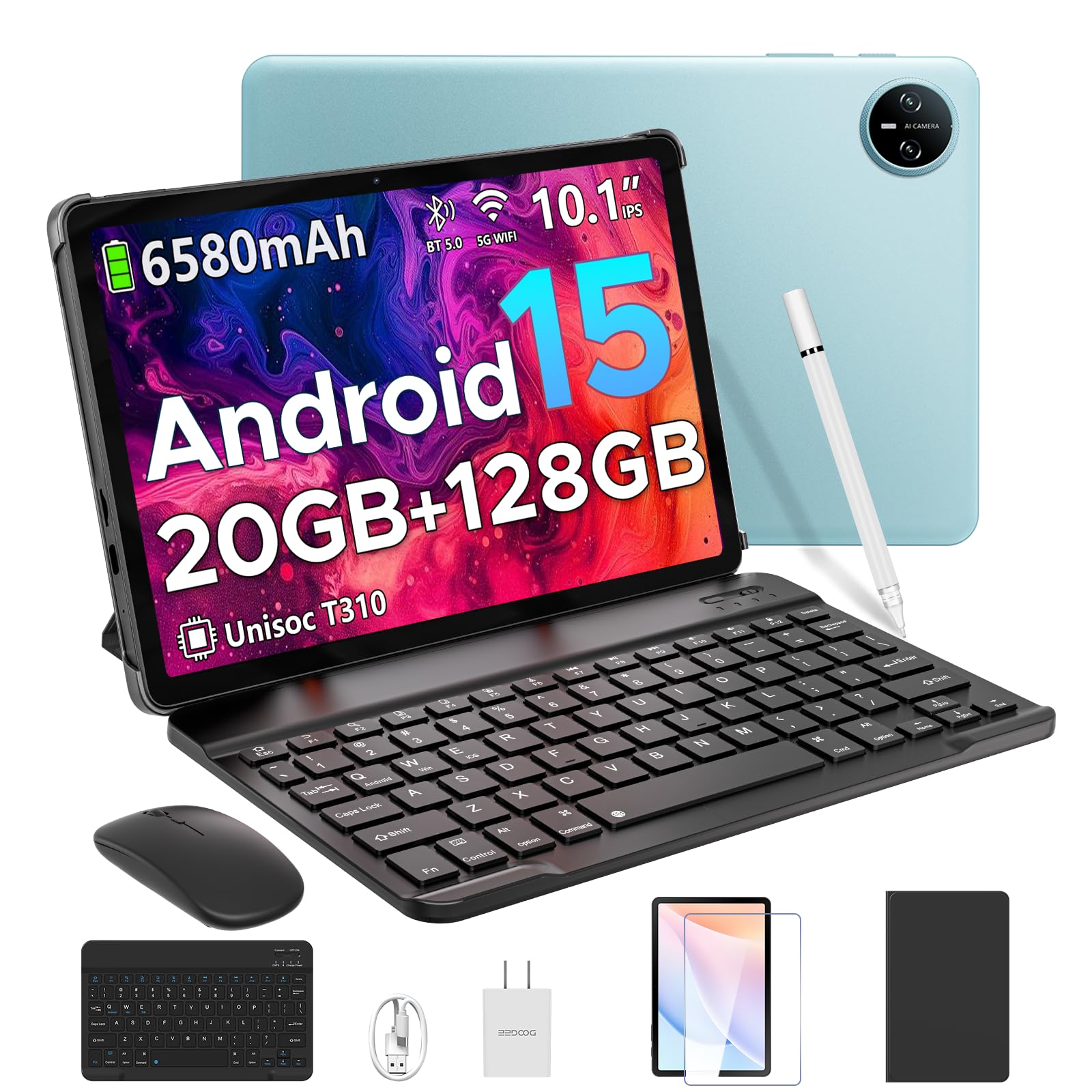
Image 1.1: The DOOGEE Tab A9 Pro Tablet.
2. Што има во кутијата
Your DOOGEE Tab A9 Pro package includes the following items:
- DOOGEE Tab A9 Pro Tablet (x1)
- USB кабел од тип C (x1)
- Полнач (x1)
- Прирачник (x1)
- Гарантна картичка (x1)
- Bluetooth тастатура (VIP издание)
- Bluetooth глушец (VIP издание)
- Пенкало (VIP издание)
- Кожна заштитна навлака (VIP издание)
- Калена фолија (VIP издание)

Image 2.1: All items included in the DOOGEE Tab A9 Pro package.
3. Производот завршиview
The DOOGEE Tab A9 Pro features a sleek design with essential components for user interaction and connectivity.
3.1 Физички карактеристики
- Прикажи: 10.1-inch IPS HD Ultra-Clear Display.
- Камери: Главна камера од 8MP (задна) и предна камера од 5MP.
- Аудио: High-Quality Dual Speakers and a 3.5mm Audio Jack.
- Пристаништа: Type-C USB port for charging and data transfer.
- Копчиња: Power button and volume controls located on the side.

Слика 3.1: Задна страна view of the DOOGEE Tab A9 Pro, highlighting the camera module.

Слика 3.2: Страна view of the tablet, illustrating the power button, volume controls, and ports.
Видео 3.1: Кратка видео презентацијаasing the ultra-thin body and design of the DOOGEE Tab A9 Pro.
4. Поставување
4.1 Почетно полнење
Before first use, fully charge your tablet using the provided Type-C USB cable and charger. The battery indicator on the screen will show charging progress.
4.2 Вклучување/исклучување
- За вклучување: Притиснете и задржете го копчето за вклучување додека не се појави логото на DOOGEE.
- За исклучување: Притиснете го и задржете го копчето за вклучување, а потоа изберете „Исклучи“ од опциите што се појавуваат на екранот.
4.3 Волшебник за почетно поставување
Upon first power-on, follow the on-screen instructions to complete the initial setup, including language selection, Wi-Fi connection, and Google account login.
5. Оперативен систем (Android 15)
The DOOGEE Tab A9 Pro runs on the Android 15 operating system, offering a smart, fluid, and secure user experience with enhanced privacy features.

Image 5.1: Visual representation of the Android 15 system interface.
Видео 5.1: Оверview of the DOOGEE Tab A9 Pro running Android 15.
6. Перформанси и складирање
The tablet is designed for smooth operation and ampкапацитет за складирање.
6.1 Процесор
Powered by the energy-efficient Unisoc T310 octa-core processor, the tablet ensures seamless performance for various tasks.

Image 6.1: Diagram illustrating the Unisoc T310 Quad-Core Processor.
6.2 RAM and Storage
The tablet features 20GB of RAM (4GB physical + 16GB virtual) and 128GB of internal storage. Storage can be expanded up to 2TB using a microSD card (sold separately).

Image 6.2: Visual representation of the tablet's RAM and ROM configuration.
7. Display & Audio
Experience vibrant visuals and clear sound with your tablet.
7.1 Екран
The 10.1-inch IPS HD display offers wide viewing angles and a resolution of 1280x800 for an immersive visual experience.

Image 7.1: The 10.1-inch IPS HD display with key specifications.
7.2 Аудио
Built-in dual speakers deliver clear and dynamic sound for movies, music, and video calls.

Image 7.2: Illustration of the tablet's dual speaker system.
8. Камери
Capture moments and conduct video calls with the integrated cameras.
8.1 главна камера
The 8MP main camera allows you to take sharp photos.

Image 8.1: Close-up of the 8MP main camera on the tablet's rear.
8.2 Предна камера
The 5MP front camera is suitable for selfies and video calls.

Image 8.2: The 5MP front camera in use for a video call.
9. Поврзување
Stay connected with various wireless options.
9.1 Wi-Fi
Supports 2.4G/5G dual-band Wi-Fi for smooth, high-speed internet access.

Image 9.1: Features of WiFi 5 connectivity on the tablet.
9.2 Bluetooth
Equipped with Bluetooth 5.0 for connecting wireless accessories.
9.3 ГПС
Built-in GPS provides accurate navigation for travel and outdoor activities.
10. Додатоци
The DOOGEE Tab A9 Pro comes with a suite of accessories to enhance its functionality.
10.1 Bluetooth тастатура
Connect the Bluetooth keyboard for a desktop-like typing experience, ideal for productivity tasks.

Image 10.1: The tablet connected to its Bluetooth keyboard for efficient typing.
10.2 Mouse and Stylus
The included mouse and stylus further enhance navigation and interaction, especially for note-taking and creative tasks.

Image 10.2: The tablet shown with its accompanying keyboard and mouse.

Image 10.3: The tablet being used with the stylus for precise input.
10.3 Заштитен случај
The protective case shields your tablet from drops and scratches and can also function as a stand.

Image 10.4: The tablet securely placed within its protective case.
11. Управување со батерии
The tablet is equipped with a high-capacity battery for extended use.
11.1 Капацитет на батеријата
Features a long-lasting 6580mAh battery, providing hours of power for various activities without frequent recharging.

Image 11.1: Diagram showing the 6580mAh battery inside the tablet.
Video 11.1: A video highlighting the large battery capacity of the DOOGEE Tab A9 Pro.
12. Безбедносни карактеристики
Protect your device and data with built-in security options.
12.1 Отклучување со лице
Effortlessly unlock your tablet using facial recognition technology.

Image 12.1: Illustration of the facial recognition unlock feature.
12.2 Fortified Privacy Shield
Android 15 provides enhanced privacy controls, robust data encryption, timely security patches, and proactive app screening for unbreakable security.

Слика 12.2: Готовоview of Android 15's privacy features.
13. Multitasking & Productivity
Optimize your workflow and entertainment with these features.
13.1 Мултитаскинг на поделен екран
Run two applications simultaneously side-by-side for enhanced productivity.

Image 13.1: The tablet displaying two apps in split-screen mode.
13.2 Вграден WPS Office
The tablet comes with WPS Office pre-installed, providing PC-level productivity for documents, spreadsheets, and presentations (Note: WPS Office feature may be unavailable in certain regions).

Слика 13.2: Таблетот е прикажанasing WPS Office applications.
Video 13.1: A video demonstrating the DOOGEE Tab A9 Pro's capabilities for learning and work.
14. Одржување
14.1 Чистење
Користете мека крпа што не остава влакненца за чистење на екранот и телото на таблетот. Избегнувајте употреба на груби хемикалии или абразивни материјали.
14.2 Ажурирања на софтверот
Редовно проверувајте и инсталирајте системски ажурирања за да обезбедите оптимални перформанси, безбедност и пристап до нови функции. Одете до Поставки > Систем > Ажурирање на системот за да проверите дали има ажурирања.
15 Смена на проблеми
Овој дел се однесува на вообичаени проблеми со кои може да се соочите со вашиот таблет.
15.1 Таблетот не се вклучува
- Проверете дали таблетот е доволно наполнет. Приклучете го на полначот најмалку 30 минути.
- Притиснете го и држете го копчето за вклучување 10-15 секунди за да извршите присилно рестартирање.
15.2 Бавни перформанси
- Затворете ги непотребните апликации во заднина.
- Исчисти ги податоците од кешот за често користените апликации.
- Ensure sufficient storage space is available. Delete old files или префрлете ги на надворешен складишен простор.
- Рестартирајте го таблетот.
15.3 Проблеми со Wi-Fi поврзување
- Рестартирајте го вашиот Wi-Fi рутер и таблетот.
- Заборавете на Wi-Fi мрежата и повторно поврзете се.
- Проверете дали сте во опсегот на Wi-Fi сигналот.
15.4 Додатоците не се поврзуваат
- Ensure Bluetooth is enabled on the tablet and the accessory.
- Check if the accessory is charged and in pairing mode.
- Refer to the accessory's individual manual for specific pairing instructions.
16. Спецификации
| Карактеристика | Спецификација |
|---|---|
| Бренд | ДУГИ |
| Име на моделот | ТАБА9ПРО |
| Број на модел на ставка | Таб А9 Про |
| Оперативен систем | Андроид 15 |
| Големина на приказ на стоечки екран | 10.1 инчи |
| Резолуција на екранот | 1280*800 HD |
| Максимална резолуција на екранот | 1280*800 пиксели |
| Бренд на процесор | Унисок |
| Графички копроцесор | Mali-G52 1-Core-2EE |
| Капацитет за складирање на меморија | 128 GB (може да се прошири до 2TB преку microSD) |
| RAM меморија | 20GB (4GB физичка + 16GB виртуелна) |
| Безжичен тип | 802.11ac, 802.11n (2.4G/5G Dual-band WiFi) |
| Bluetooth | 5.0 |
| Капацитет на батеријата | 6580mAh литиумски полимер (вклучен) |
| Просечен век на траење на батеријата | Up to 2 years (estimated lifespan) |
| Тежина на ставката | 1.05 фунти |
| Димензии на производот | 9.55 x 6.33 x 0.31 инчи |
| Боја | Blue (other colors available) |
| Датум прв на располагање | 23 април 2025 година |
17. Гаранција и поддршка
17.1 Информации за гаранцијата
Your DOOGEE Tab A9 Pro comes with a 2-Year Limited Warranty. Please refer to the included Warranty Card for detailed terms and conditions.
17.2 Поддршка за корисници
For any questions or technical assistance, please contact our support team. We aim to respond within 24 hours.
- Поддршка преку Интернет: Достапно 24/7.
- Се враќа: 30-дневна гаранција за враќање на парите и бесплатни враќања.


