1. Вовед
This manual provides detailed instructions for the setup, operation, and maintenance of your Transformers GK01 Wireless Mechanical Keyboard. The GK01 is a versatile keyboard featuring tri-mode connectivity (Bluetooth 5.0, 2.4GHz wireless, and USB-C wired), a 101-key layout, RGB backlighting, and hot-swappable switches for a customizable typing experience.

Figure 1.1: Transformers GK01 Wireless Mechanical Keyboard.
2. Содржина на пакетот
Ве молиме проверете дали сите артикли наведени подолу се вклучени во вашиот пакет:
- Transformers GK01 Wireless Mechanical Keyboard
- USB-C на USB-A кабел
- Безжичен USB адаптер од 2.4 GHz
- 2-во-1 приклучок и извлекувач на прекинувач
- Упатство за употреба (овој документ)
- Резервни прекинувачи (2 парчиња)
- Покривка за тастатура
3. Поставување и поврзување
3.1. Tri-Mode Connection Overview
The GK01 keyboard supports three connection modes: USB-C wired, 2.4GHz wireless, and Bluetooth 5.0. You can connect to up to five devices simultaneously and switch between them seamlessly.

Figure 3.1: Tri-Mode Connection Capabilities.
3.2. USB-C жична врска
- Лоцирајте го USB-C портот на тастатурата.
- Поврзете го едниот крај од испорачаниот USB-C кабел со тастатурата.
- Connect the other end of the USB-C cable to an available USB-A port on your computer.
- Тастатурата ќе биде автоматски препознаена и подготвена за употреба.
3.3. Безжична конекција од 2.4 GHz
- Locate the 2.4GHz wireless USB dongle.
- Plug the dongle into an available USB-A port on your computer.
- On the keyboard, ensure the mode switch (usually on the side or back) is set to 2.4GHz mode.
- Тастатурата треба да се поврзе автоматски. Ако не, притиснете Fn + R да се иницира спарување.

Figure 3.2: USB-C Port and 2.4GHz Dongle Location.
3.4. Bluetooth 5.0 конекција
The keyboard supports connecting to up to three Bluetooth devices (BT1, BT2, BT3).
- On the keyboard, set the mode switch to Bluetooth mode.
- To enter pairing mode for a specific Bluetooth channel, press and hold Fn + Q (за BT1), Fn + W (за BT2), или Fn + E (for BT3) for 3-5 seconds until the indicator light flashes rapidly.
- On your device (PC, tablet, smartphone), open Bluetooth settings and search for new devices.
- Select "Transformers GK01" from the list of available devices.
- Once connected, the indicator light on the keyboard will stop flashing.
- За да се префрлате помеѓу спарени Bluetooth уреди, едноставно притиснете Fn + Q, Fn + W, или Fn + E.
4. Основно работење
4.1. Keyboard Layout and Anti-Ghosting
The GK01 features a 101-key layout, providing a full set of keys including a numeric keypad. All keys are equipped with anti-ghosting technology, ensuring that every keystroke is registered accurately, even when multiple keys are pressed simultaneously.
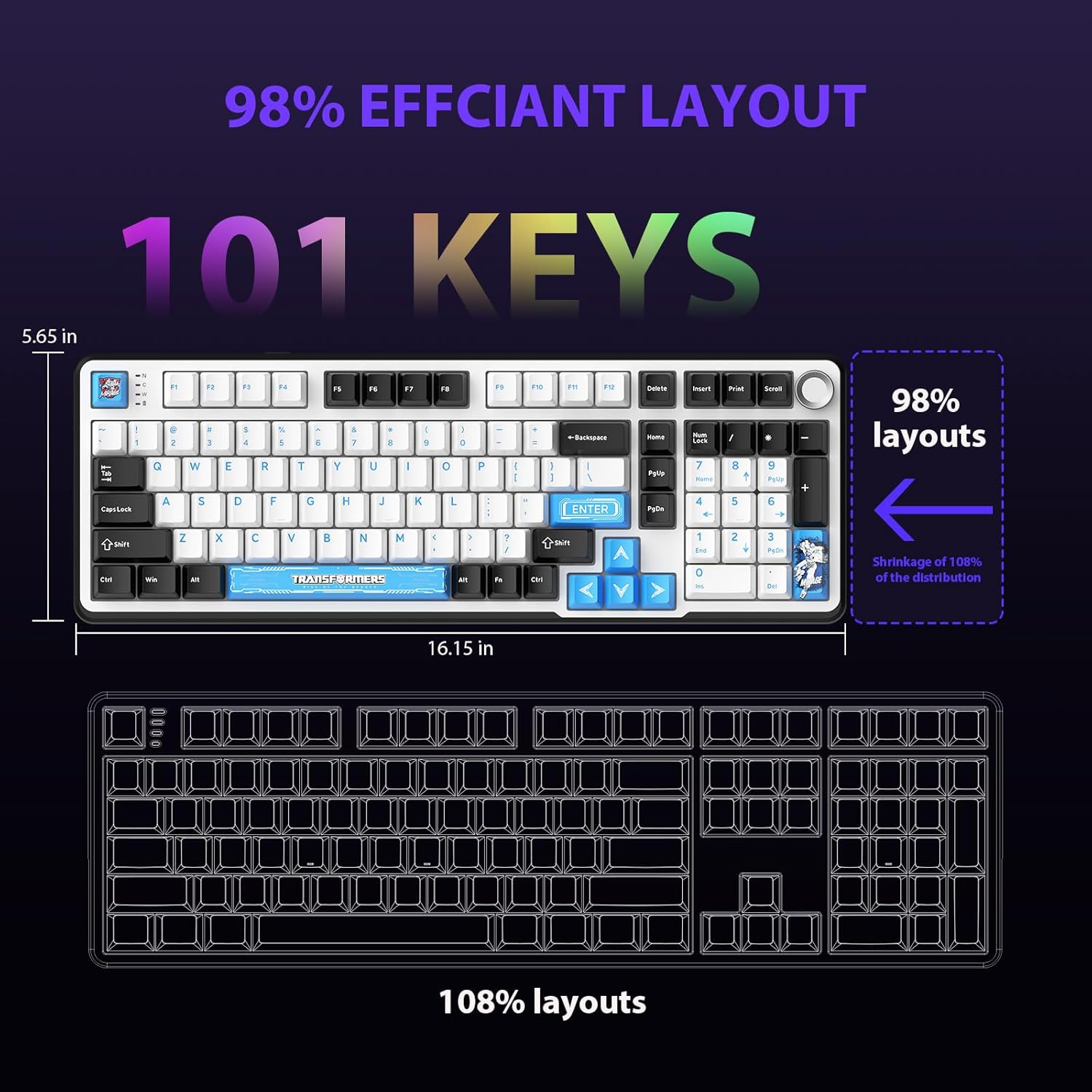
Figure 4.1: 101-Key Layout.
4.2. Multimedia Control Knob
The dedicated knob located on the top right of the keyboard provides convenient multimedia control:
- Ротирај во насока на стрелките на часовникот: Зголемете ја јачината на звукот.
- Ротирајте спротивно од стрелките на часовникот: Намалете ја јачината на звукот.
- Притиснете надолу: Исклучи/Вклучи звук на аудио.
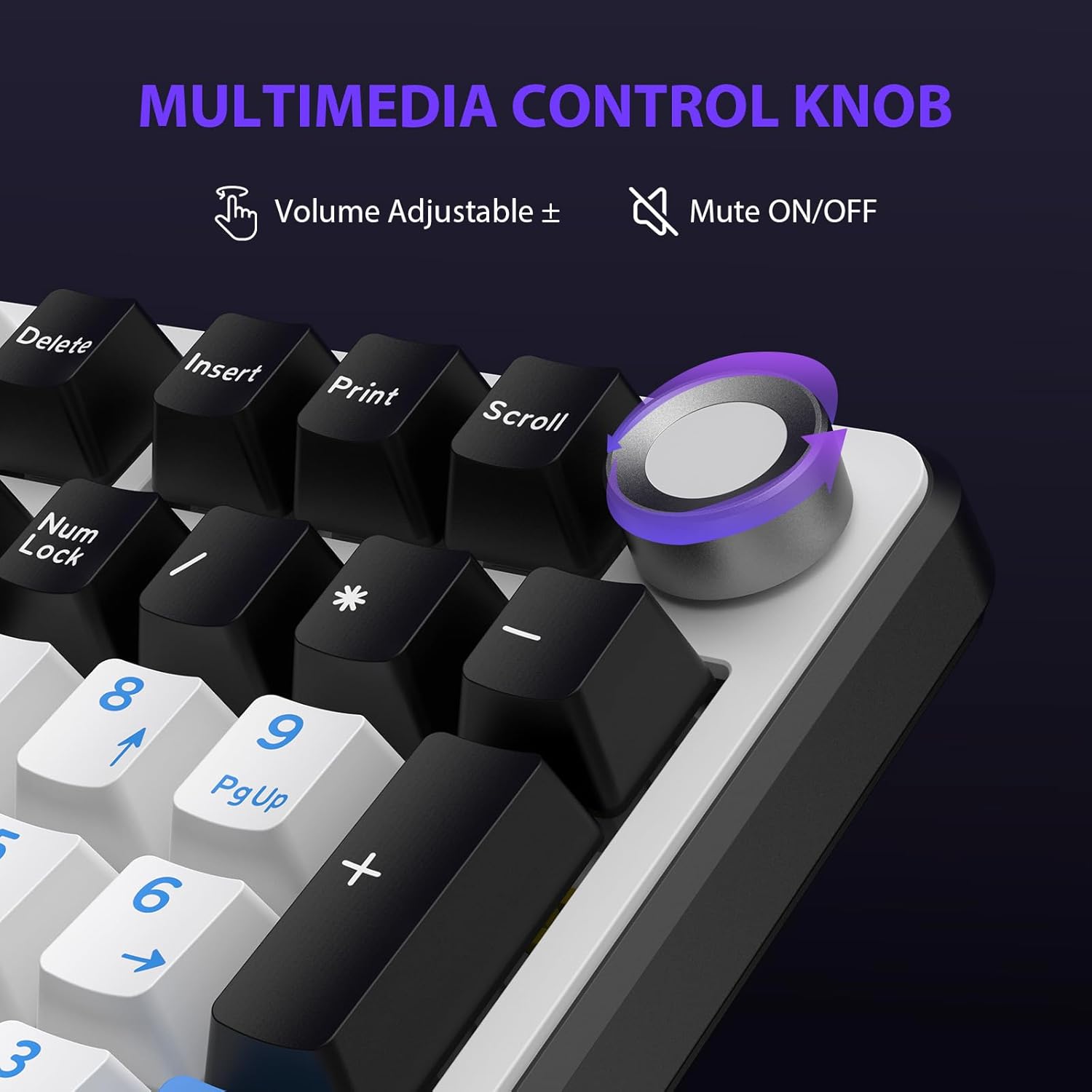
Figure 4.2: Multimedia Control Knob.
4.3. Контрола на RGB позадинско осветлување
The GK01 keyboard features 16.8 million color RGB backlighting with various effects.
- Fn + [Right Arrow]: Adjust 5 brightness levels.
- Fn + [Left Arrow]: Adjust 5 speed levels for dynamic effects.
- Fn + [Вметни]: Switch between 20 different backlight modes.
- Fn + [Внеси]: Switch color order within certain modes.
- Fn + [X]: Turn off light / activate power-saving mode.
- Fn + [Backspace]: Switch color order within certain modes.

Figure 4.3: RGB Backlight Controls.
5. Напредни карактеристики
5.1. Прекинувачи што може да се заменат со топла струја
The GK01 keyboard is equipped with pre-lubricated Cybertron linear switches and supports solder-free hot-swapping. This allows you to easily replace switches with compatible 3-pin or 5-pin mechanical switches without soldering.
За да замените прекинувач:
- Using the provided 2-in-1 keycap and switch puller, gently remove the keycap from the desired switch.
- Insert the switch puller onto the switch, ensuring it grips the top and bottom clips of the switch.
- Нежно повлечете го прекинувачот право нагоре за да го извадите од печатената плочка.
- Порамнете ги пиновите на новиот прекинувач со дупките на печатената плочка. Осигурајте се дека пиновите се прави за да избегнете свиткување.
- Цврсто притиснете го новиот прекинувач на своето место додека не кликне.
- Повторно ставете го капачето на клучот.

Figure 5.1: Hot-Swappable Switch Replacement.
5.2. Programmable Software
The GK01 supports custom software for advanced customization, including key remapping, macro creation, and detailed RGB lighting effects.
- The software is compatible only with the Windows operating system.
- The keyboard must be connected via USB-C wired mode to use the software.
- For driver download, please visit the official Transformers Keyboard website or refer to the link provided in the product packaging.
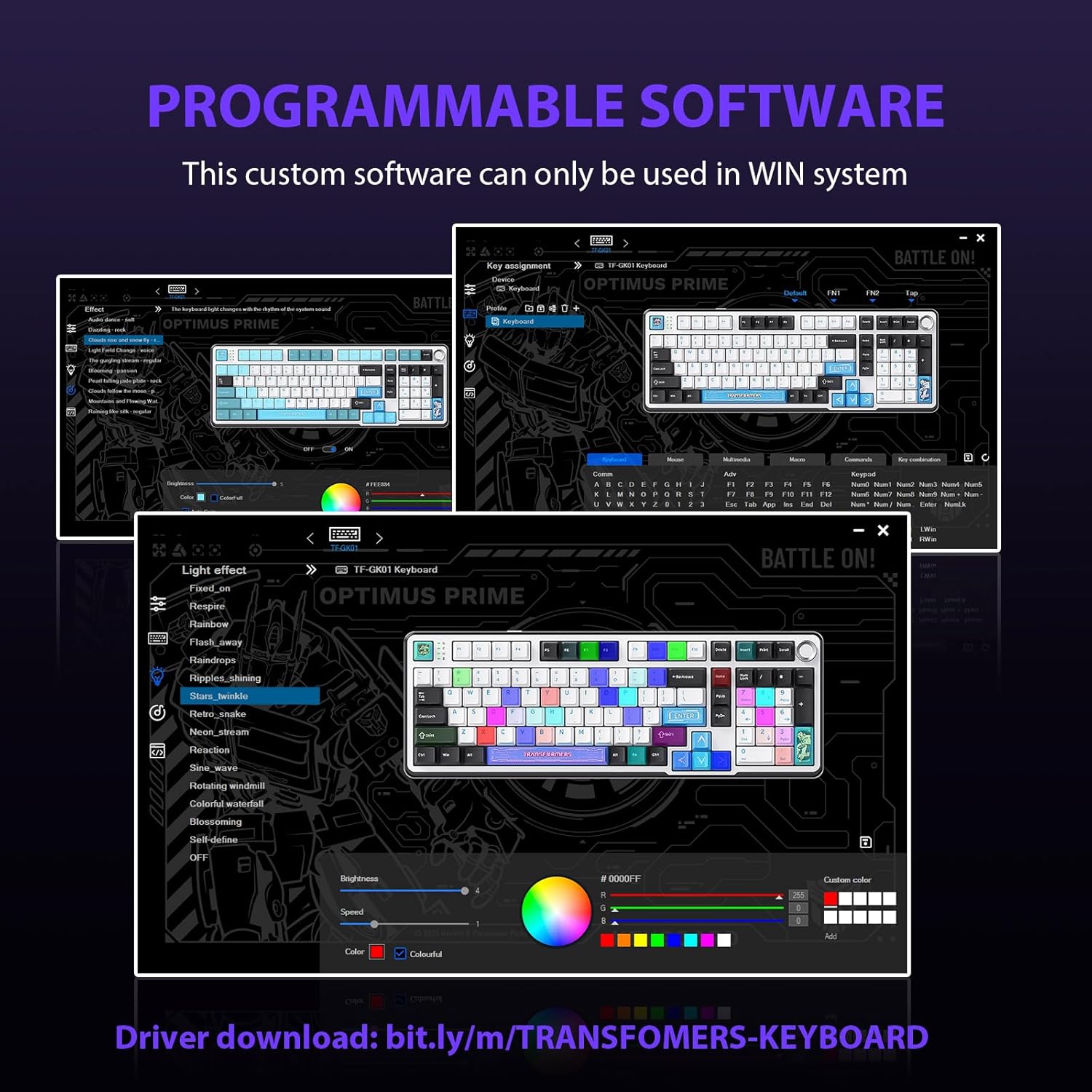
Figure 5.2: Programmable Software Interface.
5.3. Gasket Mounted Structure
The keyboard features a five-layer sound-absorbing and shock-absorbing gasket mounted structure. This design effectively reduces hollow noise and provides a softer, more consistent typing feel by isolating the plate from the case.
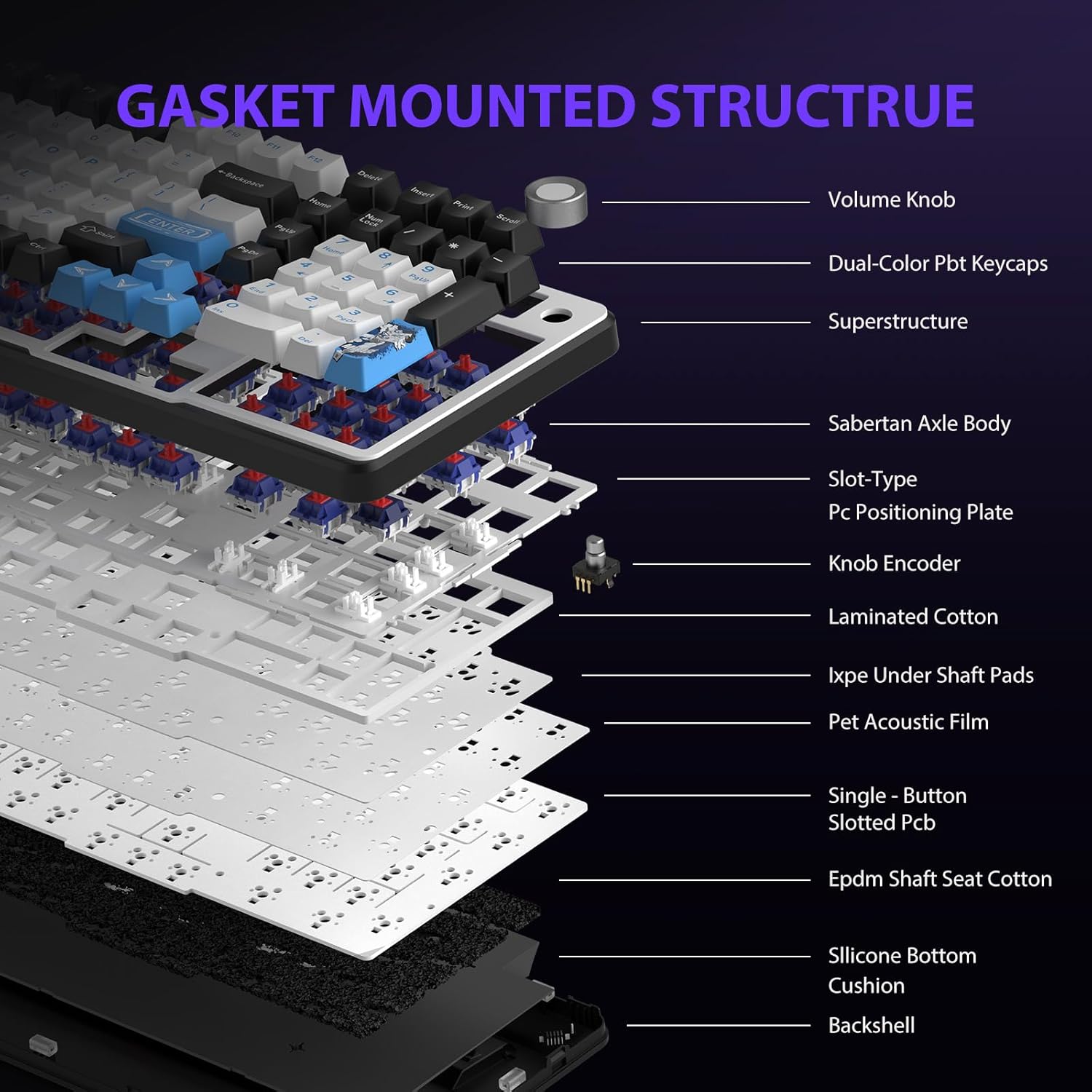
Figure 5.3: Gasket Mounted Structure Components.
6. Управување со батерии
The GK01 keyboard is equipped with a 4000mAh rechargeable battery.
- Полнење: Connect the keyboard to a USB power source using the provided USB-C cable. The indicator light will show charging status.
- Траење на батеријата: A fully charged battery provides extended usage time. Actual battery life may vary based on usage patterns and RGB lighting intensity.
- Зачувување на енергија: The keyboard will enter a power-saving sleep mode after a period of inactivity to conserve battery. Press any key to wake it up.
7. Одржување
7.1. Чистење на тастатурата
- Исклучете ја тастатурата од сите извори на енергија пред чистење.
- Користете мека крпа без влакненца малку гampизмијте со вода или благ раствор за чистење за да ги избришете капачињата на копчињата и куќиштето.
- За прашина и остатоци помеѓу копчињата, користете компримиран воздух или мала четка.
- Избегнувајте употреба на груби хемикалии или абразивни материјали.
7.2. Keycap and Switch Care
- The PBT keycaps are designed for durability and fade resistance.
- Refer to Section 5.1 for instructions on safely removing and replacing keycaps and switches.
- Ensure the keyboard feet are clean and free of debris for stable placement.

Figure 7.1: Adjustable Keyboard Feet.
8 Смена на проблеми
| Проблем | Можна причина | Решение |
|---|---|---|
| Тастатурата не реагира во безжичен режим. | Low battery, incorrect mode selected, dongle not connected, Bluetooth not paired. | Charge the keyboard. Ensure the mode switch is set correctly (2.4GHz or BT). Re-insert the 2.4GHz dongle. Re-pair Bluetooth connection. Try wired mode to confirm keyboard functionality. |
| Клучевите не се регистрираат или се пишуваат двојно. | Loose switch, software issue, debris under keycap. | Ensure switches are fully seated. Clean under keycaps. If using programmable software, ensure it's updated or try resetting keyboard settings. |
| RGB backlight not working or stuck. | Задното осветлување е исклучено, софтверски конфликт. | Притиснете Fn + X to toggle backlight. Check programmable software settings. |
| Не може да се поврзе преку Bluetooth. | Keyboard not in pairing mode, device Bluetooth off, interference. | Ensure keyboard is in Bluetooth pairing mode (Fn + Q/W/E long press). Ensure device Bluetooth is on and discoverable. Move closer to the device. |
9. Спецификации
| Карактеристика | Детал |
|---|---|
| Број на модел | TF-GK01 |
| Поврзување | Bluetooth 5.0, безжичен 2.4GHz, USB-C кабел |
| Тип на тастатура | Механички |
| Распоред | 101 Keys (Full-size) |
| Прекинувачи | Pre-lubed Cybertron Linear Switches, Hot-Swappable (3-pin/5-pin compatible) |
| Клучни клучеви | Heat-sublimated PBT |
| Задно осветлување | RGB (16.8 Million Colors, 20 modes, music rhythm effects via driver) |
| Капацитет на батеријата | 4000 mAh |
| Димензии на производот | 16.15 x 5.65 x 1.63 инчи (41.02 x 14.35 x 4.14 см) |
| Тежина на ставката | 2.24 фунти (1.02 кг) |
| Компатибилни уреди | Лаптоп, компјутер, паметен телефон, таблет |
| Посебни карактеристики | Anti-Ghosting (all keys), Multimedia Control Knob, Programmable Keys (via software), Rechargeable |
10. Гаранција и поддршка
For information regarding warranty coverage, technical support, or service inquiries, please refer to the warranty card included with your product or visit the official Transformers Keyboard webсајт.
Производител: Трансформатори