Вовед
Thank you for choosing the AOSU Solar Wall Light Camera System. This system integrates a security camera with a solar-powered wall light, offering comprehensive surveillance and illumination for your property. This manual provides detailed instructions for installation, operation, maintenance, and troubleshooting to ensure optimal performance of your device.
Содржина на пакетот
Please check the package for the following items. If any items are missing or damaged, please contact AOSU customer support.
- AOSU Solar Wall Light Camera Unit
- Detachable Solar Panel
- Држач за монтирање
- Комплет завртки за монтирање (завртки, ѕидни анкери)
- USB кабел за полнење
- Водич за брз почеток
- Шаблон за вежба
Производот завршиview
Familiarize yourself with the components of your AOSU Solar Wall Light Camera System.
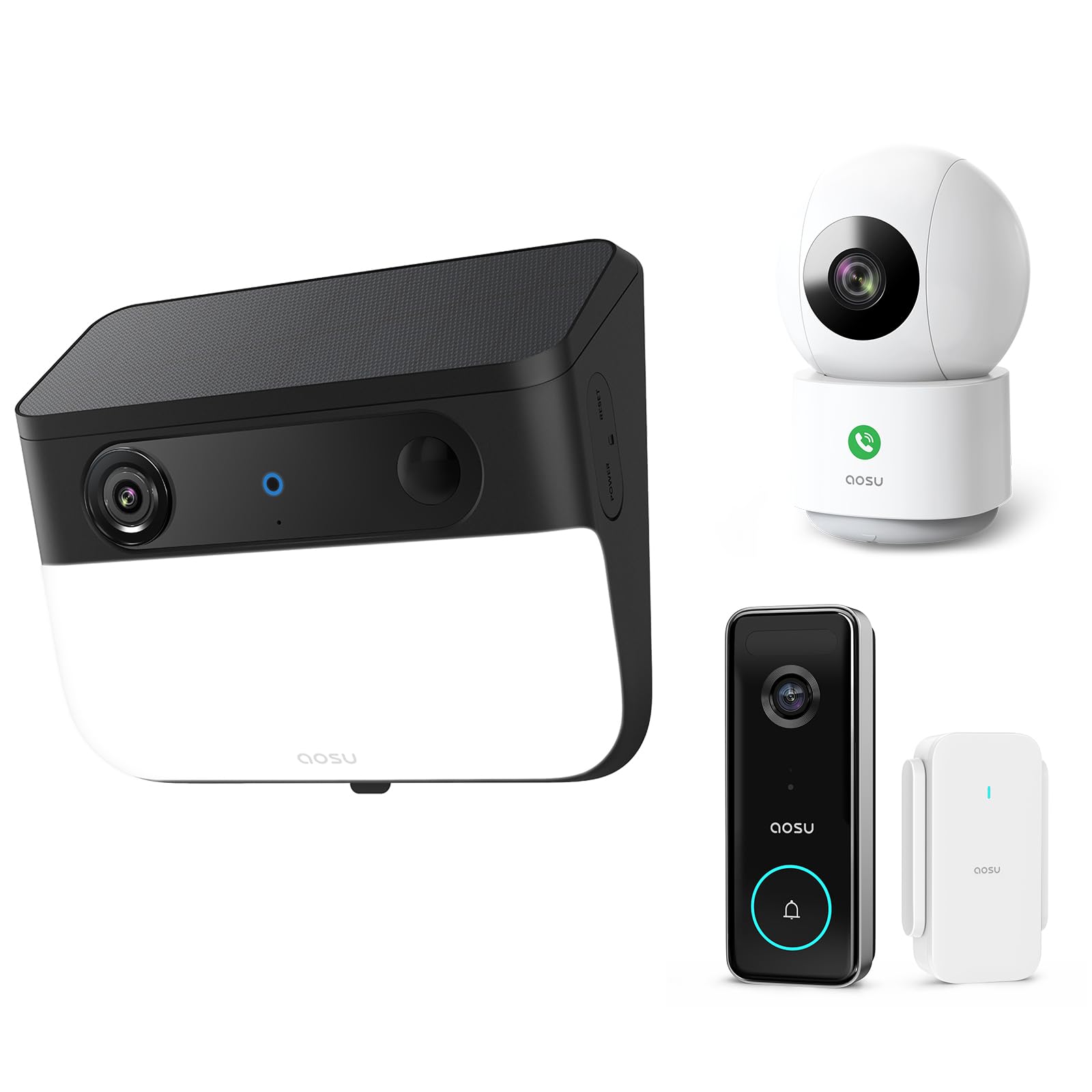
Image 1: AOSU Solar Wall Light Camera System. This image displays the main camera unit integrated with a wall light, alongside its detachable solar panel.
- Објектив на камерата: Снима видео фудtage.
- LED светлосен панел: Provides 400-lumen illumination.
- PIR сензор: Detects passive infrared motion.
- Радарски сензор: Enhances motion detection accuracy.
- Микрофон: Снима аудио.
- Говорник: Enables two-way audio communication and siren.
- Solar Panel Port: Connects the detachable solar panel for charging.
- Копче за ресетирање: Used for factory reset (typically located under a cover).
- Светло за индикатор за статус: Shows device status (e.g., charging, connected, recording).
Поставување
1. Почетно полнење
Before installation, fully charge the camera unit using the provided USB cable. Connect the USB cable to the charging port on the camera and a standard 5V/2A USB power adapter (not included). The status indicator light will show charging progress.
2. Инсталација на апликација и креирање сметка
- Download the "AOSU Security" app from the Apple App Store or Google Play Store.
- Отворете ја апликацијата и креирајте нова сметка или најавете се ако веќе имате.
3. Спарување на уредот
- In the AOSU Security app, tap the "+" icon to add a new device.
- Select "Solar Wall Light Camera" from the list of devices.
- Follow the on-screen instructions to power on the camera and scan the QR code displayed in the app using the camera's lens.
- Connect the camera to your 2.4GHz Wi-Fi network. Ensure your Wi-Fi signal is strong at the installation location.
- Once connected, name your device and complete the pairing process.
4. Монтирање на камерата и соларниот панел
Изберете место за монтирање кое обезбедува јасна view од областа што сакате да ја следите и примате ampдиректна сончева светлина за соларниот панел.
- Обележување: Use the drill template to mark the screw positions on the wall.
- Дупчење: Drill holes at the marked positions. Insert wall anchors if mounting on masonry or stucco.
- Држач за монтирање: Прицврстете го држачот за монтирање на ѕидот со помош на приложените завртки.
- Прикачи камера: Slide the camera unit onto the mounting bracket until it clicks into place. Adjust the camera angle as needed.
- Инсталација на соларни панели:
- Mount the detachable solar panel in a location that receives maximum direct sunlight throughout the day.
- Connect the solar panel cable to the solar panel port on the camera unit. Ensure a secure connection.
Упатства за работа
Во живо View и Снимање
- Open the AOSU Security app and select your camera to access the live view.
- Од во живо view, you can manually record video, take screenshots, and use two-way audio.
- Recorded events are stored in the cloud or on a local storage card (if installed).
Откривање на движење и предупредувања
- The camera utilizes advanced radar and PIR motion sensors for accurate detection.
- Configure motion detection sensitivity and activity zones within the app settings.
- Enable push notifications to receive alerts on your smartphone when motion is detected.
- Smart Motion Tracking: Activate this feature in the app to allow the camera to automatically follow detected objects within its field of view.
Wall Light Operation
- The 400-lumen wall light automatically activates at night when motion is detected.
- Adjust light duration and brightness settings via the AOSU Security app.
Ноќна визија во боја
The camera provides vivid, full-color images even in low-light conditions or complete darkness, thanks to its advanced color night vision technology. This feature activates automatically.
Doorbell Camera Functionality (if applicable)
If your model includes doorbell functionality, visitors can press the doorbell button. This will trigger a notification on your phone, allowing you to see and speak to the visitor via the app.
Одржување
- Чистење: Regularly wipe the camera lens, light panel, and solar panel with a soft, damp крпа за отстранување прашина и нечистотија. Не користете јаки хемикалии.
- Ефикасност на соларни панели: Ensure the solar panel remains free from obstructions (e.g., leaves, snow) to maximize charging efficiency.
- Ажурирања на фирмверот: Periodically check the AOSU Security app for available firmware updates. Keeping your device's firmware up-to-date ensures optimal performance and security. Follow the in-app instructions for updates.
- Нега на батеријата: While solar-powered, extreme cold or prolonged periods without sunlight may reduce battery performance. Ensure the solar panel receives adequate sunlight.
Решавање проблеми
Камерата не се поврзува со Wi-Fi
- Проверете дали вашата Wi-Fi мрежа е 2.4 GHz. Камерата не поддржува Wi-Fi од 5 GHz.
- Check Wi-Fi signal strength at the camera's location. Move the router closer or use a Wi-Fi extender if necessary.
- Проверете дали лозинката за Wi-Fi внесена во апликацијата е точна.
- Try resetting the camera by pressing the reset button for 5 seconds until you hear a prompt.
Лош квалитет на сликата
- Исчистете го објективот на камерата за да отстраните какви било дамки или нечистотија.
- Ensure there is adequate lighting in the monitored area, especially for color night vision.
- Проверете ја брзината на вашата интернет конекција. Бавната конекција може да влијае на живо view квалитет.
Motion Detection Not Working or Too Many False Alerts
- Прилагодете ги поставките за чувствителност на детекција на движење во апликацијата.
- Define specific activity zones to focus detection on critical areas and ignore irrelevant movements.
- Осигурајте се дека камерата view не е попречено од подвижни предмети како гранки од дрвја.
Соларниот панел не се полни
- Проверете дали кабелот на соларниот панел е безбедно поврзан со камерата.
- Ensure the solar panel is positioned to receive direct sunlight for several hours daily, free from shade.
- Clean the surface of the solar panel to remove any dirt or debris.
Спецификации
| Резолуција | 5MP Ultra HD (3K) |
| Ноќна визија | Напреден ноќен вид во боја |
| Излез на светлина | 400 лумени |
| Детекција на движење | Triple Motion Detection (Radar + PIR + Human Detection) |
| Следење | Паметно следење на движење |
| Поврзување | Wi-Fi од 2.4 GHz |
| Извор на енергија | Батерија што може да се полни, соларен панел |
| Оптички објектив | 7-piece ultra-clear optical glass lens |
| ASIN | B0F7Y1PRVT |
| Прво достапно | 25 март 2025 година |
Гаранција и поддршка
AOSU provides a limited warranty for this product. For detailed warranty information, please refer to the warranty card included in your package or visit the official AOSU website. For technical support, product inquiries, or warranty claims, please contact AOSU customer service through the contact information provided on the official website or within the AOSU Security app.
Службен Webсајт: www.aosu.com (Забелешка: Ова е резервирано место URL, ве молиме погледнете ја документацијата на вашиот производ за точниот webсајт.)


