Вовед
Welcome to your Angrox Universal Replacement Remote Control. This manual provides detailed instructions for setting up and operating your new remote, designed for seamless compatibility with various Philips Smart 4K UHD Android TVs. Please read this manual thoroughly to ensure optimal performance and longevity of your remote control.
1. Поставување
1.1 Инсталација на батерија
За далечинскиот управувач се потребни две AAA алкални батерии (не се вклучени).
- Лоцирајте го капакот на преградата за батерии на задниот дел од далечинскиот управувач.
- Притиснете ја јазичката и лизнете го капакот надолу за да го отворите.
- Вметнете две AAA батерии, осигурувајќи се дека позитивните (+) и негативните (-) терминали се правилно порамнети со ознаките во преградата.
- Лизгајте го капакот на батеријата на своето место додека не кликне безбедно.
1.2 Почетна врска
This Angrox replacement remote control is designed for immediate use with compatible Philips Smart TVs. No programming or pairing is required. Simply insert the batteries, and the remote is ready to operate your television.
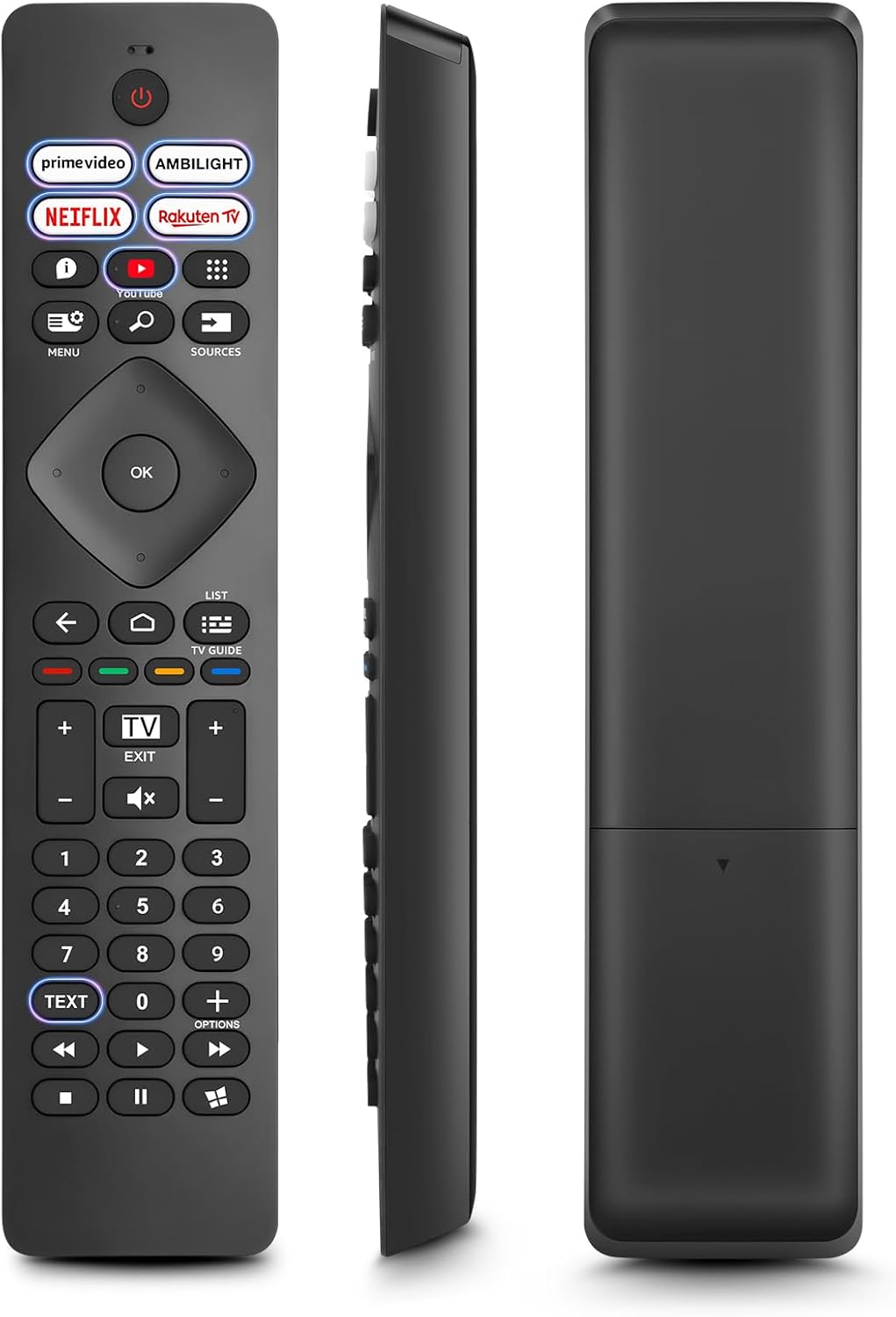
Слика: напред, од страна и одзади views of the Angrox Universal Replacement Remote Control. This image illustrates the physical design and battery compartment location.
2. Упатства за работа
2.1 Функции на копчињатаview
Familiarize yourself with the remote control's buttons and their primary functions.
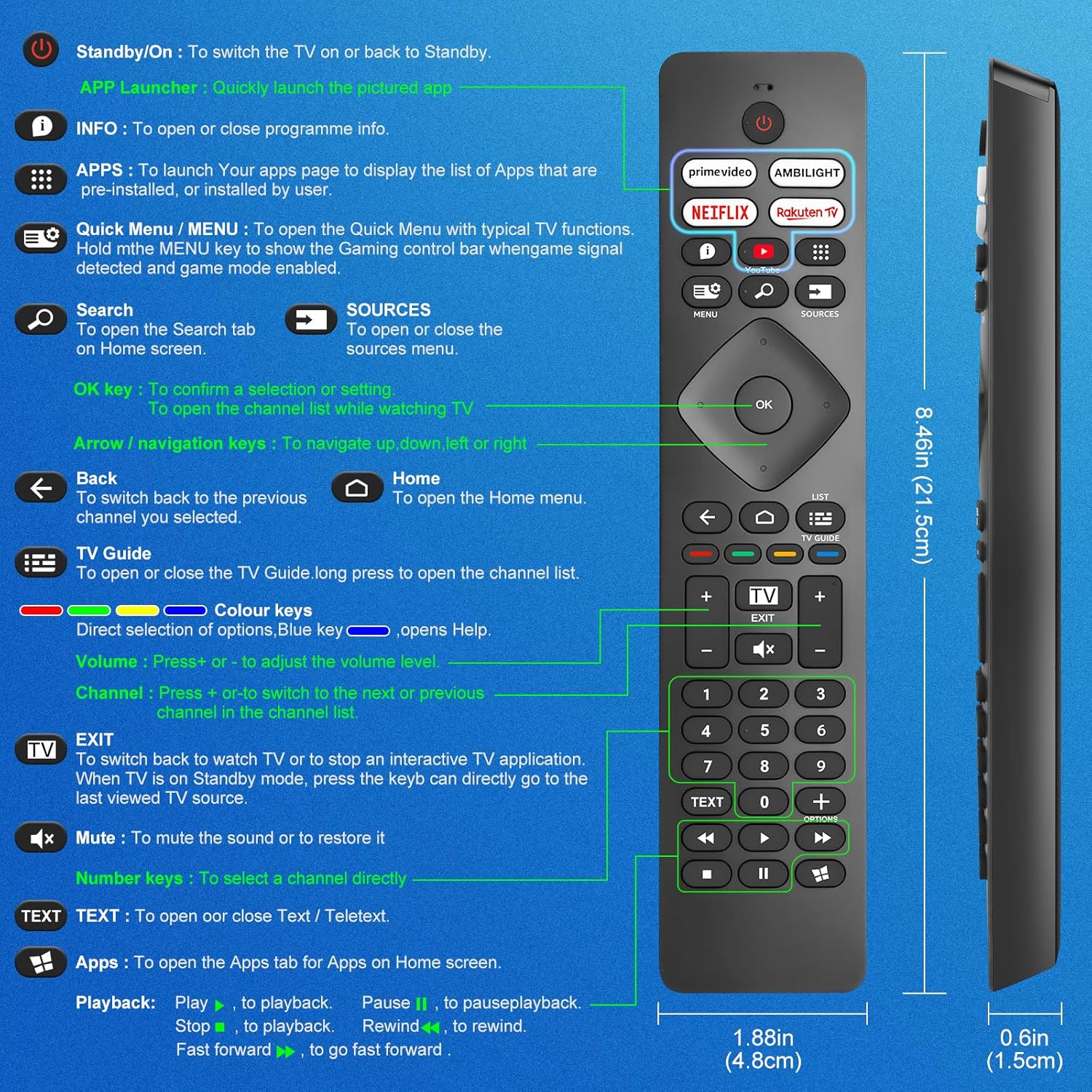
Image: A detailed diagram illustrating each button on the Angrox remote control and its corresponding function.
Detailed Button Descriptions:
- Standby/On (Power Button): За да го вклучите телевизорот или да го вратите во мирување.
- APP Launcher: Quickly launch the pictured app.
- ИНФОРМАЦИИ: To open or close programme info.
- АПЛИКАЦИИ: To launch your apps page to display the list of apps that are pre-installed or installed by the user.
- Quick Menu / MENU: To open the Quick Menu with typical TV functions. Hold the MENU key to show the Gaming control bar when game signal detected and game mode enabled.
- Пребарување: To open the Search tab on Home screen.
- ИЗВОРИ: To open or close the sources menu.
- Во ред клуч: To confirm a selection or setting. To open the channel list while watching TV.
- Arrow/Navigation keys: За навигација нагоре, надолу, лево или десно.
- Назад: За да се вратите на претходниот канал што сте го избрале.
- Дома: To open the Home menu.
- ТВ водич: To open or close the TV Guide. Long press to open the channel list.
- Colour keys (Red, Green, Yellow, Blue): Direct selection of options. Blue key opens Help.
- Волумен +/-: За да го прилагодите нивото на јачина на звук.
- Канал +/-: За да се префрлите на следниот или претходниот канал во списокот со канали.
- Излез: To switch back to watch TV or to stop an interactive TV application. When TV is on Standby mode, press the key to directly go to the last viewed TV source.
- Исклучи звук: За да го исклучите звукот или да го вратите.
- Клучеви со броеви (0-9): За директно да изберете канал.
- ТЕКСТ: To open or close Text / Teletext.
- Apps (Netflix, Prime Video, Rakuten TV, YouTube): Quick access to dedicated streaming applications.
- Контроли за репродукција (Репродукција, Пауза, Стоп, Премотување назад, Премотување напред): За репродукција на медиуми.
2.2 Копчиња за кратенки
The remote features dedicated shortcut buttons for popular streaming services and Ambilight control.

Image: The Angrox remote control with highlighted shortcut buttons for Prime Video, Ambilight, Netflix, Rakuten TV, and YouTube.
- Прво видео: Direct access to Amazon Prime Video.
- Ambilight: Control Philips Ambilight features.
- Нетфликс: Директен пристап до Netflix.
- Ракутен ТВ: Direct access to Rakuten TV.
- YouTube: Direct access to YouTube.
3. Компатибилност
This Angrox replacement remote control is universally compatible with a wide range of Philips Smart TVs, including:

Image: Visual representation of the Angrox remote's compatibility with Philips 4K Ambilight TV, 4K Ultra HD TV, LED 4K TV, and OLED 4K TV.
- 4K Ambilight TV
- 4K Ultra HD телевизор
- LED 4K телевизор
- OLED 4K телевизор
It is designed to function with all Philips Smart TV models that utilize an infrared remote control.
4. Карактеристики за изведба

Image: Graphics indicating a 0.2-second fast response and a 10-meter transmitting distance for the remote control.
- Брз одговор: Enjoy a quick response time of approximately 0.2 seconds for button presses.
- Растојание на пренос: Effective operating range up to 10 meters (approximately 33 feet).
5. Одржување
- Чистење: Use a soft, dry cloth to clean the remote control. Avoid using liquid cleaners or abrasive materials.
- Нега на батеријата: If the remote will not be used for an extended period, remove the batteries to prevent leakage and potential damage. Replace batteries when the remote's response becomes sluggish or inconsistent.
- Складирање: Чувајте го далечинскиот управувач на ладно и суво место, подалеку од директна сончева светлина и екстремни температури.
6 Смена на проблеми
6.1 Далечинскиот управувач не реагира
- Проверете ги батериите: Ensure batteries are inserted correctly with the correct polarity (+/-). Replace old or depleted batteries with new AAA alkaline batteries.
- Линија на погледот: Make sure there is a clear line of sight between the remote control and the TV's infrared sensor. Obstructions can block the signal.
- Далечински сензор: Ensure the TV's infrared sensor is not blocked or dirty.
6.2 Ограничена функционалност
- While this remote is broadly compatible, some specific advanced functions unique to certain original Philips remote models might not be replicated. Verify the button functions against the provided diagram.
6.3 Ambilight Functionality
Некои корисници повторноviews indicate that Ambilight functionality might vary. If your Ambilight button does not work as expected, ensure your TV's Ambilight feature is enabled and configured correctly in your TV settings.
7. Спецификации
| Карактеристика | Детал |
|---|---|
| Бренд | Ангрокс |
| Модел | pour Philips TV |
| Компатибилни уреди | Philips Smart TV (4K Ambilight, 4K UHD, LED 4K, OLED 4K) |
| Специјална карактеристика | Универзална |
| Тип на конектор | Инфрацрвена |
| Тип на батерија | 2 x AAA алкални (не се вклучени) |
| Димензии на ставката | 22.7 x 6.2 x 2.4 cm |
| Тежина на ставката | 60 гр |
| Боја | Црното |
Забелешка: Спецификациите се предмет на промена без претходна најава.
8. Гаранција и поддршка
For product support or warranty inquiries, please contact your retailer or the manufacturer, Angrox, directly. Please refer to your purchase documentation for specific warranty terms and contact information.
Производител: Ангрокс
ASIN: B0F83X2FQG


