1. Вовед
Thank you for choosing the Klarus E5 Plus Ultra-Slim Dual Switch Triple-Light EDC Flashlight. This manual provides detailed instructions for the safe and efficient operation, maintenance, and troubleshooting of your new device. Please read this manual thoroughly before use and retain it for future reference.
2. Производот завршиview
The Klarus E5 Plus is a compact and versatile everyday carry (EDC) flashlight featuring three distinct light sources and a dual-switch design for intuitive control. Its ultra-slim profile, magnetic base, and pocket clip offer multiple hands-free lighting options.

Figure 1: Klarus E5 Plus Flashlight with key features highlighted.
3. Содржина на пакетот
- Klarus E5 Plus Flashlight
- USB-C кабел за полнење
- Упатство за употреба (овој документ)

Figure 2: Contents included in the Klarus E5 Plus package.
4. Спецификации
| Карактеристика | Детал |
|---|---|
| Модел | Е5 ПЛУС |
| Максимален излез | 650 Lumens (Side COB) |
| Извори на светлина | Front (White), Side (Warm White, Red) |
| Димензии | 4.45"Д x 0.98"Ш x 0.31"В (113мм x 25мм x 8мм) |
| Тежина | 1.26 oz (39g) |
| Батерија | Вграден литиум-јон од 500 mAh |
| Порта за полнење | USB-C |
| Време на полнење | Прибл. 1.5 часа |
| Максимално траење | До 12.5 часа (режим на ниска температура) |
| Отпорност на вода | IPX4 (отпорен на прскање) |
| Материјал | Aluminum Alloy (6061) |
| Посебни карактеристики | Dual Switch, Magnetic Base, Pocket Clip, Flicker-Free Dimming |

Figure 3: Physical dimensions and weight comparison.
5. Поставување: Полнење на батеријата
The Klarus E5 Plus features a built-in rechargeable lithium-ion battery. Before first use, fully charge the device.
- Locate the USB-C charging port on the side of the flashlight, protected by a silicone cover.
- Gently lift the silicone cover to expose the USB-C port.
- Поврзете го приложениот USB-C кабел со фенерчето, а другиот крај вклучете го во компатибилен USB извор на напојување (на пр., компјутер, адаптер за ѕид).
- During charging, the indicator light on the flashlight will illuminate red.
- Откако ќе се наполни целосно (приближно 1.5 часа), индикаторското светло ќе светне сино.
- Disconnect the charging cable and securely close the silicone cover to maintain IPX4 water resistance.

Figure 4: Charging the Klarus E5 Plus via USB-C.
6. Упатства за работа
The E5 Plus features two distinct switches for controlling its multiple light sources.
6.1. Head Light (Front White Light) Operation
- Вклучи/исклучи: Притиснете и задржете го Прекинувач за светло за глава (upper button) for 0.5 seconds.
- Промена на осветленоста: With the head light on, single-click the Прекинувач за светло за глава to cycle through brightness modes (Low, High).
- Меморија на режимот: The head light will remember the last used brightness mode when turned off and on again.
6.2. Side Light (Warm White & Red Light) Operation
- Вклучи/исклучи: Притиснете и задржете го Side Light Switch (lower button) for 0.5 seconds.
- Change Brightness (Warm White): With the warm white side light on, single-click the Side Light Switch to cycle through brightness modes (Low, Medium, High, Turbo).
- Toggle Red Light: With the warm white side light on, double-click the Side Light Switch to switch to Red Constant-On mode. Double-click again to return to warm white.
- Црвен строб: From Red Constant-On mode, single-click the Side Light Switch to activate Red Strobe mode. Single-click again to return to Red Constant-On.
- Меморија на режимот: The warm white side light will remember the last used brightness mode. Red light modes do not have memory and will default to Red Constant-On when reactivated.

Figure 5: Dual switch operation for the Klarus E5 Plus.
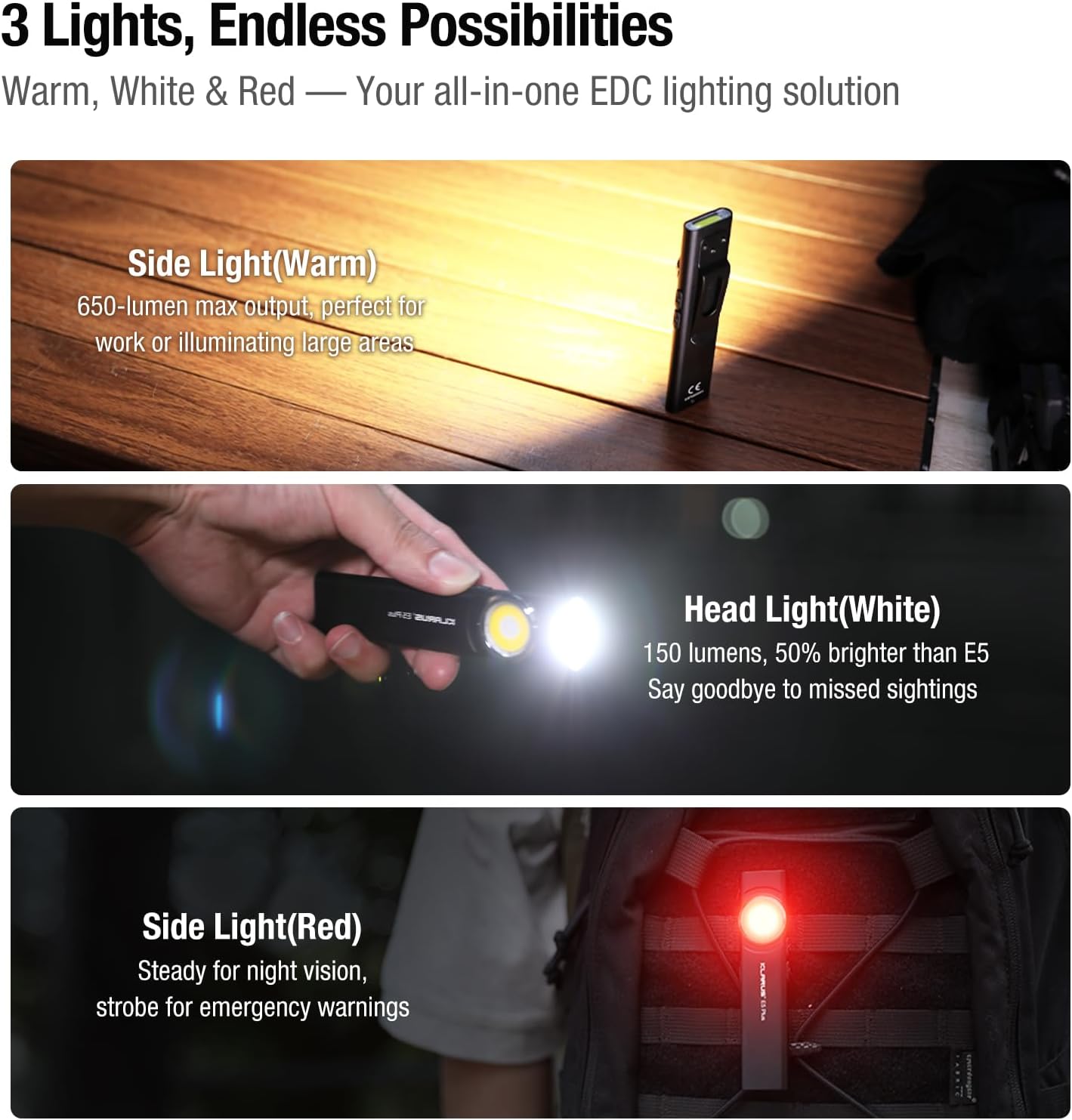
Figure 6: Three light sources and their applications.

Figure 7: Hands-free usage with magnetic base and clip.
7. Одржување
- Чистење: Избришете го телото на фенерчето со мека, дamp крпа. Избегнувајте абразивни средства за чистење или растворувачи.
- Полнење: Recharge the battery regularly to maintain optimal performance, especially if stored for extended periods.
- Складирање: Чувајте ја батериската ламба на ладно и суво место подалеку од директна сончева светлина и екстремни температури.
- Отпорност на вода: Ensure the USB-C port's silicone cover is securely closed to maintain IPX4 water resistance.
8 Смена на проблеми
| Проблем | Можна причина | Решение |
|---|---|---|
| Фенерчето не се вклучува. | Активиран е режим на слаба батерија или заклучување. | Charge the battery. Ensure no buttons are accidentally pressed during storage. |
| Излезот на светлина е слаб. | Low battery or incorrect mode selected. | Наполнете ја батеријата. Прелистајте низ режимите на осветленост за да изберете повисока поставка. |
| Индикаторот за полнење не работи. | Loose connection or faulty cable/charger. | Ensure USB-C cable is securely connected. Try a different USB-C cable or power source. |
9. Официјални видеа за производи
The following videos provide additional visual guidance and demonstrations of the Klarus E5 Plus flashlight's features and operation.
Klarus E5 Plus - Ultra-Slim Dual Switch Triple-Light EDC Flashlight
Видео 1: Оверview of the Klarus E5 Plus, highlighting its ultra-slim design, dual switch, and triple-light functionality. This video demonstrates the product's key features and versatility.
10. Гаранција и поддршка
Klarus products are manufactured to high-quality standards. For warranty information, technical support, or service inquiries, please refer to the official Klarus webлокација или контактирајте го вашиот овластен продавач. Ве молиме задржете го доказот за купување за гаранциски барања.
Производител: КЛАРУС