1. Вовед
This user manual provides detailed instructions for setting up, operating, maintaining, and troubleshooting your FIREBAT Mini PC. This guide covers both the MN56 model (featuring AMD Ryzen 7 8745HS) and the A6 model (featuring AMD Ryzen 7 6800H). Please read this manual thoroughly before using your device to ensure proper operation and longevity.
The FIREBAT Mini PCs are designed for a wide range of applications, from home and office use to education and light gaming, offering powerful performance in a compact form factor.

Figure 1.1: FIREBAT MN56 (white) and A6 (black) Mini PCs. The MN56 model is shown with RGB lighting and a vertical stand, while the A6 model is a compact black cube.
2. Информации за безбедност
To prevent injury, electric shock, fire, and damage to the device, please observe the following safety precautions:
- Use only the power adapter provided with your Mini PC.
- Не го изложувајте уредот на вода, влага или екстремни температури.
- Избегнувајте да го ставате уредот на директна сончева светлина или во близина на извори на топлина.
- Обезбедете соодветна вентилација; не ги блокирајте отворите за вентилација.
- Не обидувајте се сами да го расклопите или поправите уредот. За сите сервиси обратете се на квалификуван персонал.
- Чувајте го уредот подалеку од силни магнетни полиња.
- Ракувајте со уредот внимателно за да избегнете физичко оштетување.
3. Водич за поставување
3.1. Содржина на пакетот
Before proceeding, verify that all items are present in your package:
- FIREBAT Mini PC (MN56 or A6 model)
- Адаптер за напојување
- HDMI кабел
- Упатство за употреба (овој документ)
- (Optional) VESA Mount Bracket and Screws
3.2. Поврзување периферни уреди
Follow these steps to connect your Mini PC to a display and other essential peripherals:
- Поврзување на дисплеј: Use the provided HDMI cable or a DisplayPort (DP) cable to connect your monitor to the corresponding port on the Mini PC. Both models support triple display output via HDMI, DisplayPort, and USB-C.
- Поврзете ја тастатурата и глувчето: Plug your USB keyboard and mouse into any available USB-A ports on the Mini PC.
- Поврзување на мрежа (опционално): For a wired internet connection, connect an Ethernet cable from your router to the LAN port(s) on the Mini PC. Both models feature 2.5Gbps LAN ports.
- Поврзете напојување: Plug the power adapter into the DC-IN port on the Mini PC, then plug the other end into a power outlet.
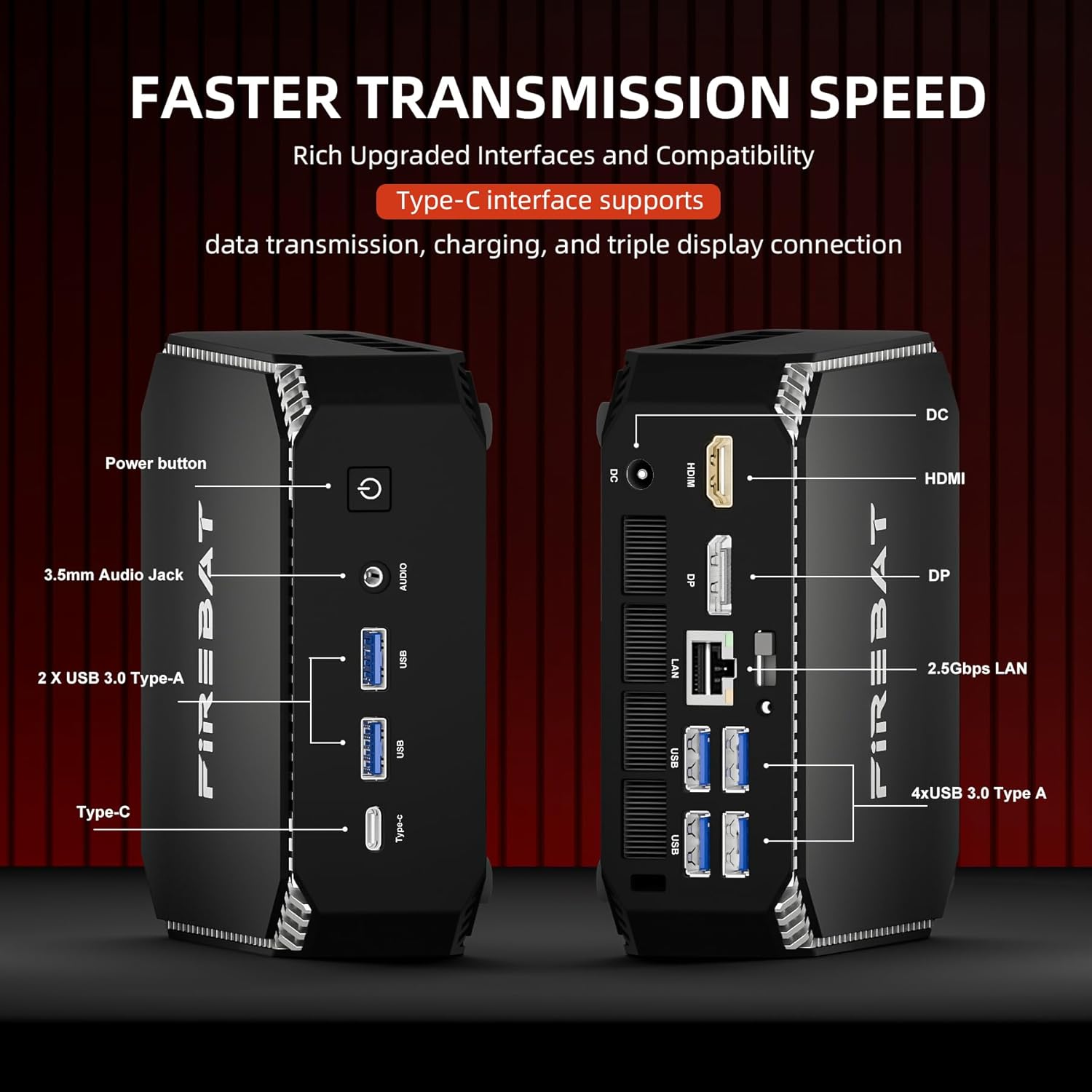
Слика 3.1: Готовоview of ports on the FIREBAT A6 Mini PC, including Power button, 3.5mm Audio Jack, USB 3.0 Type-A, Type-C, DC-IN, HDMI, DisplayPort, and 2.5Gbps LAN ports.
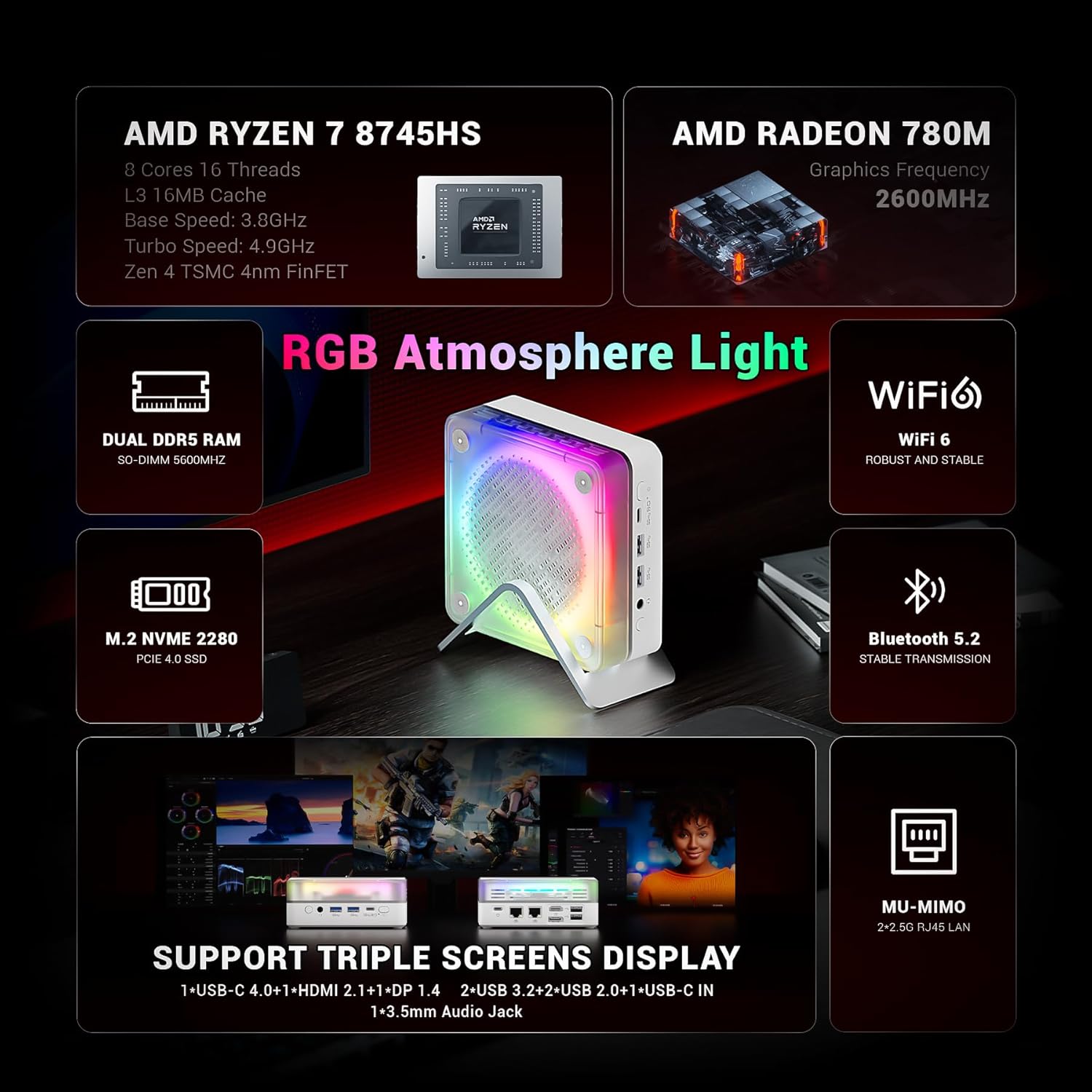
Figure 3.2: The MN56 model also features multiple USB ports, HDMI, DisplayPort, and USB-C for display output, along with dual 2.5Gbps LAN ports.
3.3. Првично вклучување
After connecting all peripherals:
- Press the Power button located on the Mini PC. The power indicator light will illuminate.
- The Mini PC will boot up. Follow the on-screen instructions to complete the initial Windows setup (if applicable).
4. Упатства за работа
4.1. Управување со енергија
- Вклучување: Притиснете го копчето за вклучување.
- Исклучи: Кликнете на копчето „Старт“ во Windows, потоа изберете „Напојување“ > „Исклучи“.
- Рестартирајте: Кликнете на копчето „Старт“ во Windows, потоа изберете Вклучување > Рестартирај.
- Спиј: Кликнете на копчето „Старт“ во Windows, потоа изберете „Напојување“ > „Спиење“.
4.2. Конфигурација на екранот
Both MN56 and A6 models support triple display output, allowing you to connect up to three monitors simultaneously for enhanced productivity.
- Connect your monitors to the HDMI, DisplayPort, and USB-C video output ports.
- In Windows, right-click on the desktop and select "Display settings" to configure your multiple displays (extend, duplicate, or show only on one).
Figure 4.1: The MN56 Mini PC demonstrating support for triple screen display configurations via USB-C, HDMI, and DisplayPort.
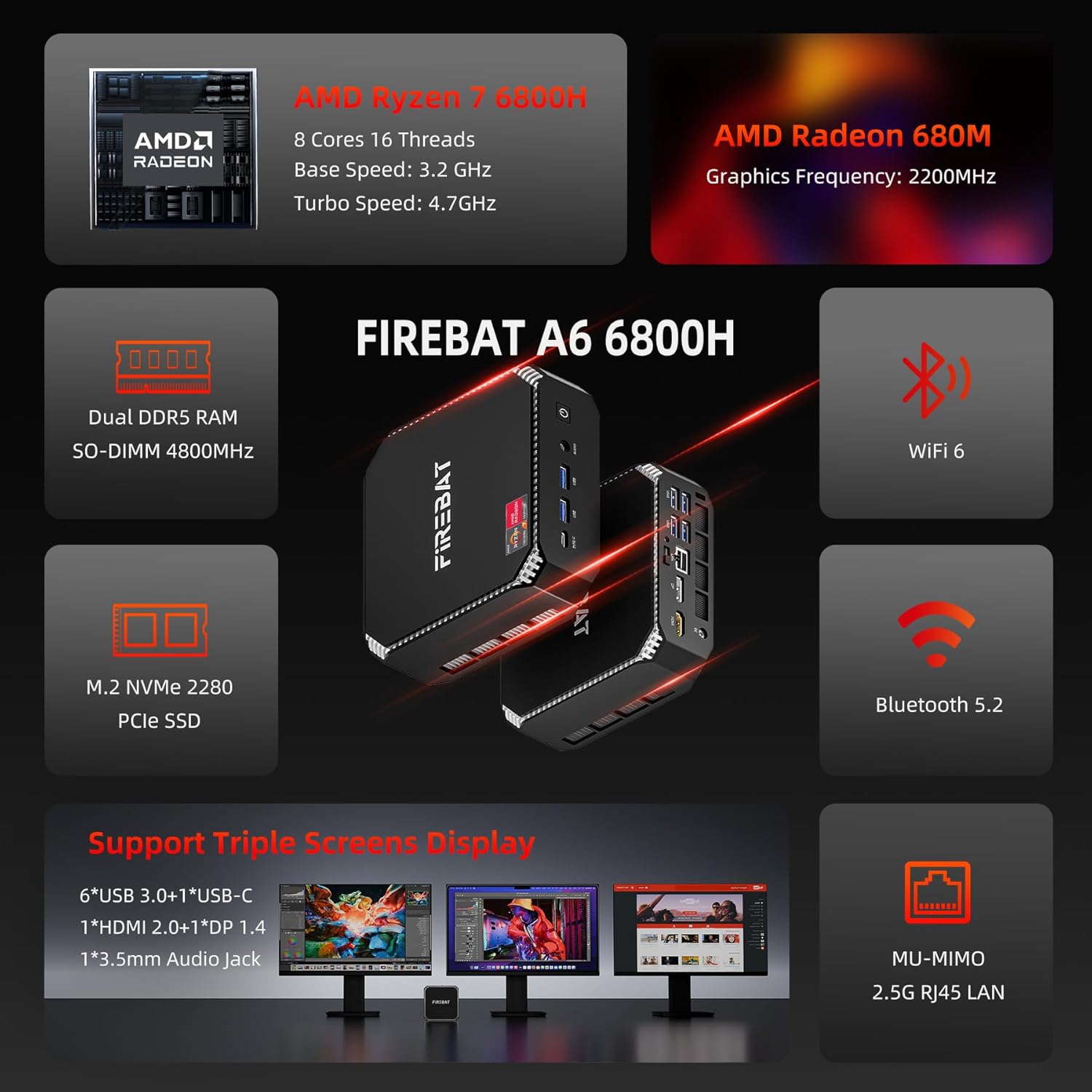
Figure 4.2: The A6 Mini PC also supports triple screen display, offering versatile connectivity options for multiple monitors.
4.3. Мрежа и поврзување
- Wi-Fi: Both models support Wi-Fi 6 for robust and stable wireless connections. To connect, click the Wi-Fi icon in the taskbar, select your network, and enter the password.
- Bluetooth: Integrated Bluetooth 5.2 allows for stable transmission to connect wireless peripherals like keyboards, mice, and headphones. Enable Bluetooth in Windows settings to pair devices.
- Жичен LAN: Utilize the dual 2.5Gbps RJ45 LAN ports for high-speed wired network connections.
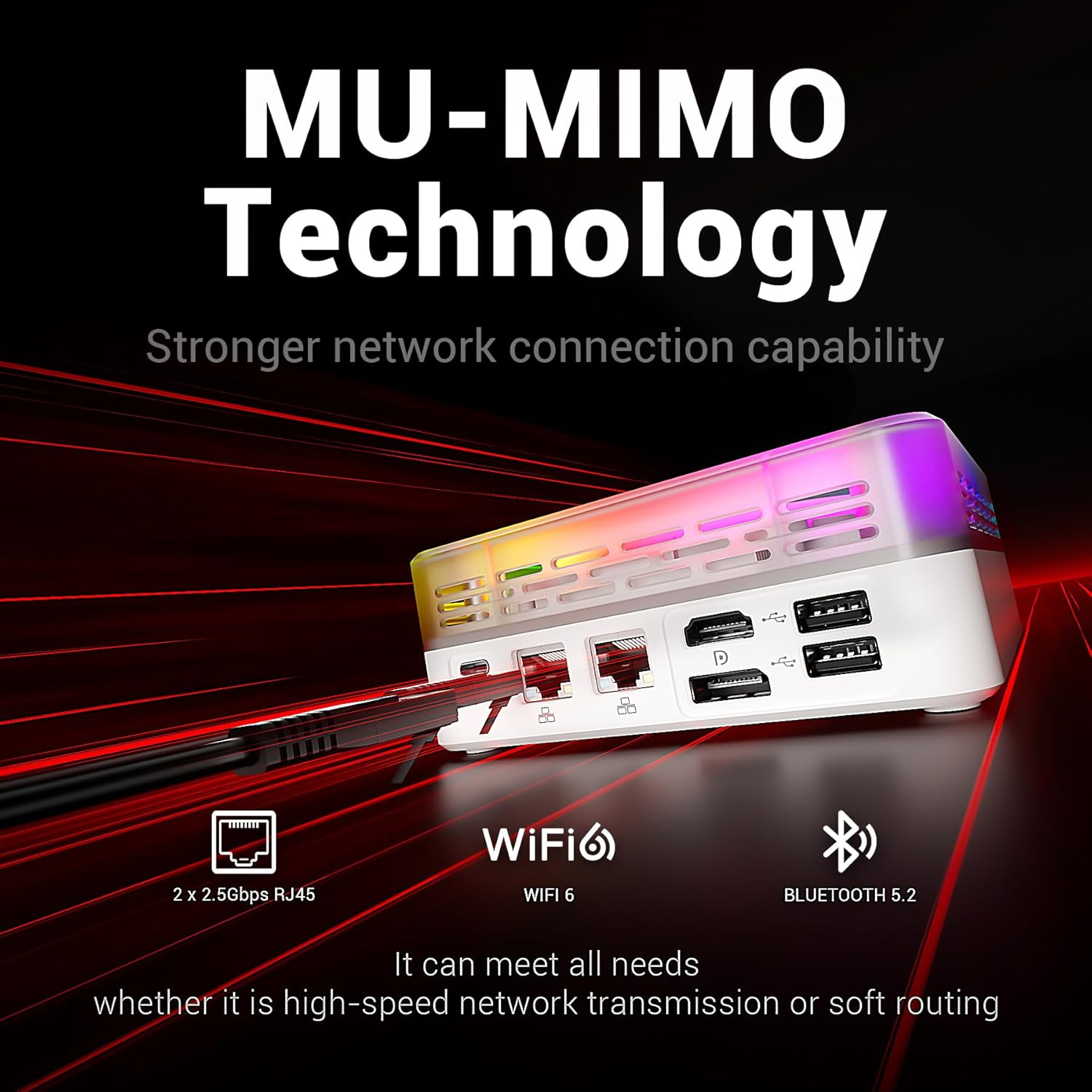
Figure 4.3: The MN56 Mini PC highlights its MU-MIMO Technology, Wi-Fi 6, Bluetooth 5.2, and dual 2.5Gbps RJ45 LAN ports for superior network connectivity.
4.4. Проширување на складиштето
Both Mini PC models come with M.2 NVMe 2280 PCIe SSDs for fast storage. If you need to expand storage, consult a qualified technician or refer to the detailed upgrade guide available on the FIREBAT website for compatible M.2 SSDs.
5. Спецификации
5.1. FIREBAT MN56 Model (White)
| Карактеристика | Детал |
|---|---|
| Процесор | AMD Ryzen 7 8745HS (8 Cores, 16 Threads, L3 16MB Cache, Base Speed: 3.8GHz, Turbo Speed: 4.9GHz, Zen 4 TSMC 4nm FinFET) |
| Графика | AMD Radeon 780M (Graphics Frequency: 2600MHz, 12 graphics card cores) |
| RAM меморија | 32GB Dual DDR5 RAM (SO-DIMM 5000MHz) |
| Складирање | 1TB M.2 NVMe 2280 PCIe 4.0 SSD |
| Мрежа | Wi-Fi 6, Bluetooth 5.2, 2 x 2.5Gbps RJ45 LAN |
| Видео излез | Triple Screens Display (USB-C 4.0+HDMI 2.1+DP 1.4) |
| Пристаништа | USB-C 4.0, HDMI 2.1, DisplayPort 1.4, USB 3.2, USB 2.0, 3.5mm Audio Jack, DC-IN, 2x 2.5Gbps LAN |
| Ладење | Dual Fans with High-efficiency Thermal Grease (65W stable performance release) |

Figure 5.1: Detailed specifications of the Ryzen 7 8745HS processor in the MN56 model.
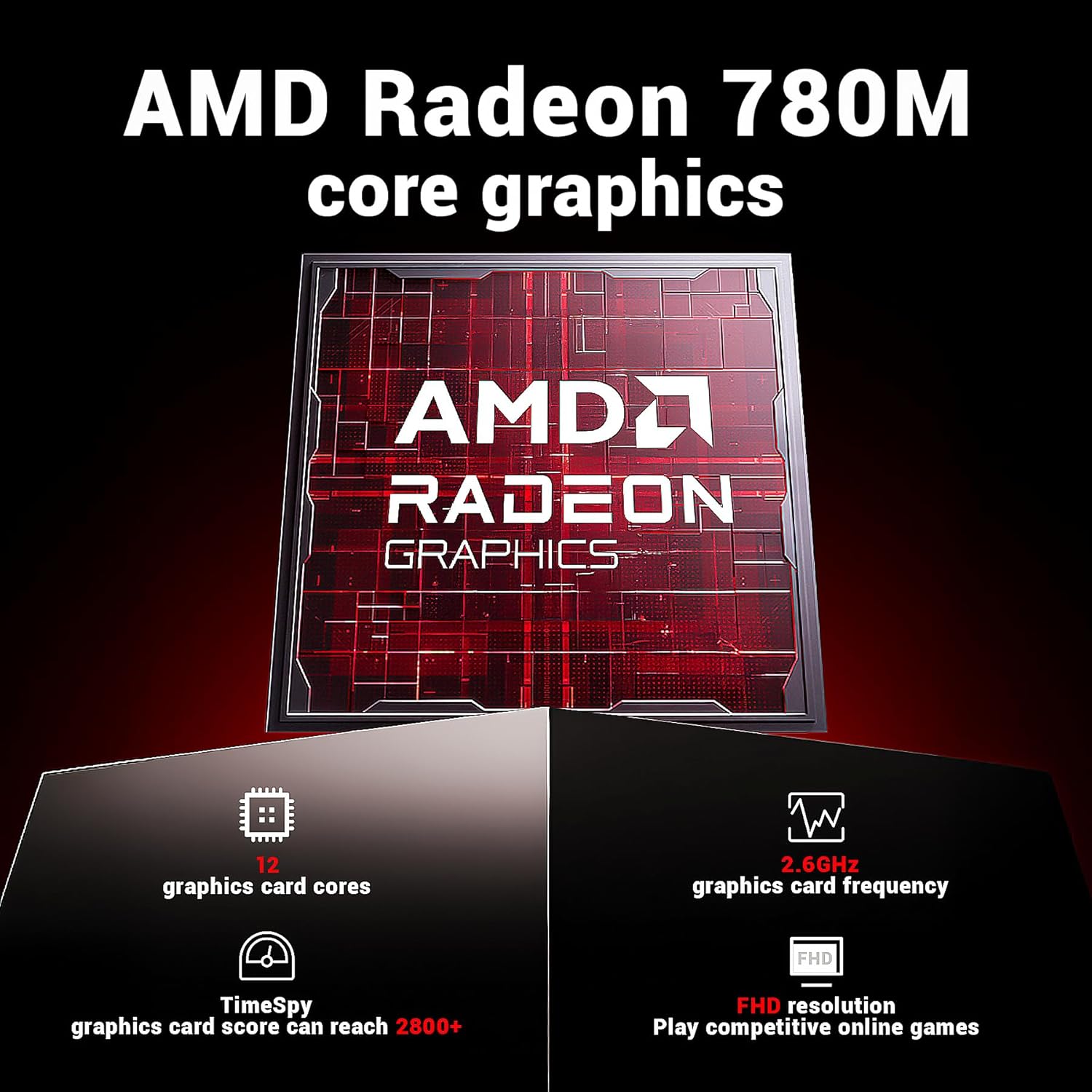
Figure 5.2: Detailed specifications of the AMD Radeon 780M core graphics in the MN56 model.

Figure 5.3: Illustration of the dual fan cooling system in the MN56 Mini PC, designed for efficient heat dissipation.
5.2. FIREBAT A6 Model (Black)
| Карактеристика | Детал |
|---|---|
| Процесор | AMD Ryzen 7 6800H (8 Cores, 16 Threads, Base Speed: 3.2GHz, Turbo Speed: 4.7GHz) |
| Графика | AMD Radeon 680M (Graphics Frequency: 2200MHz) |
| RAM меморија | 16GB Dual DDR5 RAM (SO-DIMM 4800MHz) |
| Складирање | 512GB M.2 NVMe 2280 PCIe SSD |
| Мрежа | Wi-Fi 6, Bluetooth 5.2, 2.5G RJ45 LAN |
| Видео излез | Triple Screens Display (6x USB 3.0+1x USB-C, 1x HDMI 2.0+1x DP 1.4) |
| Пристаништа | Power button, 3.5mm Audio Jack, 2x USB 3.0 Type-A, Type-C, DC-IN, HDMI, DisplayPort, 4x USB 3.0 Type-A, 2x 2.5Gbps LAN |
Слика 5.4: Готовоview of the FIREBAT A6 Mini PC's key specifications, including CPU, GPU, RAM, storage, and connectivity.
6. Одржување
Редовното одржување помага да се обезбеди долготрајност и оптимални перформанси на вашиот мини компјутер.
- Чистење: Use a soft, dry cloth to wipe the exterior of the Mini PC. For dust accumulation in vents, use compressed air. Ensure the device is powered off and unplugged before cleaning.
- Ажурирања на софтверот: Regularly check for and install operating system updates (e.g., Windows Updates) and driver updates for your hardware. This improves security, performance, and compatibility.
- Термички менаџмент: Ensure the Mini PC is placed in a well-ventilated area. Do not obstruct the air vents. The dual-fan cooling system is designed to maintain optimal temperatures, but proper airflow is crucial.
- Бекап на податоци: Периодично правете резервна копија на вашите важни податоци на надворешен диск или складирање во облак за да спречите губење на податоци.
7 Смена на проблеми
Овој дел се однесува на вообичаени проблеми со кои може да се соочите и нуди потенцијални решенија.
| Проблем | Можна причина | Решение |
|---|---|---|
| Нема струја / Уредот не се вклучува | Power adapter not connected, faulty power outlet, power button issue. | Ensure power adapter is securely connected to both the Mini PC and a working power outlet. Try a different outlet. |
| Нема приказ на мониторот | Incorrect cable connection, monitor input not selected, display driver issue. | Check HDMI/DP/USB-C cable connections. Ensure monitor is set to the correct input source. Try a different display cable or monitor. |
| Проблеми со Wi-Fi конекцијата | Incorrect Wi-Fi password, router issue, driver issue. | Verify Wi-Fi password. Restart your router. Check Wi-Fi drivers in Device Manager. |
| Бавни перформанси | Too many applications running, insufficient RAM, overheating, full storage. | Close unnecessary applications. Ensure proper ventilation. Free up disk space. Check for background processes. |
| Peripheral not recognized (USB, Bluetooth) | Driver issue, faulty peripheral, port issue. | Try a different USB port or re-pair Bluetooth device. Update drivers for the peripheral. |
If the problem persists after trying these solutions, please contact FIREBAT customer support.
8. Гаранција и поддршка
FIREBAT is committed to providing high-quality products and excellent customer service.
- Информации за гаранцијата: For detailed warranty terms and conditions, please refer to the warranty card included with your product or visit the official FIREBAT webлокација. Гаранцијата обично вклучува дефекти во материјалите и изработката при нормална употреба.
- Техничка поддршка: If you encounter any issues not covered in this manual or require further assistance, please contact our support team.
Контакт информации:
- Е-пошта: support@firebatpc.com
- Webсајт: www.firebatpc.com
When contacting support, please have your product model (MN56 or A6) and purchase information ready to expedite the process.


