1. Вовед
The LD Systems DAVE 15 G4X is a powered compact PA system designed for various live sound applications, including DJs, live bands, and solo entertainers. This system comprises a 15-inch subwoofer and two 8-inch satellites, delivering a total peak power of 2060 Watts. It features an integrated 6-channel mixer, versatile input options, Bluetooth connectivity, and advanced DSP technology for clear and powerful sound reproduction.
This manual provides essential information for the safe and efficient setup, operation, and maintenance of your DAVE 15 G4X PA system. Please read it thoroughly before initial use and keep it for future reference.
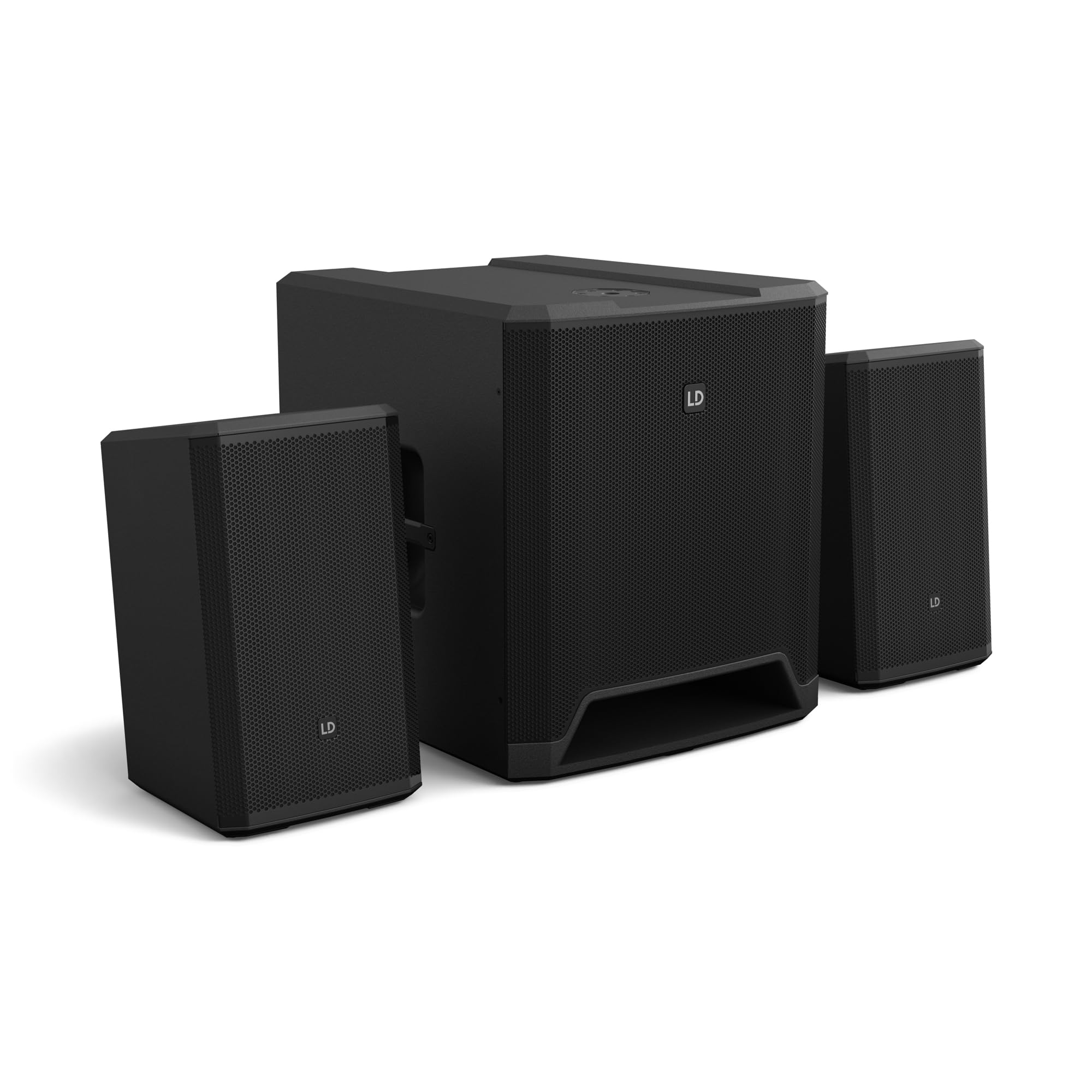
Слика 1: Готовоview of the LD Systems DAVE 15 G4X PA System components.
2. Инструкции за безбедност
Секогаш почитувајте ги следниве безбедносни мерки за да спречите електричен удар, пожар или повреда:
- Обезбедете ја јачината на напојувањетоtage matches the rating on the unit.
- Не го изложувајте уредот на дожд или влага.
- Не го отворајте casing; препуштете го целото сервисирање на квалификуван персонал.
- Ставете го уредот на стабилна, рамна површина.
- Обезбедете соодветна вентилација околу уредот.
- Избегнувајте да ставате предмети на врвот на уредот.
- Исклучете го напојувањето пред чистење или поместување на уредот.
3. Поставување
Proper setup is crucial for optimal performance and safety. Follow these steps to assemble your DAVE 15 G4X system:
3.1 Отпакување и поставување
- Carefully unpack all components: one 15-inch subwoofer and two 8-inch satellite speakers.
- Place the subwoofer on a stable, flat surface.
- Position the satellite speakers. They can be placed on speaker stands (not included) or mounted on a T-stand above the subwoofer (accessories sold separately).

Слика 2: Прample of a stereo setup with one satellite speaker mounted on a pole above the subwoofer. Speaker pole not included.

Слика 3: Прample of a stereo setup with both satellite speakers on separate poles. Speaker poles not included.

Слика 4: Прample of a cluster mode setup with both satellite speakers mounted on a T-stand above the subwoofer. Speaker pole not included.
3.2 Поврзување на звучниците
- Connect the two satellite speakers to the "SAT LEFT" and "SAT RIGHT" outputs on the rear panel of the subwoofer using appropriate speaker cables.
- Ensure secure connections.

Figure 5: Rear panel connections of the DAVE 15 G4X subwoofer, including power input, satellite outputs, and various audio inputs.
3.3 Поврзување за напојување
- Connect the supplied power cable to the "POWER INPUT" on the subwoofer's rear panel.
- Plug the other end into a suitable AC power outlet.
- Пред да го поврзете на струја, проверете дали прекинувачот за напојување е во положба „OFF“.
4. Ракување со миксер
The DAVE 15 G4X features an integrated 6-channel mixer for connecting various audio sources. Familiarize yourself with the control panel:

Слика 6: Детално view of the DAVE 15 G4X mixer control panel, showing input controls, EQ, reverb, and mode selection.
4.1 Input Channels 1 & 2 (Mono)
- Input Type Selection: Use the "SELECT" button to toggle between Microphone (MIC), High-Impedance Instrument (HI-Z), or Line-level (LINE) input.
- Здобијат со контрола: Adjust the "HIGH" knob for input sensitivity.
- 2-бенд EQ: Use the "LOW" and "HIGH" knobs to adjust bass and treble frequencies for each channel.
- Реверб: Select one of three reverb presets (SMALL, LARGE, PLATE) and adjust the "REVERB" knob for the desired effect level.
4.2 Input Channels 3 & 4 (Stereo Line)
- These inputs are designed for stereo line-level sources such as keyboards, synthesizers, or drum machines.
- Adjust the "INPUT 3/4" knob for the overall volume of these channels.
4.3 Input Channels 5 & 6 (Digital/Bluetooth)
- Внесување SPDIF: Connect a digital audio source via the SPDIF TOSLINK input on the rear panel.
- Спарување на Bluetooth: Press and hold the "HOLD TO LINK" button to activate Bluetooth pairing mode. Пребарај за "LD Systems DAVE 15 G4X" on your device and connect.
- Избор на извор: Use the "SOURCE" button to switch between SPDIF and Bluetooth inputs.
- Adjust the "INPUT 5/6" knob for the overall volume of these channels.
4.4 Главни контроли
- MAIN Volume: The large "MAIN" knob controls the overall output volume of the system.
- SUB Volume: Adjust the "SUB" knob to control the volume level of the subwoofer.
- ВИСОК Јачина: Adjust the "HIGH" knob to control the volume level of the satellite speakers.
- Поставки на режимот: Use the "SELECT" button under "MODE" to choose between different setup presets (e.g., Stereo, Cluster Mode) for optimized sound dispersion.
5. Одржување
Regular maintenance ensures the longevity and optimal performance of your DAVE 15 G4X PA system.
- Чистење: Use a soft, dry cloth to wipe down the surfaces. For stubborn dirt, a slightly damp cloth can be used, followed by a dry cloth. Avoid abrasive cleaners or solvents, as they may damage the polyurea coating.
- Вентилација: Ensure that all ventilation openings remain clear of dust and debris to prevent overheating.
- Складирање: When not in use for extended periods, store the system in a dry, dust-free environment. Consider using protective covers or bags (accessories sold separately) to prevent damage.
- Управување со кабли: Редовно проверувајте ги сите кабли за знаци на абење или оштетување. Веднаш заменете ги сите оштетени кабли.
6 Смена на проблеми
If you encounter issues with your DAVE 15 G4X system, refer to the following common problems and solutions:
6.1 Нема излез на звук
- Проверете ја моќноста: Ensure the system is powered on and the power cable is securely connected. Verify the "POWER" indicator light is illuminated.
- Нивоа на гласност: Confirm that the "MAIN," "SUB," and "HIGH" volume knobs are turned up. Check individual channel gain controls.
- Избор на влез: Ensure the correct input source is selected for the active channel (e.g., MIC, HI-Z, LINE, SPDIF, Bluetooth).
- Кабелски врски: Verify all audio cables (input sources, satellite speakers) are correctly and securely connected.
- Изворен уред: Check if your audio source device (microphone, instrument, media player) is functioning correctly and outputting sound.
6.2 Distorted or Unclear Sound
- Влезна добивка: Reduce the input gain for the affected channel if the "SIGNAL" or "LIMIT" indicator lights are constantly red.
- Главен волумен: Lower the "MAIN" volume if the overall sound is distorted.
- Поставки за EQ: Adjust the EQ (LOW, HIGH) settings on individual channels to improve clarity.
- Квалитет на кабел: Осигурајте се дека користите висококвалитетни, заштитени аудио кабли.
6.3 Проблеми со Bluetooth поврзувањето
- Режим на спарување: Ensure the DAVE 15 G4X is in Bluetooth pairing mode (press and hold "HOLD TO LINK").
- Видливост на уредот: Make sure Bluetooth is enabled on your source device and it is discoverable.
- Растојание: Keep your Bluetooth device within the effective range of the PA system.
- Пречки: Оддалечете се од други безжични уреди што може да предизвикаат пречки.
- Заборавете на уредот: If previously paired, try "forgetting" the DAVE 15 G4X on your device and re-pairing.
7. Спецификации
Detailed technical specifications for the LD Systems DAVE 15 G4X PA System:
| Карактеристика | Спецификација |
|---|---|
| Име на моделот | LDS-DAVE15G4X |
| Тип на звучник | Powered 2.1 PA System |
| Големина на сабвуфер | 15 инчи |
| Големина на сателитски звучник | 2 x 8 инчи |
| Врвна излезна моќност | 2060 вати |
| Канали за миксер | 6-Channel Integrated Mixer |
| Технологија за поврзување | Bluetooth, SPDIF TOSLINK, XLR, 1/4" Jack, RCA |
| Тип на монтирање | Floor Standing (Subwoofer), Pole Mount (Satellites) |
| Димензии на производот (сабвуфер) | 20"Д x 19"Ш x 21"В (приближно) |
| Тежина на ставката | 119 pounds (total system approximate) |
| Вклучени компоненти | LDDAVE15G4X (Subwoofer, 2 Satellites, Power Cable) |
| DSP технологија | DynX DSP (Gen.2), FIR Filters |
| Материјал за кабинет | Durable Polyurea Coating |
8. Информации за гаранцијата
Warranty terms and conditions for the LD Systems DAVE 15 G4X PA System are typically provided with your purchase documentation or can be found on the official LD Systems webстраница. Ве молиме задржете го доказот за купување за какви било гаранциски побарувања.
За детални информации за гаранцијата, посетете ја LD Systems official webсајт или контактирајте го вашиот овластен дилер.
9. Поддршка за корисници
Should you require technical assistance, service, or have questions regarding your LD Systems DAVE 15 G4X PA System, please contact LD Systems customer support or your local authorized dealer.
For further support and resources, please visit the LD Systems official webсајт.


