Вовед
This manual provides detailed instructions for the installation, operation, and maintenance of your Ctronics 4K Hybrid Zoom WLAN Outdoor Security Camera, Model 930C-4K. Please read this manual thoroughly before using the product to ensure proper functionality and safety.
The Ctronics 4K Hybrid Zoom WLAN Outdoor Security Camera features a dual-lens system, 10x hybrid zoom (6x optical + 4x digital), automatic zoom tracking, human recognition, 4K full-color night vision, two-way audio, and IP66 weather resistance for reliable outdoor surveillance.

Figure 1: Ctronics 4K Hybrid Zoom WLAN Outdoor Security Camera (Model 930C-4K)
Содржина на пакетот
Проверете дали сите артикли се присутни во пакувањето:
- Ctronics 4K Hybrid Zoom WLAN Outdoor Security Camera
- Адаптер за напојување
- Монтирачки завртки и ѕидни приклучоци
- Waterproof Kit for Network Cable
- Шаблон за вежба
- Упатство за употреба
Безбедносни мерки на претпазливост
- Ensure the power supply matches the camera's requirements (12V).
- Do not expose the camera to extreme temperatures or humidity beyond its operating range.
- Избегнувајте директно изложување на силни извори на светлина, што може да влијае на квалитетот на сликата.
- Handle the camera with care to prevent physical damage.
- Consult a professional for installation if you are unsure about electrical wiring or mounting procedures.
Поставување
1. Физичка инсталација
The camera supports both wall and ceiling mounting. Choose a location that provides optimal coverage and a stable Wi-Fi signal.
- Изберете локација за монтирање: Identify a suitable outdoor location, ensuring it is within range of your Wi-Fi network and has access to a power outlet.
- Обележете ги дупките за дупчење: Use the provided drill template to mark the positions for drilling on the wall or ceiling.
- Дупчете дупки: Издупчете дупки на означените места и вметнете ги ѕидните приклучоци.
- Монтирање камера: Прицврстете го држачот за камера на ѕидот или таванот со помош на приложените завртки.
- Поврзете напојување: Connect the power adapter to the camera and plug it into a power outlet. Ensure the connection is waterproof using the provided kit if applicable.

Figure 2: Camera mounting options (wall-mounted and ceiling-mounted) demonstrating IP66 weather resistance.
2. Мрежна врска
The camera supports stable and fast dual-band Wi-Fi (2.4GHz and 5GHz).
- Преземи апликација: Download the "Ctronics Pro" app from your smartphone's app store (iOS or Android).
- Регистрирајте сметка: Отворете ја апликацијата и регистрирајте нова сметка или најавете се ако веќе имате.
- Додадете камера: Следете ги упатствата во апликацијата за да ја додадете вашата камера. Ова обично вклучува скенирање QR-код на камерата или рачно внесување на нејзиниот ID.
- Поврзете се на Wi-Fi: Select your Wi-Fi network (2.4GHz or 5GHz) and enter the password. The camera will connect to your network.
- Почетно поставување: Complete any initial setup steps prompted by the app, such as setting a device password and time zone.

Figure 3: Ctronics Pro app interface for camera management.

Figure 4: Illustration of the camera's stable dual-band Wi-Fi connectivity (2.4GHz and 5GHz).
Ракување со камерата
1. Во живо View и PTZ контрола
- Open the Ctronics Pro app and select your camera to access the live view.
- Use the on-screen controls to pan (355°) and tilt (90°) the camera to adjust its viewинголен агол.
- Utilize the 10x hybrid zoom feature (6x optical + 4x digital) to get a closer look at specific areas.

Figure 5: The camera's 10x hybrid zoom capability, showing a zoomed-in view of a child in a backyard.

Figure 6: Illustration of the dual-lens system providing both narrow (50° view, 8mm) and wide (90° view, 3.6mm) perspectives.
2. Motion Detection and Auto-Tracking
- Access the camera settings in the app to configure motion detection zones and sensitivity.
- Enable human recognition to filter out false alarms caused by animals or inanimate objects.
- Activate auto-tracking zoom, which allows the camera to automatically follow detected human movement and zoom in for clearer details.
- Set up preset points for quick navigation to frequently monitored areas.
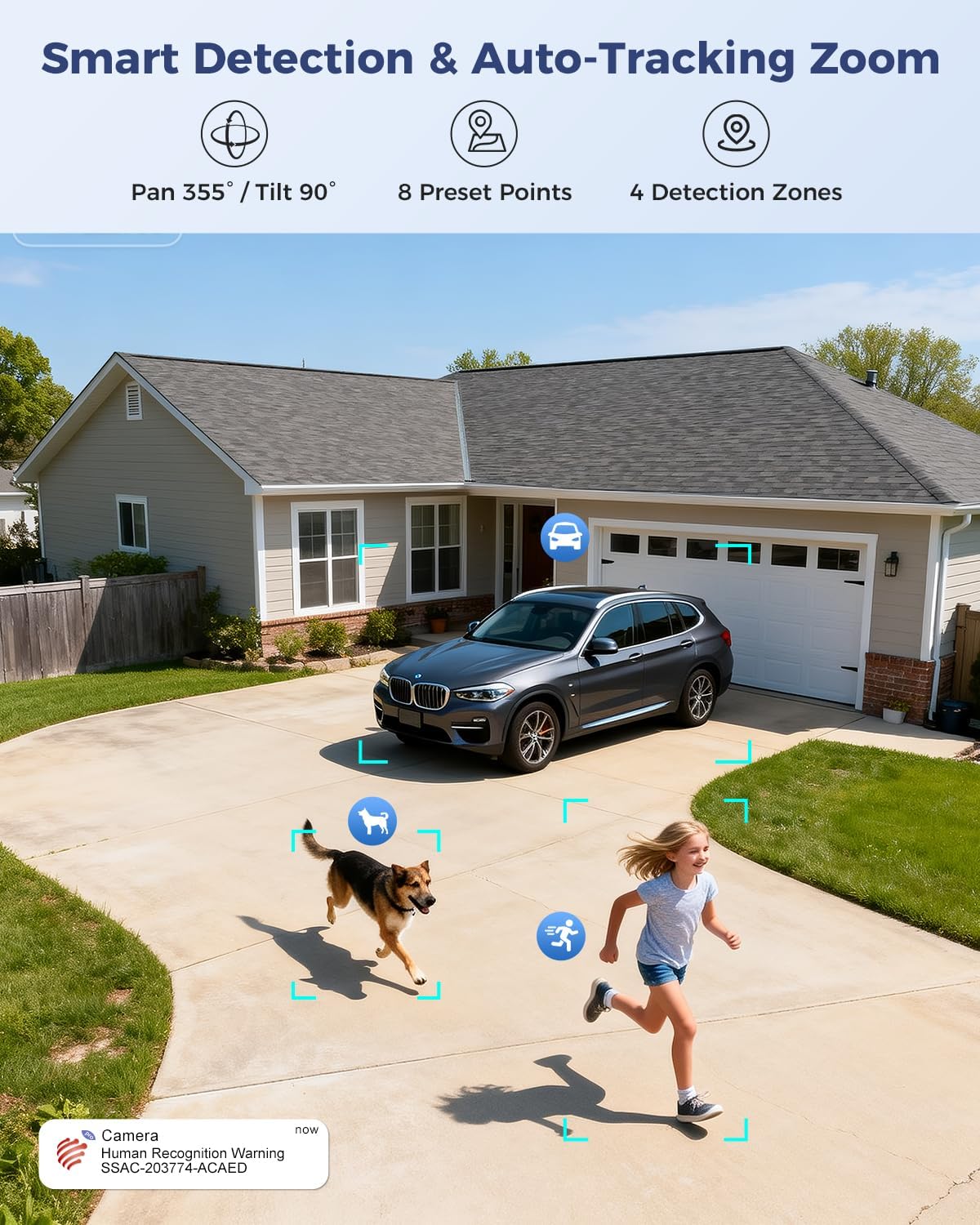
Figure 7: Visual representation of smart detection features including pan/tilt, preset points, detection zones, and human recognition with auto-tracking.
3. Ноќно гледање
The camera features a starlight lens for 4K full-color night vision, providing clear images even in low-light conditions.
- Камерата автоматски се префрла во режим на ноќно гледање кога амбиенталната светлина е недоволна.
- The starlight lens (F/1.6 aperture) enhances low-light performance, offering a night vision range of up to 30 meters.

Figure 8: Comparison of starlight lens night vision (top) providing full-color clarity versus a normal lens (bottom) in low light conditions.
4. Двонасочно аудио
Use the two-way audio feature to communicate with visitors or deter intruders.
- Во живо view, допрете ја иконата за микрофон за да зборувате преку звучникот на камерата.
- The camera's built-in microphone allows you to hear audio from the camera's vicinity.
5. Снимање и складирање
The camera offers multiple storage options for recorded footage:
- MicroSD картичка: Supports up to 256GB microSD card (not included) for local storage.
- Складирање во облак: Optional 30-day cloud storage service (subscription may be required).
- NVR: Supports Network Video Recorder (NVR) for 24/7 continuous recording.
- FTP: Supports FTP for uploading recordings to an FTP server.

Слика 9: Готовоview of the camera's four storage options: MicroSD card (up to 256GB), 30-day Cloud, NVR (7/24 Recording), and FTP support.
6. Компатибилност на уреди
Access and manage your camera from various devices and platforms:
- Мобилна апликација: Ctronics Pro (iOS, Android)
- PC клиент: HiP2P Client (Windows, Mac OS)
- Web Прелистувач: Пристап преку web browser for live view и поставувања.

Figure 10: The camera's broad device compatibility, showing access from smartphones, tablets, laptops, and desktop computers.
Одржување
- Чистење: Редовно чистете го објективот на камерата со мека, сува крпа за да обезбедите јасен квалитет на сликата. Не користете груби хемикалии.
- Ажурирања на фирмверот: Check the Ctronics Pro app periodically for available firmware updates. Keeping the firmware updated ensures optimal performance and security.
- Напојување: Осигурајте се дека адаптерот за напојување и кабелот не се оштетени.
Решавање проблеми
| Проблем | Можна причина | Решение |
|---|---|---|
| Камера офлајн | No power; Wi-Fi signal weak or disconnected; incorrect Wi-Fi password. | Check power connection; move camera closer to router or use a Wi-Fi extender; re-enter Wi-Fi password in app. |
| Лош квалитет на сликата | Валкана леќа; недоволно осветлување; проблеми со мрежниот пропусен опсег. | Clean the lens; ensure adequate lighting for optimal night vision; check network speed. |
| Откривањето на движење не работи | Detection sensitivity too low; detection zones not configured; human recognition disabled. | Adjust sensitivity in app; configure detection zones; enable human recognition. |
| Проблеми со двонасочно аудио | Microphone/speaker muted in app; network latency. | Ensure audio is enabled in app; check network connection. |
Спецификации
| Карактеристика | Детал |
|---|---|
| Број на модел | 930C-4K |
| Видео резолуција | 4K (3840 pixels) |
| Зумирајте | 10x Hybrid Zoom (6x Optical + 4x Digital) |
| Опсег на пан/навалување | Пан 355 °, Навалување 90 ° |
| Тип на објектив | Dual Lens (Narrow 50°/8mm, Wide 90°/3.6mm) |
| Ноќна визија | 4K Full-Color Starlight Night Vision (F/1.6), up to 30 meters |
| Аудио | Двонасочно аудио |
| Поврзување | Dual-Band Wi-Fi (2.4GHz, 5GHz), Wired Ethernet |
| Опции за складирање | MicroSD (up to 256GB), Cloud, NVR, FTP |
| Отпорност на времето | IP66 |
| Напојување | 12 Volt, 12 Watt |
| Димензии (Д x Ш x В) | 25 x 13 x 20 cm |
| Материјал | Метал |
| Тип на монтирање | Wall- and Ceiling-mount |
| Компатибилни уреди | Десктоп, лаптоп, паметен телефон, таблет |
Гаранција и поддршка
Информации за гаранцијата
This product typically comes with a standard manufacturer's warranty. For specific warranty terms and conditions, please refer to the documentation included with your purchase or contact Ctronics customer support. Amazon's return policy for this product is 30 days for refund/replacement.
Поддршка за корисници
If you encounter any issues or have questions regarding your Ctronics camera, please contact Ctronics customer support through their official website or the contact information provided in the product packaging. You can also refer to the FAQ section within the Ctronics Pro app for common solutions.


