1. Производот завршиview
The Gurjot F75 Pro is an advanced 81-key 75% layout wireless mechanical keyboard designed for versatility and performance. It features tri-mode connectivity, hot-swappable switches, vibrant RGB backlighting, and a long-lasting 8000mAh battery, making it suitable for various devices and uses.

Image 1: Gurjot F75 Pro Wireless Mechanical Keyboard (Navy Black variant).
2. Содржина на пакетот
Проверете дали сите артикли се присутни во вашиот пакет:
- Gurjot F75 Pro Wireless Mechanical Keyboard (Model K81-New Navy Black)
- Капак за прашина x1
- USB-C кабел x1
- Keycap/Switches Puller x1
- Extra Leobog Reaper Switches x2
- English/Chinese Brochure (Instruction Manual)

Image 2: All items included in the Gurjot F75 Pro keyboard package, including the keyboard, USB-C cable, keycap/switch puller, extra switches, and documentation.
3. Поставување и поврзување
3.1 Полнење на тастатурата
Before first use, fully charge the keyboard using the provided USB-C cable. Connect the USB-C end to the keyboard's port and the USB-A end to a power source (e.g., computer USB port, USB wall adapter).
3.2 Трирежимска врска
The keyboard supports three connection modes: Bluetooth 5.0, 2.4GHz wireless, and USB-C wired. A switch on the side of the keyboard allows you to select the desired mode.

Слика 3: Приказ на тастатуратаasing its three connectivity modes: USB-C wired, 2.4GHz wireless, and Bluetooth 5.0.
3.2.1 Bluetooth 5.0 конекција
- Flip the mode switch on the keyboard to the Bluetooth position.
- На вашиот уред (компјутер, лаптоп, таблет, паметен телефон), овозможете Bluetooth и пребарувајте нови уреди.
- Select "K81-New" or similar from the list of available devices to pair.
- The keyboard can connect to up to five devices simultaneously. Use shortcut keys (refer to the included brochure for specific key combinations) to switch between paired devices.
3.2.2 Безжична конекција од 2.4 GHz
- Flip the mode switch on the keyboard to the 2.4GHz position.
- Insert the 2.4GHz USB dongle into an available USB port on your computer or gaming console.
- Тастатурата треба автоматски да се поврзе.
3.2.3 USB-C жична врска
- Connect the provided USB-C cable from the keyboard to your computer or device.
- Тастатурата автоматски ќе се префрли во жичен режим и ќе почне да се полни.
3.3 Прилагодување на висината на тастатурата
The keyboard features adjustable kickstands on the underside to customize the typing angle for ergonomic comfort.
4. Упатства за работа
4.1 RGB позадинско осветлување
The F75 Pro keyboard features 16.8 million RGB lighting colors with 19 pre-set lighting effects. You can adjust the lighting brightness and speed using the multi-function knob or specific FN key combinations (refer to the included brochure for details).
Video 1: Demonstration of the Gurjot Wireless Mechanical Keyboard with Knob, showcasing its design and features. This video is 28 seconds long.
4.2 мултифункционално копче
The dedicated knob on the keyboard allows for easy control of backlight settings and media functions (e.g., volume control, play/pause).
4.3 Карактеристики за игри
- Превртување на клучот N: Обезбедува прецизно регистрирање на сите притискања на копчиња, дури и при брзи, истовремени внесувања.
- Заклучување со WIN копче: Prevents accidental presses of the Windows key during intense gaming sessions.
5. Одржување
5.1 Чистење
Use the included dust cover to protect the keyboard when not in use. For cleaning, gently wipe the keycaps and surface with a soft, dry cloth. Avoid using harsh chemicals or abrasive materials.
5.2 Прекинувачи што може да се заменат со топла струја
The keyboard features a hot-swappable base supporting 3-pin or 5-pin switches. Use the provided keycap/switches puller to easily remove and replace switches without soldering. Extra Leobog Reaper switches are included for replacement or customization.
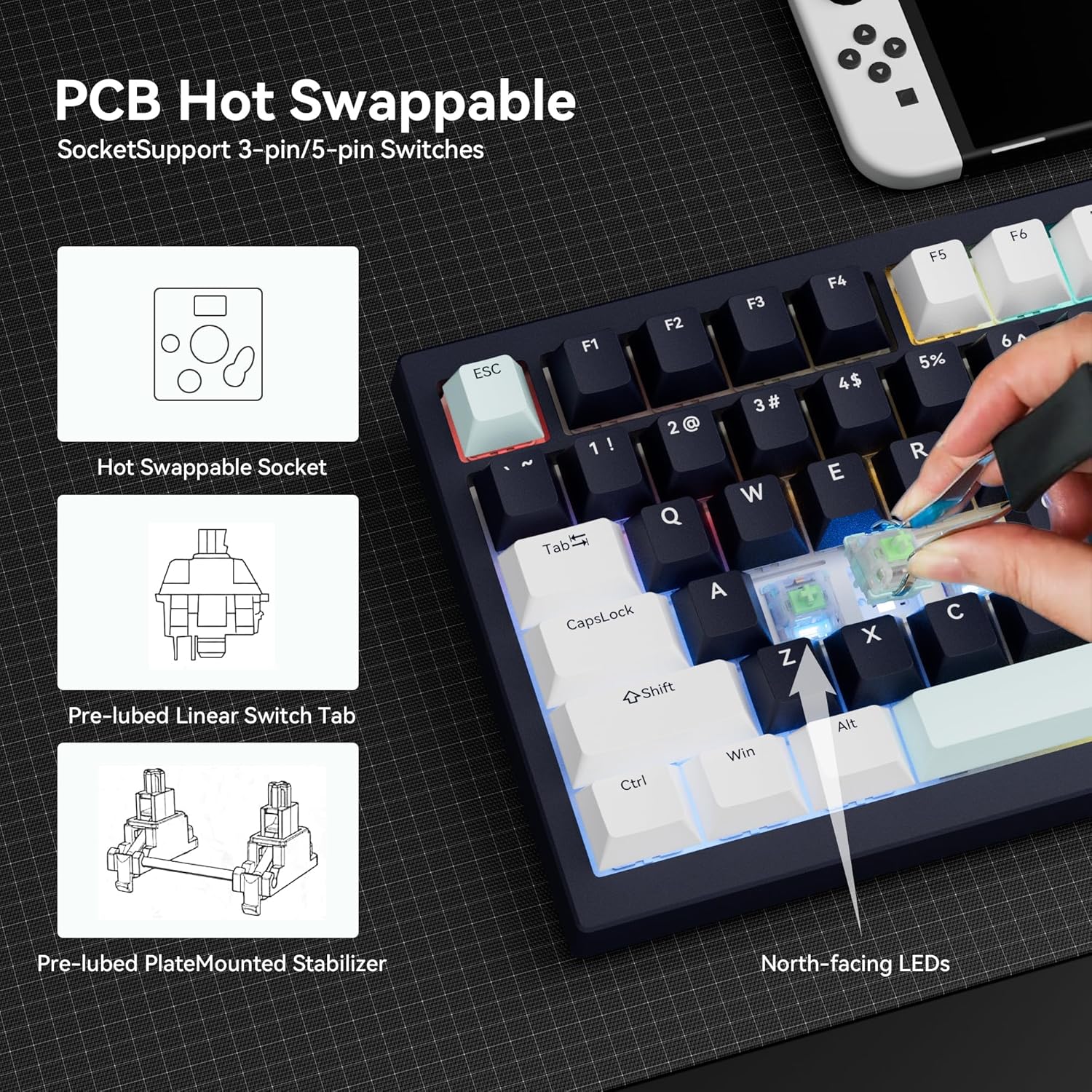
Image 4: Illustration of the PCB hot-swappable design, allowing for easy switch replacement.
6 Смена на проблеми
Ако наидете на проблеми, обидете се со следново:
- Проблеми со поврзувањето: Ensure the mode switch is set correctly for your desired connection type (Bluetooth, 2.4GHz, or wired). For Bluetooth, re-pair the device. For 2.4GHz, ensure the dongle is securely inserted. For wired, check the USB-C cable connection.
- Задно осветлување не работи: Check if the backlight is turned off or set to a very low brightness level using the knob or FN key combinations. Ensure the keyboard has sufficient battery charge.
- Копчињата не реагираат: Ensure the keyboard is powered on and properly connected. If specific keys are not responding, consider replacing the switch using the hot-swappable feature.
7. Спецификации
| Карактеристика | Детал |
|---|---|
| Бренд | Gurjot |
| Број на модел | K81-New Navy Black |
| Технологија за поврзување | 2.4GHz, BT5.0, USB-C |
| Компатибилни уреди | Лаптоп, компјутер, играчка конзола, таблет, паметен телефон |
| Опис на тастатурата | Механички |
| Посебни карактеристики | Backlit, Hot-Swappable |
| Боја | Navy Black |
| Позадинско осветлување на тастатурата | RGB (16.8 Million Colors, 19 Pre-set Effects) |
| Број на клучеви | 81 |
| Капацитет на батеријата | 8000 mAh |
| Материјал | Пластика |
| Распоред на тастатура | QWERTY, 75% Compact |
| Тип на прекинувач | Pre-lubed Linear Mechanical Switches |
| Димензии | 330.5 x 142 x 44 mm (приближно, врз основа на сликата) |
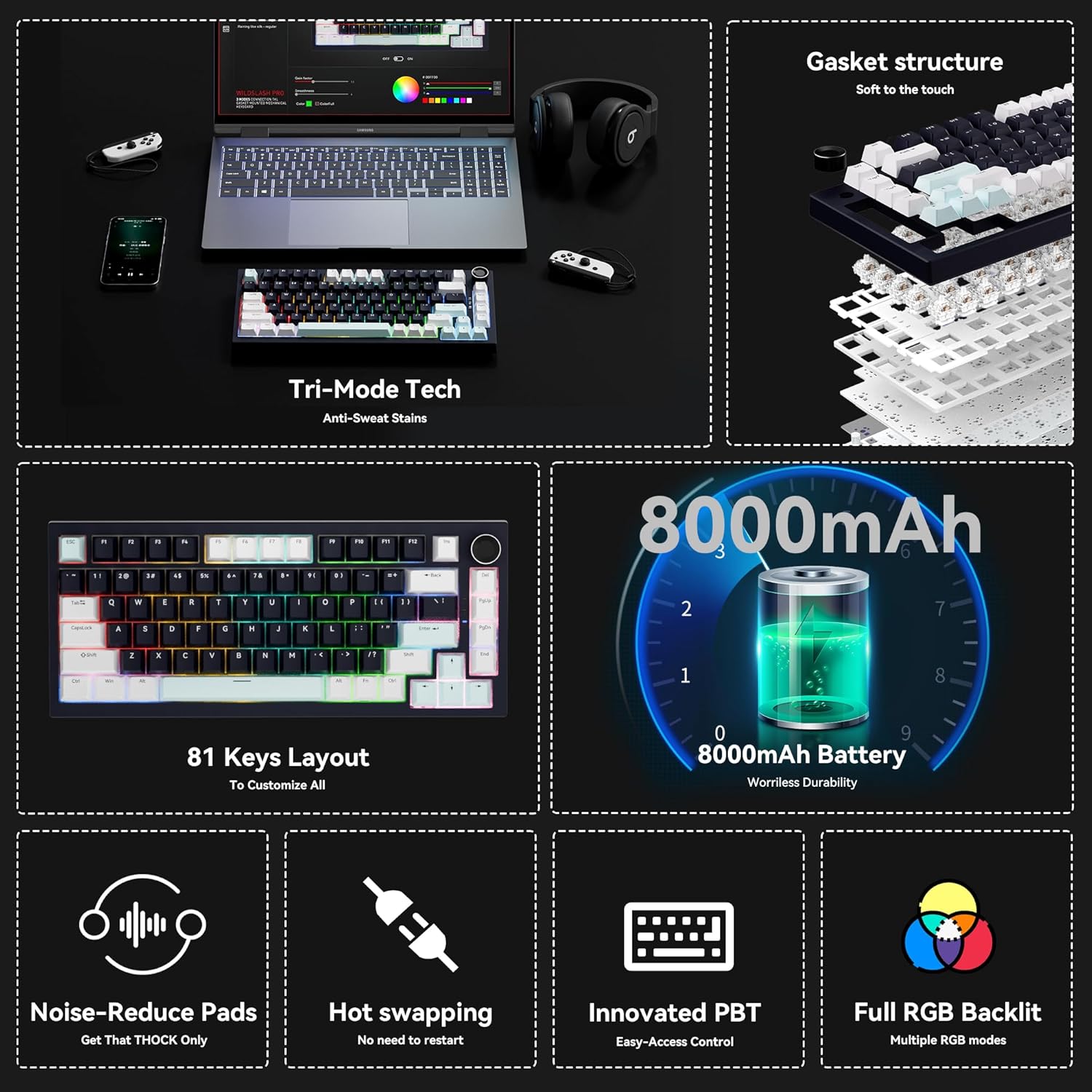
Слика 5: Готовоview of key features including tri-mode connectivity, gasket structure, 81-key layout, 8000mAh battery, noise reduction, hot-swapping, PBT keycaps, and full RGB backlighting.

Слика 6: Детално view emphasizing the 8000mAh high-capacity battery, with an estimated battery life of 53 hours (backlit ON) and 400 hours (backlit OFF).

Image 7: Exploded diagram illustrating the updated gasket structure and internal components for enhanced typing feel and sound.
8. Официјални видеа за производи
Video 1: An official product video from Gurjot Mechanical Keypads, titled "Wireless Mechanical Keyboard with Knob". This video provides a concise overview of the keyboard's features and design. Duration: 0:28.
Video 2: An official product video from Gurjot Mechanical Keypads, titled "Gurjot Wireless Mechanical Keyboard with Knob". This video offers a more in-depth look at the keyboard's functionalities. Duration: 1:14.
Video 3: An official product video from Gurjot Mechanical Keypads, titled "Gurjot Mechanical keyboard display". This video highlights the visual aspects and various lighting modes of the keyboard. Duration: 0:54.
9. Гаранција и поддршка
This product is covered by a standard manufacturer's warranty. For specific warranty details or technical support, please refer to the contact information provided in the included English/Chinese brochure or visit the official Gurjot Mechanical Keypads webсајт.


