1. Вовед
This manual provides detailed instructions for the setup, operation, and maintenance of your boAt Aavante 5.2.4 Prime 6250DA Dolby Atmos Soundbar. This system is designed to deliver an immersive audio experience with its 5.2.4 channel configuration, dual subwoofers, wireless satellite speakers, and Dolby Atmos technology.
2. Содржина на пакетот
Проверете дали сите артикли наведени подолу се присутни во вашиот пакет:
- Звучна лента
- Сабвуфер (x2)
- Satellite Speakers (x2)
- Кабел за напојување
- Далечински управувач
- AA Batteries (x2) for Remote
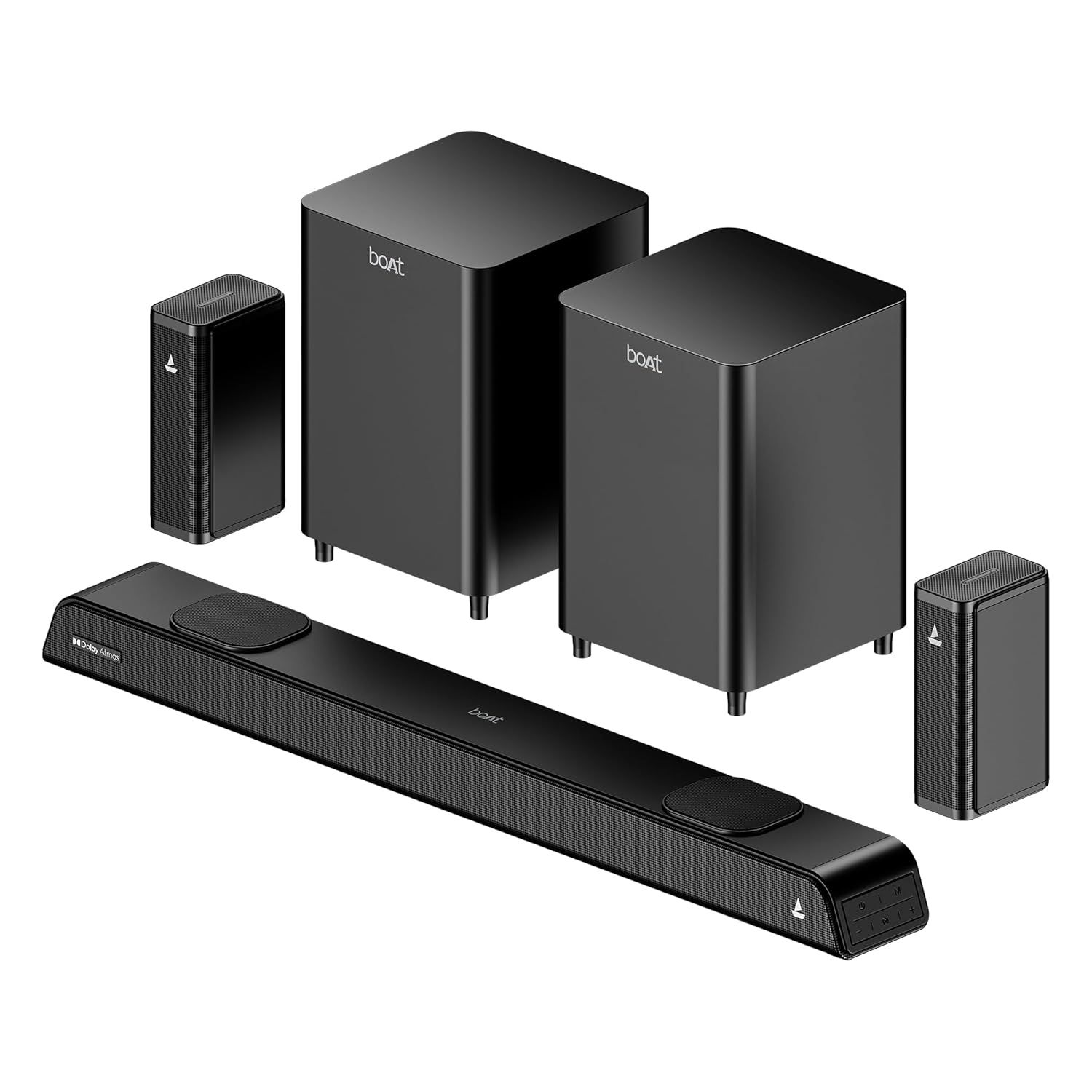
Image: The complete boAt Aavante 5.2.4 Prime 6250DA soundbar system, including the main soundbar unit, two subwoofers, and two satellite speakers, all in a premium black finish.
3. Производот завршиview
3.1 Системски компоненти
The boAt Aavante 5.2.4 Prime 6250DA system consists of the following main components:
- Звучна лента: The central unit housing multiple speakers for front and height channels.
- Dual Wired Subwoofers: Two dedicated units for powerful bass reproduction.
- Безжични задни сателитски звучници: Two compact speakers that connect wirelessly to the main system for surround sound.
3.2 Контроли и индикатори
The soundbar features onboard controls and an LED display. A master remote control is included for comprehensive system management.

Image: The master remote control for the boAt Aavante 5.2.4 Prime 6250DA, showing buttons for power, volume, mode selection, EQ settings, Bluetooth, bass, and treble adjustments.
4. Поставување
4.1 Поставување звучници
Optimal placement is crucial for achieving the best sound experience:
- Звучна лента: Place the soundbar centrally below your television. Ensure it is not obstructed.
- Сабвуфери: Position the two subwoofers on the floor, ideally near the front of the room. Experiment with placement to find the best bass response for your listening area.
- Сателитски звучници: Place the wireless satellite speakers behind your primary listening position, to the left and right. Ensure they have a clear line of sight to the soundbar for stable wireless connection.

Image: Diagram illustrating the recommended placement for the 5.2.4 channel soundbar system, showing the soundbar in front of the TV, two subwoofers near the front, and two satellite speakers positioned behind the listener for immersive surround sound.

Image: A visual representation of a 360-degree surround sound setup, highlighting the effect of multiple phantom speakers creating an immersive audio environment around the listener.
4.2 Поврзување на системот
Connect the soundbar to your audio sources using the available ports. Ensure all power cables are securely connected to the soundbar, subwoofers, and satellite speakers, then plug them into a power outlet.

Image: Icons representing the various connectivity options available on the boAt Aavante 5.2.4 Prime 6250DA soundbar: Optical, Bluetooth v5.3, AUX IN, HDMI e-ARC, and USB.
HDMI (eARC) Connection:
- Connect an HDMI cable (not included) from the HDMI eARC port on the soundbar to the HDMI eARC/ARC port on your television.
- On your TV, navigate to the audio settings and set the sound output to 'Auto' or 'Passthrough' to ensure proper transmission of Dolby Atmos or 5.1 content. If set to 'PCM' or 'Stereo', the soundbar will default to 2.0 stereo output.
Оптичка врска:
- Connect an optical cable (not included) from the OPTICAL OUT port on your TV or audio source to the OPTICAL IN port on the soundbar.
- Select 'Optical' as the input source on the soundbar.
AUX конекција:
- Connect a 3.5mm AUX cable (not included) from the audio output of your device to the AUX IN port on the soundbar.
- Select 'AUX' as the input source on the soundbar.
USB конекција:
- Вметнете USB-уред што содржи аудио files во USB-портата на лентата за звук.
- Select 'USB' as the input source on the soundbar. The soundbar will automatically begin playing compatible audio files.
5. Упатства за работа
5.1 Вклучување/исклучување
Притиснете го Моќ копчето на далечинскиот управувач или на саундбарот за да го вклучите или исклучите системот.
5.2 Избор на влезен извор
Притиснете го РЕЖИМ button on the remote control or the soundbar to cycle through available input sources: HDMI (eARC), Optical, AUX, USB, and Bluetooth.
5.3 Спарување преку Bluetooth
- Turn on the soundbar and select 'Bluetooth' mode. The LED display will indicate 'BT'.
- Enable Bluetooth on your mobile device and search for 'boAt Aavante 6250DA'.
- Select the device to pair. Once connected, the soundbar will indicate successful pairing.
5.4 режими на EQ
The soundbar offers various Equalizer (EQ) modes to optimize audio for different content types. Press the EQ button on the remote to switch between modes:
- Филм: Enhances dialogue clarity and cinematic effects.
- Музика: Обезбедува избалансиран професионален звукfile за репродукција на музика.
- Спорт: Optimizes audio for sports broadcasts, emphasizing commentary and crowd sounds.
- Вести: Се фокусира на јасност на вокалот за вести и ток-шоуа.

Image: A graphical representation of the EQ modes interface, showing options for Movie, Music, Sports, and News, allowing users to personalize sound settings.
5.5 Volume, Bass, and Treble Control
Користете го VOL+ / VOL- buttons on the remote to adjust the overall volume. Dedicated BASS + / БАСС- и ТРОБЕЛО + / ТРЕБРА- buttons allow for fine-tuning of low and high frequencies.
6. Одржување
За да се обезбеди долготрајност и оптимални перформанси на вашиот саундбар систем:
- Чистење: Use a soft, dry cloth to clean the surfaces of the soundbar, subwoofers, and satellite speakers. Avoid using liquid cleaners or abrasive materials.
- Вентилација: Ensure adequate airflow around all components to prevent overheating. Do not block ventilation openings.
- Животна средина: Држете го системот подалеку од директна сончева светлина, извори на топлина и прекумерна влага.
7 Смена на проблеми
If you encounter issues with your boAt Aavante 5.2.4 Prime 6250DA, refer to the following common solutions:
| Проблем | Можна причина | Решение |
|---|---|---|
| Нема моќ | Power cable not connected; power outlet not active. | Проверете ги приклучоците за напојување; обидете се со друг штекер. |
| Нема звук | Incorrect input source selected; volume too low; cables loose. | Select correct input; increase volume; check all audio cables. |
| No sound from satellite speakers | Wireless connection issue; speakers not powered. | Ensure satellite speakers are powered on and paired with the soundbar. |
| Dolby Atmos not working | TV audio output not set to 'Auto' or 'Passthrough'; content is not Dolby Atmos. | Set TV sound output to 'Auto' or 'Passthrough'. Ensure playing Dolby Atmos compatible content. |
| Проблеми со спарување со Bluetooth | Уредот е предалеку; саундбарот не е во режим на спарување; пречки. | Ensure soundbar is in BT mode; move device closer; restart both devices. |

Image: A visual representation of how Dolby Atmos creates an immersive sound field, with sound waves emanating from various points around the listener, including overhead, for a multi-dimensional audio experience.

Image: A comparison graphic showing the difference between regular audio and Dolby Atmos audio waveforms, illustrating the enhanced detail and dynamic range provided by Dolby Atmos.
8. Спецификации
| Карактеристика | Детал |
|---|---|
| Име на моделот | Aavante 5.2.4 Prime 6250DA |
| Број на модел | HA0079 |
| Аудио излез | 625W RMS |
| Конфигурација на каналот | 5.2.4 Channel (Soundbar, Dual Subwoofers, Wireless Satellites) |
| Аудио технологија | Dolby Atmos |
| Поврзување | Bluetooth v5.3, HDMI (eARC), USB, AUX, Optical, Coaxial |
| Контролен метод | Далечински управувач |
| Димензии на производот | 90D x 7.4W x 11H Centimeters (Soundbar) |
| Тежина на ставката | 7 kg (Total System) |
| Вклучени компоненти | Soundbar, 2x Subwoofers, 2x Satellites, Cable, Remote |
| Извор на енергија | Жичен |
| Батерии за далечински управувач | 2 AA батерии (вклучени) |

Слика: Внатрешен view of the soundbar highlighting its components and the powerful 625W output, indicating boAt Signature Sound technology.

Image: Two boAt subwoofers, emphasizing their role in delivering powerful and deep bass for the audio system.
9. Гаранција и поддршка
Your boAt Aavante 5.2.4 Prime 6250DA soundbar system comes with a Ограничена гаранција. For detailed warranty terms and conditions, please refer to the warranty card included in your package or visit the official boAt webсајт.
For technical assistance, troubleshooting not covered in this manual, or warranty claims, please contact boAt customer support through their official channels. Keep your purchase receipt and product serial number handy when contacting support.


