1. Вовед
Thank you for choosing the Riflewell 7.0 Cu Ft Large Fingerprint Safe Box. This manual provides essential information for the safe and efficient operation of your new security safe. Please read these instructions carefully before use and retain them for future reference.
This safe is designed to protect your valuables, including documents, cash, pistols, and jewelry, with advanced fingerprint and password locking mechanisms, dual alarm systems, and robust construction.
2. Што е вклучено
По распакувањето, проверете дали се присутни сите следни компоненти:
- 1 x Riflewell 7.0 Cu Ft Safe Box
- 4 x Клучеви за итни случаи
- 1 x USB Type-C Cable (for external power)
- 4 x Anti-slip Foot Pads
- 6 x завртки за проширување (за монтирање)
- 1 x Упатство за употреба (овој документ)

3. Карактеристики на производот
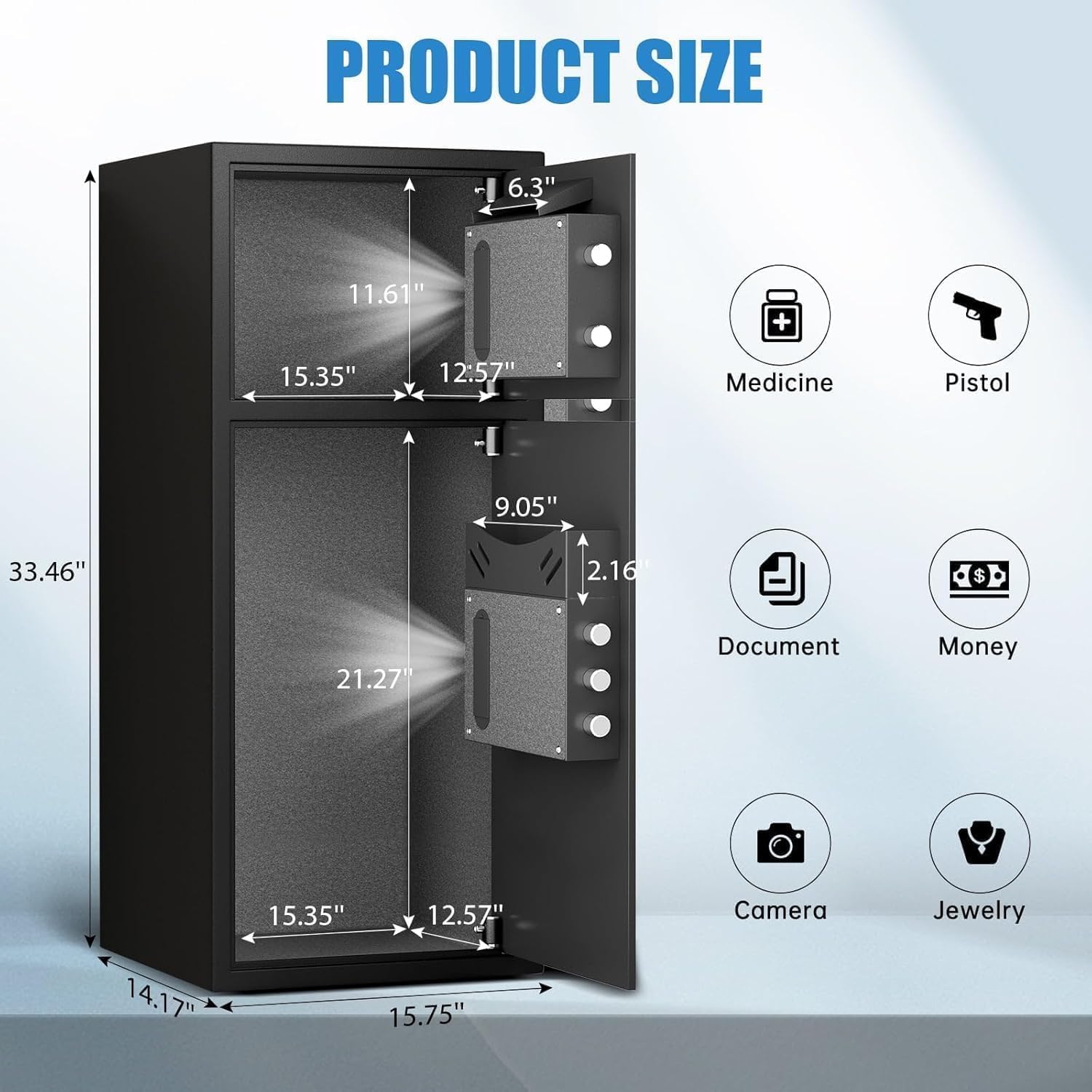
- Екстра голем капацитет: External size 14.17"D x 15.75"W x 33.5"H, with a 7.0 cubic feet capacity. Features a double-door design for separate access.
- Подобрена безбедност: Equipped with a fingerprint and password lock system. Features 3D glowing digital buttons and a unique embedded fingerprint design (US appearance patent).
- Депозитен термин: A convenient front slot allows for easy deposit of money or coins without opening the main door.
- Внатрешна организација: Includes a metal storage box for smaller items and soft flannel lining to protect valuables from scratches. Internal LED lights illuminate the interior.
- Anti-Theft Construction: Made of reinforced low carbon alloy steel with micro-slit laser cutting precision. Features a pry-resistant thickened door and five solid live bolts.
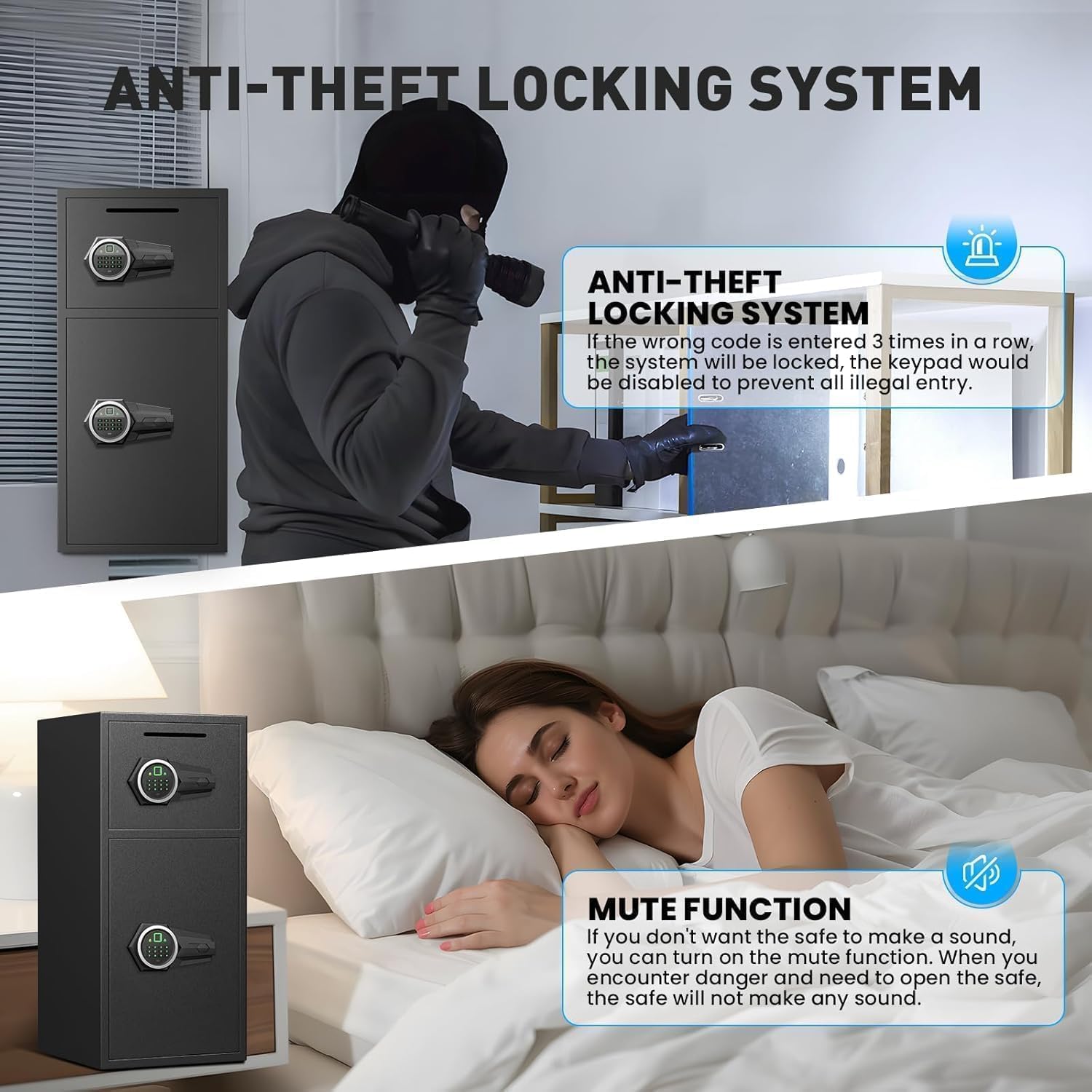
- Двоен алармен систем: Activates an alarm (up to 70 decibels) after three consecutive incorrect password attempts or violent vibrations. Includes a mute function for silent operation.
- Итна моќност: Universal emergency power jack (USB Type-C) ensures access even if internal batteries are depleted.


4. Поставување
4.1 First Time Opening (Using Emergency Key)
Before initial use, you must open the safe using the emergency key to install batteries and set up your access methods.
- Лоцирајте го клучалката за итни случаи, која обично е скриена зад капак на панелот со тастатурата.
- Insert an emergency key and turn it counter-clockwise to its limit.
- Завртете го копчето во насока на стрелките на часовникот за да ја отворите вратата.
4.2 Инсталација на батерија
The electronic lock requires 4 AA alkaline batteries (not included). Do not use lithium or rechargeable batteries.
- With the safe door open, locate the battery compartment on the inside of the door.
- Отстранете го капакот на батеријата.
- Вметнете 4 AA алкални батерии, внимавајќи на правилниот поларитет.
- Заменете го капакот на батеријата.
4.3 Setting Up Fingerprint
You can program multiple fingerprints for convenient access.
- With the safe door open, short press the red 'SETTING BUTTON' located inside the door.
- Place your finger on the fingerprint collector. When you hear a short beep, remove your finger.
- Repeat placing and removing your finger four times until the safe confirms successful registration.
4.4 Setting Up Password
You can set a 3-8 digit user password.
- With the safe door open, short press the red 'SETTING BUTTON' located inside the door.
- Input your desired 3-8 digit user code on the keypad.
- Press '#' to confirm your password.
4.5 Монтирање на сефот
For added security, the safe can be mounted to a wall or floor using the provided expansion screws.
- Identify a suitable location for mounting. The safe has 4 pre-drilled holes on the back and 2 on the bottom.
- Означете ги точките за дупчење на ѕидот или подот низ претходно издупчените дупки.
- Дупчете дупки на означените позиции.
- Align the safe with the drilled holes and secure it using the expansion screws.

5. Ракување со сефот
5.1 Opening with Fingerprint or Password
- To open with fingerprint: Place your registered finger on the fingerprint collector until the lock disengages.
- To open with password: Input your 3-8 digit user code and press '#'. The lock will disengage.
- Завртете го копчето во насока на стрелките на часовникот за да ја отворите вратата.
5.2 Отворање со клуч за итни случаи
The emergency key provides manual access in case of forgotten codes or battery failure.
- Locate the emergency keyhole.
- Insert an emergency key and turn it counter-clockwise to its limit.
- Завртете го копчето во насока на стрелките на часовникот за да ја отворите вратата.
5.3 Opening with USB Cable (External Power)
If the internal batteries are dead and you don't have the emergency key, you can use a USB Type-C cable for temporary external power.
- Connect the USB Type-C cable to the port on the keypad panel and to an external power source (e.g., power bank).
- Once powered, use your registered fingerprint or password to open the safe as usual.
- Завртете го копчето во насока на стрелките на часовникот за да ја отворите вратата.
6. Безбедносни карактеристики
6.1 Dual Alarm Function
Сефот е опремен со двоен алармен систем за спречување на неовластен пристап:
- Аларм за неточна лозинка: If three consecutive incorrect passwords are entered, the alarm will sound for 20 seconds.
- Аларм за вибрации: In standby mode, press and hold "4" until you hear two beeps to activate the vibration alarm. If the safe is shaken or hit violently, the alarm will sound for 20 seconds.
The alarm can only be deactivated by removing the batteries.
6.2 Функција за исклучување
The safe features an upgraded mute function, suitable for various scenarios where silent operation is preferred. Refer to the quick start guide for specific instructions on activating/deactivating the mute mode.
7. Одржување
- Замена на батерија: Заменете ги батериите веднаш кога ќе се појави индикаторот за слаба батерија за да обезбедите континуирана функционалност.
- Чистење: Исчистете ја надворешноста на сефот со мека, дamp крпа. Избегнувајте абразивни средства за чистење или растворувачи кои би можеле да ја оштетат завршната обработка.
- Складирање на клучеви: Store emergency keys in a secure location away from the safe, but easily accessible to you.
8 Смена на проблеми
- Safe not opening: Ensure batteries are correctly installed and charged. Try using the emergency key or external USB power. Verify the correct password or fingerprint is being used.
- Alarm sounding unexpectedly: Check if the vibration alarm is activated. Ensure no unauthorized attempts have been made to open the safe. Deactivate by removing batteries.
- Тастатурата не реагира: Replace batteries. If using external power, ensure the USB cable is securely connected and the power source is active.
9. Спецификации
| Карактеристика | Спецификација |
|---|---|
| Бренд | Riflewell |
| Димензии на производот | 14.17" Д x 15.75" Ш x 33.5" В |
| Тип на заклучување | Electronic Combination Lock (Fingerprint & Password) |
| Капацитет | 7 кубни стапки |
| Материјал | Reinforced Low Carbon Alloy Steel |
| Посебни карактеристики | Alarm System, LED Light, Deposit Slot, Double Door, Soft Lining |
| Тип на монтирање | Монтирање на под / Монтирање на ѕид |
| Тежина на ставката | 49.5 фунти |
| Број на модел на ставка | KL-85W-shao |
10. Гаранција и поддршка
Riflewell is committed to customer satisfaction. If you encounter any problems with your safe, please contact us directly. We offer:
- Доживотна гаранција
- 24-Hour Online Customer Service
- 90-Day Unconditional Returns
- Услуга за доживотно појавување клучеви
To find seller support on Amazon:
- Најавете се на вашата сметка на купувач на Amazon.
- Најдете ја вашата нарачка.
- Click "Get help" to contact the seller for product support.


