1. Вовед
Ви благодарам за купувањетоasing the ZEBRONICS Zeb Paradise Neo Wireless Headphones. This manual provides detailed instructions for setup, operation, and maintenance of your device. Please read this manual carefully before use to ensure proper functionality and to maximize your listening experience.
Key features of your Zeb Paradise Neo headphones include 40mm drivers for clear audio, up to 50 hours of playback, rapid charging, a dedicated gaming mode with low latency, three EQ modes, Environmental Noise Cancellation (ENC), and dual pairing capability.

Image 1.1: ZEBRONICS Zeb Paradise Neo Wireless Headphones. This image shows a front-side view of the black ZEBRONICS Zeb Paradise Neo wireless headphones, highlighting their sleek design and on-ear form factor.
2. Содржина на пакетот
Проверете дали сите предмети се присутни во пакувањето:
- ZEBRONICS Zeb Paradise Neo Wireless Headphones (1 Unit)
- USB Type-C Charging Cable (1 Unit)
- AUX Cable (1 Unit)
- QR Code Guide (1 Unit)
3. Производот завршиview
Запознајте се со компонентите на слушалките:
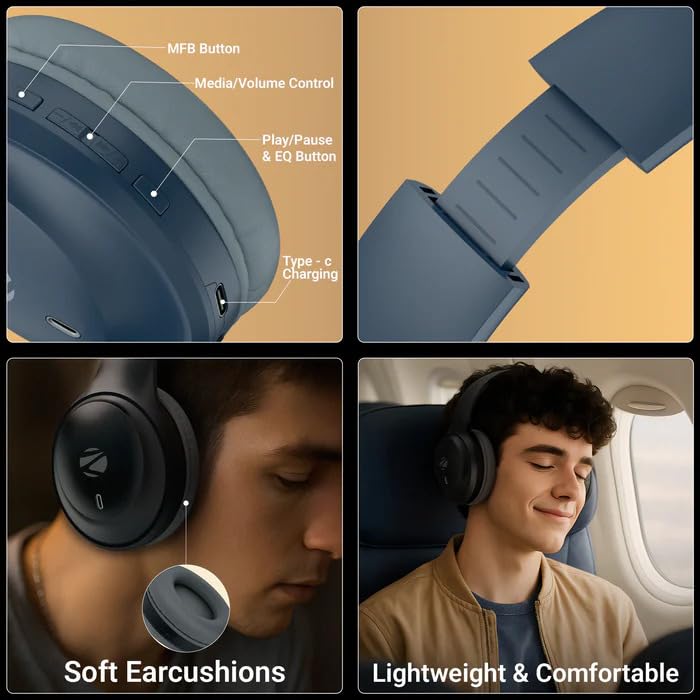
Image 3.1: Headphone Controls and Features. This image displays the various control buttons and features on the ZEBRONICS Zeb Paradise Neo headphones. It highlights the MFB (Multi-Function Button), Media/Volume Control buttons, Play/Pause & EQ Button, and the Type-C Charging port. It also shows the soft ear cushions and the lightweight, comfortable design.
- Копче MFB: Multi-Function Button for power, pairing, and call management.
- Media/Volume Control: Buttons for adjusting volume and navigating tracks.
- Play/Pause & EQ Button: Controls playback and switches between EQ modes.
- Пристаниште за полнење од тип C: За поврзување на кабелот за полнење.
- AUX пристаниште: За жична аудио врска.
- Микрофон: For call function and voice assistant.
4. Поставување и полнење
4.1 Почетно полнење
Before first use, fully charge the headphones. Connect the supplied USB Type-C charging cable to the headphone's charging port and the other end to a USB power adapter (not included) or a computer's USB port.
- A red LED indicator will illuminate during charging.
- The LED indicator will turn off once charging is complete.
- Времето на полнење е приближно 1.5 часа.
- Rapid charging provides approximately 7 hours of use from a 10-minute charge.
4.2 Вклучување/исклучување
- Вклучување: Press and hold the MFB button for approximately 3 seconds until the LED indicator flashes blue.
- Исклучено: Press and hold the MFB button for approximately 5 seconds until the LED indicator flashes red and then turns off.
5. Упатства за работа
5.1 Спарување преку Bluetooth
- Осигурајте се дека слушалките се целосно наполнети и исклучени.
- Press and hold the MFB button for approximately 5-7 seconds until the LED indicator flashes red and blue alternately. This indicates pairing mode.
- На вашиот мобилен уред, овозможете Bluetooth и побарајте достапни уреди.
- Select "ZEB-PARADISE NEO" from the list of found devices.
- Once paired, the LED indicator will flash blue intermittently.
Слушалките автоматски ќе се обидат да се поврзат со последниот поврзан уред кога ќе се вклучат.
5.2 Двојно спарување
The Zeb Paradise Neo supports dual pairing, allowing connection to two Bluetooth devices simultaneously.
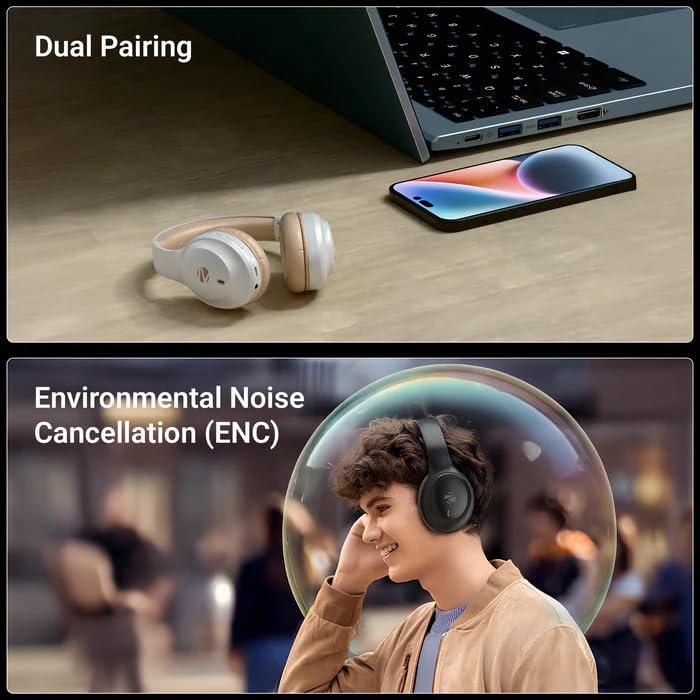
Image 5.1: Dual Pairing Capability. This image illustrates the dual pairing feature of the ZEBRONICS Zeb Paradise Neo headphones, showing them connected to both a laptop and a smartphone simultaneously. This allows seamless switching between audio sources.
- Pair the headphones with the first device (e.g., smartphone) as described in Section 5.1.
- Оневозможете го Bluetooth на првиот уред. Слушалките повторно ќе влезат во режим на спарување.
- Pair the headphones with the second device (e.g., laptop).
- Повторно овозможете Bluetooth на првиот уред. Слушалките сега треба да бидат поврзани со двата уреди.
Audio will play from the device that is actively transmitting sound. You may need to manually select the headphones as the output device on one of the connected sources.
5.3 Функција за повикување
- Одговори/заврши повик: Притиснете го копчето MFB еднаш.
- Одбијте го повикот: Press and hold the MFB button for approximately 2 seconds.
- Повторно бирајте последен број: Double-press the MFB button.
5.4 режими на EQ
The headphones feature 3 Equalizer (EQ) modes to customize your audio experience. Press the Play/Pause & EQ button to cycle through the available modes (e.g., Bass Boost, Balanced, Treble Boost).
5.5 Режим на играње (ниска латенција)
Activate Gaming Mode for reduced audio latency, ideal for gaming. Refer to the QR code guide for specific instructions on activating and deactivating Gaming Mode, as this may vary.
5.6 AUX Mode (Wired Connection)
To use the headphones with a wired connection, connect the supplied 3.5mm AUX cable to the headphone's AUX port and the other end to your audio source's 3.5mm audio jack. The headphones will automatically switch to AUX mode.
6. Одржување
- Чистење: Користете мека, сува крпа за чистење на слушалките. Не користете груби хемикалии или абразивни материјали.
- Складирање: Слушалките чувајте ги на ладно и суво место, подалеку од директна сончева светлина и екстремни температури.
- Нега на батеријата: За да го продолжите траењето на батеријата, избегнувајте често целосно празнење на слушалките. Полнете ги редовно, дури и ако не ги користите подолг период.
- Изложеност на вода: These headphones are not waterproof. Avoid exposure to water or moisture.
7 Смена на проблеми
| Проблем | Можно решение |
|---|---|
| Слушалките не се вклучуваат. | Проверете дали слушалките се наполнети. Поврзете ги на извор на напојување и обидете се повторно. |
| Не може да се спари со уредот. |
|
| Нема звук или има ниска јачина на звук. |
|
| Прекината врска. |
|
8. Спецификации
| Име на моделот | Paradise Neo (ZEB-WHP 11) |
| Bluetooth верзија | 5.4 |
| Опсег | 10 метри (без пречки) |
| Големина на возачот | 40 мм |
| Импеданса на звучник | 32 Ω |
| Фреквентен одговор | 20Hz - 20kHz |
| Чувствителност | 99dB ± 3dB |
| Импеданса на микрофон | 2.2 kΩ |
| Чувствителност на микрофонот | -38dB ± 3dB |
| Време на полнење | 1.5 часа |
| Време на репродукција | Up to 50 hours* (at 50% volume) |
| Време за разговор | До 40 часа * |
| Нето Тежина | 161 гр |
| Димензии на производот (Ш x Д x В) | 18.8 x 8.4 x 21.5 cm (Package dimension) |
*Battery life may vary based on usage, volume levels, and environmental factors.
9. Гаранција и поддршка
For warranty information and customer support, please refer to the QR code guide included in your package or visit the official ZEBRONICS webсајт. Чувајте ја вашата потврда за купување за барања за гаранција.
Manufacturer: Zebronics India Pvt Ltd.
Country of Origin: India.


