Вовед
This manual provides detailed instructions for the Redragon K521KS Tri-Mode Wireless Gaming Keyboard. It covers setup, operation, maintenance, and troubleshooting to ensure optimal performance and user experience. The K521KS keyboard offers versatile connectivity options, customizable RGB backlighting, and features designed for gaming and productivity.
Водич за поставување
1. Почетно полнење
Before first use, fully charge the keyboard using the provided USB-C cable. Connect the USB-C end to the keyboard and the USB-A end to a power source (e.g., computer USB port, USB wall adapter). The charging indicator will show the charging status.
2. Режими на поврзување
The Redragon K521KS supports three connection modes: USB-C Wired, 2.4GHz Wireless, and Bluetooth Wireless.
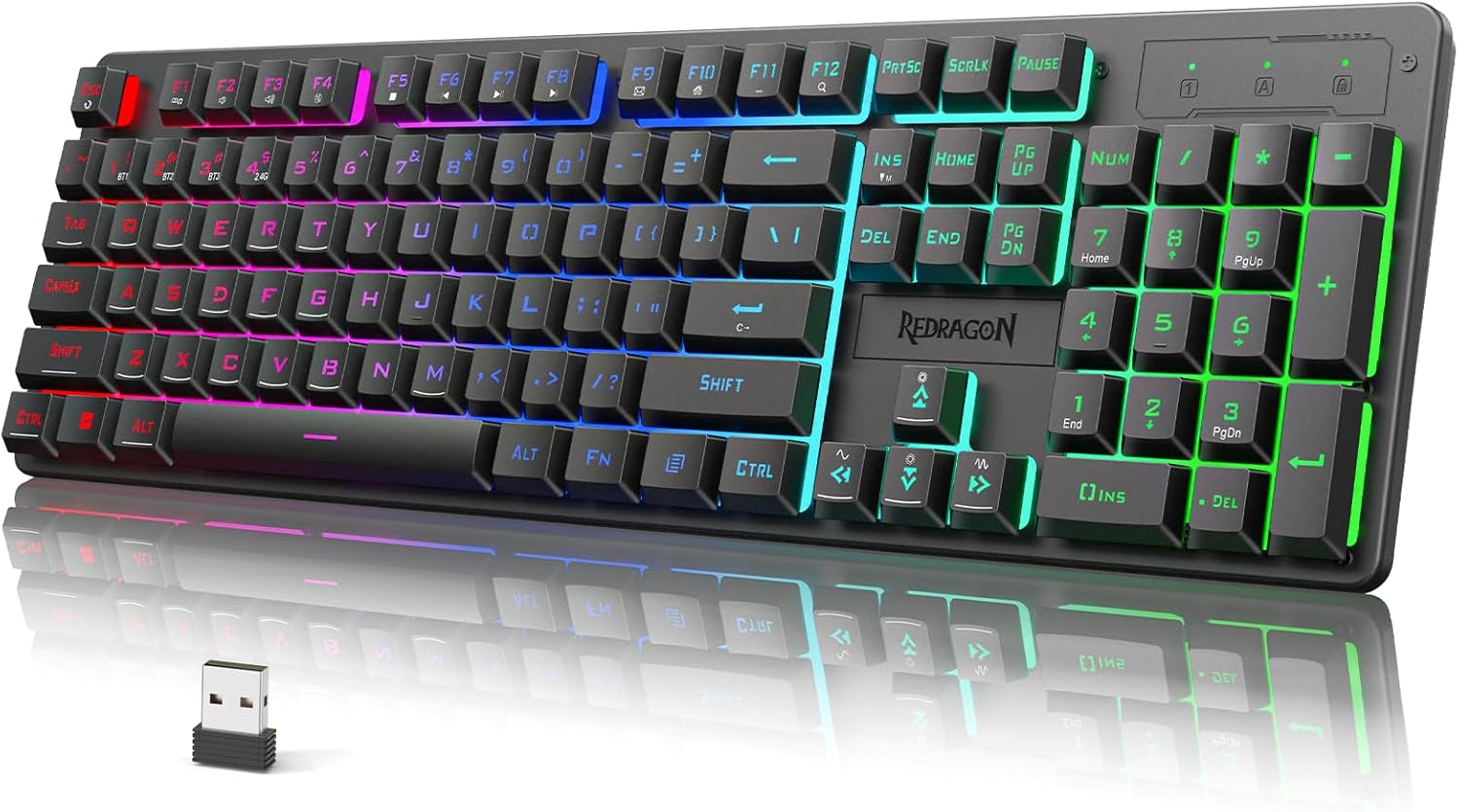
Слика: Надview of the Redragon K521KS keyboard highlighting its three connection modes: USB-C, 2.4GHz wireless with a dongle, and Bluetooth.
USB-C жична конекција:
Connect the keyboard directly to your computer using the USB-C cable. The keyboard will be recognized automatically and is ready for use. This mode also charges the keyboard.
Безжична врска од 2.4 GHz:
- Пронајдете го USB-адаптерот од 2.4 GHz, кој обично се чува во преграда на тастатурата.
- Вклучете го USB-адаптерот во слободен USB-порт на вашиот компјутер.
- Turn on the keyboard and select the 2.4GHz mode (refer to the keyboard's mode switch or indicator). The keyboard should connect automatically.
Bluetooth безжична врска:
The K521KS supports connecting up to five Bluetooth devices simultaneously.
- Ensure the keyboard is in Bluetooth pairing mode (refer to the keyboard's specific key combination for Bluetooth pairing, often FN + BT1/BT2/BT3).
- On your device (PC, tablet, etc.), enable Bluetooth and search for new devices.
- Select "Redragon K521KS" or a similar name from the list of available devices to pair.
- To switch between paired Bluetooth devices, use the designated FN key combinations (e.g., FN+BT1, FN+BT2, FN+BT3).
Упатства за работа
1. Контрола на RGB позадинско осветлување
The keyboard features multiple RGB backlighting modes and customization options.

Image: The Redragon K521KS keyboard showcasing its RGB backlighting with various colors.
- Adjust RGB Backlight Mode: Притиснете FN + INS to cycle through 8 different RGB backlighting modes and 7 monochrome colors.
- Прилагодете ја осветленоста на позадинското осветлување: Притиснете FN + стрелка нагоре за зголемување на осветленоста, FN + стрелка надолу да се намали осветленоста.
- Прилагодете ја брзината на задно осветлување: Притиснете FN + Лева стрелка to decrease animation speed, FN + Стрелка надесно to increase animation speed.
- Вклучување/исклучување на светлата: Use the dedicated light control key or a specific FN combination if available.
2. Multimedia Combination Keys
The K521KS keyboard includes 12 multimedia keys accessible via the FN key for enhanced control over media and system functions.

Image: Diagram illustrating the FN key combinations for multimedia controls on the Redragon K521KS keyboard.
| Комбинација на клучеви | Функција |
|---|---|
| FN + F1 | Медиа плеер |
| FN + F2 | Волумен - |
| FN + F3 | Волумен + |
| FN + F4 | Исклучи звук |
| FN + F5 | Стоп |
| FN + F6 | Претходна песна |
| FN + F7 | Пушти/Пауза |
| FN + F8 | Следна песна |
| FN + F9 | Е-пошта |
| FN + F10 | Почетна страница |
| FN + F11 | Заклучи тастатура |
| FN + F12 | Калкулатор |
3. Programmable Software
The Redragon K521KS keyboard supports programmable software for advanced customization of RGB lighting, key functions, and macros. This allows users to personalize their keyboard settings.
- Преземање на софтвер: The official software can be downloaded from the Redragon webсајт: redragon.com.
- Опции за приспособување: Use the software to:
- Edit RGB lighting effects and colors.
- Прераспореди ги клучните функции.
- Креирајте и доделувајте макроа.
4. Anti-Ghosting and Win Lock
The keyboard features 25-key anti-ghosting to ensure that multiple key presses are registered accurately, which is crucial for gaming. It also includes a Windows key lock function.

Image: The Redragon K521KS keyboard illustrating the 25-key anti-ghosting feature and the FN+WIN key combination to lock the Windows key.
- Анти-духови: The 25-key anti-ghosting ensures that simultaneous key presses are registered correctly, preventing input conflicts during intense gaming sessions.
- Заклучување на Windows: Притиснете FN + WIN to lock or unlock the Windows key. Locking the Windows key prevents accidental presses that could interrupt gameplay.
5. Ергономски дизајн
The Redragon K521KS keyboard is designed with user comfort in mind, featuring a foldable stand to adjust the typing angle.

Слика: Страничната страна view of the Redragon K521KS keyboard with its foldable stand extended, illustrating the ergonomic design.
- Преклопен држач: Utilize the integrated foldable stand at the rear of the keyboard to elevate the typing angle, reducing wrist strain during prolonged use.
Информации за батеријата
The Redragon K521KS keyboard is equipped with a built-in 4000mAh high-capacity rechargeable battery, providing extended usage time in wireless modes.

Image: Visual representation of the keyboard's 4000mAh battery capacity.
- Капацитет на батеријата: 4000 mAh.
- Полнење: Charge the keyboard using the supplied USB-C cable. Connect to a powered USB port.
- Индикатор за батерија: The keyboard features an indicator light to show battery status and charging progress. Refer to the specific indicator behavior in the quick start guide for details.
- Зачувување на енергија: To conserve battery life, the keyboard may enter a sleep mode after a period of inactivity. Press any key to wake it up.
Одржување
Proper maintenance ensures the longevity and performance of your Redragon K521KS keyboard.
- Чистење: Користете мека, сува крпа за да ја избришете површината на тастатурата. За подлабоко чистење, можете да користите малку дamp cloth with mild soap, ensuring no liquid enters the keyboard.
- Чистење на капачето на тастатурата: Keycaps can be carefully removed for thorough cleaning. Use a keycap puller (if provided) or gently pry them off. Clean keycaps with water and mild soap, then ensure they are completely dry before reattaching.
- Отстранување прашина: Користете компримиран воздух за отстранување на прашина и остатоци од меѓу копчињата.
- Складирање: Кога не ја користите подолг период, чувајте ја тастатурата на суво и ладно место, подалеку од директна сончева светлина и екстремни температури.
Решавање проблеми
If you encounter issues with your Redragon K521KS keyboard, refer to the following common solutions:
- Тастатурата не реагира (жичен режим):
- Проверете дали USB-C кабелот е безбедно поврзан и со тастатурата и со компјутерот.
- Обидете се да се поврзете со друга USB порта на вашиот компјутер.
- Тестирајте ја тастатурата на друг компјутер за да исклучите проблеми специфични за системот.
- Keyboard Not Responding (2.4GHz Wireless Mode):
- Ensure the 2.4GHz USB dongle is properly inserted into a USB port.
- Verify the keyboard is switched to 2.4GHz mode.
- Проверете го нивото на батеријата на тастатурата и наполнете ја доколку е потребно.
- Try re-pairing the keyboard with the dongle (refer to the quick start guide for specific re-pairing instructions).
- Тастатурата не реагира (Bluetooth режим):
- Ensure Bluetooth is enabled on your device and the keyboard is in Bluetooth mode.
- Проверете го нивото на батеријата на тастатурата.
- Обидете се да ја распарите и повторно да ја спарите тастатурата со вашиот уред.
- Ensure you are selecting the correct Bluetooth channel (BT1, BT2, BT3) on the keyboard.
- RGB Backlighting Not Working or Incorrect:
- Ensure the backlight is turned on (check FN key combinations).
- Cycle through different RGB modes using FN + INS.
- Прилагодете ја осветленоста користејќи FN + Стрелка нагоре/надолу.
- If using programmable software, ensure settings are correctly applied and saved.
- Забелешка: Some users report that lighting settings may reset after power cycling the computer. This is a known characteristic for some models without persistent memory for lighting settings.
- Клучевите не се регистрираат или се пишуваат двојно:
- Clean under the affected keycaps to remove any debris.
- Ensure the keyboard firmware is up to date (check Redragon webстраница).
Спецификации
| Карактеристика | Детал |
|---|---|
| Број на модел | K521KS |
| Технологија за поврзување | USB-C, безжичен 2.4 GHz, Bluetooth |
| Опис на тастатурата | Тастатура за игри |
| Тип на прекинувач | Mechanical Feeling |
| Капацитет на батеријата | 4000mAh (1 Nonstandard Battery included) |
| Посебни карактеристики | RGB Backlit, Anti-Ghosting (25 Keys), Multimedia Keys, Programmable Software |
| Компатибилни уреди | PC |
| Боја | Црното |
| Материјал | Пластика |
| Тежина на ставката | 1.83 фунти |
| Димензии на пакетот | 17.87 x 6.42 x 1.65 инчи |
| Производител | Редрагон |
Гаранција и поддршка
Redragon products are designed for reliability and performance. For warranty information, technical support, or service inquiries, please visit the official Redragon webвеб-страница или директно контактирајте ја нивната корисничка поддршка.
- Службен Webсајт: www.redragon.com
- Поддршка за корисници: Погледнете го делот „Поддршка“ или „Контактирајте не“ на официјалната страница. webсајт за детали за контакт.


