Вовед
This manual provides detailed instructions for the setup, operation, and maintenance of your SPYPOINT FORCE-PRO 30 Megapixel 4K Trail Camera. Designed for outdoor monitoring, this camera captures high-resolution photos and videos, making it ideal for wildlife observation and security. Please read this manual thoroughly to ensure proper use and optimal performance of your device.
Содржина на пакетот
Verify that all items listed below are present in your package. If any items are missing or damaged, please contact SPYPOINT customer support.
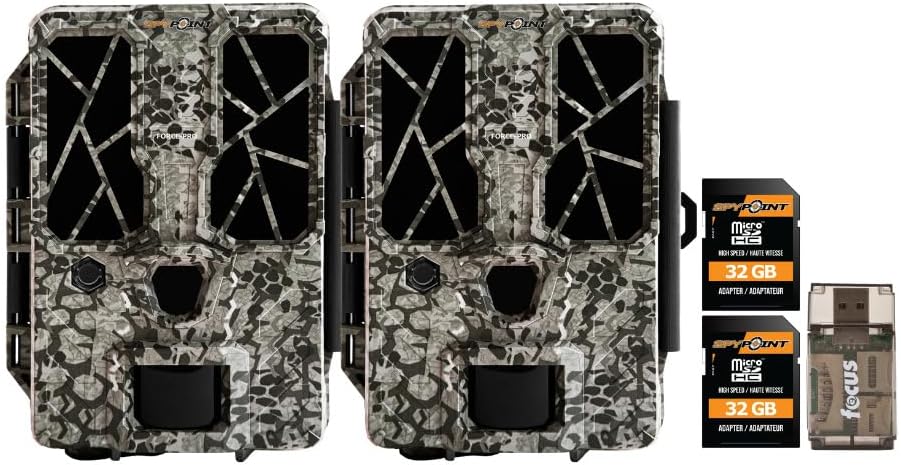
- 2 x SPYPOINT FORCE-PRO 30 Megapixel Trail Camera
- 2 x SPYPOINT MicroSD 32GB Ultra High Speed Class 10 Memory Card
- 1 x Focus All-In-One High Speed Card Reader

Производот завршиview
The SPYPOINT FORCE-PRO is a robust trail camera designed for reliable performance in outdoor environments. It features advanced imaging capabilities and user-friendly controls.
Клучни карактеристики
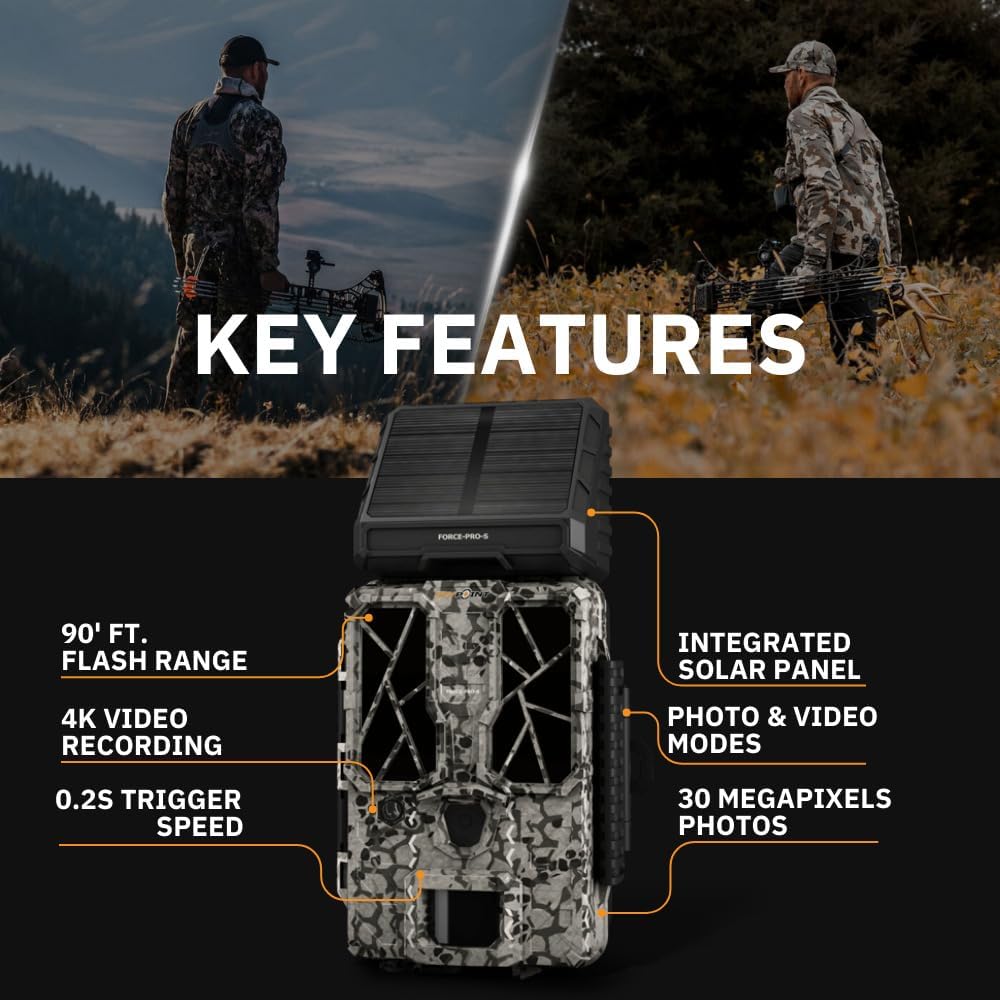
- Висока резолуција: 30 Megapixel photos and 4K video recording with sound.
- Брза брзина на активирање: Ultra-fast 0.2-second trigger speed to capture quick movements.
- Широк опсег на откривање: Опсег на откривање од 110 стапки.
- Powerful Flash: 90-foot flash range with 54 LEDs for clear night images.
- Интегриран соларен панел: For extended battery life and reduced maintenance.
- Dual-SIM Cellular: Automatically connects to the best available network for reliable transmission (if cellular model).



Поставување
1. Инсталација на извор на енергија
The FORCE-PRO camera is equipped with an integrated solar panel for charging its internal battery. For initial setup or extended use without sufficient sunlight, an external power source can be used.
- Внатрешна батерија: Ensure the camera's internal battery is charged. The integrated solar panel will charge it during daylight hours.
- Надворешно напојување (опционално): If using an external 12V power source (not included), connect it to the camera's 12V jack.
2. MicroSD Card Insertion
A MicroSD card is required to store photos and videos. Two 32GB MicroSD cards are included in this bundle.
- Пронајдете го слотот за MicroSD картичка на камерата.
- Вметнете ја MicroSD картичката со златните контакти свртени кон задната страна на камерата додека не кликне на своето место.
- За да ја извадите, нежно притиснете ја картичката додека не испадне.
3. Првично вклучување и основна конфигурација
- Turn the camera ON using the power switch.
- Follow the on-screen prompts (if available) or refer to the camera's menu for initial settings such as date, time, and language.
- Format the MicroSD card through the camera's menu for optimal performance.
4. Монтирање на камерата
The camera can be mounted using a strap, tripod, or other compatible mounting accessories. While specifications mention 'Tabletop Mount', for outdoor use, secure mounting is crucial.
- Изберете локација што обезбедува јасна view на посакуваната област за следење.
- Ensure the camera is securely fastened to prevent movement from wind or animals.
- Position the camera to avoid direct sunlight into the lens, which can cause overexposure.
Упатства за работа
Режими на камера
- Режим на фотографија: Снима неподвижни слики кога е активирано.
- Видео режим: Снима видео клипови кога се активира.
- Режим на фотографија + видео: Captures a photo followed by a video clip.
Прилагодување на поставките
Access the camera's menu using the built-in screen and navigation buttons to customize settings:
- Резолуција: Select desired photo (up to 30MP) and video (up to 4K) resolution. Higher resolutions consume more storage.
- Одложување на активирањето: Поставете го доцнењето помеѓу последователните активирања.
- Чувствителност: Adjust the motion sensor sensitivity to suit the environment and avoid false triggers.
- Работно време: Define specific times the camera should be active.
- Датум/Време Свamp: Enable or disable the date and time overlay on images/videos.
Враќање податоци
- MicroSD картичка: Remove the MicroSD card from the camera and insert it into the included Focus All-In-One High Speed Card Reader. Connect the card reader to a computer to access files.
- SPYPOINT App: For cellular models, use the SPYPOINT mobile application to view and manage captured media remotely. The app also allows for camera settings adjustments and firmware updates.
Одржување
- Чистење: Regularly clean the camera lens and housing with a soft, dry cloth. Avoid abrasive materials or harsh chemicals.
- Проверка на батеријата: Monitor battery levels, especially during periods of low sunlight. The integrated solar panel helps maintain charge, but supplemental charging may be needed.
- Ажурирања на фирмверот: Periodically check for and install firmware updates via the SPYPOINT app or webстраница за да се обезбедат оптимални перформанси и пристап до нови функции.
- Складирање: When not in use, store the camera in a cool, dry place away from direct sunlight.
Решавање проблеми
- Камерата не се активира: Check motion sensor sensitivity, ensure no obstructions, and verify battery level.
- Лош квалитет на слика/видео: Clean the lens, check resolution settings, and ensure proper lighting conditions.
- Проблеми со моќноста: Ensure the internal battery is charged or an external power source is properly connected. Check for any damage to power cables.
- Грешки во MicroSD картичката: Reformat the MicroSD card (backing up data first) or try a different card. Ensure the card is properly inserted.
- Connectivity Problems (Cellular Models): Verify cellular signal strength in the camera's location. Check your SPYPOINT app for data plan status.
Спецификации
| Карактеристика | Спецификација |
|---|---|
| Модел | СИЛА-ПРО |
| Резолуција на фотографијата | 30 мегапиксели |
| Видео резолуција | 4K |
| Брзина на активирањето | 0.2 секунди |
| Опсег на откривање | 110 стапки |
| Опсег на блиц | 90 стапки |
| LED диоди | 54 |
| Извор на енергија | Integrated Solar Panel, Corded Electric (external 12V option) |
| Поврзување | USB, Wired (for data transfer), Cellular (for remote management) |
| Материјал | Пластика |
| Отпорност на вода | Водоотпорен |
| Тип на фокус | Автоматски фокус |
| UPC | 196271434986 |
Гаранција и поддршка
For warranty information, technical support, or service inquiries, please refer to the official SPYPOINT webлокација или директно контактирајте го нивниот оддел за корисничка поддршка. Зачувајте го доказот за купување за гаранциски барања.
ШПИОНТ Webсајт: www.spypoint.com


