Вовед
Thank you for choosing the pTron Studio Evo Wireless Over-Ear Headphones. This manual provides essential information for setting up, operating, and maintaining your headphones to ensure optimal performance and longevity. Please read these instructions carefully before use.

Слика: Надview of pTron Studio Evo features including sound quality, battery life, driver size, controls, charging, and connectivity modes.
Поставување
1. Распакување и компоненти
Внимателно отстранете ги сите предмети од пакувањето. Кутијата треба да содржи:
- pTron Studio Evo Wireless Over-Ear Headphones
- Кабел за полнење USB Type-C
- 3.5mm Audio Cable (Aux-in)
- Упатство за употреба (овој документ)
2. Полнење на слушалките
Before first use, fully charge your headphones. Connect the provided USB Type-C cable to the charging port on the headphones and the other end to a compatible USB power source (e.g., wall adapter, computer USB port).
- Време на полнење: Приближно 2 часа за целосно полнење.
- Траење на батеријата: Up to 70 hours of playtime on a single full charge.

Image: pTron Studio Evo headphones highlighting 70 hours of playtime and Type-C fast charging.
3. Вклучување/исклучување
- За вклучување: Притиснете и задржете го копчето за вклучување приближно 3 секунди додека не светне LED индикаторот.
- За исклучување: Притиснете го и задржете го копчето за вклучување приближно 3 секунди додека LED индикаторот не се исклучи.
4. Bluetooth спарување
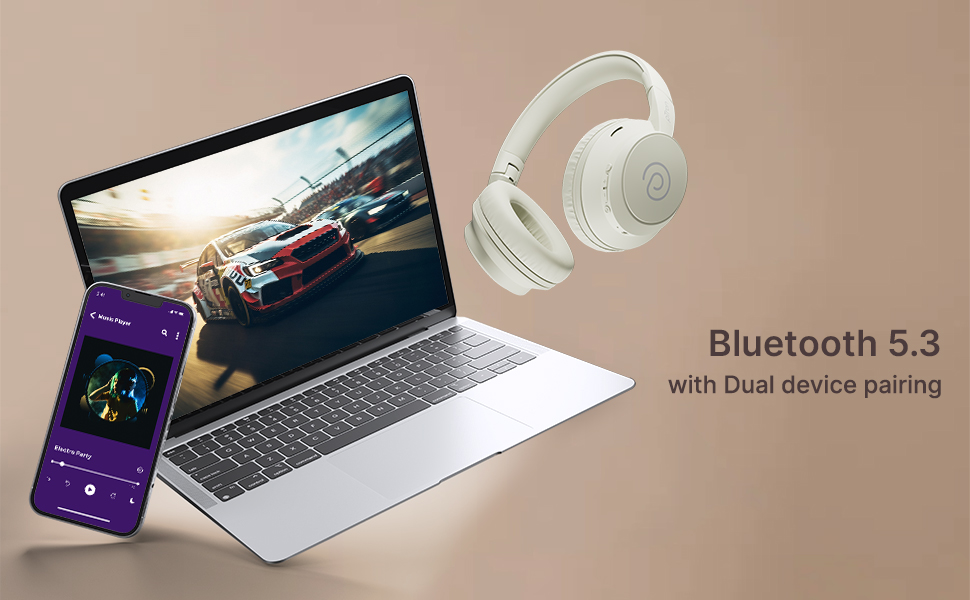
The pTron Studio Evo headphones utilize Bluetooth 5.3 for stable wireless connectivity.
- Проверете дали слушалките се исклучени.
- Притиснете го и држете го копчето за вклучување 5-7 секунди додека LED индикаторот не трепка наизменично црвено и сино, што укажува на режим на спарување.
- На вашиот уред (паметен телефон, лаптоп итн.), овозможете Bluetooth и пребарајте достапни уреди.
- Select "pTron Studio Evo" from the list of found devices.
- Откако ќе се поврзе, LED индикаторот ќе свети постојано сино или бавно ќе трепка сино.
Спарување со два уреди: These headphones support connecting to two devices simultaneously. After pairing with the first device, disable Bluetooth on that device, then pair with the second device. Re-enable Bluetooth on the first device, and the headphones should connect to both. You can then switch audio playback between the two devices.

Image: Headphones connected to both a phone and a laptop, demonstrating Bluetooth 5.3 dual device pairing.
5. Жична врска (Aux-in)
For a wired connection, use the provided 3.5mm audio cable. Plug one end into the headphone's 3.5mm jack and the other end into your audio source's auxiliary output. The headphones will automatically switch to wired mode when the cable is connected.
Упатства за работа
1. Контроли надview
The headphones feature integrated buttons for easy control of music, calls, and modes.
Слика: Детална view of the integrated control buttons on the pTron Studio Evo headphones.
- Копче за вклучување: Притиснете и задржете за вклучување/исклучување. Кратко притиснете за репродукција/пауза на музика или одговарање/завршување на повици.
- Јачина на звук (+): Кратко притискање за зголемување на јачината на звукот. Долго притискање за следната песна.
- Намалување на јачината на звукот (-): Кратко притискање за намалување на јачината на звукот. Долго притискање за претходната песна.
- EQ копче: Short press to cycle through EQ modes (Bass, Movie, Pop, Vocal).
2. Режими на еквилајзер
The pTron Studio Evo headphones offer multiple low-latency EQ modes optimized for different audio experiences:
- Режим на игра: Ја намалува аудио латенцијата за посинхронизирано искуство со играње.
- Режим на филм: Enhances dialogue clarity and cinematic sound effects.
- Музички режим: Обезбедува балансиран аудио професионалецfile за општо слушање музика.
- Режим на бас: Boosts low frequencies for a deeper bass response.
- Режим на попување: Optimized for pop music genres.
- Вокален режим: Enhances vocal clarity, ideal for podcasts or audiobooks.
Press the EQ button to switch between these modes.
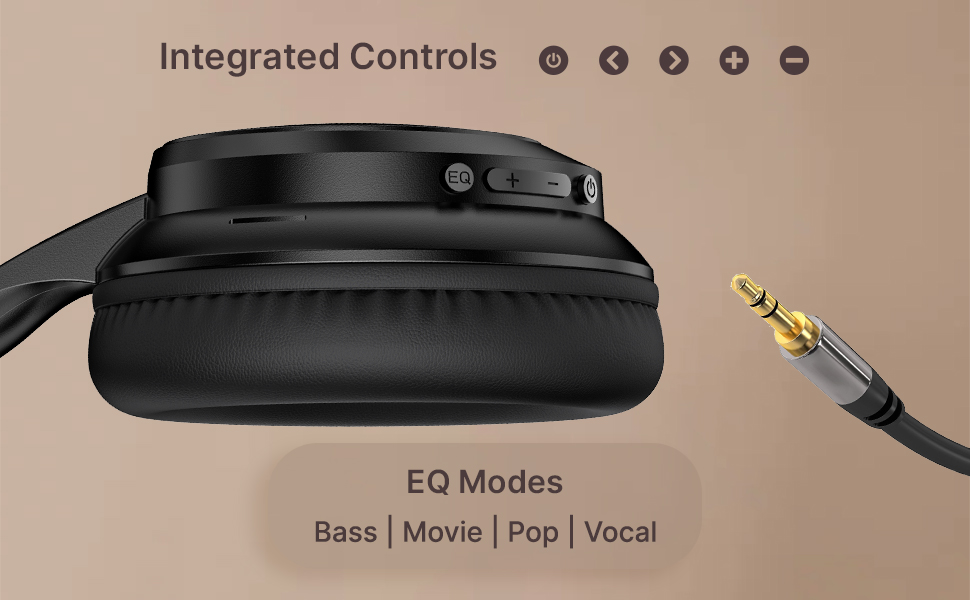
Image: User engaging in gaming with headphones, demonstrating low-latency sync for game mode.
3. Остварување и примање повици
The headphones include a built-in HD microphone for hands-free calls.
- Одговори/заврши повик: Кратко притиснете го копчето за вклучување.
- Одбијте го повикот: Притиснете и задржете го копчето за вклучување 2 секунди.
4. Гласовен асистент
Access your device's voice assistant (e.g., Siri, Google Assistant) by double-pressing the Power button.
5. Носење слушалки
The pTron Studio Evo headphones feature an ergonomic design with soft earcups and an adjustable head beam for comfortable all-day listening. Adjust the head beam to position the earcups exactly over your ears for the best fit and sound isolation.
Одржување
1. Чистење
Regularly clean your headphones to maintain hygiene and performance.
- Користете мека, сува крпа за да ги избришете слушалките и лентата за глава.
- Не користете абразивни средства за чистење или растворувачи.
- Avoid getting moisture into the charging port or audio jack.
2. Водоотпорност
The headphones are IPX5 water-resistant, meaning they can withstand splashes and sweat. Do not submerge them in water or expose them to heavy rain.
3. Складирање
The foldable design allows for easy storage. Fold the headphones when not in use to protect them from damage and save space. Store them in a cool, dry place away from direct sunlight and extreme temperatures.
Решавање проблеми
- Без моќност: Проверете дали слушалките се целосно наполнети. Поврзете ги на извор на напојување и обидете се повторно.
- Не може да се спари: Make sure Bluetooth is enabled on your device and the headphones are in pairing mode (flashing red and blue LED). Try restarting both devices.
- Нема звук: Check the volume levels on both the headphones and your connected device. Ensure the correct audio output is selected on your device. If using a wired connection, ensure the 3.5mm cable is fully inserted.
- Лош квалитет на звукот: Ensure the headphones are within the Bluetooth range (up to 10 meters) of your device. Avoid obstacles that may interfere with the signal. Try switching EQ modes.
- Микрофонот не работи: Ensure the headphones are properly connected and selected as the input device on your call application.
Спецификации
| Карактеристика | Спецификација |
|---|---|
| Име на моделот | Студио |
| Технологија за поврзување | Безжичен (Bluetooth) |
| Технологија на безжична комуникација | Bluetooth 5.3 |
| Опсег на Bluetooth | 10 метри |
| Големина на драјвер за аудио | 40 милиметри |
| Траење на батеријата | 70 часа |
| Време на полнење | 2 часа |
| Џек за слушалки | 3.5 мм Jackек |
| Ниво на отпорност на вода | IPX5 Водоотпорен |
| Контролен метод | Притисни копче, глас |
| Контрола на бучава | Звучна изолација |
| Материјал | Акрилонитрил бутадиен стирен (ABS) |
| Тежина на ставката | 157 грама |
| Димензии на производот | 19.2 x 15.8 x 7.9 cm |
Гаранција и поддршка
1. Гаранција на производителот
The pTron Studio Evo headphones come with a 1-годишна гаранција на производителот from the date of purchase. This warranty covers manufacturing defects only. Please retain your proof of purchase for warranty claims.
2. Поддршка за корисници
За какви било прашања, техничка помош или барања за гаранција, ве молиме контактирајте ја поддршката за корисници на pTron:
- Е-пошта: support@ptron.in
- Телефон: 040-67138888


