1. Вовед
Thank you for choosing the HTC GT-288 Electric Shaver. This manual provides essential information for the safe and effective operation, maintenance, and care of your new shaver. Please read these instructions thoroughly before first use and retain them for future reference.
2. Информации за безбедност
За да го намалите ризикот од електричен удар, повреда или оштетување, секогаш следете ги овие основни безбедносни мерки на претпазливост:
- Не го потопувајте кабелот за полнење или адаптерот за напојување во вода или други течности.
- Чувајте го апаратот подалеку од деца.
- Ensure the shaver is fully dry before connecting it to the charging cable.
- Do not use the shaver if the blade or foil is damaged, as this may cause injury.
- Користете го само обезбедениот USB кабел за полнење.
- This appliance is designed for personal use only.
3. Содржина на пакетот
Ве молиме проверете го пакувањето за следните ставки:
- 1 x HTC GT-288 Electric Shaver
- 1 x USB кабел за полнење
- 3 x Precision Combs (1mm, 3mm, 5mm)
- 1 x четка за чистење
- 1 x масло за подмачкување
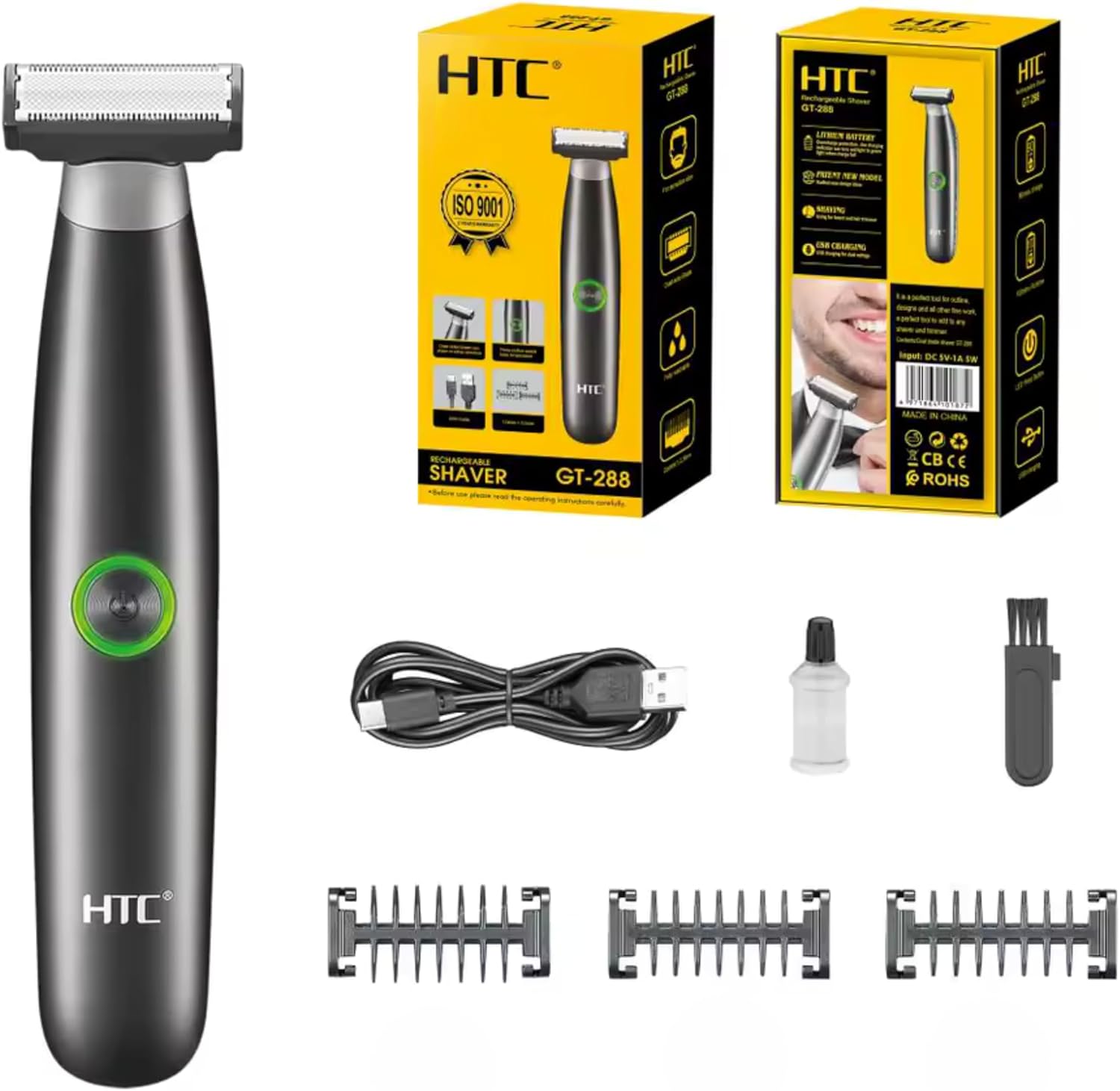
Image 3.1: Contents of the HTC GT-288 Electric Shaver package, including the shaver, USB cable, three precision combs, cleaning brush, and lubricating oil.
4. Производот завршиview
The HTC GT-288 Electric Shaver features a sleek design with a dual-sided blade for efficient trimming and shaving. It includes an easy-to-operate press-button switch and is fully washable for convenient cleaning.
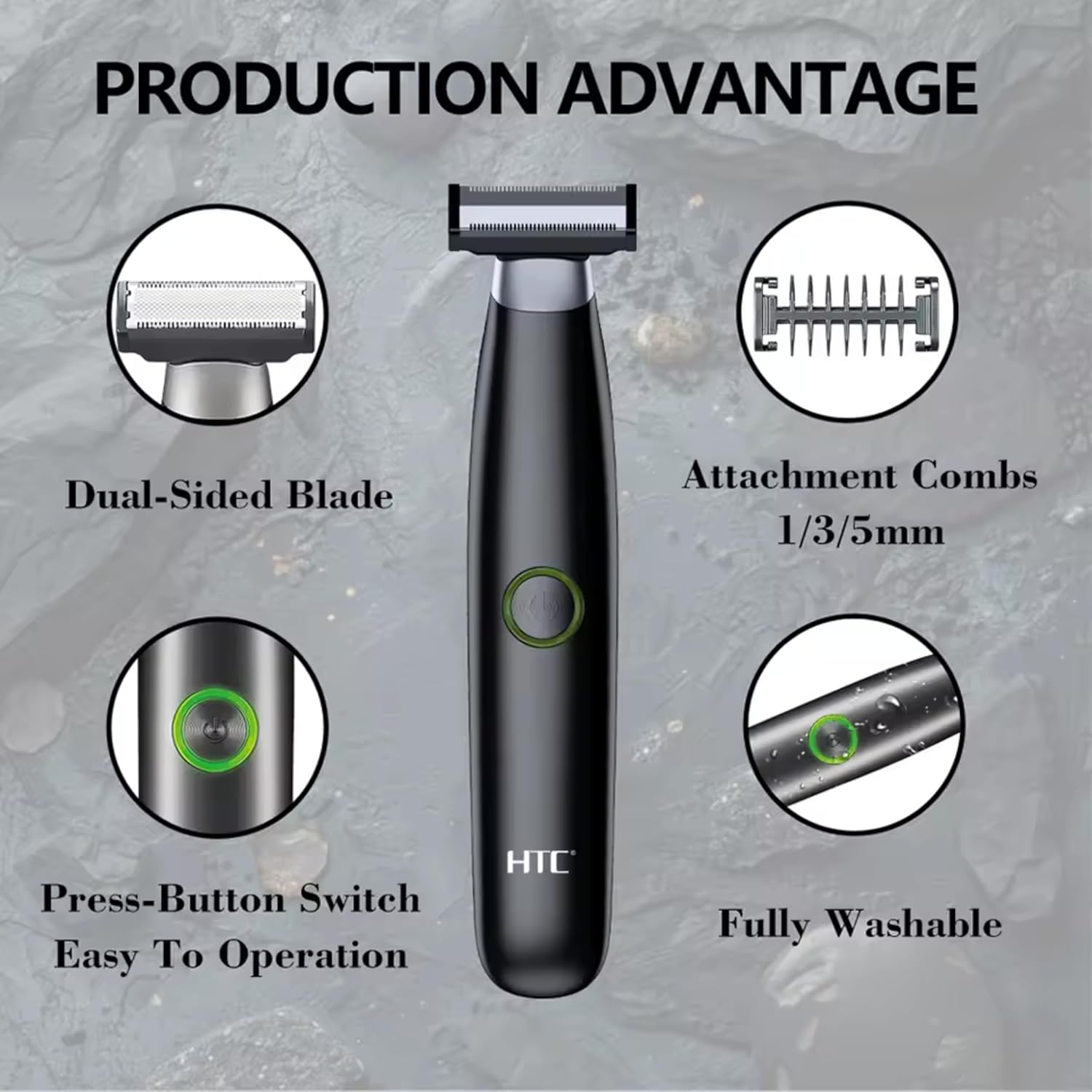
Слика 4.1: Готовоview of the HTC GT-288 Electric Shaver's key features, highlighting the dual-sided blade, attachment combs (1/3/5mm), press-button switch, and fully washable design.

Image 4.2: Detail of the LED press button, which serves as the on/off switch for easy operation.
5. Поставување
- Отпакувај: Внимателно отстранете ги сите компоненти од пакувањето.
- Почетна наплата: Before first use, fully charge the shaver. Refer to Section 6 for charging instructions.
- Attach Comb (Optional): If desired, select one of the three precision combs (1mm, 3mm, or 5mm) and slide it onto the shaver head until it clicks into place. Ensure it is securely attached.
6. Полнење
The HTC GT-288 Electric Shaver is equipped with a rechargeable battery for cordless operation.
- Проверете дали машината за бричење е исклучена.
- Connect the small end of the USB charging cable to the charging port on the shaver.
- Connect the larger end of the USB cable to a compatible USB power source (e.g., computer, USB wall adapter).
- The LED indicator on the shaver will illuminate to show that it is charging.
- Allow the shaver to charge completely before its first use. A full charge typically takes several hours.
- Откако целосно ќе се наполни, исклучете го USB кабелот.
7. Упатства за работа
The HTC GT-288 shaver can be used for both wet and dry shaving.
- Вклучување: Press the LED button to turn on the shaver.
- Суво бричење: For dry shaving, ensure your skin is clean and dry. Gently press the shaver against your skin and move it in slow, even strokes against the direction of hair growth.
- Влажно бричење: For wet shaving, apply shaving foam or gel to your skin. The shaver is waterproof, allowing for use in the shower or with water. Move the shaver in gentle, even strokes.
- Using Precision Combs: Attach the desired 1mm, 3mm, or 5mm comb for trimming beards, sideburns, or other facial hair to a specific length. Move the shaver with the comb attached against the direction of hair growth for an even trim.
- Исклучено: Press the LED button again to turn off the shaver after use.
8. Одржување и чистење
Редовното чистење обезбедува оптимални перформанси и го продолжува животниот век на вашиот брич.
- Исклучи: Секогаш исклучувајте го бричот пред чистење.
- Глава за плакнење: The shaver is fully washable (IPX6 rated). You can rinse the shaver head directly under running water to remove hair clippings.
- Користете четка за чистење: For more thorough cleaning, use the provided cleaning brush to remove stubborn hair particles from the blade and comb attachments.
- Подмачкување на сечилата: After cleaning and drying, apply a small drop of the provided lubricating oil to the blades. Turn on the shaver for a few seconds to distribute the oil evenly. This helps maintain blade performance.
- Сува: Оставете го бричот целосно да се исуши на воздух пред да го складирате или повторно да го полните.

Image 8.1: The HTC GT-288 Electric Shaver being rinsed under a faucet, illustrating its IPX6 fully washable design for easy cleaning.
9 Смена на проблеми
| Проблем | Можна причина | Решение |
|---|---|---|
| Бричот не се вклучува. | Батеријата е испразнета. | Наполнете го бричот целосно. |
| Shaver does not cut effectively. | Сечилата се затнати со влакна или се мат. | Clean the shaver head thoroughly. Apply lubricating oil. If problem persists, blades may need replacement. |
| Брич кубе влакна. | Battery is low or blades are clogged. | Charge the shaver. Clean the shaver head. |
| Бричот запира за време на употребата. | Батеријата е испразнета. | Наполнете го бричот. |
10. Спецификации
- Бренд: HTC
- Име на модел: ГТ-288
- Извор на енергија: USB се полни
- Посебни карактеристики: USB Cable, Adjustable Combs, Rechargeable, Water Resistant, Wet & Dry Use
- Препорачана употреба: Facial Shaving, Beard Trimming, Daily Use, Travel
- Вклучени компоненти: Electric Shaver, USB Cable, 3 Precision Combs, Cleaning Brush, Lubricating Oil
- Тежина на производот: 250 грама
- Боја: Црното
- Материјал на сечилото: Нерѓосувачки челик
- Тип на глава: Прецизен тример
11. Гаранција и поддршка
This product is manufactured by HTC. For any questions, technical support, or warranty claims, please contact the seller or manufacturer directly through your purchase platform. Please retain your proof of purchase for warranty purposes.


