1. Вовед
The SMSL AS400 is a versatile audio device combining a Digital-to-Analog Converter (DAC), a headphone ampладилник (HPA) и моќност ampпоживо (AMP) into a single unit. Designed for high-fidelity audio reproduction, it supports various input sources and offers powerful output for both speakers and headphones. This manual provides detailed instructions for the proper setup, operation, and maintenance of your AS400 unit.

Figure 1.1: The SMSL AS400 functions as a DAC, Headphone Amplifier, and Power Ampживописен.
2. Информации за безбедност
- Напојување: Користете го само испорачаниот адаптер за напојување. Осигурајте се дека јачината на звукотtage одговара на вашите локални спецификации за напојување.
- Вентилација: Не ги блокирајте отворите за вентилација. Обезбедете соодветен проток на воздух околу уредот за да спречите прегревање.
- Влага: Keep the unit away from water, moisture, and high humidity environments.
- Чистење: Исклучете го напојувањето пред чистење. Користете сува, мека крпа. Не користете течни или аеросолни средства за чистење.
- Сервисирање: Не обидувајте се сами да го сервисирате овој производ. Пренесете ги сите сервиси на квалификуван сервисен персонал.
- Поставување: Поставете го уредот на стабилна, рамна површина. Избегнувајте да го поставувате во близина на извори на топлина или на директна сончева светлина.
3. Содржина на пакетот
Проверете дали сите артикли се присутни во пакетот:
- SMSL AS400 Unit
- Далечински управувач (RC-8A)
- Кабел за напојување
- USB кабел
- Bluetooth антена
- Упатство за употреба (овој документ)
4. Производот завршиview
4.1 Преден панел

Figure 4.1: Front Panel of the SMSL AS400 and included remote control.

Figure 4.2: Front Panel Component Identification.
- Екран за прикажување: Го прикажува тековниот влез, sample rate, volume, and menu options.
- Далечински прозорец: Инфрацрвен ресивер за далечинскиот управувач.
- Копче за функција:
- Press: Enter menu / OK
- Hold: Exit menu
- Rotate: Change value / Volume control
- 4.4 мм приклучок за слушалки: Balanced headphone output.
- Излез за слушалки 6.35 мм: Unbalanced headphone output.
4.2 Заден панел

Figure 4.3: Rear Panel Component Identification.
- Терминал за заземјување: For connecting a turntable ground wire.
- PHONO Input: RCA inputs for turntables with MM cartridges.
- LINE Input (AUX): RCA analog input for external audio sources.
- Коаксијален влез: Дигитален аудио влез.
- SW Out (Preamp): Subwoofer pre-out.
- USB Input (PRE): USB-B input for connecting to a computer or other digital source.
- Оптички влез: Дигитален аудио влез.
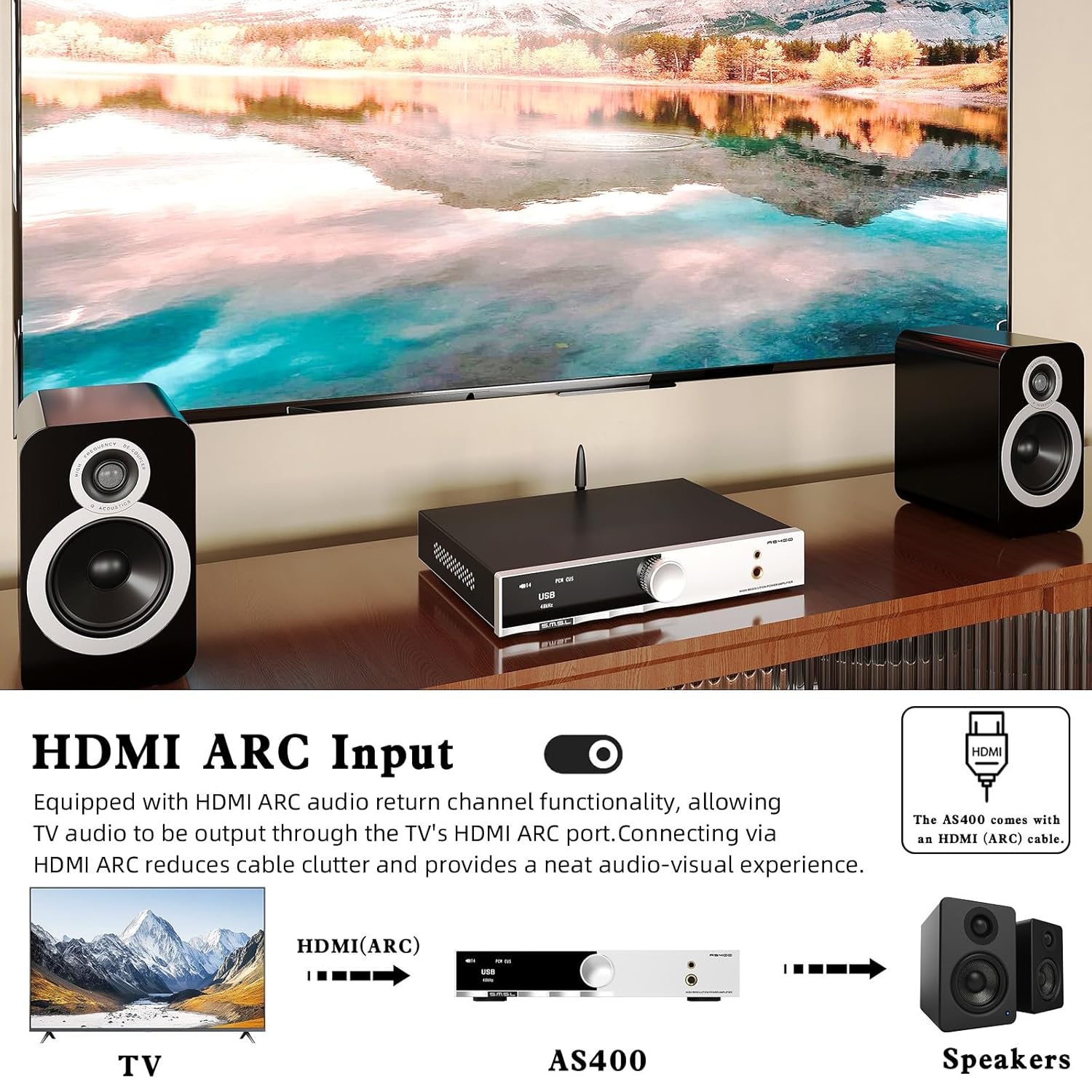
- HDMI (ARC) влез: Audio Return Channel for connecting to a TV.
- Антена за Bluetooth: За безжична Bluetooth конекција.
- Left/Right Channel Output: Терминали за звучници за пасивни звучници.
- Влез за напојување со наизменична струја: Поврзете го кабелот за напојување овде.
4.3 Далечински управувач (RC-8A)
Слика 4.4: Функции на далечинско управување.
- ВКЛУЧУВАЊЕ/ИСКЛУЧУВАЊЕ: Го вклучува или исклучува уредот.
- Горе долу: Навигирајте низ опциите на менито или прилагодете ги поставките.
- МЕНИ/ОК: Enters the main menu or confirms a selection.
- FN (Function): Enters the secondary interface for additional settings.
- Избор на внесување: Циклично ги прелистува достапните влезни извори.
- Исклучи звук: Го исклучува или го вклучува звукот на аудио излезот.
- Префрлување на излез: Switches between speaker and headphone outputs.
- Волумен +/-: Ја прилагодува излезната јачина на звук.
5. Поставување
5.1 Поврзување звучници
- Ensure the AS400 is powered off.
- Connect your passive speakers to the Left and Right Channel Output terminals on the rear panel. Ensure correct polarity (+ to + and - to -).
- If using a powered subwoofer, connect it to the SW Out (Preamp) port using an RCA cable.
5.2 Поврзување на аудио извори
The AS400 supports multiple input types:
- USB: Connect a computer or other USB audio source to the USB Input (PRE) port using the provided USB cable.
- Оптички/коаксијален: Connect digital audio sources (e.g., CD player, game console) to the Optical or Coaxial Input ports.
- RCA (LINE): Connect analog audio sources (e.g., media player) to the LINE Input (AUX) ports.
- ФОНО: Connect a turntable with an MM cartridge to the PHONO Input ports. Ensure the turntable's ground wire is connected to the Grounding Terminal on the AS400.
- HDMI (ARC): Connect your TV's HDMI ARC port to the AS400's HDMI (ARC) Input for TV audio output.
- Bluetooth: Screw the Bluetooth antenna onto its designated port for wireless connectivity.

Figure 5.1: HDMI ARC and Bluetooth Connectivity.
5.3 Поврзување за напојување
- Connect the power cable to the AC Power Input on the rear panel of the AS400.
- Вклучете го другиот крај од кабелот за напојување во соодветен ѕиден штекер.
6. Упатства за работа
6.1 Вклучување/исклучување
Press the Power ON/OFF button on the remote control or the function knob to turn the unit on or off.
6.2 Избор на влез
Use the 'Input Select' button on the remote or rotate the function knob to cycle through available inputs (USB, Optical, Coaxial, RCA, PHONO, HDMI ARC, Bluetooth).
6.3 Контрола на јачината на звукот
Adjust the volume using the 'Volume +/-' buttons on the remote or by rotating the function knob.
6.4 Навигација низ менито и поставки
Press the function knob or the 'MENU/OK' button on the remote to enter the main menu. Use the 'Up/Down' buttons or rotate the knob to navigate. Press 'MENU/OK' to select an option. Hold the function knob or press the 'FN' button to exit the menu.
Key menu options include:
- Влез: Го избира активниот аудио влез.
- Излез: Switches between speaker and headphone outputs.
- EQ: Select from 8 preset EQ modes (Direct, Bass, Rock, etc.) to tailor sound.
- Бас / високи тонови: Adjust bass and treble levels for personalized sound.
- Филтер: Select from 5 PCM digital filters.
- Боја: Change the display screen color.
- BT Clear: Clears paired Bluetooth devices.

Figure 6.1: Setup Menu and Sound Customization Options.
6.5 Спарување преку Bluetooth
- Проверете дали Bluetooth антената е поврзана.
- Изберете „Bluetooth“ како влезен извор на AS400.
- On your mobile device, search for Bluetooth devices and select 'SMSL AS400'.
- Once paired, audio from your device will stream to the AS400.
- To clear paired devices, navigate to 'BT Clear' in the menu.
6.6 MQA/MQA-CD репродукција
The AS400 supports MQA and MQA-CD decoding. When playing MQA content via USB, Optical, or Coaxial inputs, the display will indicate MQA status, ensuring studio-quality audio reproduction.
7. Одржување
- Чистење: Use a soft, dry cloth to wipe the exterior of the unit. Avoid abrasive cleaners or solvents.
- Прашина: Regularly dust the unit, especially around ventilation areas, to prevent dust buildup.
- Врски: Периодично проверувајте ги сите кабелски врски за да се осигурате дека се безбедни.
- Складирање: Доколку го складирате уредот подолг временски период, исклучете го од струја и складирајте го на ладно и суво место.
8 Смена на проблеми
If you encounter issues with your AS400, please refer to the following common problems and solutions:
| Проблем | Можна причина | Решение |
|---|---|---|
| Нема моќ | Кабелот за напојување е исклучен; штекерот е неисправен. | Проверете го поврзувањето на кабелот за напојување; обидете се со друг штекер. |
| Нема излез на звук | Incorrect input selected; volume too low; speakers/headphones not connected; output mode incorrect. | Verify input source; increase volume; check speaker/headphone connections; ensure correct output mode (speaker/headphone) is selected in the menu. |
| Bluetooth врската е нестабилна | Antenna not connected; interference; device too far. | Ensure Bluetooth antenna is securely attached; move device closer to AS400; clear paired devices via 'BT Clear' in menu and re-pair. |
| Subwoofer output is weak or not triggering. | Subwoofer sensitivity setting; AS400 subwoofer output level. | Adjust the gain/volume setting on your powered subwoofer. Ensure the subwoofer is powered on. Note that the AS400's subwoofer output is a pre-out and its level is tied to the main volume. |
| Искривен звук | Input signal too high; faulty cable; speaker impedance mismatch. | Reduce input source volume; check/replace cables; ensure speaker impedance is within AS400's supported range. |
Доколку проблемот продолжи и по обидот за овие решенија, контактирајте ја службата за корисничка поддршка.
9. Спецификации

Слика 9.1: Детални спецификации на производот.
| Карактеристика | Спецификација |
|---|---|
| Влезови | RCA / BT / USB / Optical / Coaxial / Phono / I²S / HDMI (ARC) |
| THD+N | 0.003% |
| Излезна моќност (RMS) | 165W x2 (4Ω), 85W x2 (8Ω) |
| Влезна чувствителност/импеданса | 280mV/22kΩ |
| Димензии (ШxВxД) | 210.4 x 46 x 254 mm |
| Тежина | 1.57 кг (3.46 фунти) |
| USB компатибилност | Windows 7 / 8 / 8.1 / 10 / 11, Mac OSX, Linux |
| Длабочина на бит | USB: 1bit, 16-32bit; Optical/Coaxial: 1bit, 16-32bit |
| SNR | 107 dB |
| Одделување канали | 98 dB |
| USB пренос | Асинхрон пренос |
| Потрошувачка на енергија | 40W (нормална јачина на звук) |
| MQA декодер | USB / Оптички / Коаксијален |
| MQA-CD декодер | Оптички / коаксијален |
| Sampling Rate (USB) | PCM: 44.1-768kHz; DSD: 2.8224-11.2896MHz |
| Sampling Rate (Optical/Coaxial) | PCM: 44.1-192kHz; DSD: DSD64 (DoP) |
10. Гаранција и поддршка
The SMSL AS400 comes with a standard manufacturer's warranty. Please refer to the warranty card included in your package for specific terms and conditions, including warranty period and coverage.
For technical support, troubleshooting assistance beyond this manual, or warranty claims, please contact your authorized SMSL dealer or visit the official SMSL webсајт за информации за контакт.
Ве молиме зачувајте го доказот за купување за целите на гаранцијата.


