1. Вовед
Ви благодарам за купувањетоasing the Moukey MAMP3 2.0 Channel Stereo Amplifier. This manual provides essential information for the safe and efficient operation of your device. Please read it thoroughly before use and retain it for future reference.
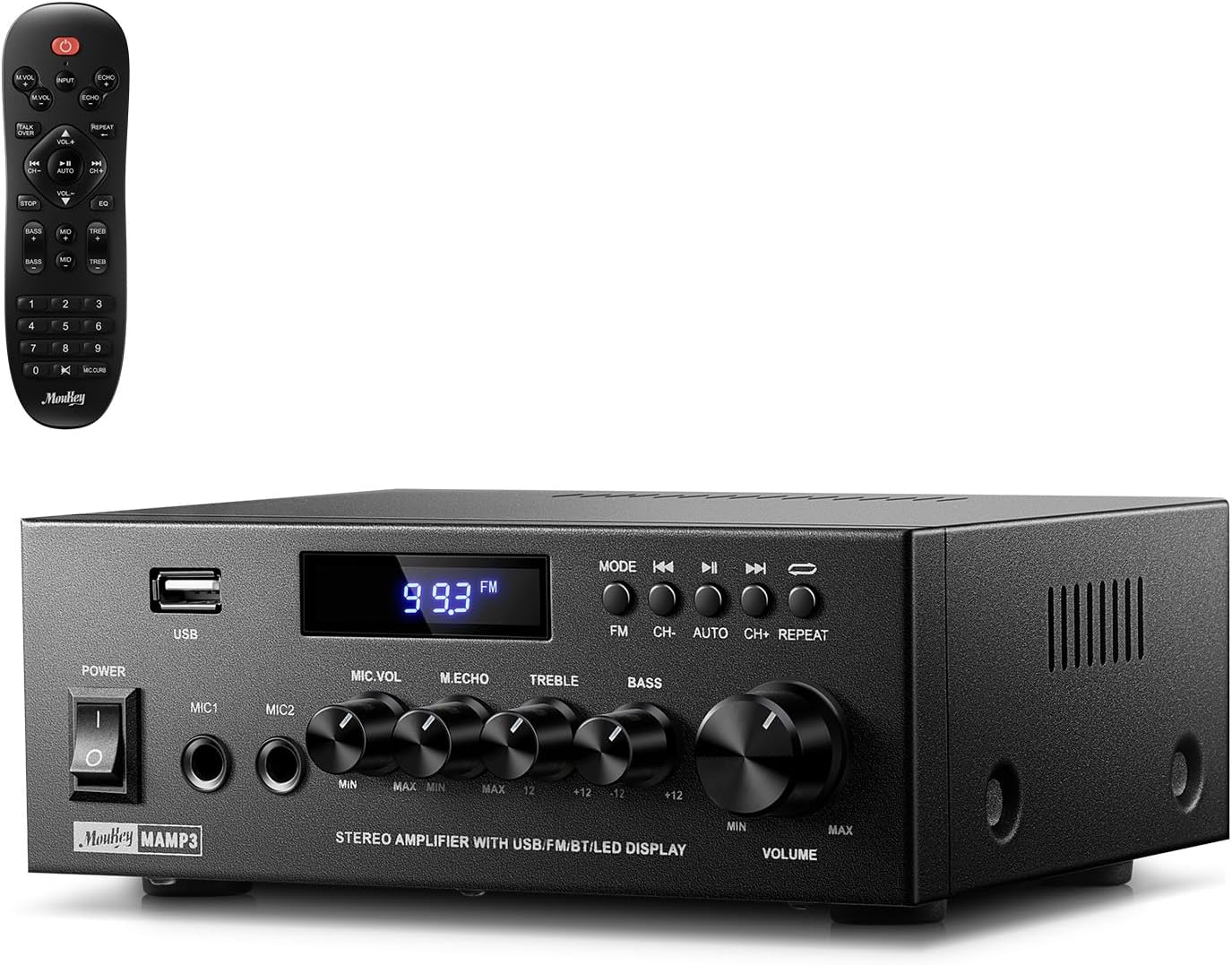
Image 1.1: The Moukey MAMP3 amplifier and its remote control.
2. Инструкции за безбедност
- Прочитајте ги сите упатства пред да ракувате со ampживописен.
- Чувајте го ampДржете го ладилникот подалеку од вода, влага и екстремни температури.
- Не ги блокирајте отворите за вентилација. Обезбедете правилен проток на воздух околу уредот.
- Користете го само адаптерот за напојување испорачан со уредот.
- Не обидувајте се сами да го поправите или модифицирате уредот. За сите сервиси обратете се на квалификуван персонал.
- Disconnect the power cord from the outlet if the unit will be unused for extended periods.
3. Производот завршиview
3.1 Клучни карактеристики
- 2.0 Channel Stereo Audio Output
- Bluetooth 5.3 за стабилна безжична конекција
- Multiple Audio Inputs: RCA, USB, FM Radio, 2 Microphone Inputs
- Full-function Remote Control with EQ adjustments
- Customizable Treble, Midrange, and Bass controls
- Memory function for mode, volume, and EQ settings
- 300 вати врвна излезна моќност
3.2 Контроли и индикатори на предниот панел

Image 3.1: Front Panel Layout
- Прекинувач: Го вклучува или исклучува уредот.
- MIC1/2: 6.35 мм влезни приклучоци за микрофон.
- Копче за јачина на звук на микрофонот: Ја прилагодува јачината на звукот на поврзаните микрофони.
- Ехо копче: Го прилагодува ефектот на ехо за микрофоните.
- Рачка за високи тонови: Го прилагодува излезот за аудио со висока фреквенција.
- Бас копче: Го прилагодува излезот за аудио со ниска фреквенција.
- Копче за јачина на музика: Главна контрола на јачината на звукот за сите аудио извори.
- USB слот: За поврзување на USB уреди за складирање за репродукција на аудио.
- Лед екран: Ги прикажува тековниот режим, информациите за песната или FM фреквенцијата.
- Копче MODE: Switches between input sources (BT, Aux, CD, USB, FM).
- Претходно копче: Skips to the previous track (USB/BT) or FM station.
- Копче за репродукција/пауза: Plays or pauses audio (USB/BT).
- Следно копче: Skips to the next track (USB/BT) or FM station.
- Копче за повторување: Repeats current track or all tracks (USB).
3.3 Приклучоци на задниот панел

Image 3.2: Rear Panel Connections
- Влез на FM антена: Поврзете ја вклучената FM антена за радио прием.
- АУДИО ВЛЕЗ (RCA): Connect external audio sources like CD/DVD players using RCA cables.
- AUDIO OUTPUT (Speaker Terminals): Connect passive speakers. Ensure correct polarity (+ to + and - to -).
- POWER AC INPUT: Поврзете го кабелот за напојување со штекер за наизменична струја.
4. Поставување
4.1 Отпакување
Внимателно отстранете го amplifier and all accessories from the packaging. Verify that all items listed in the 'What's in the Box' section are present.
4.2 Поврзување звучници
МAMP3 amplifier supports two passive speakers. Connect your speakers to the Аудио-излез terminals on the rear panel. Ensure that the positive (+) terminal on the amplifier connects to the positive (+) terminal on your speaker, and the negative (-) terminal on the amplifier connects to the negative (-) terminal on your speaker. Incorrect polarity can affect sound quality.

Image 4.1: Speaker Connection Diagram
4.3 Поврзување на аудио извори
На amplifier offers multiple input options:
- Влез RCA: Use RCA cables to connect devices such as CD players, DVD players, or other audio equipment to the АУДИО ВЛЕЗ jacks on the rear panel.
- USB влез: Вметнете USB флеш драјв во USB слот on the front panel for direct audio playback.
- Bluetooth: Pair your Bluetooth-enabled device (smartphone, tablet, laptop) wirelessly.
- ФМ радио: Connect the included FM antenna to the Влез за FM антена on the rear panel for radio reception. Extend the antenna for optimal signal.
- Влезови за микрофон: Поврзете до два микрофони на MIC1/2 jacks on the front panel for karaoke or public address.

Image 4.2: Available Signal Inputs
4.4 Поврзување за напојување
Поврзете го кабелот за напојување со POWER AC INPUT on the rear panel and then plug it into a standard AC power outlet.
5. Упатства за работа
5.1 Вклучување/исклучување
Притиснете го Прекинувач за напојување на предниот панел за да го вклучите amplifier on or off. The LED display will illuminate when the unit is powered on.
5.2 Избор на влез
Притиснете го РЕЖИМ button on the front panel or the remote control to cycle through the available input sources: Bluetooth (BT), Auxiliary (Aux), CD, USB, and FM radio. The selected mode will be shown on the LED display.
5.3 Контрола на јачината на звукот
Завртете го големиот Music Volume Knob on the front panel clockwise to increase volume and counter-clockwise to decrease it. Volume can also be adjusted using the remote control.
5.4 Прилагодување на еквилајзерот (EQ)
Adjust the sound characteristics using the Трепл копче и Бас копче on the front panel. The remote control also provides dedicated buttons for Treble, Midrange, and Bass adjustments. The amplifier will automatically save your preferred EQ settings.
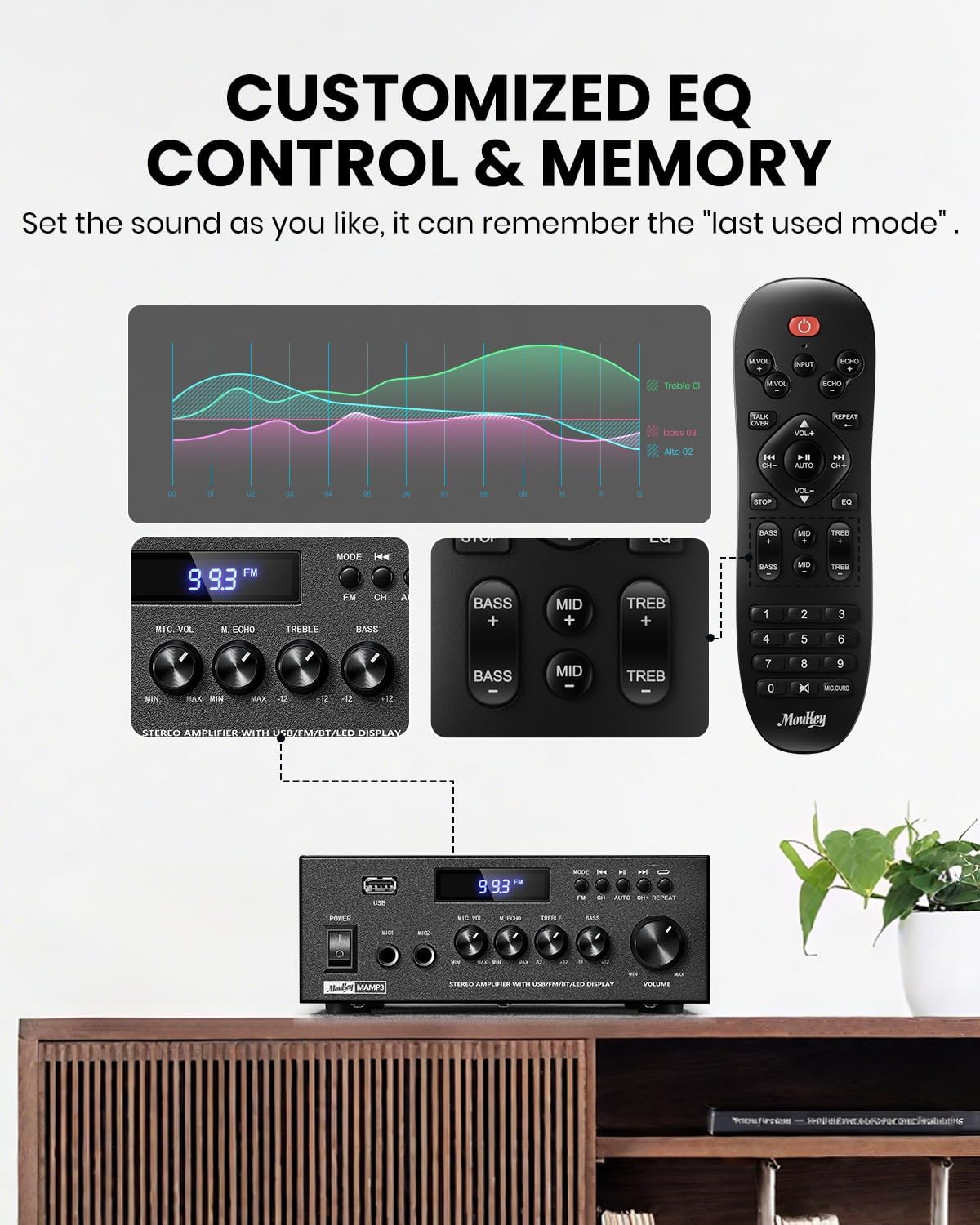
Image 5.1: Customizable EQ Control
5.5 Контроли на микрофонот
If microphones are connected, use the Копче за јачина на звук на микрофон to adjust their output level and the Копче за ехо to add an echo effect. The remote control also features a 'Talkover' function.
5.6 Работа со Bluetooth
- Притиснете го РЕЖИМ button until "BT" appears on the LED display. The amplifier is now in Bluetooth pairing mode.
- On your mobile device, enable Bluetooth and search for "Moukey MAMP3".
- Select "Moukey MAMP3" to pair. Once connected, you will hear a confirmation tone.
- Сега можете да репродуцирате аудио од вашиот уред преку ampживописен.

Image 5.2: Bluetooth Pairing
5.7 Работа со FM радио
- Притиснете го РЕЖИМ button until "FM" appears on the LED display.
- Автоматско скенирање: Press the "AUTO" button on the remote to automatically scan and save available FM stations.
- Рачно подесување: Use the number pad on the remote control to directly enter the desired FM frequency (e.g., for 101.1 MHz, enter 1011).
- Користете го Претходна и Следно buttons to navigate between saved stations or fine-tune frequencies.
5.8 USB репродукција
Вметнете USB флеш-уред што содржи MP3 или WAV аудио fileи во USB слот. На amplifier will automatically switch to USB mode and begin playback. Use the Претходна, Пушти/Пауза, и Следно buttons to control playback. The Повторете button allows you to repeat the current track or all tracks.
Далечински управувач 5.9
The included full-function remote control allows for convenient operation from a distance. It provides control over input selection, volume, EQ settings (treble, midrange, bass), microphone echo, and talkover functions across all input modes.

Image 5.3: Upgraded Remote Control Functionality
6. Одржување
- Чистење: Користете мека, сува крпа за чистење на надворешноста на ampНе користете течни средства за чистење или растворувачи.
- Вентилација: Ensure that the ventilation openings are free from dust and debris to prevent overheating.
- Складирање: Кога не се користи подолг период, чувајте го ampладилникот на ладно и суво место, подалеку од директна сончева светлина и екстремни температури.
7 Смена на проблеми
| Проблем | Можна причина | Решение |
|---|---|---|
| Нема моќ | Кабелот за напојување не е поврзан; Приклучокот е неисправен; Прекинувачот е исклучен. | Ensure power cord is securely connected; Test outlet with another device; Turn power switch on. |
| Нема излез на звук | Volume too low; Incorrect input selected; Speaker wires loose/incorrectly connected; Audio source issue. | Increase volume; Select correct input mode; Check speaker wire connections and polarity; Verify audio source is playing. |
| Bluetooth не се поврзува | Amplifier not in BT mode; Device too far; Device already connected to another unit; Interference. | Префрли amplifier to BT mode; Move device closer; Disconnect from other devices; Reduce interference. |
| Лош FM прием | Антената не е поврзана или е лошо позиционирана; Слаб сигнал. | Connect and adjust FM antenna position; Try auto-scan or manual tuning for stronger stations. |
| Проблеми со репродукција преку USB | Неподдржано file format; USB drive not formatted correctly; USB drive capacity too large. | Обезбедете files are MP3/WAV; Format USB drive to FAT32; Use USB drives 32GB or less. |
8. Спецификации
| Карактеристика | Спецификација |
|---|---|
| Број на модел | MAMP3 |
| Излезна моќност | 300 вати (врв) |
| Канали | 2.0 стерео |
| Технологија за поврзување | Auxiliary, Bluetooth 5.3, FM, USB |
| Компатибилни уреди | Smartphone, Tablet, Laptop, Computer, Speakers, CD/DVD Player |
| Тип на конектор | RCA, USB, 2 Mic input |
| Режим за излез на звук | Стерео |
| Димензии на производот | 6.1"Д x 7.1"Ш x 2.8"В (15.5 x 18.0 x 7.1 см) |
| Тежина на ставката | 2.14 фунти (0.97 кг) |
| Боја | Црното |
8.1 Што има во кутијата
- Муки МAMP3 Ampживописен
- Далечински управувач
- FM антена
- Упатство за употреба
- Адаптер за напојување
9. Гаранција и поддршка
9.1 Информации за гаранцијата
Moukey products are designed and manufactured to the highest quality standards. This product is covered by a limited warranty against defects in materials and workmanship. Please refer to the warranty card included with your purchase for specific terms and conditions, or visit the official Moukey webсајт за детални информации за гаранцијата.
9.2 Поддршка за корисници
If you encounter any issues or have questions regarding your Moukey MAMP3 amplifier, please contact our customer support team. You can find contact information on the official Moukey webвеб-страница или преку вашата платформа за купување.
Webсајт: www.moukey.com (Прample link, please refer to actual product documentation)
Е-пошта: support@moukey.com (Прample email, please refer to actual product documentation)


