1. Вовед
Thank you for choosing the Oakcastle IR200 Internet Radio. This manual provides essential information for the safe and efficient operation of your device. Please read it thoroughly before use and retain it for future reference.
The Oakcastle IR200 is a versatile audio system offering multiple listening options, including Internet Radio, DAB+, FM, Bluetooth 5.3, and AUX input. It features a color display, remote control, and podcast support for a comprehensive audio experience.
2. Содржина на пакетот
Внимателно распакувајте ја кутијата и проверете дали сите предмети наведени подолу се присутни и во добра состојба:
- Oakcastle IR200 Internet Radio Unit
- Кабел за напојување
- Далечински управувач
- Упатство за употреба (овој документ)
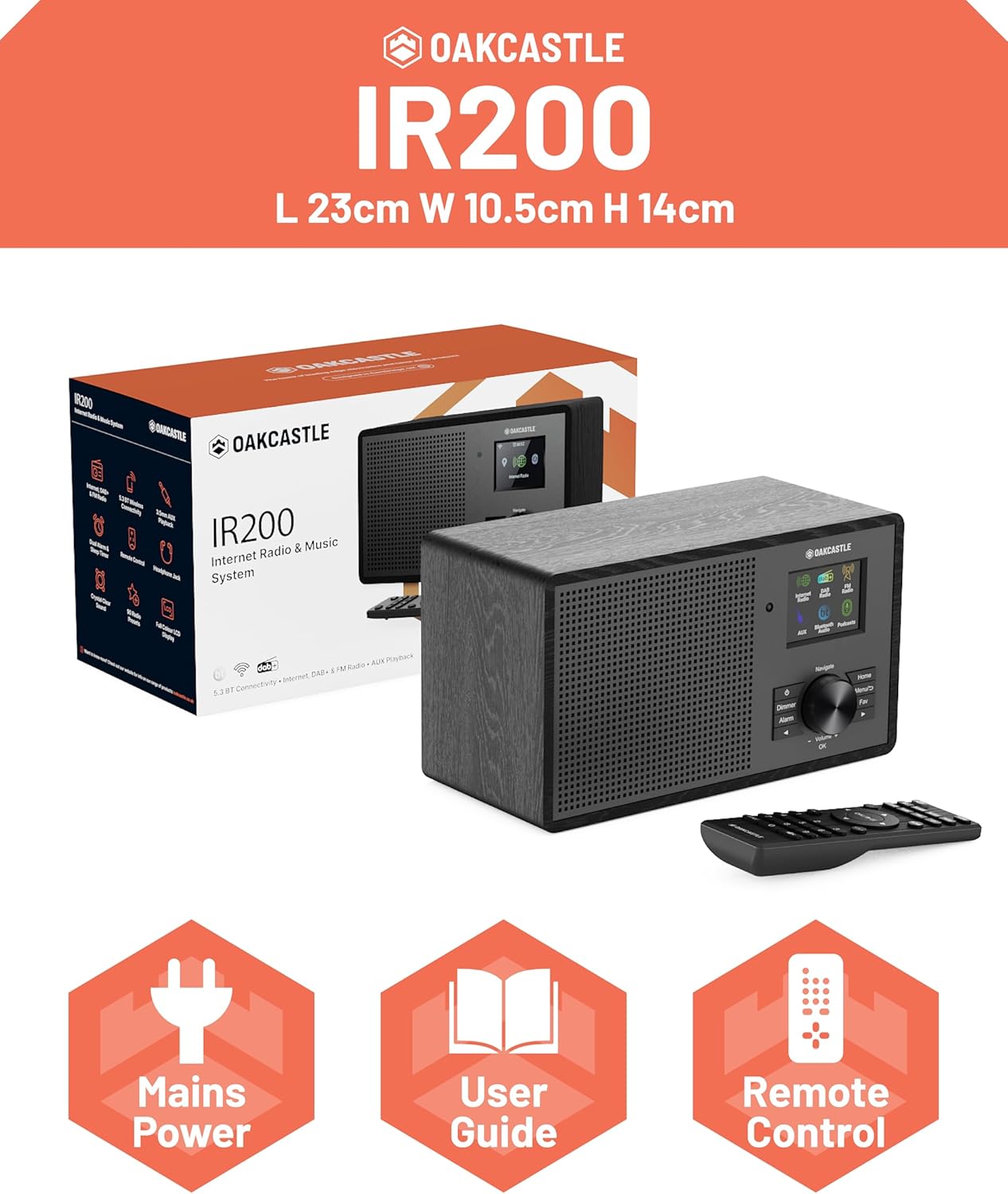
Image 2.1: Contents of the Oakcastle IR200 package, including the radio unit, its box, power cable, remote control, and user manual.
3. Производот завршиview
Familiarize yourself with the main components and controls of your Oakcastle IR200 radio.
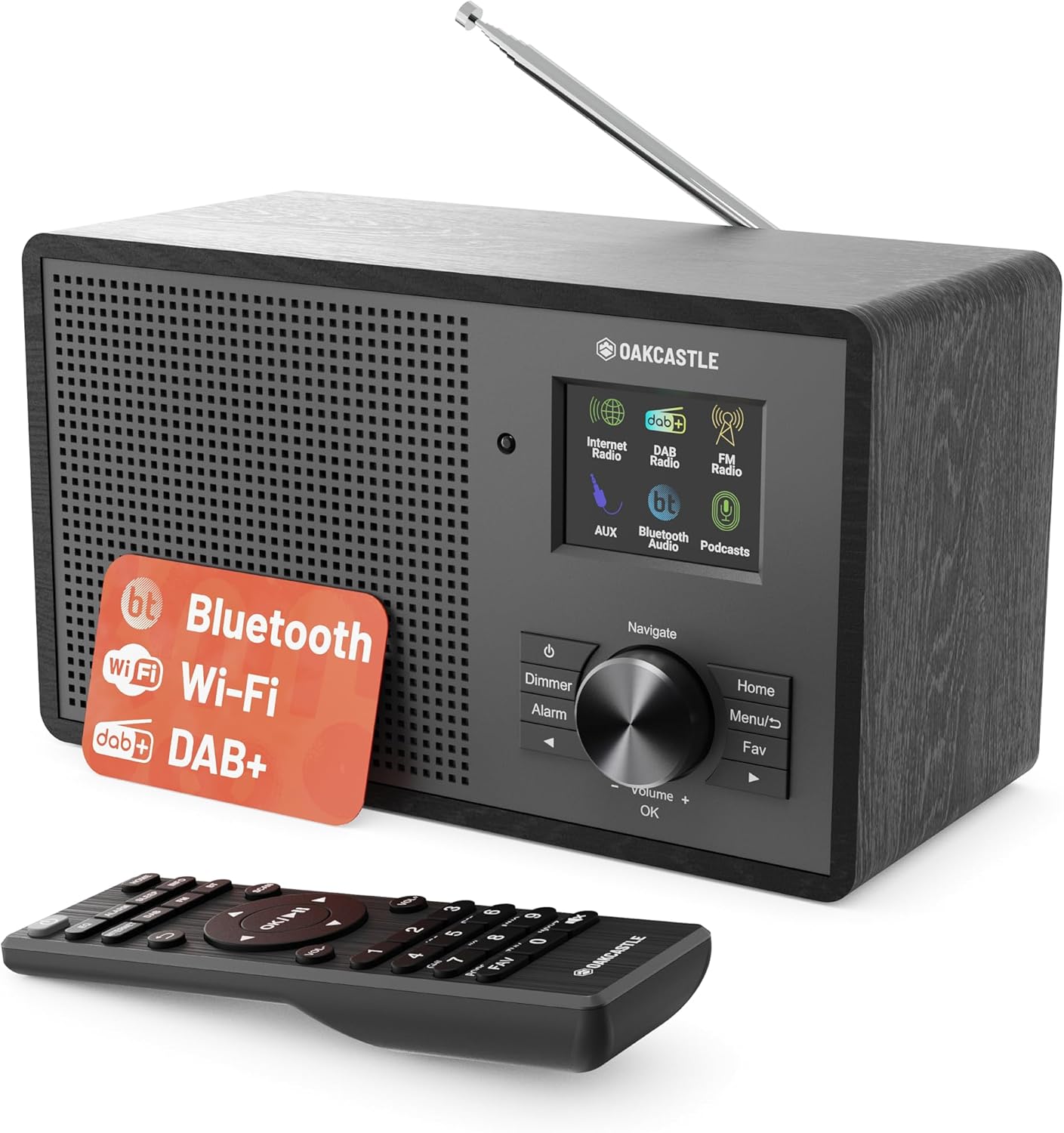
Слика 3.1: напред view of the Oakcastle IR200 radio, showcasing the display, control knob, buttons, and the included remote control.
3.1 Контроли на предниот панел
- Екран за прикажување: Ги прикажува информациите за станицата, времето и опциите од менито.
- Navigate/Volume/OK Knob: Rotate to navigate menus or adjust volume; press to confirm selections.
- Копче за вклучување: Turns the unit on/off or puts it into standby.
- Копче за затемнување: Ја прилагодува осветленоста на екранот.
- Копче за аларм: Пристапува до поставките за аларм.
- Копче за почеток: Се враќа во главното мени.
- Копче за мени: Accesses mode-specific menus.
- Fav Button: Accesses favorite station presets.
3.2 Приклучоци на задниот панел

Слика 3.2: Задна страна view of the Oakcastle IR200, highlighting the headphone output and AUX input ports.
- Телескопска антена: За DAB+ и FM прием.
- Влез AUX: Поврзете надворешни аудио уреди.
- Излез за слушалки: Поврзете слушалки за приватно слушање.
- DC ВО: Поврзување со адаптер за напојување.
4. Почетно поставување
4.1 Поврзување за напојување
- Insert the power cable into the DC IN port on the rear of the radio.
- Plug the other end of the power cable into a wall socket.
- Press the Power button on the front panel or remote control to turn on the radio.
4.2 Прилагодување на антената
For optimal DAB+ and FM reception, fully extend the telescopic antenna located at the rear of the unit.
4.3 Network Connection (for Internet Radio)
- Upon first power-on, the radio will guide you through the network setup.
- Изберете „Мрежен волшебник“ или „Поставување на Wi-Fi“ од менито.
- Радиото ќе скенира за достапни Wi-Fi мрежи. Изберете ја вашата мрежа од листата.
- Enter your Wi-Fi password using the navigation knob and OK button.
- Откако ќе се поврзе, радиото ќе прикаже порака за потврда.
5. Работни режими
The Oakcastle IR200 offers several listening modes. Press the "Home" button to access the main menu and select your desired mode.
5.1 Интернет радио
Access thousands of global radio stations via your Wi-Fi connection.

Image 5.1: The radio's display screen in Internet Radio mode, showing station information.
- Од главното мени, изберете „Интернет радио“.
- You can browse stations by location, genre, or search by name.
- Rotate the Navigate knob to scroll through options and press OK to select.
- To save a station as a favorite, press the "Fav" button during playback.
5.2 DAB+ радио
Уживајте во висококвалитетни дигитални радио емитувања.

Image 5.2: The radio's display screen in DAB+ Radio mode, showing the current station.
- From the main menu, select "DAB+ Radio".
- The radio will automatically scan for available DAB+ stations.
- Use the Navigate knob to select a station from the list.
- To save a station as a favorite, press the "Fav" button during playback.
5.3 FM радио
Вклучете се во традиционалните аналогни FM емитувања.
- Од главното мени, изберете „FM радио“.
- To auto-scan for stations, press and hold the OK button or use the scan function via the menu.
- To manually tune, rotate the Navigate knob.
- To save a station as a favorite, press the "Fav" button during playback.
5.4 Bluetooth поврзување
Стримувајте аудио безжично од вашите уреди со Bluetooth.

Image 5.3: The radio's display screen in Bluetooth mode, indicating readiness for pairing.
- From the main menu, select "Bluetooth". The radio will enter pairing mode.
- On your external device (e.g., smartphone), enable Bluetooth and search for "Oakcastle IR200".
- Select "Oakcastle IR200" to pair. Once connected, you can stream audio.
5.5 Влез AUX
Поврзете надворешни аудио извори користејќи 3.5 мм аудио кабел.
- Поврзете го едниот крај од 3.5 mm аудио кабел со AUX IN приклучокот на задната страна од радиото.
- Поврзете го другиот крај со приклучокот за слушалки или аудио излезот на вашиот надворешен уред.
- From the main menu, select "AUX".
- Контролирајте ја репродукцијата од вашиот надворешен уред.
5.6 Поткасти
Browse and listen to a wide range of podcasts.
- From the main menu, select "Podcasts".
- Browse podcasts by category or search for specific titles.
- Select a podcast to start listening.
6. Settings and Features
6.1 Системски поставки
Access general system settings via the main menu to configure time, language, display, and more.
- Време/датум: Set time format, synchronize time.
- Јазик: Select your preferred language for the menu.
- Прикажи: Adjust backlight, color scheme.
- Мрежа: Reconfigure Wi-Fi settings.
- Ажурирање на софтверот: Check for and install firmware updates.
6.2 Еквилајзер (EQ)
Customize the audio output to your preference using the equalizer settings, accessible via the remote control or system menu.
6.3 мемории
The radio supports over 90 presets for your favorite Internet, DAB+, and FM stations. To recall a preset, press the "Fav" button and select from the list.
6.4 Аларми
Set alarms to wake up to your favorite radio station or a buzzer sound. Access alarm settings via the "Alarm" button on the front panel or remote.
7. Далечински управувач
The included remote control provides convenient access to all radio functions from a distance.
Ensure batteries are correctly inserted. Point the remote control towards the front of the radio for optimal response.
7.1 Функции на далечинскиот управувач
- Моќност: On/Off/Standby.
- Волумен +/-: Прилагодете го нивото на јачина на звук.
- Копчиња за навигација (горе/долу/лево/десно): Навигирајте низ менијата.
- ДОБРО: Потврдете го изборот.
- Mode Buttons (Internet, DAB, FM, Bluetooth, AUX): Префрлете се помеѓу режимите.
- Preset Buttons (1-90+): Directly select saved favorite stations.
- EQ: Пристапете до поставките на еквилајзерот.
- Мени: Access mode-specific menus.
- Омилени: Access favorite station list.
8. Одржување
8.1 Чистење
To clean the radio, use a soft, dry cloth. Do not use abrasive cleaners, waxes, or solvents as these may damage the finish.
8.2 Општа нега
- Држете го уредот подалеку од директна сончева светлина, извори на топлина и влага.
- Избегнувајте испуштање на уредот или негово изложување на силни удари.
- Обезбедете соодветна вентилација околу уредот.
9 Смена на проблеми
| Проблем | Можна причина | Решение |
|---|---|---|
| Нема моќ | Power cable not connected; wall socket not active. | Check power cable connection; try a different wall socket. |
| Нема звук | Јачината на звукот е прениска; активирано е исклучување на звукот; избран е неточен извор. | Increase volume; Check mute status; Select correct input mode. |
| Интернет радиото не се поврзува | Incorrect Wi-Fi password; Weak Wi-Fi signal; Router issue. | Re-enter Wi-Fi password; Move radio closer to router; Restart router. |
| Слаб DAB+/FM прием | Antenna not extended; Poor signal area. | Fully extend antenna; Reposition radio for better signal. |
| Bluetooth не се спарува | Radio not in pairing mode; Device too far; Device already paired. | Ensure radio is in Bluetooth mode; Move device closer; Unpair from other devices. |
10. Спецификации
| Карактеристика | Детал |
|---|---|
| Бренд | Оуккасл |
| Модел | IR200 |
| Боја | Црното |
| Технологија за поврзување | Wi-Fi, Bluetooth 5.3, AUX |
| Технологија за подесување | Интернет радио, DAB+, FM |
| Посебни карактеристики | Bluetooth, EQ, Podcasts, Internet Radio, Remote Control |
| Извор на енергија | Electric Cable (Mains) |
| Димензии на производот (В x Ш x Д) | 14 см x 10.5 см x 23 см (приближно) |
| Тежина на производот | 0.94 кг |
| Компатибилни уреди | MP3 плеер, паметен телефон, таблет |
11. Гаранција и поддршка
11.1 Информации за гаранцијата
The Oakcastle IR200 comes with a standard warranty. An extended 3-year warranty is available upon product registration on the manufacturer's website. Please refer to the warranty card included in your package or visit the official Oakcastle webсајт за детали.
11.2 Поддршка за корисници
For technical assistance, troubleshooting, or further inquiries, please contact Oakcastle customer support. Contact details can typically be found on the official Oakcastle webна локацијата или на гарантната картичка.


