1. Вовед
Welcome to the user manual for the MARSTEK 63A 110V Automatic/Manual Transfer Switch. This device is engineered to provide seamless power management by automatically or manually switching between primary (L1) and backup (L2) power sources. It features an LED display for real-time monitoring and incorporates comprehensive protection features to ensure the safety and reliability of your electrical system.
This manual provides essential information for the safe and efficient installation, operation, and maintenance of your transfer switch. Please read it thoroughly before installation and use.
2. Важни безбедносни информации
Always follow basic safety precautions when installing, operating, and maintaining this product to reduce the risk of fire, electric shock, and injury to persons.
- Инсталацијата мора да ја изврши квалификуван електричар во согласност со сите локални и национални електрични прописи.
- Disconnect all power sources before performing any installation, wiring, or maintenance.
- Не го вклучувајте прекинувачот ако изгледа оштетен.
- Обезбедете соодветно заземјување за да спречите електричен удар.
- Овој уред е дизајниран за внатрешна употреба во сува средина.
- Keep children away from electrical equipment.
3. Содржина на пакетот
- 1 x MARSTEK 63A 110V Automatic/Manual Transfer Switch
- 1 x DIN Rail
- 1 x Упатство за употреба (овој документ)
4. Производот завршиview
The MARSTEK 63A 110V Automatic/Manual Transfer Switch is a compact device designed for reliable power source switching. It features an LED display for real-time voltage and operational status, and offers both automatic and manual control options.
Клучни карактеристики
- Automatic or Manual Switching: Seamless transfer between primary (L1) and backup (L2) power sources.
- Сеопфатна заштита: Вклучува overvoltagд, подволtage, и заштита од прекумерна струја.
- Следење во реално време: High-definition LED display shows voltagд и статус.
- Лесна инсталација: DIN rail mountable design.
- Широка апликација: Suitable for commercial, industrial, and residential backup power systems.
Дијаграм на производот

This image displays the main unit of the transfer switch, highlighting its compact design and the integrated LED display. The DIN rail is also shown, indicating its mounting method.
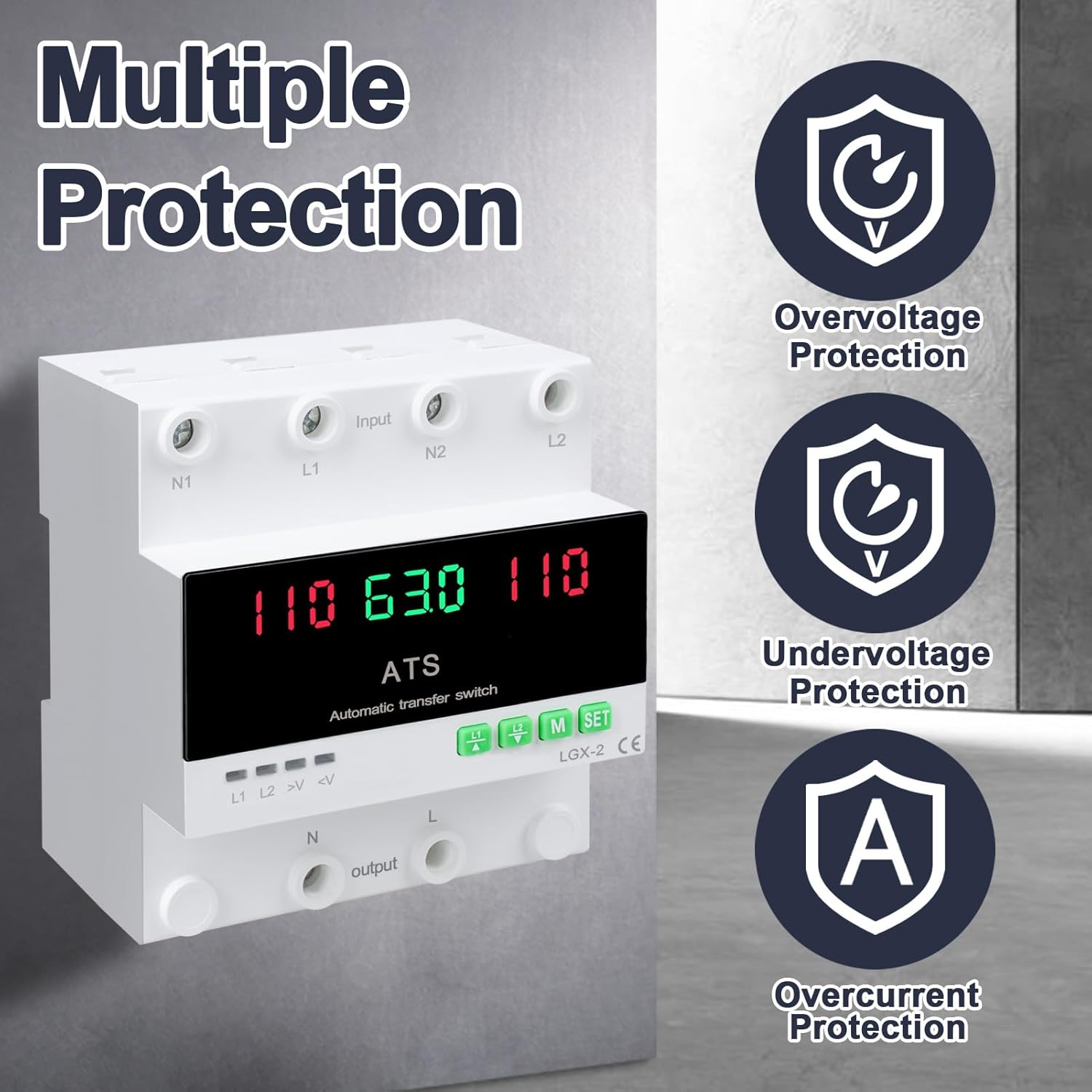
This image illustrates the built-in safety mechanisms of the transfer switch, emphasizing its capability to protect connected devices from electrical instability through overvoltagд, подволtage, and overcurrent safeguards.
5. Спецификации
| Параметар | Вредност |
|---|---|
| Модел | Dual Power 63A |
| Тековен рејтинг | 63 Amps |
| Оперативен волtage | 120 волти |
| Режим на работа | ON-AUTO-MANUAL |
| Димензии на производот (Д x Ш x В) | 4.3 x 3.5 x 3.3 инчи |
| Тежина | 13.12 унци |
| Тип на контакт | Нормално затворено |
| Тип на конектор | Приклучи се |
| Терминал | Завртка |
| Тип на коло | 2-насочен |
| Материјал за контакт | Бакар |
| Номинална фреквенција | 50/60 Hz |
| Overvoltagд Заштитен праг | AC140V |
| Подволtagд Заштитен праг | AC90V |
6. Поставување и инсталација
Proper installation is crucial for the safe and reliable operation of the transfer switch. This device is designed for DIN rail mounting.
Пред инсталацијата
- Ensure all power sources are disconnected at the main breaker before beginning installation.
- Потврдете дека томtage and current ratings of the transfer switch match your electrical system requirements.
- Prepare the installation location, ensuring it is dry, well-ventilated, and easily accessible.
Дијаграм за поврзување

This diagram illustrates the correct wiring connections for the transfer switch. It shows the input terminals for primary power (N1, L1) and backup power (N2, L2), and the output terminals (N, L) to the load. The diagram also labels the LED indicators for L1 output, L2 output, overvoltagе, и подволtage, as well as the menu/reset and manual ON/OFF buttons.
Чекори за инсталација
- Mount the DIN rail securely in your electrical panel or enclosure.
- Attach the transfer switch onto the DIN rail.
- Connect the primary power source (N1, L1) to the designated input terminals.
- Connect the backup power source (N2, L2) to the designated input terminals.
- Connect the load (N, L) to the output terminals.
- Двапати проверете ги сите врски за затегнатост и исправност.
- Once all wiring is complete and verified, restore power to the system.
7. Операција
The MARSTEK transfer switch offers both automatic and manual operation modes.
Автоматски режим

In automatic mode, the switch prioritizes the primary power source (L1). If L1 fails or experiences voltage fluctuations (undervoltage или overvoltage), the switch will automatically transfer the load to the backup power source (L2). When L1 is restored and stable, the switch will automatically transfer the load back to L1.
Рачен режим

The transfer switch can be manually operated using the buttons on the front panel.
- To close L1: Press the button labeled "L1" (often indicated by an up arrow or similar icon). Press again to open L1.
- To close L2: Press the button labeled "L2" (often indicated by a down arrow or similar icon). Press again to open L2.
In manual mode, the automatic transfer function is overridden. Ensure you understand the implications of manual switching before use.
LED Display and Indicators
The LED display provides real-time information about the system status.
- The main display shows voltage readings for the active power source.
- L1: Indicates L1 output is active.
- L2: Indicates L2 output is active.
- >V: Overvoltage индикаторско светло.
- <V: Подволtage индикаторско светло.
- M: Menu selection/Reset button.
- СЕТ: Manual ON/OFF button.
8. Одржување
The MARSTEK transfer switch requires minimal maintenance.
- Периодично проверувајте ги поврзувањата на жиците за да се осигурате дека се безбедни и без корозија.
- Одржувајте го уредот чист и без прашина и остатоци. Користете сува, мека крпа за чистење.
- Не користете абразивни средства за чистење или растворувачи.
- Обезбедете соодветна вентилација околу уредот за да спречите прегревање.
Warning: Always disconnect all power sources before performing any maintenance.
9 Смена на проблеми
Овој дел нуди решенија за вообичаени проблеми со кои може да се соочите.
| Проблем | Можна причина | Решение |
|---|---|---|
| Уредот не се вклучува. | No input power; incorrect wiring; internal fault. | Check main breakers and power sources. Verify all wiring connections. If the problem persists, contact support. |
| No automatic transfer. | Device in manual mode; power source within acceptable limits; fault in L1 or L2 detection. | Ensure the device is set to automatic mode. Check voltage levels of both L1 and L2. Contact support if automatic transfer fails despite correct settings. |
| Overvoltage (>V) or Undervoltage (<V) indicator lit. | Влез волtage outside specified range. | Проверете го томtage of the active power source. The device will automatically switch if the voltage is outside the set parameters (AC140V overvoltage, AC90V undervoltage). Address the power source issue. |
| Активирана е заштитата од прекумерна струја. | Load exceeds the 63A current rating. | Reduce the connected load. Ensure total current draw does not exceed 63 Amps. |
10. Гаранција и поддршка
For warranty information and technical support, please refer to the MARSTEK official webлокација или контактирајте го вашиот продавач. Чувајте ја сметката како доказ за купување.
Manufacturer: JUXIANG
Бренд: МАРСТЕК


