1. Вовед
Thank you for choosing the WOLFANG WDV01 Portable DVD Player. This manual provides essential information for setting up, operating, and maintaining your device. Please read it carefully before use to ensure optimal performance and longevity of your product.
The WOLFANG WDV01 is designed for portable entertainment, featuring a 9.5-inch unit with a 7.5-inch HD swivel screen, stereo speakers, and a long-lasting battery. It supports various disc and file formats, making it versatile for different media content.
2. Содржина на пакетот
Проверете дали сите артикли се присутни во пакувањето:
- WOLFANG WDV01 Portable DVD Player
- Далечински управувач
- Упатство за употреба
- AC полнач
- Полнач за автомобил
- 3-во-1 AV кабел

Image: Contents of the WOLFANG WDV01 package, showing the DVD player, remote control, user manual, AC charger, car charger, and AV cable.
3. Производот завршиview
3.1 Клучни карактеристики
- Прикажи: 9.5-inch unit with 7.5-inch HD eye-protection screen.
- Ротација на екранот: 270° horizontal rotation and 180° vertical flip for flexible viewинг агли.
- Аудио: Интегрирани стерео звучници.
- Траење на батеријата: Up to 6 hours of playback on a full charge.
- Опции за напојување: AC power adapter and car charger included.
- Функција на меморија: Breakpoint memory resumes playback from the last stopped point.
- Медиумска компатибилност: Supports DVD, SVCD, VCD, CD-R/RW discs.
- File Поддршка за формат: JPEG, WMA, MPG, MP3, DIVX, VOB, AVI.
- Надворешно поврзување: USB port, SD card slot (max 32GB), AV input, AV output, 3.5mm headphone jack.
3.2 Распоред на уреди
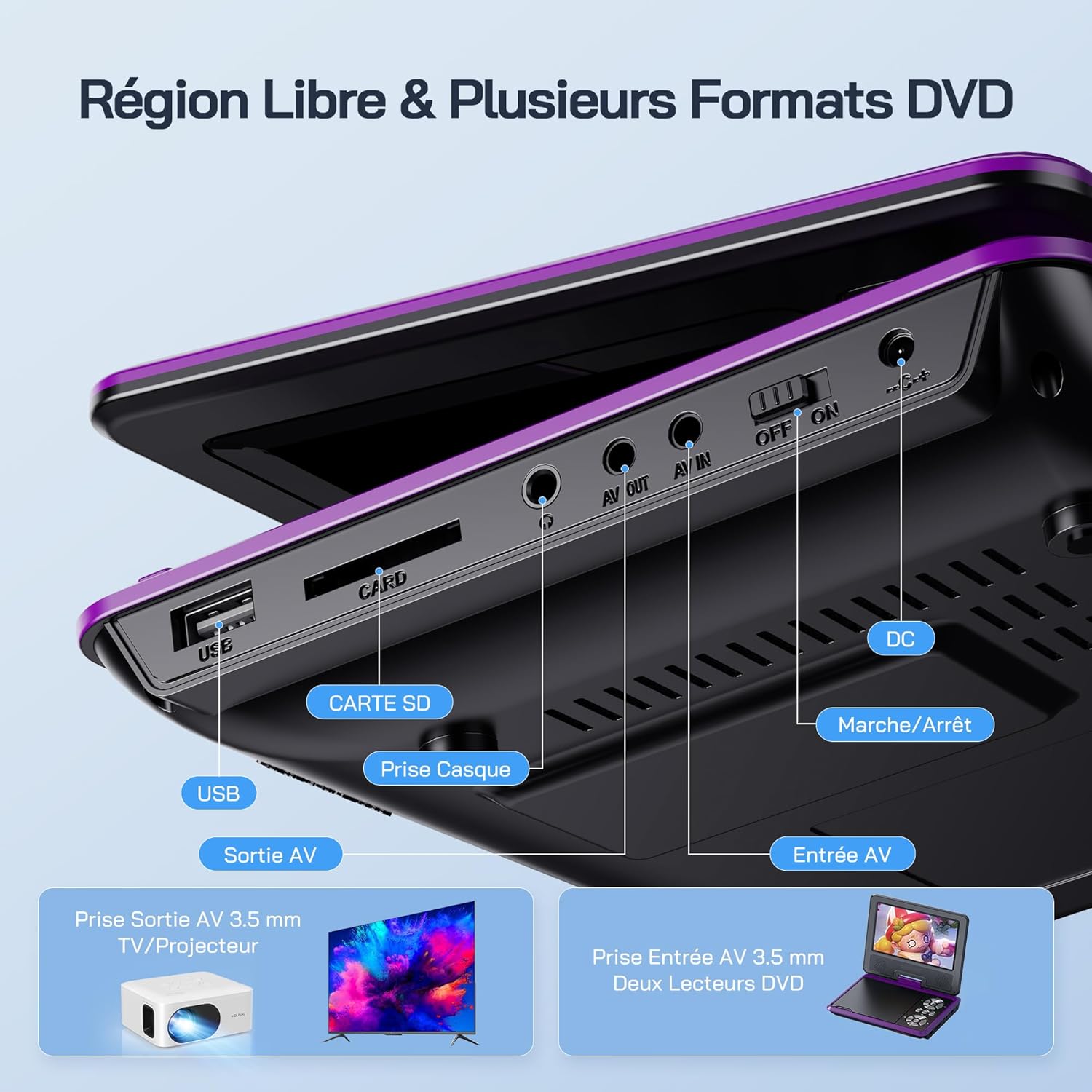
Слика: Детална view of the side panel of the WOLFANG WDV01, highlighting the USB port, SD card slot, headphone jack, AV OUT, AV IN, DC power input, and ON/OFF switch.
- USB порта: За поврзување на USB флеш драјвови.
- Слот за SD-картичка: For inserting SD/MMC cards.
- Jackек за слушалки: 3.5 мм аудио излез за слушалки.
- ИЗЛЕЗ: Audio/Video output for connecting to a TV or projector.
- AV ВО: Audio/Video input for connecting external devices or another DVD player.
- DC ВО: Влез за напојување за AC адаптер или полнач за автомобил.
- ВКЛУЧЕН/ИСКЛУЧЕН прекинувач: Контрола на енергија за уредот.
4. Поставување
4.1 Почетно полнење
Before first use, fully charge the device. Connect the AC charger to the DC IN port on the player and plug it into a wall outlet. The charging indicator light will illuminate. Once fully charged, the light may change color or turn off, depending on the model.
4.2 Вклучување/исклучување
To power on the device, slide the ON/OFF switch to the "ON" position. To power off, slide it to the "OFF" position.
4.3 Прилагодување на екранот
The screen can be rotated 270 degrees horizontally and flipped 180 degrees vertically. Adjust the screen to your preferred viewing angle. This feature is particularly useful for mounting in a car or for shared viewинг.

Image: Illustration demonstrating the 270-degree rotation and 180-degree flip capabilities of the WOLFANG WDV01 screen.
5. Упатства за работа
5.1 Репродукција на DVD/CD
- Open the disc cover gently.
- Place a compatible DVD or CD onto the spindle, label side up.
- Затворете го капакот на дискот.
- The player will automatically detect and begin playback. If not, select "Disc" from the main menu.
Забелешка: This device supports DVD, SVCD, VCD, CD-R/RW discs. It is not compatible with 1080p, 4K, or Blu-ray discs.
5.2 Playing from USB/SD Card
- Вметнете USB флеш-меморија во USB-портата или SD-картичка во слотот за SD-картичка.
- From the main menu, select "USB" or "SD" depending on your media source.
- Движете се низ папките и files using the control buttons or remote control.
- Изберете го саканиот file (JPEG, WMA, MPG, MP3, DIVX, VOB, AVI) to begin playback.
Забелешка: Maximum supported Micro SD card capacity is 32GB. Video files should have a resolution up to 720x480. Image files should have a resolution up to 2650x1440.
5.3 Функција на меморија на точка на прекин
The player automatically remembers the last playback position. When you power on the device again or re-insert the same disc/media, it will prompt you to resume playback from where you left off. This function may need to be activated in the system settings.

Image: Visual representation of the breakpoint memory feature, illustrating how the player can pause and resume video playback from the exact point of interruption.
5.4 Connecting to an External Display (TV/Projector)
Use the provided 3-in-1 AV cable to connect the player to a TV or projector.
- Поврзете го едниот крај од AV кабелот со AV OUT приклучокот на DVD плеерот.
- Connect the other end of the AV cable to the corresponding AV input ports (Yellow for Video, Red for Right Audio, White for Left Audio) on your TV or projector.
- Изберете го точниот AV влезен извор на вашиот телевизор или проектор.
- The player's screen content will now be displayed on the external screen.

Image: A WOLFANG WDV01 Portable DVD Player connected to a large television screen, displaying content for a family watching together, demonstrating the TV sync feature.
5.5 Connecting to Another DVD Player (AV IN)
The AV IN port allows you to connect another compatible device, such as a second DVD player, to display its content on the WOLFANG WDV01 screen.
- Connect one end of an AV cable to the AV OUT port of the external device.
- Connect the other end of the AV cable to the AV IN port on the WOLFANG WDV01.
- Switch the WOLFANG WDV01 to AV input mode (refer to the on-screen menu or remote control for this option).
6. Одржување
6.1 Чистење на уредот
- Уверете се дека уредот е исклучен и исклучен од струја пред да го чистите.
- Користете мека, сува крпа за да ја избришете надворешноста на плеерот.
- За екранот, користете мека крпа без влакненца, специјално дизајнирана за електронски екрани. Не користете абразивни средства за чистење или растворувачи.
- За чистење на леќата на дискот, користете специјализиран диск за чистење на DVD леќи. Не обидувајте се рачно да ја чистите леќата.
6.2 Грижа за батерии
- Избегнувајте изложување на уредот на екстремни температури (топли или ладни).
- If storing the device for an extended period, charge the battery to approximately 50% to prolong its lifespan.
- Не обидувајте се сами да ја замените внатрешната батерија. Контактирајте ја службата за корисници доколку се појават проблеми со батеријата.
6.3 Складирање
Store the player in a cool, dry place away from direct sunlight and moisture. Keep it in its original packaging or a protective case when not in use to prevent damage.
7 Смена на проблеми
| Проблем | Можна причина | Решение |
|---|---|---|
| Нема моќ | Battery drained, power adapter not connected, power switch off. | Charge the battery, ensure power adapter is securely connected, slide power switch to ON. |
| Дискот не се репродуцира | Incompatible disc format, disc dirty/scratched, disc inserted incorrectly. | Check disc compatibility (no Blu-ray/4K), clean disc, insert disc label side up. |
| Нема звук | Volume too low, headphones connected, audio settings incorrect. | Зголемете ја јачината на звукот, исклучете ги слушалките, проверете ги поставките за аудио излез. |
| Нема слика на телевизорот | AV cable loose, incorrect TV input selected. | Ensure AV cable is securely connected, select correct AV input on TV. |
| USB/SD картичката не е препознаена | Incompatible format, card/drive damaged, incorrect file систем. | Ensure media is formatted to FAT32, check for damage, try another USB/SD card. Max 32GB SD card. |
If the problem persists after trying these solutions, please contact WOLFANG customer support.
8. Спецификации
| Карактеристика | Детал |
|---|---|
| Бренд | ВОЛФАНГ |
| Модел | WDV01 |
| Големина на екранот | 7.5 инчи |
| Големина на единицата | 9.5 инчи (дијагонала) |
| Резолуција на екранот | До 800 x 480 пиксели |
| Компатибилност со диск | DVD, SVCD, VCD, CD-R/RW |
| File Поддршка за формат | Video: AVI, MPG, MP3, DIVX, VOB; Audio: WMA, MP3; Image: JPEG |
| Поддршка за USB/SD картички | Max 32GB (Micro SD) |
| Video Resolution (USB/SD) | До 720 x 480 пиксели |
| Image Resolution (USB/SD) | До 2650 x 1440 пиксели |
| Траење на батеријата | 4-6 часа |
| Тежина на ставката | 1100 грама |
| UPC | 850067892205 |
9. Гаранција и поддршка
9.1 Гаранција на производителот
The WOLFANG WDV01 Portable DVD Player comes with a 24-месечна гаранција од производителот од датумот на купување. Оваа гаранција ги покрива дефектите во материјалите и изработката при нормална употреба. Не ги покрива штетите предизвикани од злоупотреба, несреќи, неовластени модификации или нормално абење.
Ве молиме чувајте го вашиот доказ за купување за барањата за гаранција.
9.2 Поддршка за корисници
For any questions, technical assistance, or warranty claims, please contact WOLFANG customer support. Our team is available to assist you and aims to respond within 24 hours.
Contact information can typically be found on the official WOLFANG webвеб-страница или преку вашата платформа за купување.


