1. Вовед
Welcome to the DOOGEE Note 56 user manual. This guide provides essential information to help you set up, operate, and maintain your new smartphone. The DOOGEE Note 56 is an unlocked Android 16 smartphone featuring a powerful Octa-Core processor, a large 6150mAh battery, and a vibrant 6.56-inch 90Hz HD+ display. It is designed for efficient daily use, photography, and connectivity.
2. Што има во кутијата
Your DOOGEE Note 56 package includes the following items:
- 1 x DOOGEE Note 56 Cell Phone
- 1 x кутија за пакување
- 1 x Упатство за употреба
- 1 x Заштитна фолија (претходно нанесена)
- 1 x ПИН на SIM картичка
- 1 x кабел за порт од тип C
- 1 x полнач
- 1 x Гарантна картичка
- 1 x TPU заштитна футрола
3. Уредот завршиview
Familiarize yourself with the physical components and design of your DOOGEE Note 56.
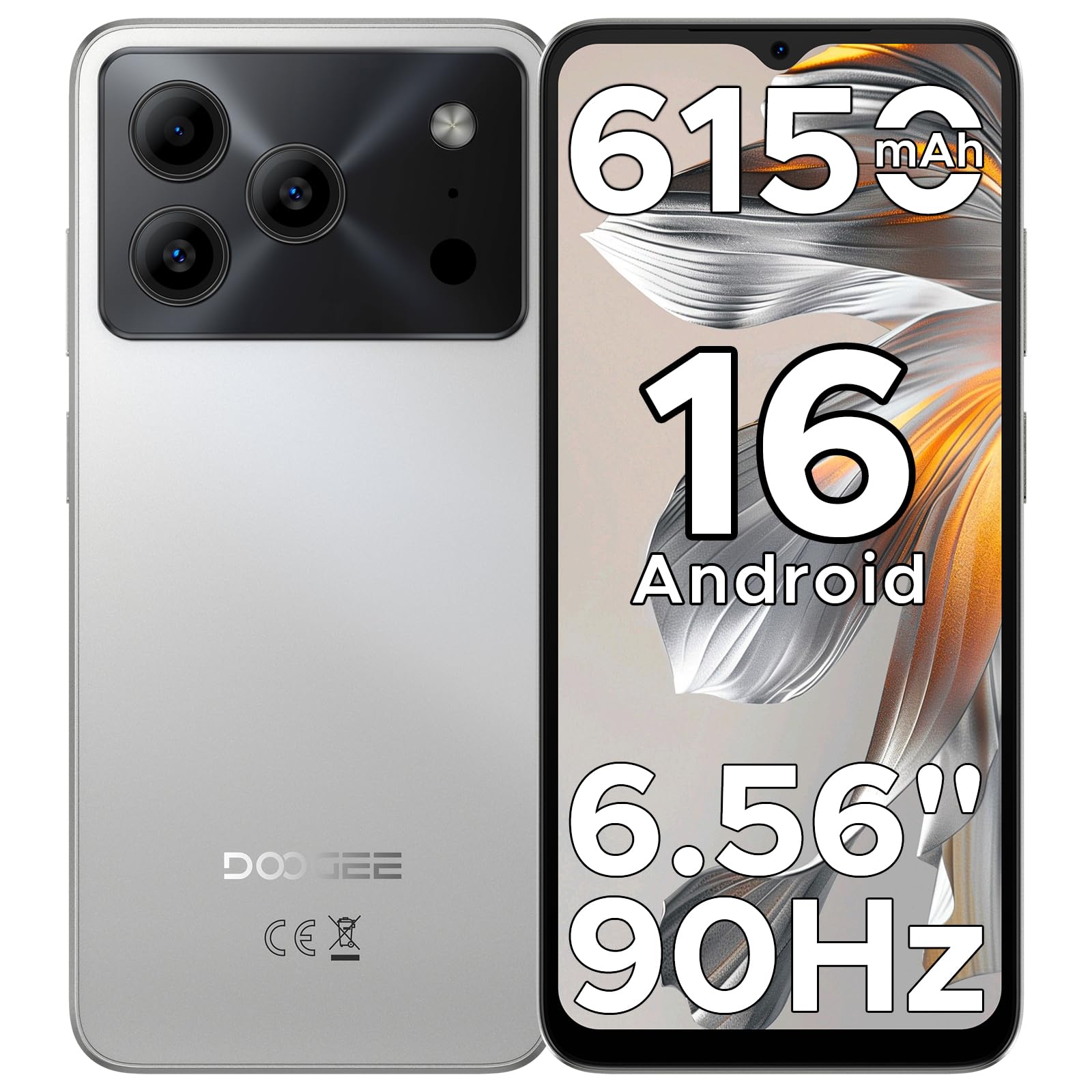
Image: The DOOGEE Note 56 smartphone, showcasing its slim design and key features such as the 8.45mm ultra-slim body, 6150mAh Silicon-Carbon Battery, Up-To-Date Android 16, 6.56" 90Hz Display, AI Scene Recognition, Instant Face Unlock, and 3.5mm Headphone Jack.

Слика: Крупен план view of the DOOGEE Note 56 highlighting its ultra-slim 8.45mm profile and lightweight 195g design, emphasizing its pocket-friendly and refined appearance.
Физички копчиња и порти:
- Копче за вклучување: Сместено од страна, се користи за вклучување/исклучување на уредот или будење/мирување на екранот.
- Копчиња за јачина на звук: Се наоѓа од страна и се користи за прилагодување на јачината на звукот на медиумите и повиците.
- Приклучок за USB Type-C: Се наоѓа на дното, се користи за полнење и пренос на податоци.
- 3.5 мм приклучок за слушалки: Located at the top, for connecting wired headphones.
- Слот за SIM/TF картичка: Located on the side, for inserting SIM cards and a TF (microSD) card.
4. Поставување
4.1. Вметнување SIM и TF картички
- Locate the SIM/TF card slot on the side of your phone.
- Insert the provided SIM eject tool into the small hole next to the slot to open the tray.
- Place your Nano-SIM card(s) and/or TF card into the tray according to the diagram on the tray.
- Внимателно турнете го држачот назад во отворот додека не се поклопи со телото на телефонот.
4.2. Првично вклучување и поставување
- Притиснете и задржете го копчето за вклучување додека не се појави логото на DOOGEE.
- Следете ги упатствата на екранот за да го изберете вашиот јазик, да се поврзете на Wi-Fi и да ја поставите вашата сметка на Google.
- Configure security settings, including Face Unlock, for quick and secure access.
5. Упатства за работа
5.1. Оперативен систем Android 16
Your DOOGEE Note 56 runs on the latest Android 16 OS, offering an intuitive and secure user experience. Navigate through apps, customize your home screen, and access various features with ease.

Image: A visual representation of the Android 16 operating system interface on the DOOGEE Note 56, showing various app icons and system settings.
5.2. Отклучување со лице
For convenient and secure unlocking, your device supports Face Unlock. To set it up:
- Одете на Поставки > Безбедност > Отклучување со лице.
- Следете ги упатствата на екранот за да го регистрирате вашето лице.
- Обезбедете добри услови на осветлување за време на регистрацијата за оптимални перформанси.

Image: A user demonstrating the Instant Face Unlock feature on the DOOGEE Note 56, highlighting its quick and secure access capabilities.
5.3. Интеграција со вештачка интелигенција на Gemini
The DOOGEE Note 56 integrates Gemini AI features, enhancing your device's intelligence and responsiveness. This includes smart body sensing, dual system mode, super clipboard, memory expansion, screen optimization, and customizable screen colors.
Video: This video demonstrates how to utilize and upgrade Gemini AI features on a DOOGEE smartphone, showcasing its capabilities within the Android 16 operating system.
6. Карактеристики на камерата
Capture memorable moments with the DOOGEE Note 56's advanced camera system.
6.1. Rear Camera (8MP)
The 8MP main camera delivers clear, natural photos. Features include:
- HDR: Го подобрува динамичкиот опсег за балансирана експозиција при предизвикувачко осветлување.
- Професионален режим: Offers manual control over camera settings.
- Ноќен режим: Го подобрува квалитетот на фотографијата во услови на слаба осветленост.
- Препознавање на сцени со вештачка интелигенција: Automatically detects 12 scenes and optimizes settings for stunning shots.
- Режим на портрет: Creates a depth-of-field effect for professional-looking portraits.
- Снимање насмевка: Automatically takes a photo when a smile is detected.
- Панорами: Capture wide-angle scenic views.
- Burst Shots: Направете повеќе фотографии брзо по ред.
- Fun Filters: Применете креативни филтри на вашите фотографии.

Image: An illustration of the DOOGEE Note 56's camera capabilities, including AI Scene Recognition icons and various sample photos taken with the 8MP main camera and 5MP front camera.
6.2. Front Camera (5MP)
The 5MP front camera is perfect for selfies and video calls, featuring Beauty Mode and Portrait Effect for bright and natural results.
7. Поврзување
Stay connected with a range of network and wireless options.
- 4G Двојна СИМ картичка: Поддржува две SIM картички за флексибилно користење на мрежата.
- Wi-Fi: Поврзете се со безжични мрежи за пристап до интернет.
- Bluetooth 4.2: За поврзување со безжични додатоци.
- GPS: За услуги за навигација и локација.
- ФМ радио: Уживајте во вашите омилени радио станици.
7.1. Supported Network Bands:
- GSM: Б2/3/5/8
- WCDMA: B1/2/4/5/8
- ТДД: Б38 / 40/41
- FDD: B1/2/3/4/5/7/8/18/19/20/25/26/28A/28B/66
- Поддршка: EDGE/GPRS
8. Управување со батерии
The DOOGEE Note 56 is equipped with a large 6150mAh Silicon-Carbon battery for extended usage.

Слика: Внатрешен view of the DOOGEE Note 56 highlighting its 6150mAh Silicon-Carbon Battery, emphasizing its longer lifespan, unmatched durability, 1000 charge cycles, 4 years durable battery, 20% smaller size, and 5W reverse charging capability.
Video: This video highlights the 6150mAh Silicon-Carbon Battery of the DOOGEE Note 56, showcasing its capacity and efficiency.
8.1. OTG обратно полнење
The device supports OTG (On-The-Go) reverse charging, allowing you to use your Note 56 to charge other compatible devices.
8.2. Tips for Extending Battery Life:
- Adjust screen brightness to a lower level.
- Исклучете Wi-Fi, Bluetooth и GPS кога не ги користите.
- Затворете ги апликациите во позадина.
- Enable battery saver mode in settings.

Image: This image illustrates various usage scenarios for the DOOGEE Note 56, demonstrating its extended battery life for web browsing (7 hours), music playing (49.5 hours), video watching (14 hours), and calling (28 hours).
9. Складирање и перформанси
The DOOGEE Note 56 is powered by a UNISOC SC9863A Octa-Core processor, ensuring smooth performance for applications and daily tasks.
- RAM меморија: 24GB (virtual RAM expansion, 8GB physical RAM).
- Внатрешно складирање: 64 GB.
- Проширен простор за складирање: Supports up to 2TB via TF (microSD) card (TF card needs to be purchased separately).

Image: A visual representation of the DOOGEE Note 56's internal memory and storage, showing 64GB ROM and 24GB RAM (3GB+21GB virtual expansion), emphasizing smooth multitasking and ampле простор.
10. Приказ
Experience immersive visuals on the 6.56-inch HD+ 90Hz IPS waterdrop screen.
- Големина: 6.56 инчи
- Резолуција: 720 x 1612 пиксели
- Стапка на освежување: 90 Hz
- Сооднос: 20:9
- PPI: 269

Image: The DOOGEE Note 56 display showcasing its 6.56-inch HD+ screen with a 90Hz refresh rate, designed for smooth viewing and social media interaction.
11. Одржување и грижа
To ensure the longevity and optimal performance of your DOOGEE Note 56, follow these care guidelines:
- Избегнувајте изложување на телефонот на екстремни температури, директна сончева светлина или прекумерна влага.
- Користете само одобрени полначи и кабли.
- Исчистете го екранот и куќиштето со мека крпа што не остава влакненца.
- Utilize the provided TPU protective case and pre-applied protective film to guard against scratches and minor impacts.
12 Смена на проблеми
If you encounter issues with your DOOGEE Note 56, try the following basic troubleshooting steps:
- Уредот не се вклучува: Проверете дали батеријата е наполнета. Поврзете го полначот и почекајте неколку минути пред повторно да се обидете да го вклучите.
- Екранот не реагира: Рестартирајте го уредот со притискање и држење на копчето за вклучување околу 10-15 секунди.
- Мрежни проблеми: Check if your SIM card is properly inserted. Verify network settings and ensure you have an active plan with your carrier.
- Паѓања на апликацијата: Исчистете го кешот на проблематичната апликација или повторно инсталирајте ја. Проверете дали софтверот на вашиот уред е ажуриран.
За посложени проблеми, обратете се на официјалната поддршка на DOOGEE. webсајт или контактирајте со службата за корисници.
13. Спецификации
| Карактеристика | Детал |
|---|---|
| Име на моделот | ЗАБЕЛЕШКА 56 |
| Оперативен систем | Андроид 16 |
| Процесор | UNISOC SC9863A Octa-Core (1.6 GHz CPU Speed) |
| RAM меморија | 24 GB (8 GB физичка + 16 GB виртуелна) |
| Внатрешно складирање | 64 GB |
| Складирање што може да се прошири | До 2 TB преку TF картичка |
| Големина на приказ | 6.56 инчи |
| Резолуција на екранот | 720 x 1612 (HD+) |
| Стапка на освежување | 90 Hz |
| Задна камера | 8 MP |
| Предна камера | 5 MP |
| Капацитет на батеријата | 6150 милиониamp Часови (Li-Po) |
| Поврзување | 4G Dual SIM, Wi-Fi, Bluetooth 4.2, GPS, FM Radio, USB Type-C |
| Аудио Џек | 3.5 мм |
| Димензии | 6.45 x 2.98 x 0.33 инчи |
| Тежина на ставката | 6.9 унци (195 грама) |
| Посебни карактеристики | Dual SIM, Expandable Memory, Supports USB OTG, Face Unlock |
14. Гаранција и поддршка
Your DOOGEE Note 56 comes with a warranty. Please refer to the included Warranty Card in your product package for detailed information on warranty terms, conditions, and duration.
For technical support, service, or further inquiries, please visit the official DOOGEE website or contact their customer service channels. Keep your purchase receipt and warranty card handy for any claims.


